


Table of Contents
4 Host import
For Zabbix versions up to 1.8.3, host and template import is available at Configuration → Export/Import. Starting with 1.8.3, import and export controls are available on corresponding configuration pages (Configuration → Hosts and Configuration → Templates).
Step 1
Configure settings for data import and press “Import”.
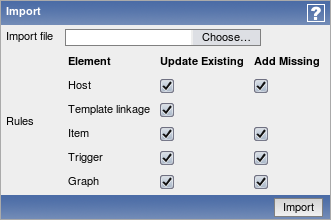
Pay attention to the following parameters of the item:
| PARAMETER | Description |
|---|---|
| Import file | File name of XML file. |
| Rules | Element defines element of XML file. If parameter Update is set for Existing element, then the import will update it with data taken from the file. Otherwise it will not update it. If parameter Add is set for Missing element, then the import will add new element with data taken from the file. Otherwise it will not add it. |
Note that Zabbix versions 1.8.x place triggers before items in the export and such data can not be imported in Zabbix 1.6.x. If such a path is desired, items should be moved in front of the triggers.