

14 ODBC-bewaking
Overzicht
ODBC-monitoring komt overeen met het Database monitor itemtype in de Zabbix-frontend.
ODBC is een middle-ware API in de programmeertaal C voor het benaderen van databasebeheersystemen (DBMS). Het ODBC-concept is ontwikkeld door Microsoft en later overgebracht naar andere platforms.
Zabbix kan elke database bevragen die wordt ondersteund door ODBC. Om dit te doen, maakt Zabbix geen directe verbinding met de databases, maar gebruikt het de ODBC-interface en drivers die zijn geconfigureerd in ODBC. Deze functie maakt efficiëntere monitoring van verschillende databases mogelijk voor meerdere doeleinden - bijvoorbeeld het controleren van specifieke database-wachtrijen, gebruiksstatisitieken en dergelijke. Zabbix ondersteunt unixODBC, wat een van de meest gebruikte open source ODBC API-implementaties is.
Zie ook de bekende problemen voor ODBC-controles.
unixODBC installeren
De aanbevolen manier om unixODBC te installeren is door de standaard pakketbronnen van het Linux-besturingssysteem te gebruiken. In de meest populaire Linux-distributies is unixODBC standaard opgenomen in het pakketrepository. Als het niet beschikbaar is, kan het worden verkregen via de unixODBC-website: http://www.unixodbc.org/download.html.
Het installeren van unixODBC op RedHat/Fedora-gebaseerde systemen met behulp van het dnf-pakketbeheer:
shell> dnf -y install unixODBC unixODBC-develHet installeren van unixODBC op SUSE-gebaseerde systemen met behulp van het zypper-pakketbeheer:
# zypper in unixODBC-develHet unixODBC-devel-pakket is nodig om Zabbix te compileren met unixODBC-ondersteuning.
unixODBC installeren
De aanbevolen manier om unixODBC te installeren is door de standaard pakketbronnen van het Linux-besturingssysteem te gebruiken. In de meest populaire Linux-distributies is unixODBC standaard opgenomen in het pakketrepository. Als het niet beschikbaar is, kan het worden verkregen via de unixODBC-website: http://www.unixodbc.org/download.html.
Het installeren van unixODBC op RedHat/Fedora-gebaseerde systemen met behulp van het dnf-pakketbeheer:
shell> dnf -y install unixODBC unixODBC-develHet installeren van unixODBC op SUSE-gebaseerde systemen met behulp van het zypper-pakketbeheer:
# zypper in unixODBC-develHet unixODBC-devel-pakket is nodig om Zabbix te compileren met unixODBC-ondersteuning.
MySQL
To install the MySQL unixODBC database driver, use the package manager for the system of your choice:
# For Ubuntu/Debian systems:
apt install odbc-mariadb

# For RedHat/Fedora-based systems:
dnf install mariadb-connector-odbc

# For SUSE-based systems:
zypper install mariadb-connector-odbc
To install the database driver without a package manager, please refer to MySQL documentation for mysql-connector-odbc, or MariaDB documentation for mariadb-connector-odbc.
PostgreSQL
To install the PostgreSQL unixODBC database driver, use the package manager for the system of your choice:
# For Ubuntu/Debian systems:
apt install odbc-postgresql

# For RedHat/Fedora-based systems:
dnf install postgresql-odbc

# For SUSE-based systems:
zypper install psqlODBC
To install the database driver without a package manager, please refer to PostgreSQL documentation.
Oracle
To install the unixODBC database driver, please refer to Oracle documentation.
MSSQL
To install the MSSQL unixODBC database driver for Ubuntu/Debian systems, use the package manager for the system of your choice:
# For Ubuntu/Debian systems:
apt install tdsodbc

# For RedHat/Fedora-based systems (EPEL packages: https://docs.fedoraproject.org/en-US/epel/):
dnf install epel-release
dnf install freetds

# For SUSE-based systems:
zypper install libtdsodbc0
To install the database driver without a package manager, please refer to FreeTDS user guide.
unixODBC configureren
De ODBC-configuratie wordt uitgevoerd door de odbcinst.ini- en odbc.ini-bestanden aan te passen. Om de locatie van het configuratiebestand te verifiëren, typt u:
shell> odbcinst -jodbcinst.ini wordt gebruikt om de geïnstalleerde ODBC-database-stuurprogramma's op te lijsten:
[mysql]
Description = ODBC voor MySQL
Driver      = /usr/lib/libmyodbc5.so
Parameterdetails:
| Attribuut | Beschrijving |
|---|---|
| mysql | Naam van het database-stuurprogramma. |
| Description | Omschrijving van het database-stuurprogramma. |
| Driver | Locatie van de bibliotheek van het database-stuurprogramma. |
odbc.ini wordt gebruikt om gegevensbronnen te definiëren:
[test]
Description = MySQL testdatabase
Driver      = mysql
Server      = 127.0.0.1
User        = root
Password    =
Port        = 3306
Database    = zabbix
Parameterdetails:
| Attribuut | Beschrijving |
|---|---|
| test | Naam van de gegevensbron (DSN). |
| Description | Omschrijving van de gegevensbron. |
| Driver | Naam van het database-stuurprogramma - zoals gespecificeerd in odbcinst.ini |
| Server | IP/DNS van de databaseserver. |
| User | Databasegebruiker voor verbinding. |
| Password | Wachtwoord van de databasegebruiker. |
| Port | Verbindingspoort van de database. |
| Database | Naam van de database. |
Om te controleren of de ODBC-verbinding succesvol werkt, moet een verbinding met de database worden getest. Dit kan worden gedaan met het hulpprogramma isql (inbegrepen in het unixODBC-pakket):
shell> isql test
+---------------------------------------+
| Connected!                            |
|                                       |
| sql-statement                         |
| help [tablename]                      |
| quit                                  |
|                                       |
+---------------------------------------+
SQL>
odbcinst.ini
The odbcinst.ini file lists the installed ODBC database drivers.
If odbcinst.ini is missing, it is necessary to create it manually.
[TEST_MYSQL]
Description=ODBC for MySQL
Driver=/usr/lib/libmyodbc5.so
FileUsage=1| Parameter | Description |
|---|---|
| TEST_MYSQL | Database driver name. |
| Description | Database driver description. |
| Driver | Database driver library location. |
| FileUsage | Determines whether the database driver supports connecting to a database server without the support for accessing local files (0); supports reading data from files (1); supports writing data to files (2). |
| Threading | Thread serialization level. Supported for PostgreSQL. Since 1.6, if the driver manager is built with thread support, you may add another driver entry. |
odbc.ini
The odbc.ini file is used to configure data sources.
[TEST_MYSQL]
Description=MySQL Test Database
Driver=mysql
Server=127.0.0.1
User=root
Password=
Port=3306
Socket=
Database=zabbix| Parameter | Description |
|---|---|
| TEST_MYSQL | Data source name (DSN). |
| Description | Data source description. |
| Driver | Database driver name (as specified in odbcinst.ini). |
| Server | Database server IP/DNS. |
| User | Database user for connection. |
| Password | Database user password. |
| Port | Database connection port. |
| Socket | Database connection socket. |
| Database | Database name. |
For other possible configuration parameter options, see MySQL documentation.
The odbc.ini file for PostgreSQL may contain additional parameters:
[TEST_PSQL]
Description=PostgreSQL Test Database
Driver=postgresql
Username=zbx_test
Password=zabbix
Servername=127.0.0.1
Database=zabbix
Port=5432
ReadOnly=No
Protocol=7.4+
ShowOidColumn=No
FakeOidIndex=No
RowVersioning=No
ShowSystemTables=No
Fetch=Yes
BoolsAsChar=Yes
SSLmode=Require
ConnSettings=| Parameter | Description |
|---|---|
| ReadOnly | Specifies whether the database connection allows only read operations (SELECT queries) and restricts modifications (INSERT, UPDATE, and DELETE statements); useful for scenarios where data should remain unchanged. |
| Protocol | PostgreSQL backend protocol version (ignored when using SSL connections). |
| ShowOidColumn | Specifies whether to include Object ID (OID) in SQLColumns. |
| FakeOidIndex | Specifies whether to create a fake unique index on OID. |
| RowVersioning | Specifies whether to enable applications to detect if data has been modified by other users while you are attempting to update a row. Note that this parameter can speed up the update process, since, to update a row, every single column does not need to be specified in the WHERE clause. |
| ShowSystemTables | Specifies whether the database driver should treat system tables as regular tables in SQLTables; useful for accessibility, allowing visibility into system tables. |
| Fetch | Specifies whether the driver should automatically use declare cursor/fetch to handle SELECT statements and maintain a cache of 100 rows. |
| BoolsAsChar | Controls the mapping of Boolean types. If set to "Yes", Bools are mapped to SQL_CHAR; otherwise, they are mapped to SQL_BIT. |
| SSLmode | Specifies the SSL mode for the connection. |
| ConnSettings | Additional settings sent to the backend on connection. |
Testing ODBC connection
To test if the ODBC connection is working successfully, you can use the isql utility (included in the unixODBC package):
isql test
+---------------------------------------+
| Connected!                            |
|                                       |
| sql-statement                         |
| help [tablename]                      |
| quit                                  |
|                                       |
+---------------------------------------+
Itemconfiguratie in de Zabbix frontend
Configureer een database monitoring item.
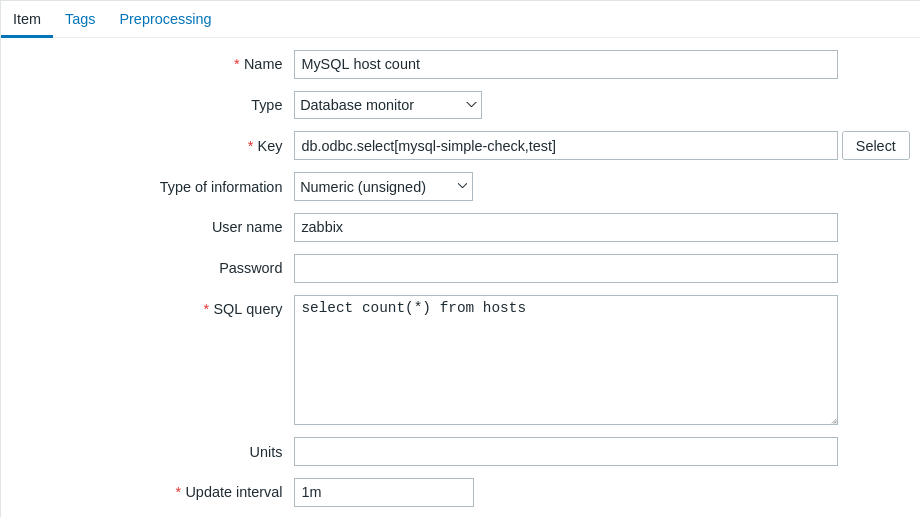
Alle verplichte invoervelden zijn gemarkeerd met een rode asterisk.
Specifiek voor database monitoring items moet je het volgende invoeren:
| Type | Selecteer hier Database monitor. |
| Key | Voer een van de twee ondersteunde item keys in: db.odbc.select[<unieke korte beschrijving>,<dsn>,<connection string>] - dit item is bedoeld om één waarde terug te geven, namelijk de eerste kolom van de eerste rij van het resultaat van de SQL-query. Als een query meer dan één kolom teruggeeft, wordt alleen de eerste kolom gelezen. Als een query meer dan één regel teruggeeft, wordt alleen de eerste regel gelezen. db.odbc.get[<unieke korte beschrijving>,<dsn>,<connection string>] - dit item kan meerdere rijen/kolommen in JSON-formaat teruggeven. Hierdoor kan het worden gebruikt als een master-item dat alle gegevens in één systeemaanroep verzamelt, terwijl JSONPath-preprocessing kan worden gebruikt in afhankelijke items om individuele waarden te extraheren. Zie een voorbeeld van het geretourneerde formaat dat wordt gebruikt in low-level discovery. Dit item wordt ondersteund sinds Zabbix 4.4. De unieke beschrijving dient om het item te identificeren in triggers, enzovoort. Hoewel dsn en connection string optionele parameters zijn, moet ten minste één van hen aanwezig zijn. Als zowel de gegevensbronnaam (DSN) als de verbindingsreeks zijn gedefinieerd, wordt de DSN genegeerd.De gegevensbronnaam, indien gebruikt, moet worden ingesteld zoals gespecificeerd in odbc.ini. De verbindingsreeks kan driver-specifieke argumenten bevatten. Voorbeeld (verbinding voor MySQL ODBC-driver 5): => db.odbc.get[MySQL voorbeeld,,"Driver=/usr/local/lib/libmyodbc5a.so;Database=master;Server=127.0.0.1;Port=3306"] |
| Gebruikersnaam | Voer de gebruikersnaam voor de database in. Deze parameter is optioneel als de gebruiker is gespecificeerd in odbc.ini. Als een verbindingsreeks wordt gebruikt en het veld Gebruikersnaam niet leeg is, wordt het toegevoegd aan de verbindingsreeks als UID=<gebruiker> |
| Wachtwoord | Voer het wachtwoord van de databasegebruiker in. Deze parameter is optioneel als het wachtwoord is gespecificeerd in odbc.ini. Als een verbindingsreeks wordt gebruikt en het veld Wachtwoord niet leeg is, wordt het toegevoegd aan de verbindingsreeks als PWD=<wachtwoord>.Als een wachtwoord een puntkomma bevat, moet het worden omhuld door accolades, bijvoorbeeld: Wachtwoord: {P?;)*woord} (als het feitelijke wachtwoord P?;)*woord is) Het wachtwoord wordt na de gebruikersnaam aan de verbindingsreeks toegevoegd als: UID=<gebruikersnaam>;PWD={P?;)*woord}Om de resulterende string te testen, voer je uit: isql -v -k 'Driver=libmaodbc.so;Database=zabbix;UID=zabbix;PWD={P?;)*woord}' |
| SQL-query | Voer de SQL-query in. Let op dat bij het db.odbc.select[] item de query slechts één waarde mag retourneren. |
| Type informatie | Het is belangrijk om te weten welk type informatie wordt geretourneerd door de query, zodat dit hier correct wordt geselecteerd. Bij een onjuist type informatie wordt het item niet ondersteund. |
Belangrijke aantekeningen
- Database monitoring items worden niet ondersteund als er geen odbc poller processen zijn gestart in de server- of proxyconfiguratie. Om ODBC-pollers te activeren, stel je de parameter StartODBCPollers in in het Zabbix server configuratiebestand, of voor checks die worden uitgevoerd door een proxy, in het Zabbix proxy configuratiebestand.
- Zabbix beperkt de uitvoeringstijd van de query niet. Het is aan de gebruiker om query's te kiezen die in een redelijke tijd kunnen worden uitgevoerd.
- De waarde van de parameter Timeout van de Zabbix-server wordt gebruikt als de ODBC-login-timeout (let op dat afhankelijk van de ODBC-drivers de instelling van de login-timeout mogelijk wordt genegeerd).
- Het SQL-commando moet een resultaatset retourneren, net als elke query met
select .... De syntaxis van de query hangt af van het RDBMS dat ze zal verwerken. De syntaxis van een aanvraag naar een opgeslagen procedure moet beginnen met het trefwoordcall.
Item key details
Parameters without angle brackets are mandatory. Parameters marked with angle brackets < > are optional.
db.odbc.select[<unique short description>,<dsn>,<connection string>]
Returns one value, that is, the first column of the first row of the SQL query result.
Return value: Depending on the SQL query.
Parameters:
- unique short description - a unique short description to identify the item (for use in triggers, etc.);
- dsn - the data source name (as specified in
odbc.ini); - connection string - the connection string (may contain driver-specific arguments).
Comments:
- Although
dsnandconnection stringare optional parameters, at least one of them is required; if both are defined,dsnwill be ignored. - If a query returns more than one column, only the first column is read. If a query returns more than one line, only the first line is read.
db.odbc.get[<unique short description>,<dsn>,<connection string>]
Transforms the SQL query result into a JSON array.
Return value: JSON object.
Parameters:
- unique short description - a unique short description to identify the item (for use in triggers, etc.);
- dsn - the data source name (as specified in
odbc.ini); - connection string - the connection string (may contain driver-specific arguments).
Comments:
- Although
dsnandconnection stringare optional parameters, at least one of them is required; if both are defined,dsnwill be ignored. - Multiple rows/columns in JSON format may be returned. This item may be used as a master item that collects all data in one system call, while JSONPath preprocessing may be used in dependent items to extract individual values. For more information, see an example of the returned format, used in low-level discovery.
Example:
# Connection for MySQL ODBC driver 5:
db.odbc.get[MySQL example,,"Driver=/usr/local/lib/libmyodbc5a.so;Database=master;Server=127.0.0.1;Port=3306"]
db.odbc.discovery[<unique short description>,<dsn>,<connection string>]
Transforms the SQL query result into a JSON array, used for low-level discovery.
The column names from the query result are turned into low-level discovery macro names paired with the discovered field values.
These macros can be used in creating item, trigger, etc. prototypes.
Return value: JSON object.
Parameters:
- unique short description - a unique short description to identify the item (for use in triggers, etc.);
- dsn - the data source name (as specified in
odbc.ini); - connection string - the connection string (may contain driver-specific arguments).
Comments:
- Although
dsnandconnection stringare optional parameters, at least one of them is required; if both are defined,dsnwill be ignored.
Foutmeldingen
ODBC-foutmeldingen zijn gestructureerd in velden om gedetailleerde informatie te verstrekken. Bijvoorbeeld:
Kan ODBC-query niet uitvoeren: [SQL_ERROR]:[42601][7][ERROR: syntax error at or near ";"; Error while executing the query]
└───────────┬───────────┘  └────┬────┘ └──┬──┘└─────────────────────────────┬─────────────────────────────────────┘
            │                   │         │    └─ Native foutcode            └─ Native foutbericht
            │                   │         └─ SQLState
            └─ Zabbix bericht   └─ ODBC retourcode
Merk op dat de lengte van het foutbericht beperkt is tot 2048 bytes, dus het bericht kan worden afgekapt. Als er meer dan één ODBC-diagnostisch record is, probeert Zabbix ze samen te voegen (gescheiden door |) zolang de lengtelimiet dat toelaat.