Ad Widget

Collapse

Monitoring / Supervision of Java process (Without JMX)

Collapse
X
 
  • Time
  • Show
Clear All
new posts
  • gcharot
    Junior Member
    • Feb 2013
    • 10

    #1

    Monitoring / Supervision of Java process (Without JMX)

    Hello,

    I have created a custom python probe to monitor java processes without JMX. JMX is interesting for certain services like JBoss / Tomcat but can be painful to deploy for other programs.
    It is actually running fine in production for services like logstash / SOLR / Elasticsearch where I didn't want to explicitly enable JMX.

    This proble can :
    * Return number of java process running based on the name returned by jps (default behavior). This more convenient than using proc.num which is based on java command line
    * Optionally return Heap and PermGen Used/Max (you can easily add new values)

    Code, template and Howto are available at :
    Zabbix scripts. Contribute to gcharot/Zabbix development by creating an account on GitHub.


    Example :
    Code:
    $ zabbix_get -s  ev-woot01  -k custom.proc.num.java[Elasticsearch,alive]
    1
    There is 1 Elasticsearch process running

    Memory stats can also be monitored :
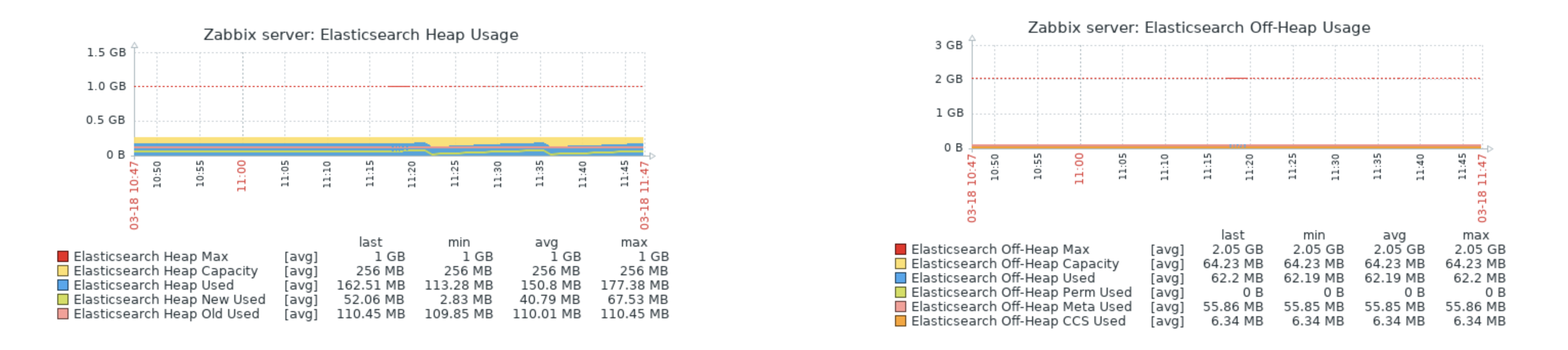

    Hope that helps !
    Greg
  • kloczek
    Senior Member
    • Jun 2006
    • 1771

    #2
    Originally posted by gcharot
    Hello,

    I have created a custom python probe to monitor java processes without JMX.
    jstat and jps are written in java.
    Try this command:
    Code:
    strace -f -e trace=file jps
    and you will see how many forked processes it generates and how many files operations it does on single run. The same test you can do with jstat.

    Sampling some base JVM monitoring data using these two tools + python process + sudo is probably heavier than using any existing JMX gateway.
    Sorry to say this seems you are trying to reinvent the wheel (.. I'm only messenger)

    PS. "Errare humanum est, sed in errare perseverare diabolicum" (it is in Latin so you not the first .. )
    http://uk.linkedin.com/pub/tomasz-k%...zko/6/940/430/
    https://kloczek.wordpress.com/
    zapish - Zabbix API SHell binding https://github.com/kloczek/zapish
    My zabbix templates https://github.com/kloczek/zabbix-templates

    Comment

    • gcharot
      Junior Member
      • Feb 2013
      • 10

      #3
      Thanks for the feedback !

      To put this into context, this solution was creted to fullfill an internal need, we have many java process/services running and we can't or don't want to enable JMX for each of them (this requires to configure/modify each application + eventually add firewall rules).
      The code had been made public because I think there might be other people in the same case (you don't always have control on the application side), if not then I'll be the only fool ;-)


      We use JMX for JBoss and it is _clearly_ the best solution whenever you can use it.

      The fist goal was to be able to know the number java process up, using proc.num is a big pain (if you know how to do it properly, i would be very please . Using jps name is much more simpler for us.

      Concerning the.performances you are theoretically right, JMX is ligther, however concidering today's hardware I'm not convinced that executing jps/jstat two times per minute will impact the overall service performance.

      So just to sum up : If you can use JMX, use it, it is the _right_ way to proceed. If you can't or don't want to use it, you still have the choice to use this method.
      This is the difference between theory (always use JMX this is _the_ way to do) and real world (JMX is great but for this particular case I can't use it).

      By the way, If you have a better idea on how to get JVM memory details without JMX other than using jstat, i'm very interested.

      Thanks for the feedback, it means my description was not clear, I added a note so people knows that they should use JMX if they can !

      Regards,
      Greg

      Comment

      • kloczek
        Senior Member
        • Jun 2006
        • 1771

        #4
        Originally posted by gcharot
        Thanks for the feedback !

        To put this into context, this solution was creted to fullfill an internal need, we have many java process/services running and we can't or don't want to enable JMX for each of them (this requires to configure/modify each application + eventually add firewall rules).
        Your needs are not specific or unique. It is typical case

        You can install zabbix JMX gateway on each monitored box.
        You can do what I'm doing at the moment like using jmx.item[] in UserParameter which hides details method of accessing to MBean->path->attr using whatever you can find (web client, jmx client in java or some jmx client like jolokia which is written in perl).
        Under such layer you can hide even codahale or other methods accessing to MBeans data.
        As long as you will be able to map MBean->path->attr using different interfaces it really doesn't matter what is beneath.

        Nevertheless your method is way wavier than even zabbix standard JMX gw. On some scale of your monitoring you will be able to observe gaps in your monitoring if your java application will be loaded enough.
        http://uk.linkedin.com/pub/tomasz-k%...zko/6/940/430/
        https://kloczek.wordpress.com/
        zapish - Zabbix API SHell binding https://github.com/kloczek/zapish
        My zabbix templates https://github.com/kloczek/zabbix-templates

        Comment

        • gcharot
          Junior Member
          • Feb 2013
          • 10

          #5
          Thanks for the advice !

          As far as I know (correct me if i'm wrong), to use this method you need to enable a JMX "socket" on each running java process. If you have multiple java process on the same host you need to open one JMX port per program :

          Code:
          java \
          -Dcom.sun.management.jmxremote \
          -Dcom.sun.management.jmxremote.port=12345 \
          ....
          In my case I don't want to open JMX or install JMX GW on every host running logstash agent.
          We also have old program where JMX just doesn't work (or devs just _don't_ want to change a single line)...
          Important modern services like JBoss/Tomcat uses JMX which is ways better (we included custom Beans).

          It is indeed heavier but works fine for us for particular cases, code is open source so people who are in the same situation can have the choice.

          Greg

          Comment

          Working...