Ad Widget

Collapse

Monitor Windows Update using a Zabbix Trap

Collapse
X
 
  • Time
  • Show
Clear All
new posts
  • StarDestroyer
    Junior Member
    • Jun 2014
    • 20

    #1

    Monitor Windows Update using a Zabbix Trap

    I recently made what I consider to be an improvement on the idea of using VB script to monitor windows updates. Rather than have a UserParameter that could time out, I wrote a very small console application in VB.net to retrieve Windows Update status and then send it to the Zabbix Server. You must first, of course, create the appropriate Items on either your Zabbix hosts or Templates (which is where I did it):
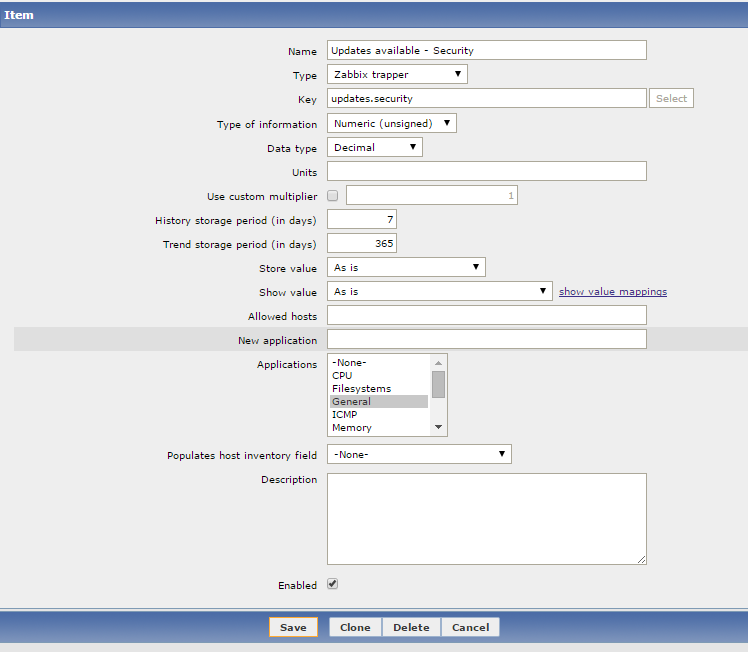


    You also need them for updates.nonsecurity and updates.critical ...

    Of course, the real magic of this is the code that actually checks for updates and sends the information to the Zabbix server. My code is dependent on the Newtonsoft.Json library for creating the JSON to send to the Zabbix server. If this is a problem for you, you could manually generate your own JSON and fill in the blanks with your data. I also left out of this code a routine that I have which checks the Active Directory site and then chooses the correct Zabbix proxy.

    Code:
    Module Module1
        Public Class zabbix_sender
            Public request As String = "sender data"
            Public data As New List(Of zabbix_data)
        End Class
    
        Public Class zabbix_data
            Public host As String
            Public key As String
            Public value As String
        End Class
    
        Sub Main()
            Dim server As String
            Dim port As Integer
    
            server = "zabbix.domain.com"
            port = 10051
    
            Dim host As String = Net.Dns.GetHostName.ToLower
    
            ' Check for updates
            Console.WriteLine("Creating Windows Update session")
            Dim updateSession = CreateObject("Microsoft.Update.Session")
            Dim updateSearcher = updateSession.CreateupdateSearcher()
            Console.WriteLine("Checking for Windows Updates that aren't installed")
            Dim searchResult = updateSearcher.Search("IsInstalled=0 and Type='Software'")
            Console.WriteLine("Found " & searchResult.Updates.Count.ToString & " total updates")
            Console.WriteLine("")
    
            ' Categorize the updates we found
            Dim totalUpdates As Integer = searchResult.Updates.Count
            Dim securityUpdates As Integer
            Dim critialUpdates As Integer
    
            Dim update
            For i = 0 To totalUpdates - 1
                update = searchResult.Updates.Item(i)
                Dim objCategories = update.Categories
                Dim strUpdateCat As String = objCategories.Item(0).Name
                Console.WriteLine(i + 1 & "> " & strUpdateCat & " - " & update.Title)
                If InStr(strUpdateCat.ToLower, "security") Then securityUpdates += 1
                If InStr(strUpdateCat.ToLower, "critical") Then critialUpdates += 1
            Next
    
            ' Record them into a sender object
            Dim z As New zabbix_sender
            Dim security As New zabbix_data
            security.host = host
            security.key = "updates.security"
            security.value = securityUpdates
            z.data.Add(security)
            Dim critical As New zabbix_data
            critical.host = host
            critical.key = "updates.critical"
            critical.value = critialUpdates
            z.data.Add(critical)
            Dim nonsecurity As New zabbix_data
            nonsecurity.host = host
            nonsecurity.key = "updates.nonsecurity"
            nonsecurity.value = totalUpdates - securityUpdates - critialUpdates
            z.data.Add(nonsecurity)
    
            ' Serialize that object as JSON
            Dim json As String
            json = Newtonsoft.Json.JsonConvert.SerializeObject(z)
            Console.WriteLine()
            Console.WriteLine(json)
            Console.WriteLine()
    
            Dim json_len As Long = json.Length  ' We need this to be a "Long" variable
    
            ' Pack all our information into Byte arrays that we can send out a socket
            Dim header() As Byte
            Dim length() As Byte
            Dim data() As Byte
            Dim all() As Byte
    
            header = Text.Encoding.ASCII.GetBytes("ZBXD" & Strings.Chr(1))
            length = BitConverter.GetBytes(json_len)
            data = Text.Encoding.ASCII.GetBytes(json)
    
            ReDim all(header.Length + length.Length + data.Length)
            System.Buffer.BlockCopy(header, 0, all, 0, header.Length)
            System.Buffer.BlockCopy(length, 0, all, header.Length, length.Length)
            System.Buffer.BlockCopy(data, 0, all, header.Length + length.Length, data.Length)
    
            ' Send our data to the Zabbix server
            Console.WriteLine("Sending data to " & server & " port " & port)
            Dim client As New System.Net.Sockets.Socket(Net.Sockets.AddressFamily.InterNetwork, Net.Sockets.SocketType.Stream, Net.Sockets.ProtocolType.Tcp)
            client.Connect(server, port)
            client.Send(all)
    
            ' Header
            Dim buffer(5 - 1) As Byte
            _receive(client, buffer, 0, buffer.Length, 10000)
            'Console.WriteLine(Text.Encoding.ASCII.GetString(buffer))
            If Not Text.Encoding.ASCII.GetString(buffer).StartsWith("ZBXD") Then Throw New Exception("Invalid response")
    
            ' Length
            ReDim buffer(8 - 1)
            _receive(client, buffer, 0, buffer.Length, 10000)
            'Console.WriteLine(Text.Encoding.ASCII.GetString(buffer))
            Dim dataLength As Integer = BitConverter.ToInt32(buffer, 0)
            If dataLength = 0 Then Throw New Exception("Invalid response")
    
            ' Message
            ReDim buffer(dataLength - 1)
            _receive(client, buffer, 0, buffer.Length, 10000)
            Console.WriteLine(Text.Encoding.ASCII.GetString(buffer))
    
            Console.WriteLine()
            Console.WriteLine("Done. Window will close after 30 seconds.")
            System.Threading.Thread.Sleep(30 * 1000)
    
    
        End Sub
    
    
        Private Sub _receive(ByVal socket As System.Net.Sockets.Socket, ByRef buffer() As Byte, ByVal offset As Integer, ByVal size As Integer, ByVal timeout As Integer)
            Dim startTickCount As Integer = Environment.TickCount
            Dim received As Integer = 0
            Do
                If Environment.TickCount > startTickCount + timeout Then Throw New Exception("Timeout.")
                Try
                    received += socket.Receive(buffer, offset + received, size - received, Net.Sockets.SocketFlags.None)
                Catch ex As Net.Sockets.SocketException
                    If ex.SocketErrorCode = Net.Sockets.SocketError.WouldBlock Or _
                        ex.SocketErrorCode = Net.Sockets.SocketError.IOPending Or _
                        ex.SocketErrorCode = Net.Sockets.SocketError.NoBufferSpaceAvailable Then
                        ' Socket buffer is probably empty ... wait and try again
                        Threading.Thread.Sleep(30)
                    Else
                        ' Something more serious
                        Throw ex
                    End If
                End Try
            Loop While received < size
        End Sub
    
    End Module
    I have my .exe copied down to the C drive of each server. I then have Windows Tasks setup to run the .exe with two triggers. One is a daily schedule that runs in the early AM and the second trigger is for 15 minutes after the system starts.
    Last edited by StarDestroyer; 16-10-2014, 20:01. Reason: Correct title
  • StarDestroyer
    Junior Member
    • Jun 2014
    • 20

    #2
    Note: This code also has a VB.net version of the code to send data to the Zabbix server based on the code in the Russian forum.

    Comment

    • drucej31
      Junior Member
      • Aug 2014
      • 15

      #3
      Good stuff.

      I've been battling this issue for quite a while so thanks for your post...

      So just to summarise.. You need to compile up this script in presumably Visual Studio.. We use a lot of sites with Proxy servers, so i'm assuming if we just use a standard DNS name per site.. e.g. proxy.zabbix.local and set this in the script which will take care of the internal lookup..

      Not quite clear about the JSON bit, but i assume this is just a library that needs to be part of the compile... The rest of it all makes sense...

      We'll give this a go though! thanks again

      Comment

      • StarDestroyer
        Junior Member
        • Jun 2014
        • 20

        #4
        Originally posted by drucej31
        So just to summarise.. You need to compile up this script in presumably Visual Studio..
        That is correct. I used VB.net 2010 myself. I created it as a new Console Application.

        Originally posted by drucej31
        We use a lot of sites with Proxy servers, so i'm assuming if we just use a standard DNS name per site.. e.g. proxy.zabbix.local and set this in the script which will take care of the internal lookup..
        That is certainly one way to do it. Another alternative is to use Active Directory sites. I use code similar to this:
        Code:
         Private Function GetZabbixServer() As String
                Dim mySystem As New ActiveDs.ADSystemInfo
                Console.WriteLine("Checking for Zabbix server in " & mySystem.SiteName)
                Select Case mySystem.SiteName
                    Case "Site1"
                        GetZabbixServer = "zabbix-site1.domain"
                    Case "Site2"
                        GetZabbixServer = "zabbix-site1.domain"
                    Case "Site3"
                        GetZabbixServer = "zabbix-site1.domain"
                    Case Else
                        Throw New Exception(mySystem.SiteName & " is not supported at this time")
                End Select
                Console.WriteLine("Found " & GetZabbixServer)
            End Function
        Originally posted by drucej31
        Not quite clear about the JSON bit, but i assume this is just a library that needs to be part of the compile...
        Yes, that's right. You can download the library and include it in your project. I generally try to avoid doing that but there are times when it's just considerably easier.

        Comment

        • drucej31
          Junior Member
          • Aug 2014
          • 15

          #5
          Strange error on updates check..

          Got a strange exception on the compiled version of this .exe ...

          Any ideas?

          See the end of this message for details on invoking
          just-in-time (JIT) debugging instead of this dialog box.

          ************** Exception Text **************
          System.Exception: Invalid response
          at zabbix.Zabbix_Functions.Main()
          at zabbix.Form1.Form1_Load(Object sender, EventArgs e)
          at System.EventHandler.Invoke(Object sender, EventArgs e)
          at System.Windows.Forms.Form.OnLoad(EventArgs e)
          at System.Windows.Forms.Form.OnCreateControl()
          at System.Windows.Forms.Control.CreateControl(Boolean fIgnoreVisible)
          at System.Windows.Forms.Control.CreateControl()
          at System.Windows.Forms.Control.WmShowWindow(Message& m)
          at System.Windows.Forms.Control.WndProc(Message& m)
          at System.Windows.Forms.ScrollableControl.WndProc(Mes sage& m)
          at System.Windows.Forms.ContainerControl.WndProc(Mess age& m)
          at System.Windows.Forms.Form.WmShowWindow(Message& m)
          at System.Windows.Forms.Form.WndProc(Message& m)
          at System.Windows.Forms.Control.ControlNativeWindow.O nMessage(Message& m)
          at System.Windows.Forms.Control.ControlNativeWindow.W ndProc(Message& m)
          at System.Windows.Forms.NativeWindow.Callback(IntPtr hWnd, Int32 msg, IntPtr wparam, IntPtr lparam)


          ************** Loaded Assemblies **************
          mscorlib
          Assembly Version: 4.0.0.0
          Win32 Version: 4.0.30319.18444 built by: FX451RTMGDR
          CodeBase: file:///C:/Windows/Microsoft.NET/Framework/v4.0.30319/mscorlib.dll
          ----------------------------------------
          zabbix
          Assembly Version: 1.0.0.0
          Win32 Version: 1.0.0.0
          CodeBase: file:///C:/Zabbix/zabbix.exe
          ----------------------------------------
          Microsoft.VisualBasic
          Assembly Version: 10.0.0.0
          Win32 Version: 11.0.50938.18408 built by: FX451RTMGREL
          CodeBase: file:///C:/Windows/Microsoft.Net/assembly/GAC_MSIL/Microsoft.VisualBasic/v4.0_10.0.0.0__b03f5f7f11d50a3a/Microsoft.VisualBasic.dll
          ----------------------------------------
          System
          Assembly Version: 4.0.0.0
          Win32 Version: 4.0.30319.34238 built by: FX452RTMGDR
          CodeBase: file:///C:/Windows/Microsoft.Net/assembly/GAC_MSIL/System/v4.0_4.0.0.0__b77a5c561934e089/System.dll
          ----------------------------------------
          System.Core
          Assembly Version: 4.0.0.0
          Win32 Version: 4.0.30319.18408 built by: FX451RTMGREL
          CodeBase: file:///C:/Windows/Microsoft.Net/assembly/GAC_MSIL/System.Core/v4.0_4.0.0.0__b77a5c561934e089/System.Core.dll
          ----------------------------------------
          System.Windows.Forms
          Assembly Version: 4.0.0.0
          Win32 Version: 4.0.30319.18408 built by: FX451RTMGREL
          CodeBase: file:///C:/Windows/Microsoft.Net/assembly/GAC_MSIL/System.Windows.Forms/v4.0_4.0.0.0__b77a5c561934e089/System.Windows.Forms.dll
          ----------------------------------------
          System.Drawing
          Assembly Version: 4.0.0.0
          Win32 Version: 4.0.30319.18408 built by: FX451RTMGREL
          CodeBase: file:///C:/Windows/Microsoft.Net/assembly/GAC_MSIL/System.Drawing/v4.0_4.0.0.0__b03f5f7f11d50a3a/System.Drawing.dll
          ----------------------------------------
          System.Runtime.Remoting
          Assembly Version: 4.0.0.0
          Win32 Version: 4.0.30319.34108 built by: FX45W81RTMGDR
          CodeBase: file:///C:/Windows/Microsoft.Net/assembly/GAC_MSIL/System.Runtime.Remoting/v4.0_4.0.0.0__b77a5c561934e089/System.Runtime.Remoting.dll
          ----------------------------------------
          Newtonsoft.Json
          Assembly Version: 6.0.0.0
          Win32 Version: 6.0.6.17820
          CodeBase: file:///C:/Zabbix/Newtonsoft.Json.DLL
          ----------------------------------------
          System.Configuration
          Assembly Version: 4.0.0.0
          Win32 Version: 4.0.30319.18408 built by: FX451RTMGREL
          CodeBase: file:///C:/Windows/Microsoft.Net/assembly/GAC_MSIL/System.Configuration/v4.0_4.0.0.0__b03f5f7f11d50a3a/System.Configuration.dll
          ----------------------------------------
          System.Xml
          Assembly Version: 4.0.0.0
          Win32 Version: 4.0.30319.34234 built by: FX452RTMGDR
          CodeBase: file:///C:/Windows/Microsoft.Net/assembly/GAC_MSIL/System.Xml/v4.0_4.0.0.0__b77a5c561934e089/System.Xml.dll
          ----------------------------------------
          System.Numerics
          Assembly Version: 4.0.0.0
          Win32 Version: 4.0.30319.18408 built by: FX451RTMGREL
          CodeBase: file:///C:/Windows/Microsoft.Net/assembly/GAC_MSIL/System.Numerics/v4.0_4.0.0.0__b77a5c561934e089/System.Numerics.dll
          ----------------------------------------
          System.Runtime.Serialization
          Assembly Version: 4.0.0.0
          Win32 Version: 4.0.30319.34234 built by: FX452RTMGDR
          CodeBase: file:///C:/Windows/Microsoft.Net/assembly/GAC_MSIL/System.Runtime.Serialization/v4.0_4.0.0.0__b77a5c561934e089/System.Runtime.Serialization.dll
          ----------------------------------------
          System.Xml.Linq
          Assembly Version: 4.0.0.0
          Win32 Version: 4.0.30319.18408 built by: FX451RTMGREL
          CodeBase: file:///C:/Windows/Microsoft.Net/assembly/GAC_MSIL/System.Xml.Linq/v4.0_4.0.0.0__b77a5c561934e089/System.Xml.Linq.dll
          ----------------------------------------
          System.Data
          Assembly Version: 4.0.0.0
          Win32 Version: 4.0.30319.18408 built by: FX451RTMGREL
          CodeBase: file:///C:/Windows/Microsoft.Net/assembly/GAC_32/System.Data/v4.0_4.0.0.0__b77a5c561934e089/System.Data.dll
          ----------------------------------------

          ************** JIT Debugging **************
          To enable just-in-time (JIT) debugging, the .config file for this
          application or computer (machine.config) must have the
          jitDebugging value set in the system.windows.forms section.
          The application must also be compiled with debugging
          enabled.

          For example:

          <configuration>
          <system.windows.forms jitDebugging="true" />
          </configuration>

          When JIT debugging is enabled, any unhandled exception
          will be sent to the JIT debugger registered on the computer
          rather than be handled by this dialog box.

          Comment

          • StarDestroyer
            Junior Member
            • Jun 2014
            • 20

            #6
            Originally posted by drucej31
            Got a strange exception on the compiled version of this .exe ...

            Any ideas?

            See the end of this message for details on invoking
            just-in-time (JIT) debugging instead of this dialog box.

            ************** Exception Text **************
            System.Exception: Invalid response
            at zabbix.Zabbix_Functions.Main()
            at zabbix.Form1.Form1_Load(Object sender, EventArgs e)
            [snip]
            I didn't state this in my original post, but the code above is for a "Console Application", not a "Windows Forms Application" ... that's my best guess as to what went wrong.

            Comment

            • SouperGrover
              Junior Member
              • May 2013
              • 22

              #7
              @StarDestroyer Very nice approach. I am curious as to why you chose to do this as a console application instead of a vbscript. Was there a library or reference you needed that wasn't available to vbscript that you needed VB.Net for?

              Comment

              Working...