
Hello,
here is a guide to install zabbix server on Centos 7 i have installed it
and all works Great!
hope it helps.
Versions:
Centos 7.3
Zabbix server 3.2
Credits:
https://serverfault.com/questions/23...per-table-cons
Installation on a new server :
First Server steps:
yum update -y
yum upgrade -y
yum install wget epel-release php56-mbstring yum-utils
yum-config-manager --enable rhui-REGION-rhel-server-extras rhui-REGION-rhel-server-optiona
and then :
yum install php-mbstring php-bcmath
# add this to .bashrc :
vi .bashrc
HISTTIMEFORMAT="%d/%m/%y %T "
# disable selinux:
vi /etc/selinux/config
change SELINUX=enforcing to SELINUX=disabled
#then run on CLI and run:
setenforce 0
# installing Zabbix server:
rpm -ivh http://repo.zabbix.com/zabbix/3.2/rh...el7.noarch.rpm
yum install zabbix-server-mysql zabbix-web-mysql zabbix-agent zabbix-java-gateway mariadb-server
#start MariaDb:
systemctl enable mariadb
systemctl start mariadb
#make SQL secure (optional)
mysql_secure_installation
#Set the below parameters in the PHP config file (/etc/php.ini )
vi /etc/php.ini
change this values:
[CODE]max_execution_time = 600
max_input_time = 600
memory_limit = 256M
post_max_size = 32M
upload_max_filesize = 16M
date.timezone = Asia/Kolkata (your machine timezone)
#firewall settings:
firewall-cmd --permanent --add-port=10050/tcp
firewall-cmd --permanent --add-port=10051/tcp
firewall-cmd --permanent --add-port=80/tcp
firewall-cmd --reload
systemctl restart firewalld
# Now start services:
systemctl start zabbix-server
systemctl enable zabbix-server
systemctl enable httpd
systemctl restart httpd
# to avoid future DB issues (DB growing too fast)we will set innodb per table:
#Backup mysql:
mysqldump --all-databases -p > mysqlall.sql
#Shutdown mysql
service mariadb stop
# Add the following lines to /etc/my.cnf.d/server.conf
[mysqld]
innodb_file_per_table
innodb_flush_method=O_DIRECT
innodb_log_file_size=1G
innodb_buffer_pool_size=4G
innodb_data_file_path=ibdata1:10M:autoextend
Whatever your set for innodb_buffer_pool_size, make sure innodb_log_file_size is 25% of innodb_buffer_pool_size.
#Delete ibdata1, ib_logfile0 and ib_logfile1 (see update below before deleting!)
rm -rf /var/lib/mysql/ib*
#Restart mysql
service mariadb restart
#now we will set zabbix DB:
mysql -p
>> create database zabbixdb;
>> grant all privileges on zabbixdb.* to zabbix@localhost identified by 'PASSWORD';
>> flush privileges;
>>exit
#building zabbixdb:
cd /usr/share/doc/zabbix-server-mysql-3.2.4/
gunzip create.sql.gz
mysql -u root -p zabbixdb < create.sql
# now we will set zabbix server DB Parameters at zabbix_server.conf:
vi /etc/zabbix/zabbix_server.conf
DBHost=localhost
DBName=zabbixdb
DBUser=zabbix
DBPassword=XXXXXXX
#restart server:
systemctl restart Zabbix-server
#enabling Zabbix agent and installing Zabbix_get:
systemctl enable zabbix-agent
systemctl start zabbix-agent
wget http://repo.zabbix.com/zabbix/3.2/rhel/7/x86_64/zabbix-get-3.2.4-2.el7.x86_64.rpm
rpm -Uvh zabbix-get-3.2.4-2.el7.x86_64.rpm
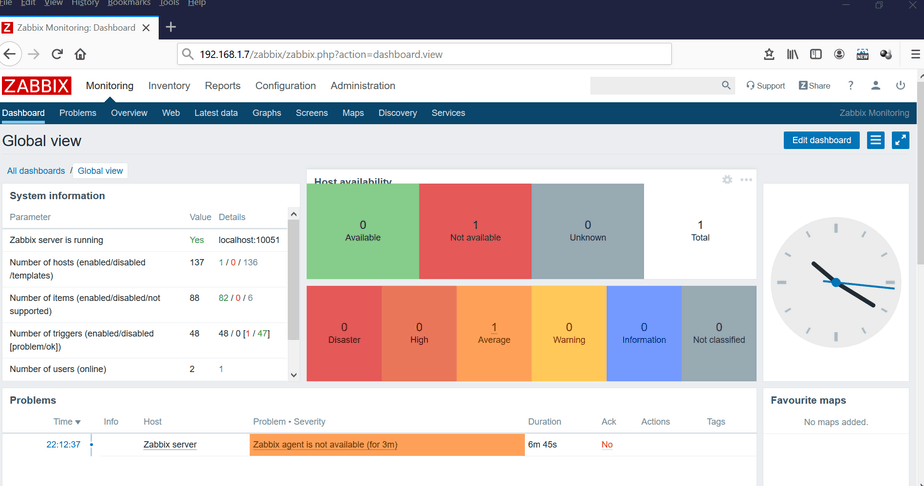
after this been done go to http://127.0.0.1/zabbix
it will reload zabbix first settings page just follow its orders and make sure
all DB settings there is correct and all packages is marked as green OK.
Login with :
user: admin
password: zabbix
Good Luck!
here is a guide to install zabbix server on Centos 7 i have installed it
and all works Great!
hope it helps.
Versions:
Centos 7.3
Zabbix server 3.2
Credits:
https://serverfault.com/questions/23...per-table-cons
Installation on a new server :
First Server steps:
yum update -y
yum upgrade -y
yum install wget epel-release php56-mbstring yum-utils
yum-config-manager --enable rhui-REGION-rhel-server-extras rhui-REGION-rhel-server-optiona
and then :
yum install php-mbstring php-bcmath
# add this to .bashrc :
vi .bashrc
HISTTIMEFORMAT="%d/%m/%y %T "
# disable selinux:
vi /etc/selinux/config
change SELINUX=enforcing to SELINUX=disabled
#then run on CLI and run:
setenforce 0
# installing Zabbix server:
rpm -ivh http://repo.zabbix.com/zabbix/3.2/rh...el7.noarch.rpm
yum install zabbix-server-mysql zabbix-web-mysql zabbix-agent zabbix-java-gateway mariadb-server
#start MariaDb:
systemctl enable mariadb
systemctl start mariadb
#make SQL secure (optional)
mysql_secure_installation
#Set the below parameters in the PHP config file (/etc/php.ini )
vi /etc/php.ini
change this values:
[CODE]max_execution_time = 600
max_input_time = 600
memory_limit = 256M
post_max_size = 32M
upload_max_filesize = 16M
date.timezone = Asia/Kolkata (your machine timezone)
#firewall settings:
firewall-cmd --permanent --add-port=10050/tcp
firewall-cmd --permanent --add-port=10051/tcp
firewall-cmd --permanent --add-port=80/tcp
firewall-cmd --reload
systemctl restart firewalld
# Now start services:
systemctl start zabbix-server
systemctl enable zabbix-server
systemctl enable httpd
systemctl restart httpd
# to avoid future DB issues (DB growing too fast)we will set innodb per table:
#Backup mysql:
mysqldump --all-databases -p > mysqlall.sql
#Shutdown mysql
service mariadb stop
# Add the following lines to /etc/my.cnf.d/server.conf
[mysqld]
innodb_file_per_table
innodb_flush_method=O_DIRECT
innodb_log_file_size=1G
innodb_buffer_pool_size=4G
innodb_data_file_path=ibdata1:10M:autoextend
Whatever your set for innodb_buffer_pool_size, make sure innodb_log_file_size is 25% of innodb_buffer_pool_size.
#Delete ibdata1, ib_logfile0 and ib_logfile1 (see update below before deleting!)
rm -rf /var/lib/mysql/ib*
#Restart mysql
service mariadb restart
#now we will set zabbix DB:
mysql -p
>> create database zabbixdb;
>> grant all privileges on zabbixdb.* to zabbix@localhost identified by 'PASSWORD';
>> flush privileges;
>>exit
#building zabbixdb:
cd /usr/share/doc/zabbix-server-mysql-3.2.4/
gunzip create.sql.gz
mysql -u root -p zabbixdb < create.sql
# now we will set zabbix server DB Parameters at zabbix_server.conf:
vi /etc/zabbix/zabbix_server.conf
DBHost=localhost
DBName=zabbixdb
DBUser=zabbix
DBPassword=XXXXXXX
#restart server:
systemctl restart Zabbix-server
#enabling Zabbix agent and installing Zabbix_get:
systemctl enable zabbix-agent
systemctl start zabbix-agent
wget http://repo.zabbix.com/zabbix/3.2/rhel/7/x86_64/zabbix-get-3.2.4-2.el7.x86_64.rpm
rpm -Uvh zabbix-get-3.2.4-2.el7.x86_64.rpm
after this been done go to http://127.0.0.1/zabbix
it will reload zabbix first settings page just follow its orders and make sure
all DB settings there is correct and all packages is marked as green OK.
Login with :
user: admin
password: zabbix
Good Luck!




Comment