Ad Widget

Collapse

How to Mount Virtual Hard Drive into Zabbix:

Collapse
X
 
  • Time
  • Show
Clear All
new posts
  • imransafi
    Junior Member
    • Aug 2012
    • 24

    #1

    How to Mount Virtual Hard Drive into Zabbix:

    Hi group:

    Hope everyone is fine,

    I have a Zabbix server that is monitoring many devices of my network, My Zabbix server is running on VMware EIxS machine now there is problem with hard drive space, its low or memory lack problem, I attach a virtual hard drive but I can't mount it Please help me step by step how to mount my Virtual Hard drive to increase my zabbix server hard drive space

    Cheers,
  • Colttt
    Senior Member
    Zabbix Certified Specialist
    • Mar 2009
    • 878

    #2
    you can increase the original-harddisk from zabbix, it is possible in vmware! after this you can resize you filesystem!


    otherwise try this in a terminal/console:
    (i think you must partition the harddrive)
    cfdisk

    and after this you can make a filesystem on this:
    mkfs.xfs /dev/sdb
    mount /dev/sdb /mnt/
    Debian-User

    Sorry for my bad english

    Comment

    • imransafi
      Junior Member
      • Aug 2012
      • 24

      #3
      How to increase the hard desk

      Thanks Shad0W Expert Man;

      How to increase the hard desk? It might be good to increase the desk than mounting new one desk;

      please let me know the steps on virtual machine and as well as commands to be run on zabbix for increasing the desk space of zabbix server
      I am not good in Linux commands so kindly explain good;.

      NOTE: I don't want my current hard desk to be FORMAT :O |NO-NEVER-NON| because a lots of configurations are saved in it.
      CHeers Shad0w
      Last edited by imransafi; 05-09-2012, 13:53. Reason: New Note

      Comment

      • Colttt
        Senior Member
        Zabbix Certified Specialist
        • Mar 2009
        • 878

        #4
        you must delete all snapshots and make a backup before!

        Open VMware Infrastructure (VI) Client and connect to VirtualCenter or the ESX host.
        1.Right-click the virtual machine.
        2.Click Edit Settings.
        3.Select Virtual Disk.
        4.Increase the size of the disk.

        Note: If this option is greyed out then the disk may be running on snapshots or the disk may be at the maximum allowed size depending on the block size of the datastore

        5.Follow the steps in Increasing the size of a disk partition (1004071) so the guest operating system is aware of the change in disk size.
        after this you can use this: http://kb.vmware.com/selfservice/mic...rnalId=1007907
        Debian-User

        Sorry for my bad english

        Comment

        • imransafi
          Junior Member
          • Aug 2012
          • 24

          #5
          What about Zabbix

          Thank you so much shadow tainted guy.!

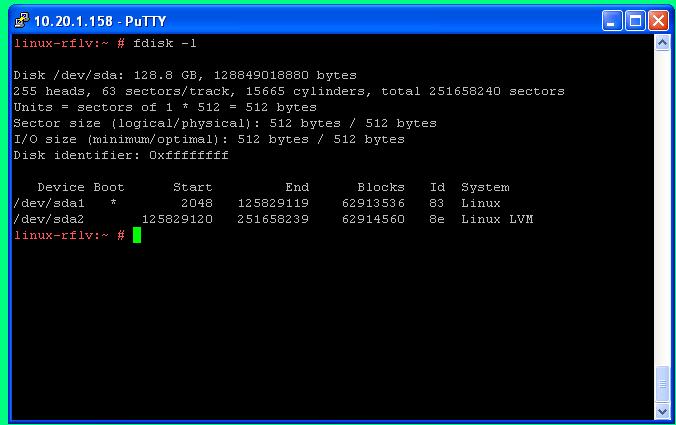
          I Deleted snapshot, I increased 60 GB new space into zabbix server Hard drive then I follow the steps you mentioned in link http://kb.vmware.com/selfservice/mic...rnalId=1007907 But I didn't understand and It doesn't work.

          Please Look at this screen-shot of my Zabbix Server disks list after I added new space and run some commands and let me know what extra commands I should run in my Zabbix Server to increase the disk size.


          HELP PLEASE

          Cheers Bro,
          Regards,
          Last edited by imransafi; 06-09-2012, 09:32. Reason: picture uploading

          Comment

          • Colttt
            Senior Member
            Zabbix Certified Specialist
            • Mar 2009
            • 878

            #6
            do you have ICQ or jabber or googlemaiL?!

            maybe we can use instantmessaging?!

            do you increase the vmware-disk, right?

            after this you restart the zabbix-server, right?

            what say ls /dev/sd* ?
            Debian-User

            Sorry for my bad english

            Comment

            • imransafi
              Junior Member
              • Aug 2012
              • 24

              #7
              I Increased the Desk

              Yes I Increased the desk space look t screenshoot /dev /sda2 is new space Just let me know how to increase it by commands in my zabbix server my Googlemail is [email protected]


              Thankyou Shad0w Best Guy!!!

              Comment

              • Colttt
                Senior Member
                Zabbix Certified Specialist
                • Mar 2009
                • 878

                #8
                ok, i add you in googletalk..
                Debian-User

                Sorry for my bad english

                Comment

                • imransafi
                  Junior Member
                  • Aug 2012
                  • 24

                  #9
                  Thanks

                  Okay We will talk soon...!

                  Comment

                  Working...