Ad Widget

Collapse

2 Zabbix Servers & 1 Zabbix Agent Communication

Collapse
X
 
  • Time
  • Show
Clear All
new posts
  • Mukesh
    Junior Member
    • Jun 2014
    • 16

    #1

    2 Zabbix Servers & 1 Zabbix Agent Communication

    I am new for zabbix so i want to confirm if anybody know 2 zabbix servers communicating with 1 zabbix agent (window/linux)? i want the alert to be triggered in both the servers.

    Also i want to know if all the services(cpu,hard disk,memory) and eventlog monitoring(application, system) can be triggered to BOTH the servers and will there be any time differences between them.

    Thank you very much

    Mukesh
  • ingus.vilnis
    Senior Member
    Zabbix Certified Trainer
    Zabbix Certified SpecialistZabbix Certified Professional
    • Mar 2014
    • 908

    #2
    Hello,

    Sure you can monitor one agent with multiple servers. You just have to specify both Zabbix server IP addresses in this agent configuration file.

    All triggers will be fired on both servers. It will depend only on the server side configuration then.

    Are you planning some high availability or production/test setup?

    Best Regards,
    Ingus

    Comment

    • Mukesh
      Junior Member
      • Jun 2014
      • 16

      #3
      2 Zabbix Servers & 1 Zabbix Agent Communication

      Thanks for reply

      can you support me which specification setting to be required in both zabbix server for fired triggered in both server

      yes i am hardly planning for high availability.but i have no idea about how to do HA in 2 zabbix Server.

      Can you support me how to create HA in 2 zabbix Server.

      i am using CentOS 6.5 x64bit OS


      Thank you

      Mukesh

      Comment

      • ingus.vilnis
        Senior Member
        Zabbix Certified Trainer
        Zabbix Certified SpecialistZabbix Certified Professional
        • Mar 2014
        • 908

        #4
        Hi Mukesh,

        There are quite many info resources available on HA setups for Zabbix. Here I can give you a list of few:

        Best Regards,
        Ingus

        Comment

        • Mukesh
          Junior Member
          • Jun 2014
          • 16

          #5
          Zabicom to Zabbix Miagration

          Hi Support Team

          I want migrate zabicom 1.18.16 to zabbix latest version .

          And please let me know which information you want from my side ..for zabbix migration ..?

          Following below information about Zabicom to zabbix Miagration

          1.Zabicom(Modifly Version to zabbix)

          OS:-CentOS 6.5 fully updates
          mysqld:-5.5.37
          mysqld Total-tables(Blank DB):-90 Tables
          php:-5.4.29
          Zabicom-Server:-1.18.16
          Zabicom-frontend :-1.18.16

          2.Zabbix

          OS:-CentOS 6.5 fully updates
          mysqld:-5.5.37
          mysqld Total-tables(Blank DB):-108 Tables
          php:-5.4.29
          Zabbix-Server:-2.2.3
          Zabbix-web :-2.2.3


          Please give me solution..

          Regards
          Mukesh

          Comment

          • natalia
            Senior Member
            • Apr 2013
            • 159

            #6
            Originally posted by ingus.vilnis
            Sure you can monitor one agent with multiple servers. You just have to specify both Zabbix server IP addresses in this agent configuration file.
            Hi Ingus,

            is it possible also that Zabbix proxy will send data to multiple Zabbix servers ?
            Did you see it work ? I am using zabbix 2.2.4

            Thanks !

            Comment

            • ingus.vilnis
              Senior Member
              Zabbix Certified Trainer
              Zabbix Certified SpecialistZabbix Certified Professional
              • Mar 2014
              • 908

              #7
              Originally posted by natalia
              Hi Ingus,

              is it possible also that Zabbix proxy will send data to multiple Zabbix servers ?
              Did you see it work ? I am using zabbix 2.2.4

              Thanks !
              Hi Natalia,

              Thank you for your question!

              Unfortunately Zabbix proxy cannot send data to multiple servers. It is not designed for that. Agent is, but proxy is not. It treats the Server= parameter as one IP no matter what you specify there in zabbix_proxy.conf file.

              You have to think for yourself what is your purpose of having two Zabbix servers. If you are looking for reliability then you should consider going for any of the high availability solutions I mentioned earlier in this post. In such case you would have two servers with failover IP addresses which would then switch whenever any of the servers goes down. Database replication then also should be set up separately.

              Best Regards,
              Ingus

              Comment

              • ingus.vilnis
                Senior Member
                Zabbix Certified Trainer
                Zabbix Certified SpecialistZabbix Certified Professional
                • Mar 2014
                • 908

                #8
                Mukesh,

                Regarding Zabicom you have to check which version of Zabbix it is using as base.

                In general you gave to import your database to the new server, connect it to Zabbix and then do the version upgrade. Database should be upgraded by Zabbix server then. There are quite many resources available on version upgrade topic either here in forums or on Zabbix official documentation and wiki.

                If you don't want to keep the history, then you could simply export all your hosts and templates from Zabicom as XML and then import them to Zabbix.

                And before that, upgrade your Zabbix installation. Version 2.2.4 is the latest one now.

                Best Regards,
                Ingus

                Comment

                • Mukesh
                  Junior Member
                  • Jun 2014
                  • 16

                  #9
                  2 Zabbix Servers & 1 Zabbix Agent Communication

                  really thanks for support
                  Hi Ingus,

                  I want to monitor Server 2008 with 2 Zabbix Server.

                  Please help me which setting we need to done my server 2008 trigger to my both zabbix server.

                  1.Zabbix Server IP 192.168.10.10 ,port 10051
                  2 Zabbix Server IP 192.168.10.11 ,port 10051

                  Window Zabbix Agent (Windows Server2008)-IP 192.168.10.12 port 10050

                  Please give me setting and how to do that.

                  Thanks
                  Mukesh

                  Comment

                  • ingus.vilnis
                    Senior Member
                    Zabbix Certified Trainer
                    Zabbix Certified SpecialistZabbix Certified Professional
                    • Mar 2014
                    • 908

                    #10
                    Mukesh,

                    On your Windows 2008 host, you have to modify zabbix_agent.win.conf file and add IP addresses of both Zabbix servers there.
                    Server=192.168.10.10,192.168.10.11

                    Don't forget to restart Zabbix agent service on Windows after you have done that.

                    Then on both Zabbix servers you have to add this Windows host with IP 192.168.10.12 port 10050 and set up the triggers and actions for this Windows server separately on each Zabbix server.

                    Agent will send data to both Zabbix servers but at this point you have no possibilities to duplicate configs of those servers.

                    Best Regards,
                    Ingus

                    Comment

                    • Mukesh
                      Junior Member
                      • Jun 2014
                      • 16

                      #11
                      2 Zabbix Servers & 1 Zabbix Agent Communication

                      Many thanks Ingus,

                      Yes, i have added both the server IP in the agent config file using same method as you have mentioned. Services restarted as well.

                      Host created in Windows Server 2008 with same credentials(IP,Triggers,Actions)

                      Trigger update is shown but there are delays in alerts to both servers. The Items monitored are CPU,Disc,Memory,Event Log(Application/System). The time difference in alert for both servers is huge e.g. CPU - 5 min. Disc - 10 min. It is not consistent as well.

                      Also the event log does not trigger to both the server. Only 1 server is triggering the alert.

                      Need your expertise to assist on the backend processing of zabbix system/configuration to allow triggers to be sent simultaneously to both the server.

                      Thanks again Ingus

                      Regards,
                      Mukesh

                      Comment

                      • ingus.vilnis
                        Senior Member
                        Zabbix Certified Trainer
                        Zabbix Certified SpecialistZabbix Certified Professional
                        • Mar 2014
                        • 908

                        #12
                        Mukesh,

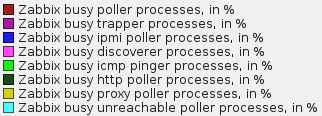
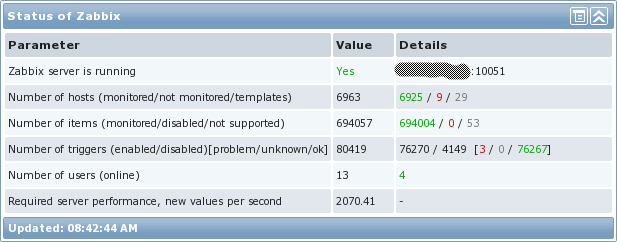
                        Please check the performance data of your Zabbix servers in
                        Monitoring -> Graphs -> select Zabbix server in top right dropdown
                        Check Zabbix queue in Administration -> Queue

                        Read these articles:
                        In the past, quite often Zabbix users have been puzzled regarding some server tuning parameters – for example, how many pollers do they need? It was usually determined based on experience, testing and a bit of guesstimating. No more fuzzy attempts – get hard facts with Zabbix 1.8.5. UPDATED 2011.11.02: new downloadable template version v2 […]

                        One of the questions for those of us that use Zabbix on a large scale is “Just how much data can Zabbix ingest before it blows up spectacularly?” Some of the work I’ve been doing lately revolves around that question. I have an extremely large environment (around 32000+ devices) that could potentially be monitored entirely […]

                        and tune your server performance according to information described there.

                        And please check what happens if you specify only one Zabbix server in your Widows host agent configuration. Do you get your data coming in correctly?

                        Best Regards,
                        Ingus

                        Comment

                        • natalia
                          Senior Member
                          • Apr 2013
                          • 159

                          #13
                          Originally posted by ingus.vilnis
                          Hi Natalia,

                          You have to think for yourself what is your purpose of having two Zabbix servers. If you are looking for reliability then you should consider going for any of the high availability solutions I mentioned earlier in this post. In such case you would have two servers with failover IP addresses which would then switch whenever any of the servers goes down. Database replication then also should be set up separately.

                          Best Regards,
                          Ingus
                          Thanks for the reply :-)
                          yes, I an looking for HA solution ... what do you described above is HA Active/Passive, what is meaning of HA Active-Active ? I don't see how it can be possible in Zabbix

                          Thanks !

                          Comment

                          • ingus.vilnis
                            Senior Member
                            Zabbix Certified Trainer
                            Zabbix Certified SpecialistZabbix Certified Professional
                            • Mar 2014
                            • 908

                            #14
                            Natalia,

                            Please take a look at this article: http://blog.zabbix.com/scalable-zabb...400-nvps/2615/

                            There I think you could find many useful ideas and working examples for your systems as well.

                            Best Regards,
                            Ingus

                            Comment

                            • natalia
                              Senior Member
                              • Apr 2013
                              • 159

                              #15
                              Originally posted by ingus.vilnis
                              Natalia,

                              Please take a look at this article: http://blog.zabbix.com/scalable-zabb...400-nvps/2615/

                              There I think you could find many useful ideas and working examples for your systems as well.

                              Best Regards,
                              Ingus
                              I read it already :-)

                              Maybe you will have any suggestion for me regarding network discovery in my post


                              Thanks anyway for your quick response !

                              Comment

                              Working...