
I'm running Zabbix 2.4.1. to monitor a number of Debian machines and I've added some Items and Triggers to monitor available updates in Apt and notify me whenever security updates are available. This works very well so far and I decided to create an overview screen that shows all available machines and the available security updates for each machine.
To do that, I've created a new screen with a "Data Overview" Resource, gave it the Debian Servers group and "Apt" as an application. So far, this almost works as expected but I've run into two issues where I'd like some hints, please.
1. The text length in String fields seems to be arbitrary limited in the "Data Overview" resource. I think it's best explained with a screenshot.
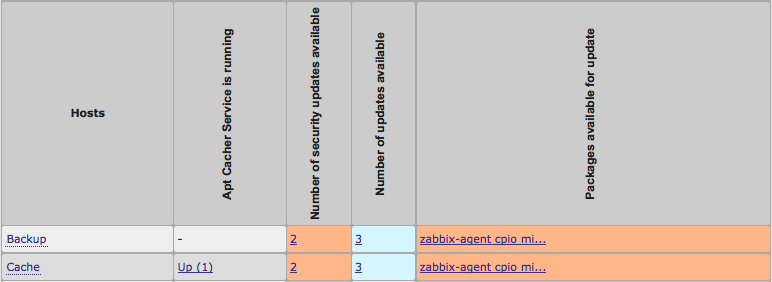
As you can see, the last field containing the available updates gets trimmed off after 20 characters, even though there is plenty of space left in the column. I'd like to have this field without trimmed content (or at least use all available space). Is this possible somehow?
2. I have two Applications. One is called "Apt" and contains the Number of Updates and the Package names. The second is called "Apt Cacher Service" and contains items for monitoring an Apt-Cacher-NG server (currently only for service availability). The problem seems to be that the "Application" field in the Screen Cell Configuration, while being set to "Apt" seems to match all applications whose name starts with "Apt" and hence, the "Apt Cacher Service is running" field appears in the Screen as well which is not desired. Is there any way around this problem, how do I manage to only get the values from the application "Apt" but not from "Apt Cacher Service" in the screen?
Thanks in advance for your help.
To do that, I've created a new screen with a "Data Overview" Resource, gave it the Debian Servers group and "Apt" as an application. So far, this almost works as expected but I've run into two issues where I'd like some hints, please.
1. The text length in String fields seems to be arbitrary limited in the "Data Overview" resource. I think it's best explained with a screenshot.
As you can see, the last field containing the available updates gets trimmed off after 20 characters, even though there is plenty of space left in the column. I'd like to have this field without trimmed content (or at least use all available space). Is this possible somehow?
2. I have two Applications. One is called "Apt" and contains the Number of Updates and the Package names. The second is called "Apt Cacher Service" and contains items for monitoring an Apt-Cacher-NG server (currently only for service availability). The problem seems to be that the "Application" field in the Screen Cell Configuration, while being set to "Apt" seems to match all applications whose name starts with "Apt" and hence, the "Apt Cacher Service is running" field appears in the Screen as well which is not desired. Is there any way around this problem, how do I manage to only get the values from the application "Apt" but not from "Apt Cacher Service" in the screen?
Thanks in advance for your help.
Attached Files

Comment