
What is the best practice for monitoring desktop computers? They're DHCP and they won't resolve in DNS so I can't set them up in the Hosts page as either IP or DNS.
-
-
Ok I set up discovery, but it added the new computer with the wrong name. There appears to be a stale DNS record for an old server, and zabbix thinks that's the computer name. Shouldn't zabbix pull the name from what the Agent feeds it, and not some erroneous DNS record?Comment
-
Monitoring desktops
Hello Cliffennis,
Try and check in at least one computer what is the hostname that is configured in the zabbix_agentd.conf. you should look for something like HOSTNAME=, see if it matches any hostname you are recieving.
Best Regards,Comment
-
The zabbix agent is correct. From the zabbix config file:
The zabbix front end server shows this on Configuration>Hosts:Code:DebugLevel=4 LogFile=c:\ProgramData\Zabbix\zabbix_agentd.log Server=sysmon1.domain.local ServerActive=sysmon1.domain.local Hostname=myserver1 EnableRemoteCommands=1 LogRemoteCommands=1 Timeout=5
zproxy-atl: ws07.domain.localComment
-
Monitoring desktops
Have you tried to flush Zabbix DNS cache ?
Best Regards,Comment
-
No I haven't. My concern is that zabbix is influenced by DNS, so if there is a stale DNS record or an incorrect DNS record it will display incorrectly in the server. I need Zabbix to properly record the system name as it pulls it from the actual system, regardless of what DNS says.Comment
-
Monitoring desktops
Can you show the hostname of the machine and the hostname that is appearing in Zabbix ?Comment
-
This is the system name, the zabbix agent config, the IP configuration of the system, and finally what it shows in the Zabbix server.
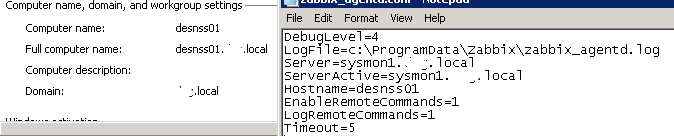


Comment
-
Monitoring desktops
Has that machine been configured before ?Comment
-
Yes it was a manually entered host. I set up half a dozen manually before doing the discovery. The other manually entered hosts showed up as "systemname_2". This is the only one that shows a system that was retired 4 years ago.Comment
-
Monitoring desktops
That is clearly a DNS Record in the DNS Server, check if the DNS server and delete that one.Comment
-
I located the stale record in Reverse DNS and deleted it. How can I make sure that Zabbix does not report names from DNS? If possible I need Zabbix to only report what the actual computer name is, as it's read from the system itself. DNS might be wrong, it should never report a system name based on DNS.Comment
-
Monitoring desktops
Zabbix searches your DNS Server for Hostnames, you just need to keep you DNS Server organized. That's all.Comment

Comment