Ad Widget

Collapse

Email in Zabbix

Collapse
X
 
  • Time
  • Show
Clear All
new posts
  • jlkz
    Junior Member
    • Mar 2016
    • 16

    #1

    Email in Zabbix

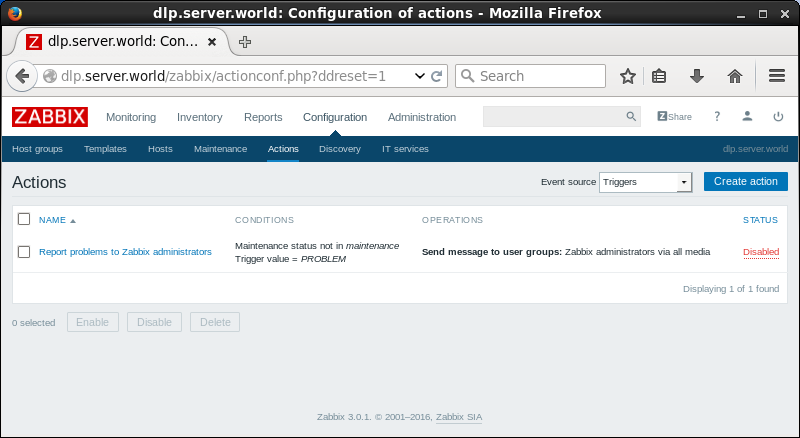
    I am running Zabbix 2.4.7 and trying to set up emails for triggers. I set up my media type with the email server information. I also set up my user with a email address. My problem is with the action. I've looked on the zabbix site but mine looks different for some reason. Idk how to add a trigger email action.



    Attached Files
  • al.netrusov
    Junior Member
    • Jun 2015
    • 14

    #2
    Choose another event source on "Configuration" -> "Actions" tab
    Attached Files

    Comment

    • jlkz
      Junior Member
      • Mar 2016
      • 16

      #3
      Cool Thanks i'll try it with that.

      Comment

      • jlkz
        Junior Member
        • Mar 2016
        • 16

        #4
        In prtg we had to add a email password for the email it would be sending it from is that a thing with this too because I did not see a place for it.

        Comment

        • al.netrusov
          Junior Member
          • Jun 2015
          • 14

          #5
          Could you please clarify your question? I don't get it.

          Thanks.

          Comment

          • jlkz
            Junior Member
            • Mar 2016
            • 16

            #6
            Does the sending email address need to add password and credentials somewhere in Zabbix like other monitoring programs?

            Comment

            • al.netrusov
              Junior Member
              • Jun 2015
              • 14

              #7
              Well, did you read Zabbix documentation?


              Configure Email media type and when it's done select it in action on "Operations" tab

              Comment

              • jstlouis
                Junior Member
                • Apr 2016
                • 3

                #8
                Hey All,

                I'm having some troubles too. I finally got emails to send using the following help online...

                This article provides an example of how to apply notification Emailsettings on a Zabbix server in CentOS 7 so that you can receive various types of error information.


                How to set up a Zabbix server to send mail reports to a Gmail address by using the SSMTP, without the need to install any MTA daemon, such as Postfix, Exim, etc


                Might help some others.

                My trouble is I'm now receiving emails, but the variables aren't coming through. Here's what I get
                ================================================== =======

                Trigger: SERVERNAME is unavailable by ICMP Trigger status: OK Trigger severity: Average Trigger URL:

                Item values:

                1. ICMP ping (SERVERNAME:icmpping): Up (1) 2. *UNKNOWN* (*UNKNOWN*:*UNKNOWN*): *UNKNOWN* 3. *UNKNOWN* (*UNKNOWN*:*UNKNOWN*): *UNKNOWN*

                Original event ID: 22168
                ================================================== =======

                I'm using the default Report Problems to Administrators Actions which had these variables configured.

                ================================================== ======
                Trigger: {TRIGGER.NAME}
                Trigger status: {TRIGGER.STATUS}
                Trigger severity: {TRIGGER.SEVERITY}
                Trigger URL: {TRIGGER.URL}

                Item values:

                1. {ITEM.NAME1} ({HOST.NAME1}:{ITEM.KEY1}): {ITEM.VALUE1}
                2. {ITEM.NAME2} ({HOST.NAME2}:{ITEM.KEY2}): {ITEM.VALUE2}
                3. {ITEM.NAME3} ({HOST.NAME3}:{ITEM.KEY3}): {ITEM.VALUE3}

                Original event ID: {EVENT.ID}

                ================================================== ======

                Thanks in advance.

                Comment

                • jlkz
                  Junior Member
                  • Mar 2016
                  • 16

                  #9
                  Yeah lets try this another way i'll post some pictures of what I have done...

                  Also along with these pictures I setup a ip with the ping template on it so when I take that email down I will get a trigger and should get a email but i'm doing something wrong. Also I already made my user with the email address attached to it.


                  http://imgur.com/2sTTvI2

                  http://imgur.com/t3hM0QC

                  http://imgur.com/GuxKP4R

                  Thanks for helping

                  Comment

                  • jlkz
                    Junior Member
                    • Mar 2016
                    • 16

                    #10
                    jstlouis
                    thanks you fixed my problem idk why all the other guides skipped this important information
                    How to set up a Zabbix server to send mail reports to a Gmail address by using the SSMTP, without the need to install any MTA daemon, such as Postfix, Exim, etc


                    Mine is working with the the variables tho 2 and 3 show as unknown but I think it's just cus there's only one the variable I guess.

                    Comment

                    • al.netrusov
                      Junior Member
                      • Jun 2015
                      • 14

                      #11
                      You right. These variables are for complex triggers where you calculate value using multiple items.

                      Comment

                      Working...