Ad Widget

Collapse

Monitoring Network Intervia via ACTIVE MODE

Collapse
X
 
  • Time
  • Show
Clear All
new posts
  • pogingfacs
    Junior Member
    • Aug 2016
    • 15

    #1

    Monitoring Network Intervia via ACTIVE MODE

    Hi Zabbix,

    I've figured out how to monitor my server outside my network using Active Mode,

    But i've encountered problem monitoring their network traffic using Active mode
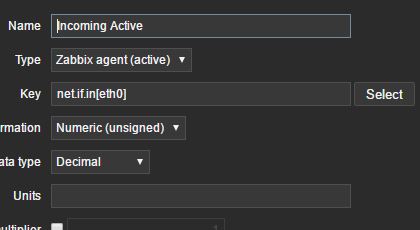


    But my server showing this "Not Supported"

    and my client "active check "net.if.out[if,<mode>]" is not supported: Cannot obtain network interface information."

    Is their any work around how can i monitor the in and out on the network interface on my server?

    ThankS!

    Your response is highly appreciated.
    Attached Files
  • pogingfacs
    Junior Member
    • Aug 2016
    • 15

    #2
    Lil bump sirs

    Comment

    • Atsushi
      Senior Member
      • Aug 2013
      • 2028

      #3
      Please check if there is an interface named eth0.
      For example in windows, I think that it is not the interface name eth0.

      Ubuntu / RHEL 6 / CentOS 6
      Code:
      $ ifconfig eth0
      RHEL 7 / CentOS 7
      Code:
      $ ip a show dev eth0

      Comment

      • michael.weber
        Senior Member
        • Nov 2015
        • 121

        #4
        What OS are you trying to Monitor with active checks?
        as Atsushi said, please verify that the Interface "eth0" exists.

        you can do this on unix Systems with root user:
        ifconfig
        eth0 Link encap:Ethernet Hardware Adresse 00:50:56:80:0a:a0
        inet Adresse:**** Bcast:**** Maske:255.255.255.240
        inet6-Adresse: fe80::250:56ff:fe80:aa0/64 Gültigkeitsbereich:Verbindung
        UP BROADCAST RUNNING MULTICAST MTU:1500 Metrik:1
        RX packets:42386435 errors:0 dropped:781 overruns:0 frame:0
        TX packets:50265355 errors:0 dropped:0 overruns:0 carrier:0
        Kollisionen:0 Sendewarteschlangenlänge:1000
        RX bytes:14406462937 (13.4 GiB) TX bytes:71325160161 (66.4 GiB)

        eth1 Link encap:Ethernet Hardware Adresse 00:50:56:b1:1b:7e
        inet Adresse:10.10.10.5 Bcast:10.10.10.255 Maske:255.255.255.0
        inet6-Adresse: fe80::250:56ff:feb1:1b7e/64 Gültigkeitsbereich:Verbindung
        UP BROADCAST RUNNING MULTICAST MTU:1500 Metrik:1
        RX packets:571 errors:0 dropped:197 overruns:0 frame:0
        TX packets:8 errors:0 dropped:0 overruns:0 carrier:0
        Kollisionen:0 Sendewarteschlangenlänge:1000
        RX bytes:34260 (33.4 KiB) TX bytes:648 (648.0 B)

        lo Link encap:Lokale Schleife
        inet Adresse:127.0.0.1 Maske:255.0.0.0
        inet6-Adresse: ::1/128 Gültigkeitsbereich:Maschine
        UP LOOPBACK RUNNING MTU:65536 Metrik:1
        RX packets:5087288 errors:0 dropped:0 overruns:0 frame:0
        TX packets:5087288 errors:0 dropped:0 overruns:0 carrier:0
        Kollisionen:0 Sendewarteschlangenlänge:0
        RX bytes:1091538819 (1.0 GiB) TX bytes:1091538819 (1.0 GiB)

        Comment

        • pogingfacs
          Junior Member
          • Aug 2016
          • 15

          #5
          I've used this,

          net.if.in[if,Ethernet]

          but when i look at latest data its empty? theirs no error on the client side

          7840:20161110:091541.354 using configuration file: C:\Program Files\Zabbix Agent\zabbix_agentd.conf
          7840:20161110:091541.370 agent #0 started [main process]
          1352:20161110:091541.370 agent #1 started [collector]
          5128:20161110:091541.370 agent #2 started[listener #1]
          6984:20161110:091541.386 agent #3 started[listener #2]
          6972:20161110:091541.386 agent #4 started[listener #3]
          4624:20161110:091541.386 agent #5 started [active checks #1]

          On the web UI "Cannot obtain network interface information."

          I've use this key, net.if.out[if,<mode>] what really the mode is?
          Last edited by pogingfacs; 11-11-2016, 03:36.

          Comment

          • Atsushi
            Senior Member
            • Aug 2013
            • 2028

            #6
            If you are using Windows, your key settings will be incorrect.

            There will be no interface with interface name "if".
            The value of "Ethernet" can not be specified as the second argument.

            Please check the list of network interfaces on the command prompt.

            ex.
            Code:
            > zabbix_agentd.exe -t net.if.list

            Comment

            Working...