Ad Widget

Collapse

Data not been appearing on graphs (1.4.2)

Collapse
X
 
  • Time
  • Show
Clear All
new posts
  • txalin
    Member
    • Jan 2008
    • 31

    #1

    Data not been appearing on graphs (1.4.2)

    Hi all,

    We are deploying a monitoring system in our company using zabbix, now we have 273 devices and about 12000 items. Everything is working fine but we have a strange issue here.
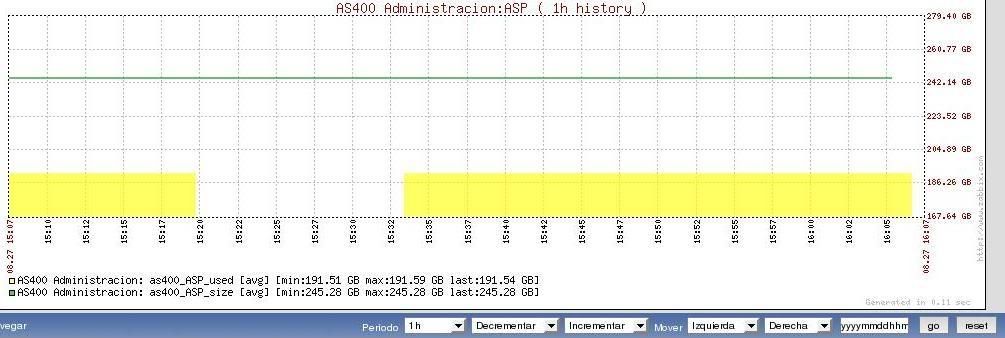
    The problem is related to the graphs. If we open any graph from any device we can see small "holes" in the graph where no data is written.

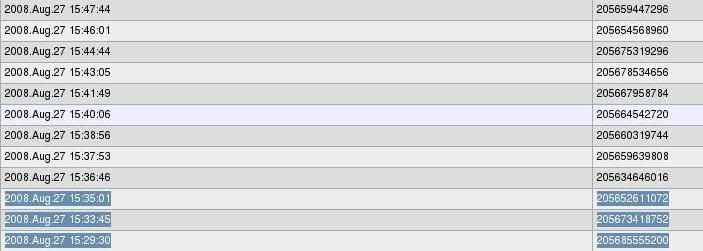
    First thing i thought is that we are loosing data due to the high amount of devices/items, but that's not the problem, we have the data, let me give you an example:

    Example of the graphs output, as you can see there is no data from 15:20 to 15:33


    But if you take a look to the latest 500 values, you can see that the data is being received by zabbix:


    Any clue about this?
    Last edited by txalin; 08-09-2008, 10:49. Reason: Fixed issue
  • Aly
    ZABBIX developer
    • May 2007
    • 1126

    #2
    Could be some bug in calculating algorithms, but a haven't seen such behavior in latest releases and there were some fixes made since 1.4.2, so I think it's fixed in the latest release
    Zabbix | ex GUI developer

    Comment

    • txalin
      Member
      • Jan 2008
      • 31

      #3
      Ok, thx for reply, where are going to update zabbix to 1.4.6, will update (or close) this thread when we have done the update

      Comment

      • txalin
        Member
        • Jan 2008
        • 31

        #4
        Hi again.... more problems, now with the update

        We try to upgrade from 1.4.2 to 1.4.6, we downloaded the new version and start the procedure that appear on the manual, page 28. Here you have the steps that we perfom:

        - Latest version downoaded from www.zabbix.com
        - Unzipped the tar.
        - Confgure with : ./configure --enable-server --with-mysql --with-net-snmp –with-libcurl and make install. Binaries where properly generated, no errors appear here.

        - Copy zabbix_server to /usr/sbin
        - Stop apache, mysql and zabbix_server.
        - Full backup of zabbix database.
        - Backup of frontend, bins and conf files.
        - Copy zabbix v1.4.6 frontend (php dir) to the apache dir.
        - Start zabbix_server
        - Start apache and mysql
        - Went to the zabbix web interface and follow up all the procedure. Everything went fine.

        And after that we go to the login page, but we still have the old version (1.4.2). We repeated the process 3 tiemes and always encounter the same issue

        When we go to the zabbix installation page, we noticed that on the upper left corner appear the correct version (1.4.6), and also when we were on the "Install" step, the upgrad takes less than 10 seconds, it was very very fast, maybe this could be a clue?

        So, anyone knows how to make the upgrade? Thx.
        Last edited by txalin; 28-08-2008, 14:27.

        Comment

        • txalin
          Member
          • Jan 2008
          • 31

          #5
          A little funny thing....

          5664:20080828:142501 ZABBIX Server stopped
          6526:20080828:143429 Starting zabbix_server. ZABBIX 1.4.6.
          6526:20080828:143429 **** Enabled features ****
          6526:20080828:143429 SNMP monitoring: YES
          6526:20080828:143429 WEB monitoring: YES
          6526:20080828:143429 Jabber notifications: NO
          6526:20080828:143429 IPv6 support: NO
          6526:20080828:143429 **************************
          6527:20080828:143431 server #1 started [Poller. SNMP:ON]
          6528:20080828:143431 server #2 started [Poller. SNMP:ON]
          6529:20080828:143431 server #3 started [Poller. SNMP:ON]
          6533:20080828:143431 server #6 started [Trapper]
          6534:20080828:143431 server #7 started [Trapper]
          6535:20080828:143431 server #8 started [Trapper]
          6536:20080828:143431 server #9 started [Trapper]

          and on the web interface.... 1.4.2

          Comment

          • Aly
            ZABBIX developer
            • May 2007
            • 1126

            #6
            You need to copy new frontend to the directory where "old" frontend is (rewrite old frontend whith the new one).
            Zabbix | ex GUI developer

            Comment

            • txalin
              Member
              • Jan 2008
              • 31

              #7
              we have do it for three times

              When we do it, the installation screen appears on the web interface, with version 1.4.6, but when we finish the installation process the frontend shows again 1.4.2, maybe could be related with rights of the zabbix folder on linux?
              Last edited by txalin; 29-08-2008, 08:16.

              Comment

              • txalin
                Member
                • Jan 2008
                • 31

                #8
                You have to be more carfefull with translations.... when we take a look to the file "sp_sp_inc.php" (Spanish translation) from 1.4.6 we noticed that the value zabbix_version says "Zabbix 1.4.2"

                Small mistake, but take us two days searching for it . Regarding the graphs, seems to be that the issue is fixed, but we are going to connect the server to a gigabyte switch today, will update the thread on monday.

                Regards.

                ********************edit*************************

                Damn, "graph holes" are still there , let see if the gigabyte connection makes something...
                Last edited by txalin; 29-08-2008, 12:36.

                Comment

                • txalin
                  Member
                  • Jan 2008
                  • 31

                  #9
                  A little bit research....

                  We were playing with zabbix_server.conf, try with diferent setups, launching different amount of instances. From 260 instances (seriously, don't do that) to 24 (default values), so, my question is, is there any guide or howto to improve the performance of zabbix_server daemon?

                  Thx in advance for you help
                  Last edited by txalin; 01-09-2008, 08:07.

                  Comment

                  • txalin
                    Member
                    • Jan 2008
                    • 31

                    #10
                    Another update...

                    After connecting the server to a gigabyte switch we noticed that the amount of holes on the graphs were singnificatly decreased. The zabbix_server.conf setup is at his moment the default from the zabbix installation.

                    Now we are looking for a good guide to make some tunning to the setup, we only found an small section on the official manual. Someone knows a better manual to do this?

                    Rgards and thx in advance for your help

                    Comment

                    • teferi
                      Member
                      • Jul 2008
                      • 93

                      #11
                      Originally posted by txalin
                      Another update...

                      After connecting the server to a gigabyte switch we noticed that the amount of holes on the graphs were singnificatly decreased. The zabbix_server.conf setup is at his moment the default from the zabbix installation.

                      Now we are looking for a good guide to make some tunning to the setup, we only found an small section on the official manual. Someone knows a better manual to do this?

                      Rgards and thx in advance for your help
                      It depends on what tuning you want to perform. Anyway - use this forums search. There are lot's of threads on how to tune zabbix.

                      Comment

                      • txalin
                        Member
                        • Jan 2008
                        • 31

                        #12
                        Ok, thx for reply

                        Will update with results

                        Comment

                        • txalin
                          Member
                          • Jan 2008
                          • 31

                          #13
                          Hi all,

                          More updates, seems to be that the issue is fixed. we perfom some tunning on the mysql database and the holes dissapear

                          Here you have our my.conf setup:

                          key_buffer = 1500M
                          max_allowed_packet = 16M
                          thread_stack = 128K
                          thread_cache_size = 8
                          max_connections = 100
                          table_cache = 1800
                          thread_concurrency = 10
                          #
                          # * Query Cache Configuration
                          #
                          query_cache_limit = 100M
                          query_cache_size = 99M

                          Note that we are not database admins, so we perform this tunning using mysqlreports and mytop tools. We followed this pages to optimize the database:

                          http://www.mysql.com/news-and-events...000000096.html


                          Before making this, we play with the zabbix_server.conf and the number of instances of pollers, pingers and so, but no success on this. And also, after the database tunning, we saw a few holes every hour, we noticed that the holes starts when the housekeeping process starts. We disable it and the holes dissapear.

                          So now, no holes and the web interface is incredible fast, even for the all - all reports on the overview page it takes less than 4 seconds, and we have 277 devices, 12000 items and 2000 trigers. So, i think that we can close this issue

                          Comment

                          Working...