Ad Widget

Collapse

can't get input power loss of UPS to turn red...

Collapse
X
 
  • Time
  • Show
Clear All
new posts
  • aprotector
    Junior Member
    • Jul 2008
    • 27

    #1

    can't get input power loss of UPS to turn red...

    I have been using the APC_battery template from the cookbook section and I have it monitoring an APC UPS we have. A simple ping is working well if you unplug the network cable because it will go red, as it should.

    However, the 'Loss of input power' is green but when I take out the plug to test it, it will stay green even though the input power is gone. When I unplug the network cable it goes gray so it seems like it's using snmp properly, but I just can't get it to go red when the power goes down.

    I have it set to disaster....can anyone think of something I need to tweak to get this to work like it should?
  • richlv
    Senior Member
    Zabbix Certified Trainer
    Zabbix Certified SpecialistZabbix Certified Professional
    • Oct 2005
    • 3112

    #2
    post item key, trigger expression and what data are you receiving when you pull the plug
    Zabbix 3.0 Network Monitoring book

    Comment

    • aprotector
      Junior Member
      • Jul 2008
      • 27

      #3
      Name: APC: Loss of Input Power - {HOSTNAME}
      trigger expression: {ISC_UPS220v:upsBasicBatteryStatus.last(0)}#2

      I don't think I have the necessary thing in the key but I have no idea what to replace it with. What key should I be using to find out if the input power is still on?

      Comment

      • richlv
        Senior Member
        Zabbix Certified Trainer
        Zabbix Certified SpecialistZabbix Certified Professional
        • Oct 2005
        • 3112

        #4
        you didn't post what data you are receiving for this key
        Zabbix 3.0 Network Monitoring book

        Comment

        • Vordam
          Junior Member
          • May 2009
          • 2

          #5
          Hi,

          I have exactly the same problem.

          My Trigger (from APC_Battery template)
          ---
          Name APC: Loss of Input Power - {HOSTNAME}
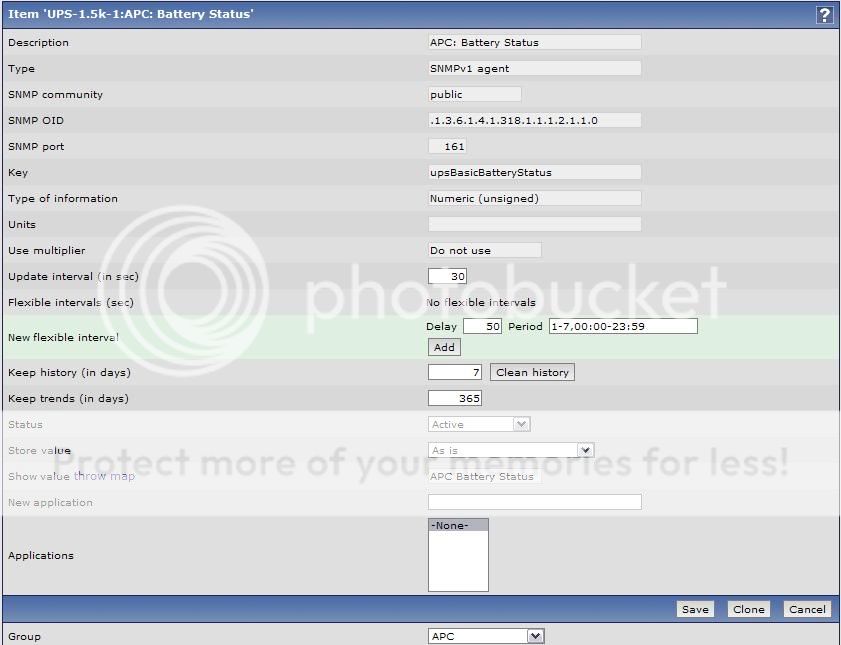
          Expression: {UPS-1.5k-1:upsBasicBatteryStatus.last(0)}#2
          ---

          Plugged the value is 2
          Unplugged = 2


          I have Smart-UPS 1500 XLM

          Thank you!

          Comment

          • richlv
            Senior Member
            Zabbix Certified Trainer
            Zabbix Certified SpecialistZabbix Certified Professional
            • Oct 2005
            • 3112

            #6
            and you didn't show us what data item is receiving either...
            Zabbix 3.0 Network Monitoring book

            Comment

            • Vordam
              Junior Member
              • May 2009
              • 2

              #7
              This is what you want to know? I get the number 2 and even when I remove the power does not change.

              Comment

              • richlv
                Senior Member
                Zabbix Certified Trainer
                Zabbix Certified SpecialistZabbix Certified Professional
                • Oct 2005
                • 3112

                #8
                not quite
                look at item history (if you pull the plug, you can look at monitoring -> latest data as well). if you always see 2, then that's a problem with your ups - or your interpretatioon ftaahedt.
                you can verify value provided with snmpget. if it is not changing, then you can't use that particular oid to detect powerloss.
                Zabbix 3.0 Network Monitoring book

                Comment

                • ServicesIt
                  Junior Member
                  • Feb 2009
                  • 19

                  #9
                  UPS input power check

                  This is the check that I use:

                  {Templ_APC_Battery:upsAdvInputLineVoltage.last(0)} =0
                  OID: .1.3.6.1.4.1.318.1.1.1.3.2.1.

                  with severity Disaster
                  Last edited by ServicesIt; 06-05-2009, 17:41.

                  Comment

                  Working...