Ad Widget

Collapse

Zabbix Map display unknown

Collapse
X
 
  • Time
  • Show
Clear All
new posts
  • stevenfoo
    Member
    • Mar 2008
    • 46

    #1

    Zabbix Map display unknown

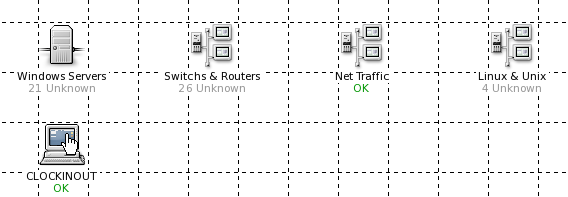
    In version 1.6.4, we have a main map display the status of maps like: window servers, linux and unix servers, network and switches.

    However when we upgraded into 1.8.2, the main map was displaying the sub-map with unknown status.

    If I click on the sub-map eg. windows servers, everything inside it is find with server displaying "OK" and some "DISABLED".

    This goes well with other sub-map. The main map does not capture the information correctly. In version 1.6.4, we don't have that issue.

    I also tried to re-create a new map and add the sub-map, however the issue is the same.

    Any ideas?
    Attached Files
    Last edited by stevenfoo; 19-04-2010, 07:04.
  • limo
    Senior Member
    • Dec 2004
    • 192

    #2
    Hi!

    Same here, we had to cleanup old templates, link new and wait for new data from agents to become OK. We have found too, that even if all triggers seems to be OK, FALSE or DISABLED, there are still some of them "unknown", and therefore, map server is unknown.. But it is not possible anywhere in web frontend find that triggers. It helped us to disable items which are unsupported, because we found that all triggers based on it are unsupported too but probably not listed between triggers.

    Comment

    • stevenfoo
      Member
      • Mar 2008
      • 46

      #3
      Originally posted by limo
      Hi!

      Same here, we had to cleanup old templates, link new and wait for new data from agents to become OK. We have found too, that even if all triggers seems to be OK, FALSE or DISABLED, there are still some of them "unknown", and therefore, map server is unknown.. But it is not possible anywhere in web frontend find that triggers. It helped us to disable items which are unsupported, because we found that all triggers based on it are unsupported too but probably not listed between triggers.

      Thanks for the update. I have really drill down to each of the stuff and cleanup. It was a pain. Whatever item "DISABLED" need to be remove from the map to work for my case.

      Comment

      • Aly
        ZABBIX developer
        • May 2007
        • 1126

        #4
        Disabled item results to unknown trigger if it's used in expression. Disable such triggers and you should be fine.

        Hint: Disabled items are colored red in trigger configuration screen.
        Zabbix | ex GUI developer

        Comment

        • Tristan
          Senior Member
          • Feb 2008
          • 110

          #5
          Originally posted by Aly
          Disabled item results to unknown trigger if it's used in expression. Disable such triggers and you should be fine.

          Hint: Disabled items are colored red in trigger configuration screen.
          But is this a correct solution? i have 300 servers in my environment, and the problem appears only with maps. So to get correct maps, i need to disable the unsupported triggers on all my hosts.

          Comment

          • Murilex
            Senior Member
            • Nov 2009
            • 124

            #6
            Zabbix frontend pre-1.8 didn't show disabled triggers count and I believe the most of us think this information is not useful on graphs. I suggest to make this functionality (show disabled triggers count on graphs) optional on frontend configuration or apply the patch proposed by Aly:

            Comment

            • Tractorboy
              Member
              • Oct 2010
              • 98

              #7
              Unknowns

              I am currently trialling zabbix and believe the product is likely to work, but my biggest issue is the "unknown" on Maps.

              The idea is that a screen will be created which would contain a map and maybe other useful snippets of information. If I cannot get rid of unknown then the managment will not see any value.

              I need some ideas please on how to sort this out.

              I have been through hosts and tried to clean up, but finding this causes other issues including a trigger of "**ERRROR**"

              Is there anything that can be provided as a scipt that would help out until this bug is resolved?

              Comment

              Working...