Ad Widget

Collapse

dynamic graphs axis scales wrong on screens

Collapse
X
 
  • Time
  • Show
Clear All
new posts
  • acalvo
    Member
    • Oct 2010
    • 30

    #1

    dynamic graphs axis scales wrong on screens

    It seems that when setting up dynamic graphs on screens which have an axis set to a fixed value, it does not change when setting up another host.

    Example:
    Code:
    saruman ~ # zabbix_get -s redmine01 -k vm.memory.size[total]
    527548416
    saruman ~ # zabbix_get -s sauron -k vm.memory.size[total]
    2125926400
    The screen is based on sauron.
    Notice how the maximum Y axis value is tight at 1.98Gb, which is correct for sauron but not for redmine01.

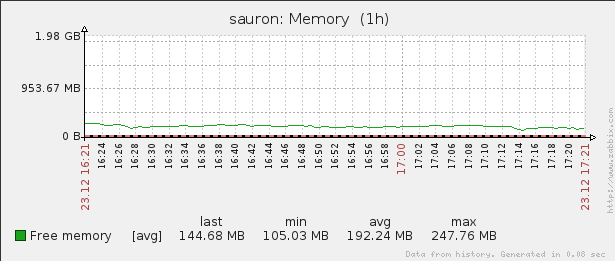
    Attached Files
  • qix
    Senior Member
    Zabbix Certified SpecialistZabbix Certified Professional
    • Oct 2006
    • 423

    #2
    I'm sorry, maybe I misunderstood.

    You stated that the axis is set to a fixed value, right? That would disable the automatic scaling. If you disable the fixed value, It should be OK.
    Maybe you can also use an item (e.g. Total memory) for the axis fixed value?
    With kind regards,

    Raymond

    Comment

    • acalvo
      Member
      • Oct 2010
      • 30

      #3
      I didn't explain the problem correctly.

      Those graphs are made with a fixed value using an item.

      In the above case, the item is the maximum memory of the host.
      However, I've thought it will reload the value from the new host selected, so the graph will display the maximum memory from the new host.

      I've attached also the maximum memory of both hosts, to check that the value from the Y axis for the graph of "redmine01" is wrong, as it should be 512MB (more or less).

      Comment

      • qix
        Senior Member
        Zabbix Certified SpecialistZabbix Certified Professional
        • Oct 2006
        • 423

        #4
        Ah, in that case, it sounds like a bug
        With kind regards,

        Raymond

        Comment

        • acalvo
          Member
          • Oct 2010
          • 30

          #5
          Bug submitted: https://support.zabbix.com/browse/ZBX-3352

          Comment

          Working...