Ad Widget

Collapse

Graphs fail after 150mbp/s

Collapse
X
 
  • Time
  • Show
Clear All
new posts
  • ro_yoshioka
    Member
    • May 2011
    • 33

    #1

    Graphs fail after 150mbp/s

    Hi,
    I'm gathering IfInOctets and IfOutOctets from a mikrotik used as PPPoE Server and Border Router, and in both of them when traffic is bigger than 150mbp/s graphs starts getting blank spaces as image below. but when I run snmpwalk to this OID, it received the right information. Do anyone has any Idea about what would be this problem?
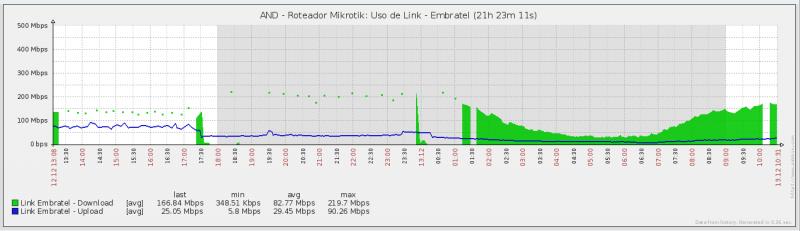


    Thanks
    Attached Files
  • ro_yoshioka
    Member
    • May 2011
    • 33

    #2
    Anyone has something to say about this problem??

    Comment

    • blazergst
      Junior Member
      • Nov 2007
      • 10

      #3
      I still have a few MikroTik routers in service running V5 or older. Here is how my graph is setup and I do not have the issue you show:

      Type: Simple
      Function: Avg
      Draw Style: Line
      Y Axis side: Left

      See if changing draw style helps.

      Also verify you have data for the period. Go to Latest Data, pick your hosts in/out graph click the drop down at the top change it from Graph to 500 latest values and see if you have missing time stamps or malformed values.

      Comment

      • ro_yoshioka
        Member
        • May 2011
        • 33

        #4
        Hi blazergst,

        My graph is quite like yours, the difference is just you choose line and I filled region. But I've checked last 500 last values and in there it seems that zabbix is gathering data with frequence bigger than I choose (150sec), but from the same server if I run snmpwalk in the same MIB I can see the increasing of values. I've already checked the zabbix server log, and theres nothing wrong been said there. This issue is driving me crazy.

        Comment

        • heaje
          Senior Member
          Zabbix Certified Specialist
          • Sep 2009
          • 325

          #5
          in your manual tests, how long does it take for data to return? is it possible that the more data your router is pushing, the slower the data is returned? perhaps the data takes longer than your configured timeout for checks in your zabbix config. the default timeout is 3 seconds.

          Comment

          • nvitaly007
            Junior Member
            • Jan 2013
            • 11

            #6
            I had exactly same looking graph, problem was with high CPU on that particular router.

            Fix it and you graph with look good (in my case i had to move NAT from router to ASA, but your case my be different, check CPU load, processes, etc)

            Comment

            Working...