Ad Widget

Collapse

SSL connect error in web scenario

Collapse
X
 
  • Time
  • Show
Clear All
new posts
  • joepadmiraal
    Junior Member
    • Dec 2013
    • 12

    #1

    SSL connect error in web scenario

    Hi,

    I am trying to monitor a website with a web monitor scenario.
    The zabbix_server.log shows this error:
    Code:
    cannot process step "health_check" of web scenario "www.mbosortiment.nl" on host "mbosortiment": SSL connect error
    From my Zabbix server I can do curl https://www.mbosortiment.nl without a problem. The certificate is not self signed.

    I searched this forum but did not find a solution to the problem.
    Does anyone have an idea about what can be wrong?

    System details:
    Zabbix 2.2.0
    Ubuntu 12.04 (fully updated)

    Thanks,
    Joep Admiraal
  • MaxM
    Member
    • Sep 2011
    • 42

    #2
    Just to check, you don't have something written in your check where you're making a https request to a http listener (e.g. https://www.example.com:80/uri)

    Comment

    • joepadmiraal
      Junior Member
      • Dec 2013
      • 12

      #3
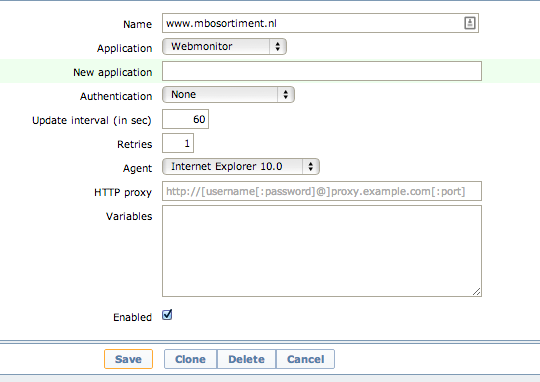
      I did not specify a port number.
      Here are screenshots of the configuration.


      Comment

      • MaxM
        Member
        • Sep 2011
        • 42

        #4
        I set up a test from my zabbix server instance running 2.2 (using the zabbix repo RPM's on centos6) with curl @ 7.19.7, no issues. How'd you install your server/proxy?

        Comment

        • joepadmiraal
          Junior Member
          • Dec 2013
          • 12

          #5
          Hi Max,

          Thanks for taking the time to help me.
          I have an Ubuntu 12.04 installation with Zabbix from the official repo.
          The machine is a VPS so it should not have any restrictions on the network part.

          I had an older version of Zabbix installed on that machine before so maybe that is causing some issues.
          I will try a clean installation on an other machine later this week and let you know if that one has no problems.

          Comment

          • joepadmiraal
            Junior Member
            • Dec 2013
            • 12

            #6
            I did a clean Ubuntu 12.04 installation with Zabbix 2.2 from the official Zabbix repo.
            It contains curl 7.22.0.

            I added web monitoring to the Zabbix host and enabled the host.
            I get the same result: ssl connection error.

            Did you do your test with my url (mbosortiment.nl)?
            Did you create new host for my server or did you reuse an existing one?

            Thanks for your help.

            Comment

            • enkrypt3d
              Member
              • Oct 2013
              • 32

              #7
              Having the same issue here - the SSL cert is giving me an error when checking the internal host name because the cert is signed using a different hostname - so how do I skip SSL validation with these web scenarios? Any checks on port 80 get redirected to 443 even when using the internal / external hostname.

              Any ideas? I'm on 2.2.1

              Comment

              • joepadmiraal
                Junior Member
                • Dec 2013
                • 12

                #8
                Hi enkrypt3d,

                I think my situation is a bit different than your's.
                My certificate actually is singed for the hostname that is using it (www.mbosortiment.nl).
                Therefore I think this is a bug in Zabbix.

                Comment

                • enkrypt3d
                  Member
                  • Oct 2013
                  • 32

                  #9


                  This is my issue - it appears that it doesn't matter that it's a real cert or not... it would be nice to have a check box that says "ignore SSL" or something to that effect in the web scenario section.

                  Comment

                  • steveboyson
                    Senior Member
                    • Jul 2013
                    • 582

                    #10
                    I think of different ways:

                    1) Have your CA certificate placed on your zabbix server so zabbix can read and verify the hostname

                    Of course that will not help for "common name mismatch"
                    2) specify an environment variable to allow curl to bypass the hostname checking (also see link above) and http://curl.haxx.se/mail/archive-2005-10/0066.html
                    If that env var is set in zabbix-server's start script I would expect zabbix-server to respect that. Unfortunately, it would affect ALL web scenarios.
                    3) If 2) does not work, patch zabbix sources to ignore the cert's hostname.
                    Again: this affects ALL web scenarios
                    4) write an external script with curl. It accepts "-k" for "no cert checking". Don't know if this idea is useable as an replacement for web scenarios since it most likely lacks functionality.

                    Last edited by steveboyson; 14-01-2014, 23:19. Reason: Add last sentence for 1)

                    Comment

                    • jesper
                      Junior Member
                      • Jan 2014
                      • 2

                      #11
                      Originally posted by enkrypt3d
                      http://www.muck.net/29/zabbix-ssl-we...comment-page-1

                      This is my issue - it appears that it doesn't matter that it's a real cert or not... it would be nice to have a check box that says "ignore SSL" or something to that effect in the web scenario section.
                      Hi,

                      I stumbled on this problem in a very similar setup(debian wheezy, official zabbix packages, some sites are working, some not, works fine with curl). As far i can tell, the problem is related to certificate(site with problem had cert with multiple Alternative Names).
                      Ultimately i did compile my zabbix server from source and it started working.
                      I think that, i found also the reason for this. Problem seems to be related to the flavor of libcurl in use. Problem existed, when i used libcurl4-gnutls-dev librarys, but not when i used libcurl4-openssl-dev for compilation.
                      I checked the debian build dependencies and the libcurl4-gnutls-dev is marked as dependency there. So it seems that debian/ubuntu packages are compiled against libcurl4-gnutls-dev.
                      I don't know why gnutls version is in use and what side effects this change may bring. For now it seems to work fine.

                      I found the easiest way to continue, was to get debian source from from jessie repo(since wheezy has still 2.0 zabbix), change the dependencies and recompile the debian package.

                      Best Regards,
                      Jesper

                      Comment

                      • Stefan-4
                        Junior Member
                        • Mar 2015
                        • 1

                        #12
                        similar problem here - gnutls handshake failed in webscenario

                        Hi everyone,

                        in my case the reason for a failing web scenario was a hardened TLS cipher configuration on a nginx server:
                        "Step "......." [1 of 1] failed: SSL connect error: gnutls_handshake() failed: A TLS fatal alert has been received.

                        This describes the error best and what cipher suite has to be added to prevent the problem:


                        My config:
                        Zabbix 2.4.4 on Ubuntu Server 12.04 LTS

                        Comment

                        Working...