Ad Widget

Collapse

zabbix upgrade issue

Collapse
X
 
  • Time
  • Show
Clear All
new posts
  • jerry-zabbix
    Junior Member
    • Dec 2019
    • 1

    #1

    zabbix upgrade issue

    hello,
    I am using zabbix 3.4 version (docker environment) right now, and I wanna upgrade to 4.4 the latest version.
    I have 2 containers; zabbix-server and zabbix-web (nginx), and my database is using MySQL (it's a VM).
    lots of my server is deployed zabbix-agent 2.2 version.
    I wondering :

    1. how to upgrade the zabbix in docker ?
    2. does the agent 2.2 version support / compatible with server version 4.4 ?
    3. does the upgrade will impact the template I using ? I concern the template will become invalid after my upgrade.
    4. is that some default template on zabbix server 4.4 will not able to run on agent version 2.2 (I have too many hosts in monitor, it's painful if I need to upgrade the agent 1 by 1)

    tons of thanks
  • Jesse0
    Junior Member
    • Dec 2019
    • 1

    #2
    Originally posted by jerry-zabbix
    hello,
    I am using zabbix 3.4 version (docker environment) right now, and I wanna upgrade to 4.4 the latest version.
    I have 2 containers; zabbix-server and zabbix-web (nginx), and my database is using MySQL (it's a VM).
    lots of my server is deployed zabbix-agent 2.2 version.
    I wondering :

    1. how to upgrade the zabbix mycfavisit in docker ?
    2. does the agent 2.2 version support / compatible with server version 4.4 ?
    3. does the upgrade will impact the template I using ? I concern the template will become invalid after my upgrade.
    4. is that some default template on zabbix server tellgamestop 4.4 will not able to run on agent version 2.2 (I have too many hosts in monitor, it's painful if I need to upgrade the agent 1 by 1)

    tons of thanks

    upgrade Zabbix


    Zabbix distributes Docker images for each component. Not only does this mean you can quickly standup the monitoring solution, but upgrades also become a simple matter of trading up images.

    In this article, I will show how to stand up and then upgrade a zabbix installation using docker-compose.

    Prerequisite


    If you don’t already have Docker and Docker Compose installed, then see my article here for installing on Ubuntu.

    Also make sure you have a git client
    sudo apt-get install git Checkout an older 4.0.1 version


    Although Zabbix has newer 4.2 images, we will start by standing up a 4.01 image so that we can later show the upgrade path to 4.0.13 and then the latest 4.2.
    # get zabbix-docker repo git clone https://github.com/zabbix/zabbix-docker.git cd zabbix-docker # show current branch git branch # show tags from 4.0 branch git tag --list '4.0.*' git checkout 4.0.1 # will now show 'detached at 4.0.1' git branch # make file that replaces reference to latest docker image with 4.0.1 cp docker-compose_v3_alpine_mysql_latest.yaml docker-compose_v3_alpine_mysql_401.yaml # replace latest with 4.0.1 sed -i "s/-4.0-latest/-4.0.1/" docker-compose_v3_alpine_mysql_401.yaml Deploy a 4.0.1 stack


    Then deploy the full stack described in the yml using docker-compose:
    docker-compose -f ./docker-compose_v3_alpine_mysql_401.yaml up -d
    After a few minutes of pulling down the images and creating the containers, it is done. You should see multiple zabbix related containers now when you run:
    docker ps # if you have other images, this filters it down docker ps -f "name=zabbix"
    The status of each should show as “up”. And if you want to follow the tailed logs of all the components:
    docker-compose -f ./docker-compose_v3_alpine_mysql_401.yaml logs -f Validate the 4.0.1 stack


    In order to validate, we need to know the IP address of the nginx container that is exposing the Zabbix Admin web interface, which can be done using:
    # get all container names docker ps --format "{{.Names}}" # view container for front end docker ps -f "name=zabbix-web-nginx" # get container id using name docker ps -f "name=zabbix-web-nginx" --format "{{.ID}}" # gets IP address of nginx front end, specify network docker inspect $(docker ps -f "name=zabbix-web-nginx" --format "{{.ID}}") --format='{{ (index .NetworkSettings.Networks "zabbix-docker_zbx_net_frontend").IPAddress }}'
    The “zabbix-docker_zbx_net_frontend” used to pull the outside facing IP address is created by Docker Compose, and is the concatenation of the directory name “zabbix-docker” and “zbx_net_frontend” defined in the networks section of the original yaml.

    The web front end should be available via HTTP on port 80, which means commands like below should be successful (substitute with your IP from above).
    nc -vz 172.16.238.7 80
    And from the browser, you should be able to login with the default credentials (Admin/zabbix).


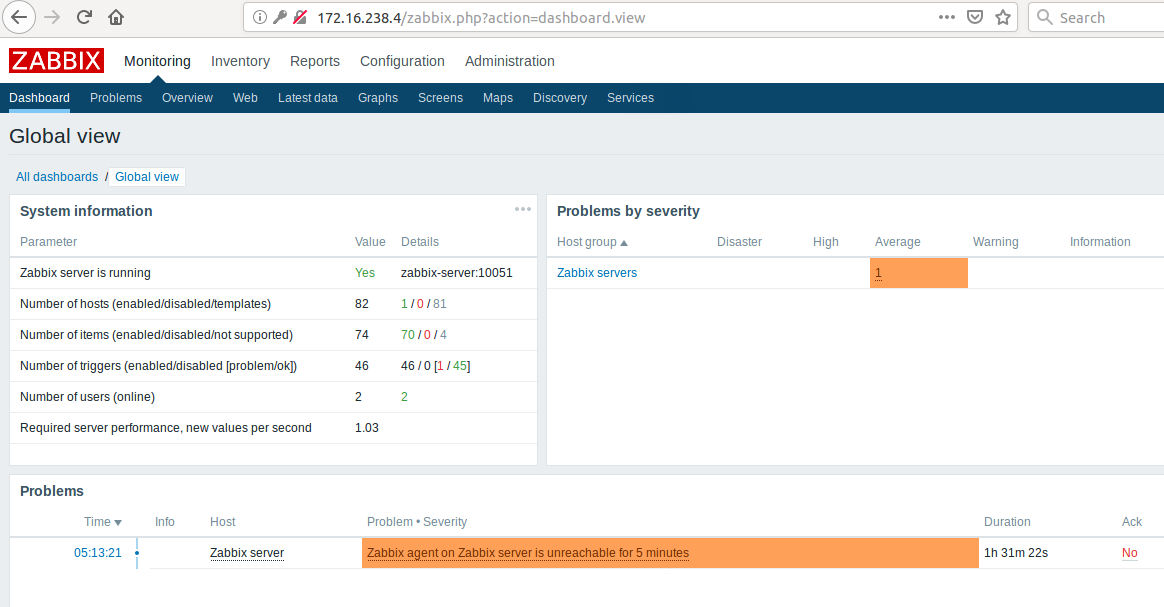
    This will get you into the Zabbix Admin web interface.


    If you scroll to the very bottom of that web page the version will be shown as “Zabbix 4.0.1”. Enable Zabbix Agent reporting


    You may notice that the dashboard lists one problem ‘Zabbix agent on Zabbix server is unreachable for 5 minutes’. This is because unlike a standard installation where they would be processes on the same host, the zabbix agent is in a different container than the server.

    To fix, this we need to get the IP address of the zabbix agent which is on the backend network.
    docker inspect $(docker ps -f name="zabbix-agent" --format "{{.ID}}") --format='{{ (index .NetworkSettings.Networks "zabbix-docker_zbx_net_backend").IPAddress }}'
    Go back to the Zabbix Admin web interface, and go to Configuration > Hosts, and click on the “Zabbix server” to update to the IP address we got above.
    Last edited by Jesse0; 04-01-2020, 22:29.

    Comment

    Working...