
 Perf_count works only in Passive Agent
After many researches I could not find an answer... Any help?
I'm running Zabbix 2.2 to monitor some Windows Servers 2008 R2.
On Windows I'm using zabbix agent with this set:
PerfCounter = app_threads_counter,"\.NET CLR LocksAndThreads(Syspro.Driver.APP)\# of current logical Threads",60
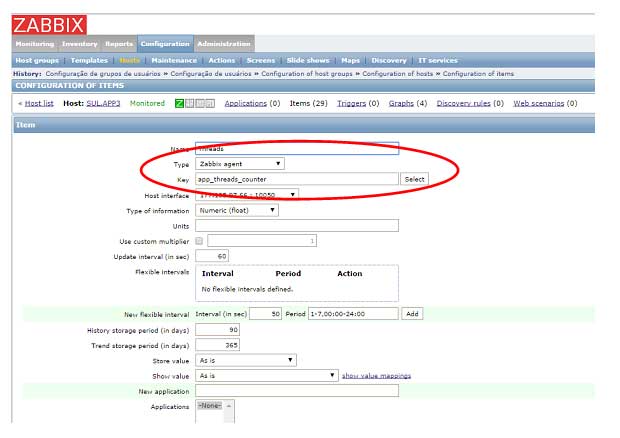
When using Zabbix Agent in normal condition it works fine:
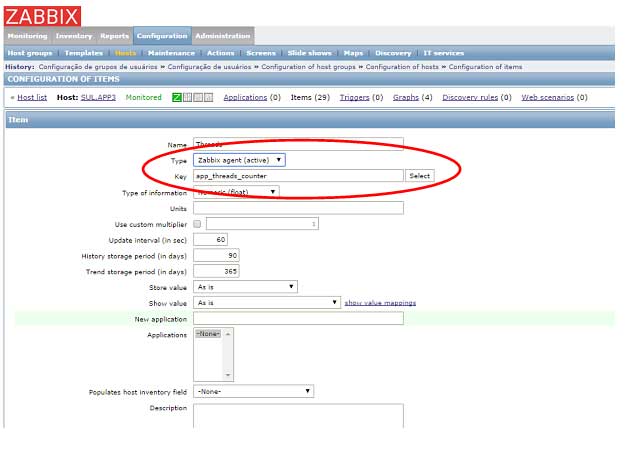
However, since host will be installed inside sub-network, we decided to use Active mode. All other Items work fine in Active mode, excepted for this PerfCounter. When I just change mode, zabbix does not receive PerfCounter info:
... and, as I restart Windows agentd:
2500:20141020:114920.595 Starting Zabbix Agent [APP3]. Zabbix 2.2.1 (revision 40801).
2500:20141020:114920.595 using configuration file: C:\zabbix_agentd.conf
34812:20141020:114920.798 agent #0 started [collector]
31220:20141020:114920.798 agent #1 started[listener #1]
17804:20141020:114920.798 agent #3 started[listener #3]
7572:20141020:114920.798 agent #2 started[listener #2]
20952:20141020:114920.798 agent #4 started [active checks #1]
20952:20141020:114924.433 active check configuration update from [1XX.1X3.10X.18:10051] started to fail (ZBX_TCP_READ() failed: [0x0000274C] Uma tentativa de conexão falhou porque o componente conectado não respondeu
corretamente após um período de tempo ou a conexão estabelecida falhou
porque o host conectado não respondeu.)
******************
I've also tried to use
perf_counter[\.NET CLR LocksAndThreads(Syspro.Driver.APP)\# of current logical Threads]
set directly as an Item but the result is the same:
- Works fine in normal operation (passive)
- Doesn't work in Active mode
Why?
I'm running Zabbix 2.2 to monitor some Windows Servers 2008 R2.
On Windows I'm using zabbix agent with this set:
PerfCounter = app_threads_counter,"\.NET CLR LocksAndThreads(Syspro.Driver.APP)\# of current logical Threads",60
When using Zabbix Agent in normal condition it works fine:
However, since host will be installed inside sub-network, we decided to use Active mode. All other Items work fine in Active mode, excepted for this PerfCounter. When I just change mode, zabbix does not receive PerfCounter info:
... and, as I restart Windows agentd:
2500:20141020:114920.595 Starting Zabbix Agent [APP3]. Zabbix 2.2.1 (revision 40801).
2500:20141020:114920.595 using configuration file: C:\zabbix_agentd.conf
34812:20141020:114920.798 agent #0 started [collector]
31220:20141020:114920.798 agent #1 started[listener #1]
17804:20141020:114920.798 agent #3 started[listener #3]
7572:20141020:114920.798 agent #2 started[listener #2]
20952:20141020:114920.798 agent #4 started [active checks #1]
20952:20141020:114924.433 active check configuration update from [1XX.1X3.10X.18:10051] started to fail (ZBX_TCP_READ() failed: [0x0000274C] Uma tentativa de conexão falhou porque o componente conectado não respondeu
corretamente após um período de tempo ou a conexão estabelecida falhou
porque o host conectado não respondeu.)
******************
I've also tried to use
perf_counter[\.NET CLR LocksAndThreads(Syspro.Driver.APP)\# of current logical Threads]
set directly as an Item but the result is the same:
- Works fine in normal operation (passive)
- Doesn't work in Active mode
Why?
Attached Files

Comment