
Hi
I have a template for monitoring several directories. Measured values are:
number of files, age of oldest/newest file, size of smallest/largest file.
The directories I need to monitor tend to grow to large numbers of files, so to prevent a long lasting process of counting / scanning files in a directory from clogging my zabbix agent, I wrote a small perl script to do the work.
The script gets executed as a cron job and creates a temporary file containing the values, then calls zabbix_sender to push the values to the zabbix server.
To make it easier to manage the monitored directories, each directory is created as a "dummy"-host with a template for the directory monitoring. The template only consists of the trapper-items needed for this.
An item inside the template looks like this:
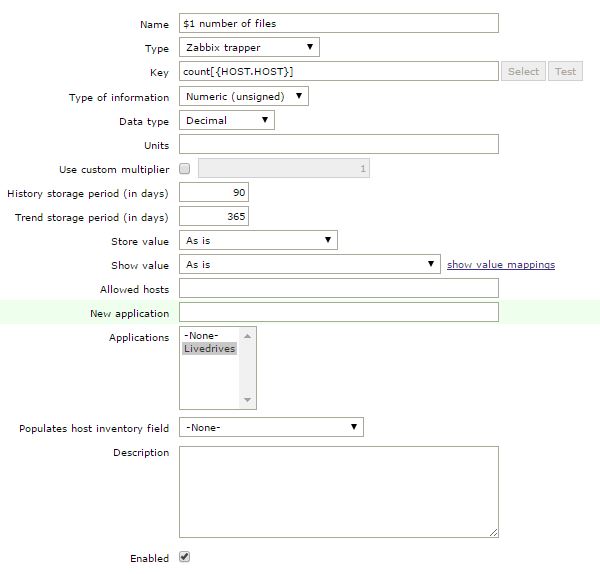
I created the host "669.orders" (Both hostname and visible hostname).
The makros get expanded to look like this:

the content of a temporary file looks like this:
the script calls zabbix_sender like this:
Now, when the script executes zabbix_sender, I'm getting this feedback:
But it don't tells me what's wrong. I maximized the log-level (loglevel 4) and got no hint. I even traced the network traffic to no avail. Now I'm stumped. Can someone hint me where to look for the problem? I already double- and triplechecked all item and hostnames. I debugged the script and can't find a problem there. The only thing I found is, when I create the item directly on the host, without the template, it works. (item key was 'orders.count') but as far as I understood, the usage of an makro inside the item key should net be a problem.
kind regards,
errorsmith
I have a template for monitoring several directories. Measured values are:
number of files, age of oldest/newest file, size of smallest/largest file.
The directories I need to monitor tend to grow to large numbers of files, so to prevent a long lasting process of counting / scanning files in a directory from clogging my zabbix agent, I wrote a small perl script to do the work.
The script gets executed as a cron job and creates a temporary file containing the values, then calls zabbix_sender to push the values to the zabbix server.
To make it easier to manage the monitored directories, each directory is created as a "dummy"-host with a template for the directory monitoring. The template only consists of the trapper-items needed for this.
An item inside the template looks like this:
I created the host "669.orders" (Both hostname and visible hostname).
The makros get expanded to look like this:
the content of a temporary file looks like this:
Code:
669.orders count[669.orders] 1454927587 0
669.orders smallest[669.orders] 1454927587 0
669.orders biggest[669.orders] 1454927587 0
669.orders newest[669.orders] 1454927587 0
669.orders oldest[669.orders] 1454927587 0
Code:
$result=`/usr/local/bin/zabbix_sender -vvvv -z $server -T -i $tempfile `;
Code:
sending data...
zabbix_sender [8052]: DEBUG: answer [{"response":"success","info":"processed: 0; failed: 5; total: 5; seconds spent: 0.000087"}]
result:
info from server: "processed: 0; failed: 5; total: 5; seconds spent: 0.000087"
kind regards,
errorsmith
Attached Files