
 Zabbix Agent 2 - Not Sending Data via Zabbix Proxy
I am new to Zabbix - I am looking to monitor Windows and Linux virtual machines that are split across multiple VLANs. One constraint is that the agent installed on the virtual machines (Zabbix Agent 2) cannot communicate directly with the Zabbix Server. I want one centralised Zabbix Server that can receive data from agents deployed on every VLAN. I understand from research that this is achieved using a Zabbix Proxy:
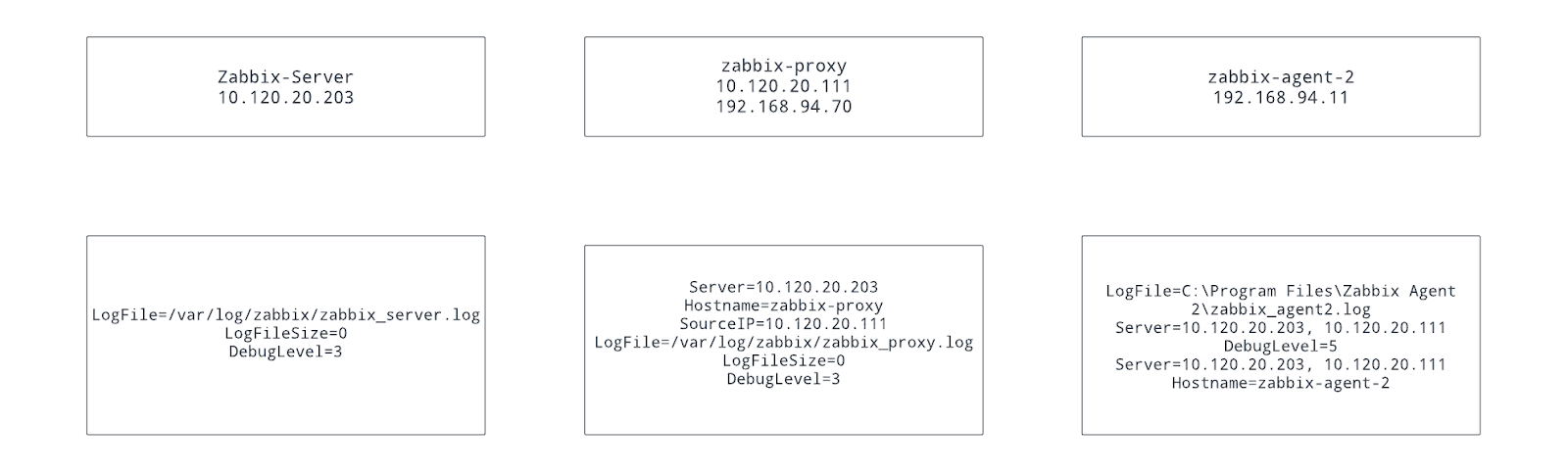
I have installed Zabbix Server on a Ubuntu virtual machine with a single NIC on my main network (10.120.20.203) - this appears to be functioning correctly (e.g. I can login to the UI etc)
I have installed Zabbix Proxy on a Ubuntu virtual machine with multiple NICs on both my main network (10.120.20.111) and my first VLAN (192.168.94.70).
I have installed Zabbix Agent 2 on a Windows virtual machine with a single NIC connected to my first VLAN (192.168.94.11).
A diagram of the setup can be seen below - along with the relevant configuration:
On my Zabbix Server, I have created a new proxy - with a name and IP that match that of the zabbix-proxy:

This appears to function as expected:

On my Zabbix Server, I have created a new host - with a name and IP that matches the zabbix agent (I have selected the correct proxy):

However, this doesn’t appear to work as I never receive any data from the agent:

Why can I not receive data from the agent through the proxy?
What steps can I take to troubleshoot the sending of agent data through the proxy?
I have installed Zabbix Server on a Ubuntu virtual machine with a single NIC on my main network (10.120.20.203) - this appears to be functioning correctly (e.g. I can login to the UI etc)
I have installed Zabbix Proxy on a Ubuntu virtual machine with multiple NICs on both my main network (10.120.20.111) and my first VLAN (192.168.94.70).
I have installed Zabbix Agent 2 on a Windows virtual machine with a single NIC connected to my first VLAN (192.168.94.11).
A diagram of the setup can be seen below - along with the relevant configuration:
On my Zabbix Server, I have created a new proxy - with a name and IP that match that of the zabbix-proxy:
This appears to function as expected:
On my Zabbix Server, I have created a new host - with a name and IP that matches the zabbix agent (I have selected the correct proxy):
However, this doesn’t appear to work as I never receive any data from the agent:
Why can I not receive data from the agent through the proxy?
What steps can I take to troubleshoot the sending of agent data through the proxy?


Comment