Ad Widget

Collapse

Oracle by Zabbix Agent 2 Issue

Collapse
X
 
  • Time
  • Show
Clear All
new posts
  • Motaz NT
    Junior Member
    • Jun 2024
    • 5

    #1

    Oracle by Zabbix Agent 2 Issue

    Hello Everyone,
    I have an issue with oracle by zabbix agent 2, here the details:
    - Target server : Oracle Linux 7, and oracle version is 19.3
    - Actions taken:
    1- install zabbix agent 2 on the target server
    2- install oracle instant 19.23 ( the one available in oracle website) on the target server
    3- create the host on zabbix server with macros ( {$ORACLE.PASSWORD} ,{$ORACLE.SERVICE},{$ORACLE.USER} and {$ORACLE.CONNSTRING} ).

    Agent is sending OS/Host data as it linked to Linux by zabbix agent active Template, but nothing related to oracle was received and i have the following errors:
    Get value from agent failed: cannot connect to [[target_server_ip]:10050]: [4] Interrupted system call
    Oracle: Failed to fetch info data (or no data for 30m)


    By googling the above errors and check proposed checks/solutions but they are not applied in my case or implemented while the issue still. These includes many topics in this community.

    Is the same issue happened with anyone and he got a solution? do anyone have a hint to start?
    Do I need to install any agent/tool (e.g oracle instant ) at zabbix server side ?

    Thanks in advances,​
  • Markku
    Senior Member
    Zabbix Certified SpecialistZabbix Certified ProfessionalZabbix Certified Expert
    • Sep 2018
    • 1781

    #2
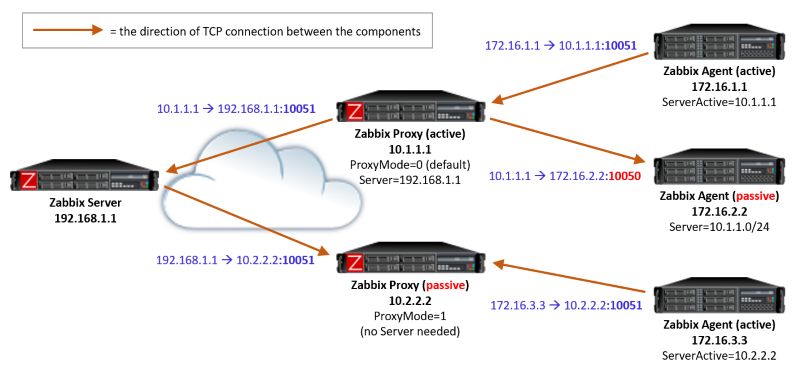
    Oracle by Zabbix agent 2 template seems to use passive items. That means that you need to configure your network and the agent to allow 10050/tcp connections from the server to the agent. Be sure to configure the Server directive correctly in the agent configuration.

    Markku

    Comment

    • Motaz NT
      Junior Member
      • Jun 2024
      • 5

      #3
      Originally posted by Markku
      Oracle by Zabbix agent 2 template seems to use passive items. That means that you need to configure your network and the agent to allow 10050/tcp connections from the server to the agent. Be sure to configure the Server directive correctly in the agent configuration.

      Markku
      Hi Markku,
      - How can i check that the port is opened ?
      - I think it is opened since other monitored items from ( Windows by Zabbix agent active ) template like CPU and memory info are getting values without issues.
      - Also i tried to disable/stop firewall on both (zabbix server and the monitored oracle host) but the same result.

      Comment

      • Markku
        Senior Member
        Zabbix Certified SpecialistZabbix Certified ProfessionalZabbix Certified Expert
        • Sep 2018
        • 1781

        #4
        Your Zabbix server already told you that it cannot connect to the agent port 10050, right? And, as I already said, ensure that your Zabbix agent is configured to allow configurations from the server:


        If you are unsure if firewalls are the reason and/or how to configure the firewalls, please contact your network administrator.

        "Windows by Zabbix agent active" --> uses active items, not passive. See also:

        Zabbix monitoring system consists of components that communicate with each other. Here is a summary of the TCP ports and some configuration characteristics of various connections. Active agent: The…


        Markku

        Comment

        • Motaz NT
          Junior Member
          • Jun 2024
          • 5

          #5
          Originally posted by Markku
          Your Zabbix server already told you that it cannot connect to the agent port 10050, right? And, as I already said, ensure that your Zabbix agent is configured to allow configurations from the server:


          If you are unsure if firewalls are the reason and/or how to configure the firewalls, please contact your network administrator.

          "Windows by Zabbix agent active" --> uses active items, not passive. See also:

          Zabbix monitoring system consists of components that communicate with each other. Here is a summary of the TCP ports and some configuration characteristics of various connections. Active agent: The…

          Hi Markko,
          - The error from zabbix server seems confused, because i'm able to receive information from monitored server but not for oracle, only system info ( items defined in Linux by zabbix agent active template).
          - Configuration on agent side is ok.. i reviewed and also as i received info it confirmed configuration correctness.
          - As per network admin check, nothing related to firewall

          - The issue is only appears for oracle by zabbix agent 2 items, no info/updates received. Therefore, i think it is related to something missed related to oracle in agent or server.

          Thanks,

          Comment

          • Markku
            Senior Member
            Zabbix Certified SpecialistZabbix Certified ProfessionalZabbix Certified Expert
            • Sep 2018
            • 1781

            #6
            Active items work so that the agent connects to the server. Your Linux template uses active items, according to the template name.

            Passive items work so that the server connects to the agent. Your Oracle template uses passive items. They are not working because the server is not able to connect to the agent, for reasons mentioned above (misconfigured agent, firewalls or other issues preventing connections from server to agent).

            Markku

            Comment

            Working...