Ad Widget

Collapse

Zabbix Proxy Configuration

Collapse
This topic has been answered.
X
X
 
  • Time
  • Show
Clear All
new posts
  • stevefxp
    Senior Member
    • Aug 2020
    • 168

    #1

    Zabbix Proxy Configuration

    Hello all,

    Is there a document that describes the proxy options? I am trying to setup a remote Zabbix proxy, so all my remote devices talk to the proxy. I am looking to see what each option means and whether I need to use them. For example the proxy has a server port and listen port option. I plan on configuring for active and passive checks. Which is which?

    Thanks,
    Steve
  • Answer selected by stevefxp at 05-01-2024, 23:05.
    ISiroshtan
    Senior Member
    • Nov 2019
    • 324

    Did you try to verify tcp communication flow? Running from proxy something like:
    Code:
    telnet zabbix_server_ip 10051
    or
    Code:
    nc -v zabbix_server_ip 10051
    If it fails then failure is on network level, with possibly firewalls, routing or some other permissions.

    Comment

    • ISiroshtan
      Senior Member
      • Nov 2019
      • 324

      #2

      Comment

      • stevefxp
        Senior Member
        • Aug 2020
        • 168

        #3
        Thank you very much. I did not know there was comprehensive documentation...

        A couple more questions when it comes to a Zabbix proxy:

        1) What is the difference between active and passive communications, when it relates to the proxy? Is it the same as an agent talking to the main Zabbix server?
        2) I can get the proxy to talk to the main Zabbix server via passive communications, but it will not via active. I get the following error on the proxy side: Unable to connect to [192.168.2.98]:10051 [cannot connect to [[192.168.2.98]:10051]: [4] Interrupted system call]
        3) I thought passive port was 10050 and active port was 10051. The attached screenshot is right from the proxy configuration documentation and it shows that the default passive proxy port is 10051. Is this a typo?
        Click image for larger version

Name:	Screenshot 2024-01-04 125539.png
Views:	729
Size:	122.3 KB
ID:	476596

        Comment

        • ISiroshtan
          Senior Member
          • Nov 2019
          • 324

          #4
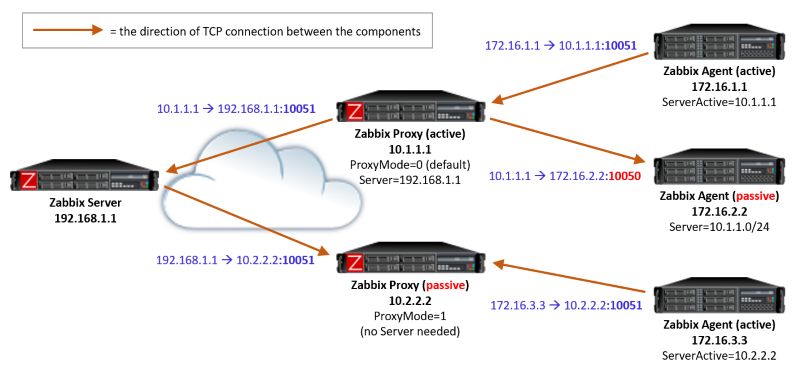
          I find this picture super helpful whenever I forget some details about how communication between Zabbix components happen (whihc happens more often then I'd like to admit).I think it should cover core of all your questions. But if you still have doubts - please do ask.

          Comment

          • stevefxp
            Senior Member
            • Aug 2020
            • 168

            #5
            Did you forget the picture??

            Comment

          • stevefxp
            Senior Member
            • Aug 2020
            • 168

            #6
            Ok so to confirm:

            1) Agent communication can be 10050 or 10051
            2) Proxy communication is 10051, regardless or passive or active

            If the above is true then I do not understand why my proxy cannot speak to my main Zabbix server over port 10051 for active communications, when passive communications works. This tells me its something else from a config perspective.

            Comment

            • ISiroshtan
              Senior Member
              • Nov 2019
              • 324

              #7
              Did you try to verify tcp communication flow? Running from proxy something like:
              Code:
              telnet zabbix_server_ip 10051
              or
              Code:
              nc -v zabbix_server_ip 10051
              If it fails then failure is on network level, with possibly firewalls, routing or some other permissions.

              Comment

              • stevefxp
                Senior Member
                • Aug 2020
                • 168

                #8
                Yes it looks like I have a network issue on one side. Thanks for pointing me in the right direction.

                Comment

                Working...