
 Monitor Windows Update using a Zabbix Trap
I recently made what I consider to be an improvement on the idea of using VB script to monitor windows updates. Rather than have a UserParameter that could time out, I wrote a very small console application in VB.net to retrieve Windows Update status and then send it to the Zabbix Server. You must first, of course, create the appropriate Items on either your Zabbix hosts or Templates (which is where I did it):
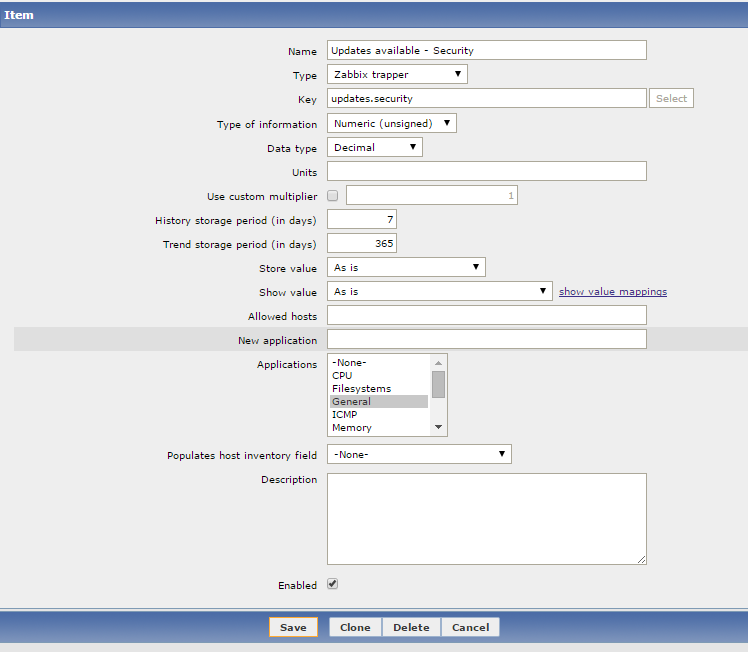
You also need them for updates.nonsecurity and updates.critical ...
Of course, the real magic of this is the code that actually checks for updates and sends the information to the Zabbix server. My code is dependent on the Newtonsoft.Json library for creating the JSON to send to the Zabbix server. If this is a problem for you, you could manually generate your own JSON and fill in the blanks with your data. I also left out of this code a routine that I have which checks the Active Directory site and then chooses the correct Zabbix proxy.
I have my .exe copied down to the C drive of each server. I then have Windows Tasks setup to run the .exe with two triggers. One is a daily schedule that runs in the early AM and the second trigger is for 15 minutes after the system starts.
You also need them for updates.nonsecurity and updates.critical ...
Of course, the real magic of this is the code that actually checks for updates and sends the information to the Zabbix server. My code is dependent on the Newtonsoft.Json library for creating the JSON to send to the Zabbix server. If this is a problem for you, you could manually generate your own JSON and fill in the blanks with your data. I also left out of this code a routine that I have which checks the Active Directory site and then chooses the correct Zabbix proxy.
Code:
Module Module1
    Public Class zabbix_sender
        Public request As String = "sender data"
        Public data As New List(Of zabbix_data)
    End Class

    Public Class zabbix_data
        Public host As String
        Public key As String
        Public value As String
    End Class

    Sub Main()
        Dim server As String
        Dim port As Integer

        server = "zabbix.domain.com"
        port = 10051

        Dim host As String = Net.Dns.GetHostName.ToLower

        ' Check for updates
        Console.WriteLine("Creating Windows Update session")
        Dim updateSession = CreateObject("Microsoft.Update.Session")
        Dim updateSearcher = updateSession.CreateupdateSearcher()
        Console.WriteLine("Checking for Windows Updates that aren't installed")
        Dim searchResult = updateSearcher.Search("IsInstalled=0 and Type='Software'")
        Console.WriteLine("Found " & searchResult.Updates.Count.ToString & " total updates")
        Console.WriteLine("")

        ' Categorize the updates we found
        Dim totalUpdates As Integer = searchResult.Updates.Count
        Dim securityUpdates As Integer
        Dim critialUpdates As Integer

        Dim update
        For i = 0 To totalUpdates - 1
            update = searchResult.Updates.Item(i)
            Dim objCategories = update.Categories
            Dim strUpdateCat As String = objCategories.Item(0).Name
            Console.WriteLine(i + 1 & "> " & strUpdateCat & " - " & update.Title)
            If InStr(strUpdateCat.ToLower, "security") Then securityUpdates += 1
            If InStr(strUpdateCat.ToLower, "critical") Then critialUpdates += 1
        Next

        ' Record them into a sender object
        Dim z As New zabbix_sender
        Dim security As New zabbix_data
        security.host = host
        security.key = "updates.security"
        security.value = securityUpdates
        z.data.Add(security)
        Dim critical As New zabbix_data
        critical.host = host
        critical.key = "updates.critical"
        critical.value = critialUpdates
        z.data.Add(critical)
        Dim nonsecurity As New zabbix_data
        nonsecurity.host = host
        nonsecurity.key = "updates.nonsecurity"
        nonsecurity.value = totalUpdates - securityUpdates - critialUpdates
        z.data.Add(nonsecurity)

        ' Serialize that object as JSON
        Dim json As String
        json = Newtonsoft.Json.JsonConvert.SerializeObject(z)
        Console.WriteLine()
        Console.WriteLine(json)
        Console.WriteLine()

        Dim json_len As Long = json.Length  ' We need this to be a "Long" variable

        ' Pack all our information into Byte arrays that we can send out a socket
        Dim header() As Byte
        Dim length() As Byte
        Dim data() As Byte
        Dim all() As Byte

        header = Text.Encoding.ASCII.GetBytes("ZBXD" & Strings.Chr(1))
        length = BitConverter.GetBytes(json_len)
        data = Text.Encoding.ASCII.GetBytes(json)

        ReDim all(header.Length + length.Length + data.Length)
        System.Buffer.BlockCopy(header, 0, all, 0, header.Length)
        System.Buffer.BlockCopy(length, 0, all, header.Length, length.Length)
        System.Buffer.BlockCopy(data, 0, all, header.Length + length.Length, data.Length)

        ' Send our data to the Zabbix server
        Console.WriteLine("Sending data to " & server & " port " & port)
        Dim client As New System.Net.Sockets.Socket(Net.Sockets.AddressFamily.InterNetwork, Net.Sockets.SocketType.Stream, Net.Sockets.ProtocolType.Tcp)
        client.Connect(server, port)
        client.Send(all)

        ' Header
        Dim buffer(5 - 1) As Byte
        _receive(client, buffer, 0, buffer.Length, 10000)
        'Console.WriteLine(Text.Encoding.ASCII.GetString(buffer))
        If Not Text.Encoding.ASCII.GetString(buffer).StartsWith("ZBXD") Then Throw New Exception("Invalid response")

        ' Length
        ReDim buffer(8 - 1)
        _receive(client, buffer, 0, buffer.Length, 10000)
        'Console.WriteLine(Text.Encoding.ASCII.GetString(buffer))
        Dim dataLength As Integer = BitConverter.ToInt32(buffer, 0)
        If dataLength = 0 Then Throw New Exception("Invalid response")

        ' Message
        ReDim buffer(dataLength - 1)
        _receive(client, buffer, 0, buffer.Length, 10000)
        Console.WriteLine(Text.Encoding.ASCII.GetString(buffer))

        Console.WriteLine()
        Console.WriteLine("Done. Window will close after 30 seconds.")
        System.Threading.Thread.Sleep(30 * 1000)


    End Sub


    Private Sub _receive(ByVal socket As System.Net.Sockets.Socket, ByRef buffer() As Byte, ByVal offset As Integer, ByVal size As Integer, ByVal timeout As Integer)
        Dim startTickCount As Integer = Environment.TickCount
        Dim received As Integer = 0
        Do
            If Environment.TickCount > startTickCount + timeout Then Throw New Exception("Timeout.")
            Try
                received += socket.Receive(buffer, offset + received, size - received, Net.Sockets.SocketFlags.None)
            Catch ex As Net.Sockets.SocketException
                If ex.SocketErrorCode = Net.Sockets.SocketError.WouldBlock Or _
                    ex.SocketErrorCode = Net.Sockets.SocketError.IOPending Or _
                    ex.SocketErrorCode = Net.Sockets.SocketError.NoBufferSpaceAvailable Then
                    ' Socket buffer is probably empty ... wait and try again
                    Threading.Thread.Sleep(30)
                Else
                    ' Something more serious
                    Throw ex
                End If
            End Try
        Loop While received < size
    End Sub

End Module


Comment