
Hi,
I'm having trouble with my active-only agent configuration. All of my agent are behind a firewall and the only real way to monitor them is through an "active agent" configuration.
However, I am seeing many agents are going on and off on the "agent unreachable for more than 5 minutes" alert. I don't understand why because they are communicating with the Zabbix Server on regular basis, it just seems that they are not sending all the data?
I've started one of my agent with DebugLevel=4 and it seems very busy with the CPU (see zipped log in the attachment). One thing that puzzles me very much is that for all of my hosts, the active item "ping" is set to refresh every 60 seconds, but sometimes it goes 9 minutes without updating. See the following grep:
Also, see the weird sparse data I am getting for the CPU (below screenshot). Looking at the agent's log file, it seems super busy checking the CPU, taking measurements every second - but this is not what I see when looking at the graph.
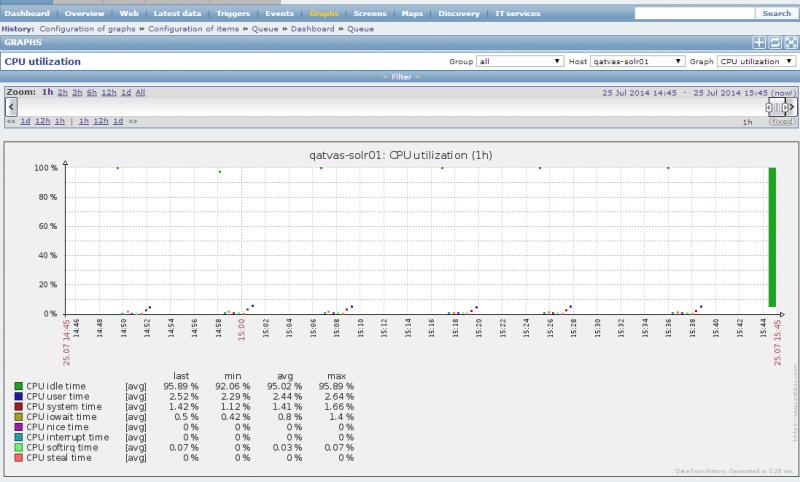
It is noteworthy that the agent's host is doing OK (no CPU strain, memory good, network to Zabbix Server fine, etc). Same for the server: it's a pretty powerful machine with CPUs at almost 99% idle.
Finally, the Zabbix Queue is pretty big. Some hosts are lagging behind of more than 10 minutes. I cannot explain why some hosts would be OK (under 30 seconds) and the rest lags. They are all using the same template, same route between agent and server, etc.
The monitoring --> Overview tab is mostly green (only a few agents unreachable when the server failed to receive the ping for a long time)
My Zabbix server version is 2.2.2.
I have no idea on how to investigate this. Please help
Thank you
- Alexandre
I'm having trouble with my active-only agent configuration. All of my agent are behind a firewall and the only real way to monitor them is through an "active agent" configuration.
However, I am seeing many agents are going on and off on the "agent unreachable for more than 5 minutes" alert. I don't understand why because they are communicating with the Zabbix Server on regular basis, it just seems that they are not sending all the data?
I've started one of my agent with DebugLevel=4 and it seems very busy with the CPU (see zipped log in the attachment). One thing that puzzles me very much is that for all of my hosts, the active item "ping" is set to refresh every 60 seconds, but sometimes it goes 9 minutes without updating. See the following grep:
Code:
/var/log/zabbix# tail -f zabbix_agentd.log | grep --line-buffered ping
                        "key":"agent.ping",
 36763:20140725:154939.031 In add_check() key:'agent.ping' refresh:60 lastlogsize:0 mtime:0
 36763:20140725:154939.033 for key [agent.ping] received value [1]
 36763:20140725:154939.033 In process_value() key:'qatvas-solr01:agent.ping' value:'1'
                        "key":"agent.ping",
                        "key":"agent.ping",
 36763:20140725:155803.531 In add_check() key:'agent.ping' refresh:60 lastlogsize:0 mtime:0
 36763:20140725:155803.537 for key [agent.ping] received value [1]
 36763:20140725:155803.538 In process_value() key:'qatvas-solr01:agent.ping' value:'1'
                        "key":"agent.ping",
                        "key":"agent.ping",
 36763:20140725:160625.294 In add_check() key:'agent.ping' refresh:60 lastlogsize:0 mtime:0
 36763:20140725:160625.296 for key [agent.ping] received value [1]
 36763:20140725:160625.296 In process_value() key:'qatvas-solr01:agent.ping' value:'1'
                        "key":"agent.ping",
It is noteworthy that the agent's host is doing OK (no CPU strain, memory good, network to Zabbix Server fine, etc). Same for the server: it's a pretty powerful machine with CPUs at almost 99% idle.
Finally, the Zabbix Queue is pretty big. Some hosts are lagging behind of more than 10 minutes. I cannot explain why some hosts would be OK (under 30 seconds) and the rest lags. They are all using the same template, same route between agent and server, etc.
The monitoring --> Overview tab is mostly green (only a few agents unreachable when the server failed to receive the ping for a long time)
My Zabbix server version is 2.2.2.
I have no idea on how to investigate this. Please help
Thank you
- Alexandre
Attached Files


Comment