Ad Widget

Collapse

Media Type : Script (SMS bash script not executed)

Collapse
X
 
  • Time
  • Show
Clear All
new posts
  • al-siput
    Junior Member
    • Jun 2008
    • 12

    #1

    Media Type : Script (SMS bash script not executed)

    Hello,

    i've created bash script for sending sms...
    the script is running if i execute it from command shell.
    but zabbix won't execute it (or maybe execute but not functioning)

    this is the script

    filename : smsalert

    Code:
    #!/bin/bash
    
    /usr/bin/gsmsendsms -d /dev/ttyS0 -b 115200 $1 "Sub:$2 -------- ------- Msg:$3 (Zabbix SMS Alert)"


    no error is recorded


  • RohrbaGe
    Senior Member
    • Aug 2005
    • 167

    #2
    Hi al-siput,
    As far as I remember you have to place the script
    in /home/zabbix/bin.

    If you do not have this structure yet, create it, and chown /chrgrp to zabbix.

    I'm using gammu with the mysqld, as this is queing multiple sms, which prog
    you are using.
    ( I have planned sometimes to use incoming sms to run actions)


    Regards
    Gerald

    Comment

    • al-siput
      Junior Member
      • Jun 2008
      • 12

      #3
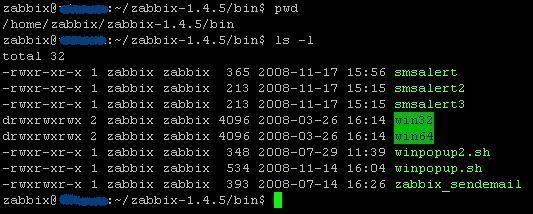
      i think i put it in right place


      the other script is running... except the sending sms part

      the sms script running smoothly before this..
      but i think after i upgraded the server (ubuntu) by issuing command
      apt-get update and apt-get upgrade
      the problem occur

      this is part of my conf file
      Code:
      # Location for custom alert scripts
      #AlertScriptsPath=/home/zabbix/bin/
      #AlertScriptsPath=/home/zabbix/zabbix-1.4.5/bin
      AlertScriptsPath=/home/zabbix/zabbix-1.4.5/bin/
      
      # Location of external scripts
      ExternalScripts=/etc/zabbix/externalscripts
      Last edited by al-siput; 18-11-2008, 05:01.

      Comment

      • Calimero
        Senior Member
        • Nov 2006
        • 481

        #4
        In the "Media" screen did you type the full path (/home/zabbix/zabbix-XXX/bin/sendsms) or relative path (sendsms) ?

        My AlertScriptPath is defined as /usr/local/zabbix/bin/.
        If I give '/usr/local/zabbix/bin/sendsms.php' as my alert script in the Media screen, Zabbix tries to run /usr/local/zabbix/bin///usr/local/zabbix/bin/sendsms.php

        So you have to give the path relative to AlertScriptPath. In my case: "sendsms.php".

        What if you add some "echo I am here >> /tmp/sms.log" in you script ?
        I guess you double checked permissions ?

        Comment

        • al-siput
          Junior Member
          • Jun 2008
          • 12

          #5
          Calimero :

          i just type the file name (refer attached pics before)

          What if you add some "echo I am here >> /tmp/sms.log" in you script ?
          I guess you double checked permissions ?
          it's working...
          only the sending sms part is not working...

          Comment

          • Calimero
            Senior Member
            • Nov 2006
            • 481

            #6
            Does zabbix have read/write permissions on /dev/ttyS0 ?

            Comment

            • JMecham
              Junior Member
              • Sep 2009
              • 2

              #7
              I got this working

              Keep in mind, I am a super n00b, but here are the steps I had to take to make it work - I realize these are hack and slash, but that's OK with me:

              make sure /etc/zabbix/zabbix_server.conf has this line, pointing to the bin directory: AlertScriptsPath=/home/zabbix/bin

              mkdir /home/zabbix/bin
              chmod 777 /home/zabbix/bin #yeah, everyone woo
              (make your script here - if it is a shell script, make sure it starts with this:

              #! /bin/sh

              I was hung up here for a long time)

              In the script, I found it useful to use absolute directory references for any file names or calls you might make.

              make a media type, script, USE SHORT FILENAME HERE ie:alert_smsemail.sh as the name.

              make a user, apply this media to the user

              of interest: $1 $2 and $3 are passed to the script at it's launch
              $1 is the "target" of the user's alert action - in my case I used an SMS email box name (###@tmomail.net)
              $2 is the subject of the trigger (PROBLEM:w/e) from the zabbix action screens
              $3 is the body of the alert message

              One last thing, I found it useful to use a script to launch a script, so that I could keep a log of the outputs (see below)

              caveat: If you are using this script to launch another application, to pass the parameters correctly, I recommend putting them in ""
              ie:
              #! /bin/sh
              expect /home/zabbix/bin/alert_smsemail "$1" "$2" "$3" >/home/zabbix/bin/runlog.txt
              Last edited by JMecham; 11-09-2009, 17:31.

              Comment

              • dagun
                Member
                • Sep 2009
                • 71

                #8
                Hi

                Originally posted by JMecham
                Keep in mind, I am a super n00b, but here are the steps I had to take to make it work - I realize these are hack and slash, but that's OK with me:

                make sure /etc/zabbix/zabbix_server.conf has this line, pointing to the bin directory: AlertScriptsPath=/home/zabbix/bin

                mkdir /home/zabbix/bin
                chmod 777 /home/zabbix/bin #yeah, everyone woo
                (make your script here - if it is a shell script, make sure it starts with this:

                #! /bin/sh

                I was hung up here for a long time)

                In the script, I found it useful to use absolute directory references for any file names or calls you might make.

                make a media type, script, USE SHORT FILENAME HERE ie:alert_smsemail.sh as the name.

                make a user, apply this media to the user

                of interest: $1 $2 and $3 are passed to the script at it's launch
                $1 is the "target" of the user's alert action - in my case I used an SMS email box name (###@tmomail.net)
                $2 is the subject of the trigger (PROBLEM:w/e) from the zabbix action screens
                $3 is the body of the alert message

                One last thing, I found it useful to use a script to launch a script, so that I could keep a log of the outputs (see below)

                caveat: If you are using this script to launch another application, to pass the parameters correctly, I recommend putting them in ""
                ie:
                #! /bin/sh
                expect /home/zabbix/bin/alert_smsemail "$1" "$2" "$3" >/home/zabbix/bin/runlog.txt
                Can you give me a detailed example?????Thanks.

                Comment

                • JMecham
                  Junior Member
                  • Sep 2009
                  • 2

                  #9
                  scripts

                  Originally posted by dagun
                  Can you give me a detailed example?????Thanks.
                  Of which part? Most of it seems pretty concise, reading back over it.

                  Comment

                  • Balaraju
                    Member
                    • Jun 2016
                    • 40

                    #10
                    sms alert from zabbix

                    Hi team,

                    I am also facing some problem with sms alert using http api.

                    I am using below script but its not working properly. Can any body help on this. in body i am getting same value what i have written in script.

                    #!/bin/bash
                    to=$1
                    subject=$2
                    body=`echo "Hostname: {HOST.NAME}, Trigger severity: {TRIGGER.SEVERITY}, {ITEM.NAME}: {ITEM.VALUE}"`
                    textconvert=$(echo "$2 $body" | tr -s " " "+")
                    /usr/bin/curl "http://xxx.xx.xxx.xx//httpapi/sendmsg.php?user=test&password=test@123&from=callt r&to=$to&message=$textconvert&msg_type=t&dcs=0&del iv_ack=1&udh=0"

                    I am getting alert but in body i am not getting hostname,severity. Can any boy help.

                    Comment

                    • Mr.D
                      Junior Member
                      • Jun 2016
                      • 2

                      #11
                      Hi Balaraju,

                      you edit as follows:

                      #!/bin/bash
                      to=$1
                      subject=$2
                      body=`echo "Hostname: {HOST.NAME}, Trigger severity: {TRIGGER.SEVERITY}, {ITEM.NAME}: {ITEM.VALUE}"`
                      textconvert=$(echo "$2 $body" | tr -s " " "+")
                      data='sendmsg.php?user=test&password=test@123&from =calltr&to='${to}'&message='${textconvert}'&msg_ty pe=t&dcs=0&deliv_ack=1&udh=0'
                      curl -X POST -d "${data}" \http://xxx.xx.xxx.xx/httpapi/

                      then check again

                      Originally posted by Balaraju
                      Hi team,

                      I am also facing some problem with sms alert using http api.

                      I am using below script but its not working properly. Can any body help on this. in body i am getting same value what i have written in script.

                      #!/bin/bash
                      to=$1
                      subject=$2
                      body=`echo "Hostname: {HOST.NAME}, Trigger severity: {TRIGGER.SEVERITY}, {ITEM.NAME}: {ITEM.VALUE}"`
                      textconvert=$(echo "$2 $body" | tr -s " " "+")
                      /usr/bin/curl "http://xxx.xx.xxx.xx//httpapi/sendmsg.php?user=test&password=test@123&from=callt r&to=$to&message=$textconvert&msg_type=t&dcs=0&del iv_ack=1&udh=0"

                      I am getting alert but in body i am not getting hostname,severity. Can any boy help.

                      Comment

                      • vlam
                        Senior Member
                        Zabbix Certified Specialist
                        • Jun 2009
                        • 166

                        #12
                        Hi All

                        I also need some help here, first off my setup is split into separate App, DB and Front-ends. I take it the alert script needs to be on the App server in usr/lib/zabbix/alertscripts

                        My question is We have a dedicated sms server that the file needs to be dropped in a folder and then it reads the To: statement and it sends the SMS to there.

                        How would I need to change my side so that I could get that working?

                        PS SMS server we use is SMS Tools 3

                        The SMS Tools 3 Server is a Windows server and the dir where the file needs to go is on C:\cygwin\var\spool\sms\outgoing

                        What in the script will need to change to be able to place the file on that Windows dir

                        script:
                        #!/bin/bash

                        to=$1
                        subject=$2
                        body=$3

                        cat <<EOF | mail -s "$subject" "$to"
                        $body
                        EOF


                        Any help in setting it up would be greatly appreciated.
                        Last edited by vlam; 15-06-2016, 09:34. Reason: Update
                        4 Zabbix Frontend Servers (Load balanced)
                        2 Zabbix App Servers (HA)
                        2 Zabbix Database Servers (HA)
                        18 Zabbix Proxy Servers (HA)
                        3897 Deployed Zabbix Agents
                        6161 Values per second
                        X-Layer Integration
                        Jaspersoft report Servers (HA)

                        Comment

                        • Mr.D
                          Junior Member
                          • Jun 2016
                          • 2

                          #13
                          Hi VLAM,

                          If your SMS tool support API, you can use it to write the script.

                          Originally posted by vlam
                          Hi All

                          I also need some help here, first off my setup is split into separate App, DB and Front-ends. I take it the alert script needs to be on the App server in usr/lib/zabbix/alertscripts

                          My question is We have a dedicated sms server that the file needs to be dropped in a folder and then it reads the To: statement and it sends the SMS to there.

                          How would I need to change my side so that I could get that working?

                          PS SMS server we use is SMS Tools 3

                          The SMS Tools 3 Server is a Windows server and the dir where the file needs to go is on C:\cygwin\var\spool\sms\outgoing

                          What in the script will need to change to be able to place the file on that Windows dir

                          script:
                          #!/bin/bash

                          to=$1
                          subject=$2
                          body=$3

                          cat <<EOF | mail -s "$subject" "$to"
                          $body
                          EOF


                          Any help in setting it up would be greatly appreciated.

                          Comment

                          Working...