Ad Widget

Collapse

Zabbix 3.2 and Juniper templates

Collapse
X
 
  • Time
  • Show
Clear All
new posts
  • Mechanix
    Member
    • Jan 2017
    • 92

    #1

    Zabbix 3.2 and Juniper templates

    Hi,

    I´m using the latest zabbix 3.2 server and I´m unable to show graphs for Device Health (CPU etc) for Juniper EX switches using this template:

    The Zabbix Team has collected all official Zabbix monitoring templates and integrations.


    Interface graphs seems to work. These device are being polled with snmpv3

    Does anybody has a working Juniper (EX) template and could share it?

    Thank you
  • batchenr
    Senior Member
    • Sep 2016
    • 440

    #2
    Originally posted by Mechanix
    Hi,

    I´m using the latest zabbix 3.2 server and I´m unable to show graphs for Device Health (CPU etc) for Juniper EX switches using this template:

    The Zabbix Team has collected all official Zabbix monitoring templates and integrations.


    Interface graphs seems to work. These device are being polled with snmpv3

    Does anybody has a working Juniper (EX) template and could share it?

    Thank you
    if a graph is not working maybe the item connected to is not supported?
    and i think you can get overall health by connecting the SNMPV3 templates to this device.

    if not- you can always use the MIB file of the device and customized it.

    Comment

    • Mechanix
      Member
      • Jan 2017
      • 92

      #3
      if not- you can always use the MIB file of the device and customized it.
      Can you explain what do you mean with that? Thank you

      Comment

      • batchenr
        Senior Member
        • Sep 2016
        • 440

        #4
        Originally posted by Mechanix
        Can you explain what do you mean with that? Thank you
        yes,

        every device have its MIB file and there is stored this device object to make
        checks on this device - after you find it i can help you investigate it .

        you can find it either on :
        Internet - by model name
        ask juniper for it
        at the device itself (i know forti have it on the device itself at some tab- search)

        Comment

        • Mechanix
          Member
          • Jan 2017
          • 92

          #5
          Thank you for your reply.
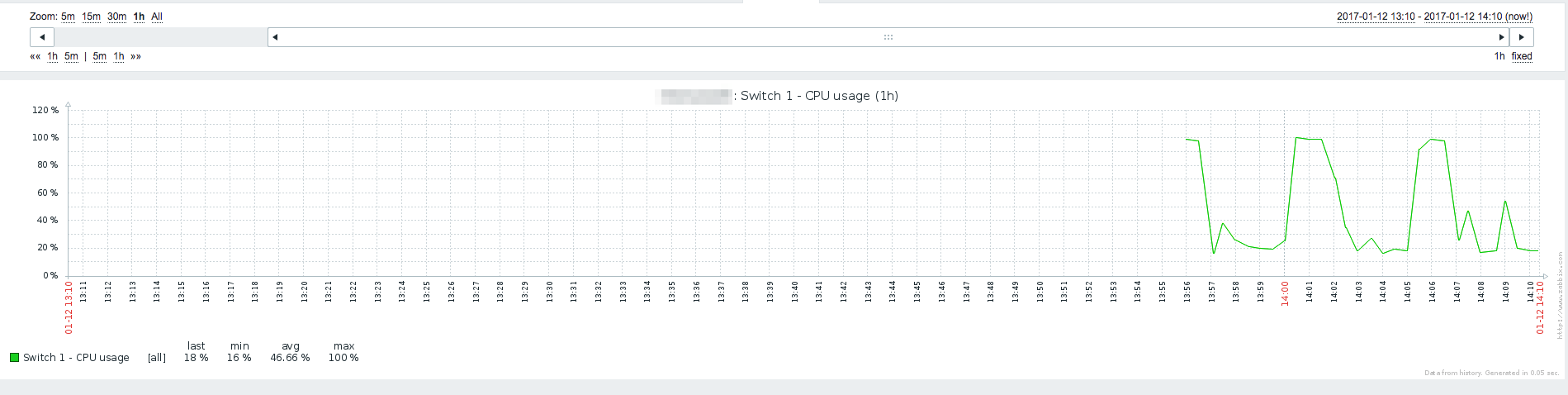
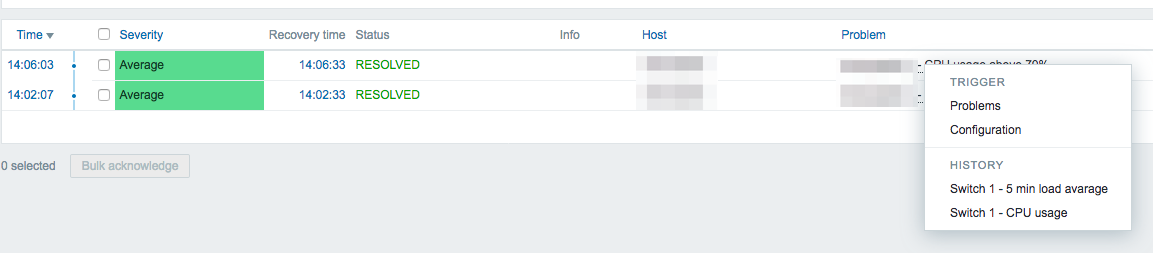
          Interesting though: one of the EX2200 switches had a short CPU spike. Under -> Monitoring->Triggers I can click on the device and see the history graphs of the CPU utilization but I cannot see the graphs in the drop down field Monitoring->Graphs
          So apparently the graphs are working. Any help is much appreciated. Thank you

          Comment

          • batchenr
            Senior Member
            • Sep 2016
            • 440

            #6
            Originally posted by Mechanix
            Thank you for your reply.
            Interesting though: one of the EX2200 switches had a short CPU spike. Under -> Monitoring->Triggers I can click on the device and see the history graphs of the CPU utilization but I cannot see the graphs in the drop down field Monitoring->Graphs
            So apparently the graphs are working. Any help is much appreciated. Thank you
            you you go to Configuration -> Hosts and see your device click on Graphs
            all the Graphs there should be on the Monitoring - > Graphs menu

            if you dont see them maybe a user issue ?
            maybe your talking about a different Graphs and thats maybe means you need to set them up ?

            i personally dont have Graphs under Monitoring->Triggers i have there my recent Triggers..

            Comment

            • Mechanix
              Member
              • Jan 2017
              • 92

              #7
              you you go to Configuration -> Hosts and see your device click on Graphs
              all the Graphs there should be on the Monitoring - > Graphs menu
              Yes, but I only see the interface graphs not the device health graphs.

              i personally dont have Graphs under Monitoring->Triggers i have there my recent Triggers..
              OK, I think it was the "Problem" page can´t recall. But have a look, maybe you understand what I mean:


              Last edited by Mechanix; 17-01-2017, 14:32.

              Comment

              • batchenr
                Senior Member
                • Sep 2016
                • 440

                #8
                Originally posted by Mechanix
                Yes, but I only see the interface graphs not the device health graphs.


                OK, I think it was the "Problem" page can´t recall. But have a look, maybe you understand what I mean:


                i cant see your attachments
                any ways- if you dont see this graphs at host conf that means that they are not set
                but you can set them manually.
                just add a graph- choose the item that collect this info and you will have a graph

                Comment

                • Mechanix
                  Member
                  • Jan 2017
                  • 92

                  #9
                  thx, I have updated the images.

                  Comment

                  • batchenr
                    Senior Member
                    • Sep 2016
                    • 440

                    #10
                    Originally posted by Mechanix
                    thx, I have updated the images.
                    ok i saw it - it seems like zabbix is gathring statistics but is not configured as a grafh

                    you can solve it-
                    see the trigger you have choose - take its item key for exsample :

                    if i had this trigger at Monitoring-> Triggers

                    Code:
                    Response time is too high on ISCSI
                    {ISCSI:icmppingsec.avg(5m)}>0.15
                    and it has a grafe i wanted i can see the item key is :
                    icmppingsec

                    then if this trigger is a part of a templet i suggest go to this template
                    throw : Configuration - > Templates and press on Graphs

                    there you choose to create a new Graph and choose this item key
                    icmppingsec

                    and then you could see this costum Graph at the Monitoring - > Graphs after 5 min

                    Comment

                    • Mechanix
                      Member
                      • Jan 2017
                      • 92

                      #11
                      Thank you. I could manually create the graphs in Configuration > Host->Graphs there I could select the CPU/Memory etc items.!!!! Thanks a lot

                      On the Template -> Graph page the only items I can select are:

                      Ping check icmpping Simple check Numeric (unsigned) Enabled
                      Red alarm RedAlarm SNMPv3 agent Numeric (unsigned) Enabled
                      Uptime Uptime SNMPv3 agent Numeric (unsigned) Enabled
                      Yellow alarm YellowAlarm SNMPv3 agent Numeric (unsigned) Enabled

                      no CPU/Memory/Temperature.

                      I would prefere to have the creation of the graphs in the template though as we have more then 50 devices.

                      Comment

                      • batchenr
                        Senior Member
                        • Sep 2016
                        • 440

                        #12
                        Originally posted by Mechanix
                        Thank you. I could manually create the graphs in Configuration > Host->Graphs there I could select the CPU/Memory etc items.!!!! Thanks a lot

                        On the Template -> Graph page the only items I can select are:

                        Ping check icmpping Simple check Numeric (unsigned) Enabled
                        Red alarm RedAlarm SNMPv3 agent Numeric (unsigned) Enabled
                        Uptime Uptime SNMPv3 agent Numeric (unsigned) Enabled
                        Yellow alarm YellowAlarm SNMPv3 agent Numeric (unsigned) Enabled

                        no CPU/Memory/Temperature.

                        I would prefer to have the creation of the graphs in the template though as we have more then 50 devices.
                        the cpu trigger -is not part of an Template?
                        you can see the template name at the Configuration- > host-> triggers
                        and search for this trigger.

                        because the item you choose if you didnt created it then it means it is a part of a template
                        you just need to find it.
                        if not- after creating this grafe select it - and copy it to some template

                        Comment

                        • Mechanix
                          Member
                          • Jan 2017
                          • 92

                          #13
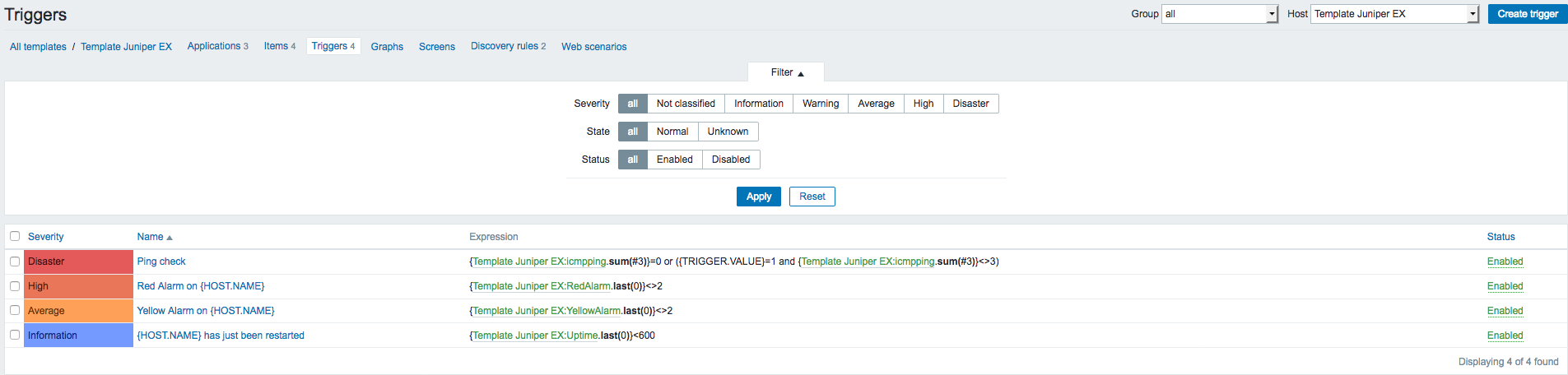
                          These are the only triggers associated to the template:


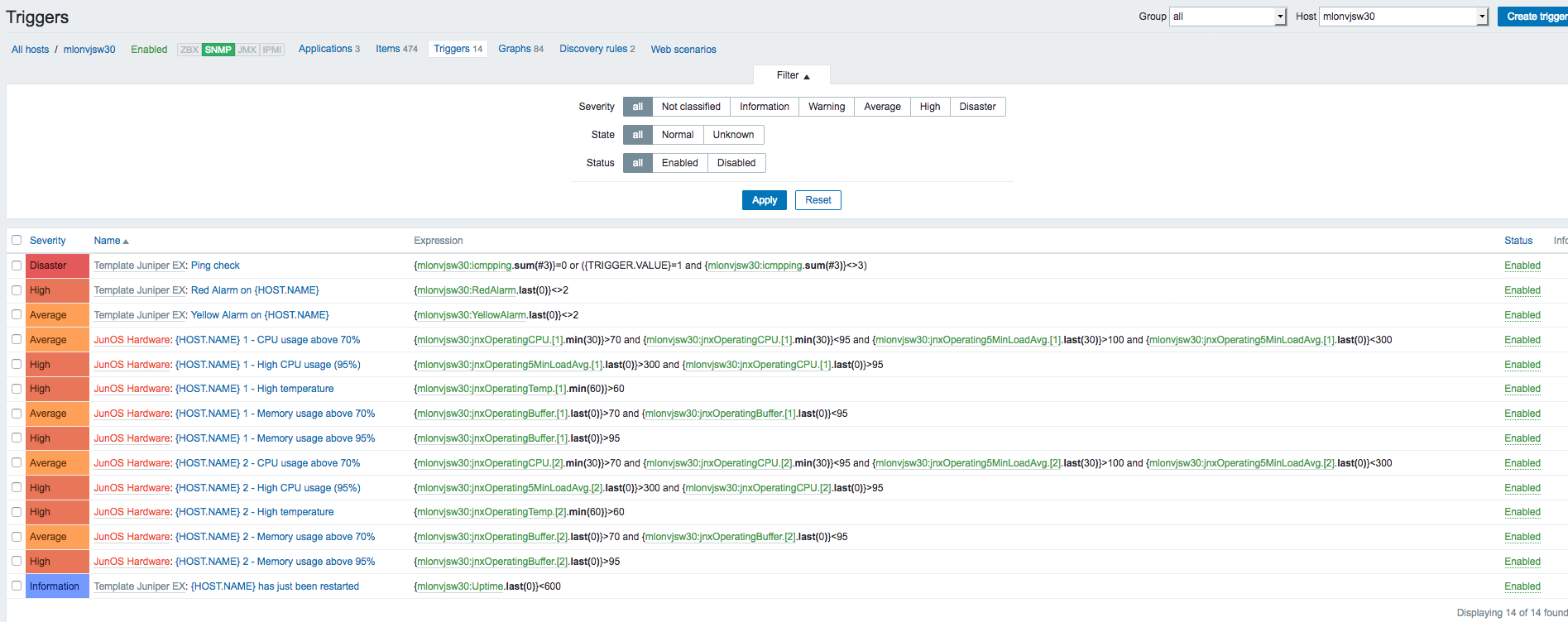
                          and here are the triggers for the host:

                          Last edited by Mechanix; 17-01-2017, 16:21.

                          Comment

                          • batchenr
                            Senior Member
                            • Sep 2016
                            • 440

                            #14
                            it seemes that the CPU item comes fron the template JunOS Hardwere
                            so create it in this template with the item jnxOpretionCPU.[1]

                            it should give you the correct Graph.
                            go to this template and create there the Graph with this existing item it should be easy
                            as the item is already there.

                            Comment

                            Working...