

- 9 Upgrade notes for 4.0.0
- Critical
- Additional dependencies
- Compression for server-proxy communication
- Server parameter for passive proxies mandatory
- Plain text protocol dropped
- Loadable modules
- Monitoring → Triggers section removed
- Disallowed item key parameter syntax
- MySQL 8.0 support
- Trigger functions
- HTTP authentication
- Upgrade with MariaDB 10.2.1 and before
- API changes
- Informational
- Deprecated macros in item names
- Timestamp correction
- Time triggers processed by history syncers
- Impact of host maintenance on trigger level
- Auto-registration changes
- Problem name generation
- Working with problems
- Server configuration cache usage
- Execution of external check script
- Zabbix Java gateway availability
- Zabbix Java gateway logs modified
- Trigger changes
- Renamed widgets, screen elements and reports
- Host column always displayed
- JMX monitoring error message
- Logging changes
- See also
- Critical
9 Upgrade notes for 4.0.0
These notes are for upgrading from Zabbix 3.4.x to Zabbix 4.0.0. All notes are grouped into:
Critical- the most critical information related to the upgrade process and the changes in Zabbix functionalityInformational- all remaining information describing the changes in Zabbix functionality
It is possible to upgrade to Zabbix 4.0.0 from versions before Zabbix 3.4.0. See the upgrade procedure section for all relevant information about upgrading from previous Zabbix versions.
Critical
Additional dependencies
- libpthread - the POSIX Threads library is now mandatory when compiling Zabbix server and Zabbix proxy. It is required for process-shared mutexes and read-write locks. If mutexes are available, but cannot be process shared then Zabbix will fall back to using semaphores as before the upgrade.
- zlib - the compression library is now mandatory when compiling Zabbix server and Zabbix proxy.
Compression for server-proxy communication
Communication between Zabbix server and Zabbix proxies is now using compression to reduce network load and increase performance on low bandwidth network links.
Note that the header of Zabbix requests/responses has been changed as part of this development.
If you are using network security devices like IDS/IPS or NGFW in your network and you are using Zabbix proxies, please make sure your application definitions are up to date for the new Zabbix proxy protocol prior to upgrading to 4.0.x as there have been reports on these devices dropping the traffic when encountering the compression in the network stream. Please contact your security vendor for more information on how to obtain updated definitions or possible workarounds if you run into this problem.
Server parameter for passive proxies mandatory
The Server parameter in passive proxy configuration, which previously was ignored, is now mandatory. The passive proxy will reject an address that is not listed in the Server parameter.
Plain text protocol dropped
Support for the plain text protocol has been dropped and a header is now mandatory. A header has been added to Zabbix get requests, Zabbix server/proxy passive check requests and frontend requests to Zabbix server.
As a consequence, Zabbix agents that are older than version 1.4 are no longer supported. Also, messages from self-written senders will be rejected if the header is absent. Whereas previously Zabbix trappers would accept messages without headers as well as messages with headers, now they will only accept messages with protocol header.
Requests from an older Zabbix get version to the new agent will fail. Note that in this case the following error message is displayed:
Check access restrictions in Zabbix agent configurationLoadable modules
History export via module is no longer supported by Zabbix proxy.
Monitoring → Triggers section removed
Monitoring → Triggers section is now removed. Related global parameters "Show events not older than" and "Max count of events per trigger to show" are removed as well respectively.
Disallowed item key parameter syntax
The following item key parameter syntax is no longer supported:
- Multi-level parameter arrays, e.g.
[a,[b,[c,d]],e] - Zapcat-style parameters, e.g.
[a][b]
Note that this syntax was never used by official Zabbix item keys, nor was it ever officially documented as supported. It only existed for backward compatibility with such solutions as Zapcat JMX Zabbix Bridge.
Note that this change does not affect single-level parameters. See aggregate items for information about supported syntax.
MySQL 8.0 support
To be able to add support of MySQL 8.0 in this version, two database changes have been made:
- 'groups' table has been renamed to 'hstgrp'
- 'function' field in the 'functions' table has been renamed to 'name'
Trigger functions
During the upgrade, parameter values of the logsource trigger function will be converted to work with added support of regular expressions and global regular expressions. There can be cases when existing parameters contain an extensive amount of regular expression special characters or their length is close to the maximum allowed limit and during conversion will exceed that maximum allowed length limit which is 255 characters. In such cases no changes will be made to those parameters and details about all these cases will be added to the log file. If there are issues with trigger performance because of this, the parameters that were not changed have to be edited manually.
HTTP authentication
When default system authentication was previously set to 'HTTP authentication' during the upgrade it will be changed to 'Internal' with 'HTTP Authentication' enabled by default. For such configuration it is required to clear existing user default password values in the database executing the following query:
UPDATE users SET passwd="" WHERE passwd=md5('zabbix')API related changes
HTTP basic-authentication specific code was removed from API, therefore
the password field is now mandatory for the API user.login action.
Upgrade with MariaDB 10.2.1 and before
Upgrading Zabbix may fail if database tables were created with MariaDB 10.2.1 and before, because in those versions the default row format is compact. This can be fixed by changing the row format to dynamic (see also ZBX-17690).
API changes
See the list of API changes in Zabbix 4.0.0.
Informational
Deprecated macros in item names
Using positional ($1, $2, ...$9) and user macros in item and item prototype names is now deprecated. As a consequence, positional macros have been removed from item names and item prototype names in the standard templates shipped with Zabbix 4.0.
If you keep using positional macros, you will encounter the following difficulties when using the new graph widget:
- It will not be possible to add any of the items named like
CPU $2 timeindividually to the graph, using its resolved name (likeCPU user time) - It will only be possible to add all items having the name like
CPU $2 timeto the graph (e.g.CPU user time,CPU system time,CPU idle time, etc.)
If you are using positional macros in item prototype names, it is suggested to update discovery rules manually by replacing the positional macro with the respective low-level discovery macro, for example, replace:
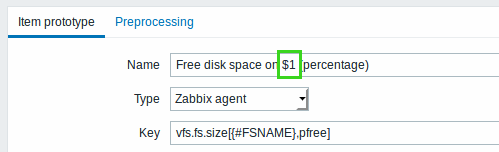
in the old item prototype naming with:
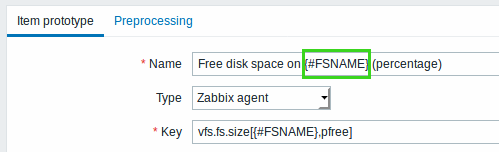
in the new item prototype naming. It will be possible to use items generated this way in the graph widget with no limitations.
Timestamp correction
Zabbix server will no longer adjust value timestamps in cases when Zabbix proxy/active agent/sender time differs from Zabbix server time.
Time triggers processed by history syncers
The processing of time-based trigger
functions such as nodata(),
date(), dayofmonth(), dayofweek(), time() and now() has been
moved from timer processes to history syncers.
While previously all time-based triggers were recalculated at the same time, creating peak loads every 30 seconds, now the time-based trigger processing is evenly spread within those 30 seconds.
With this change, the required number of timer processes may have to be recalculated, especially if previously multiple timers were configured to share the time-based trigger calculation load. Even though the time-based trigger calculations do not affect timer load anymore, maintenance calculations may require more resources and thus multiple timers can be configured to share the maintenance processing load.
Impact of host maintenance on trigger level
When a host enters maintenance, Zabbix server timer processes will now read all open problems to check if it is required to suppress those. This may have a performance impact if there are many open problems. Zabbix server will also read all open problems upon startup, even if there are no maintenances configured at the time.
If maintenance period, hosts, groups or tags are changed by user, the changes will only take effect after configuration cache synchronization.
Auto-registration changes
Auto-registration behavior has been changed in the following way:
- Active agent auto-registration actions will be rerun if host metadata is changed;
- Since metadata is only added during auto-registration, manually created hosts will have metadata missing and auto registration will be re-run;
- If a host is manually changed to be monitored by another Zabbix proxy, then auto-registration will be re-run.
As before, if auto-registration for the same host comes from a new Zabbix proxy, then auto-registration will be re-run.
Problem name generation
Problem and event names are now stored directly in the event and problem tables upon event generation, instead of being generated in runtime as previously. A database patch will populate the new problem name and event name fields without macros expanded. Note that these changes will require more storage space.
Database upgrade during the initial server startup may take a long time if there are a lot of old events and {ITEM.VALUE}, {ITEM.LASTVALUE} macros are used in trigger names.
The values for the populated event and problem name fields are:
- For trigger events - trigger name with all the macros resolved
- For internal problem events:
- Cannot obtain item value - for unsupported items
- Cannot calculate trigger expression - for unknown triggers
- For the rest of events the name will be empty
Related macro changes
Since problem names are no longer generated in runtime based on the current trigger name, and instead are being generated at the time of event, there are corresponding macro changes:
- In all default messages - {TRIGGER.NAME} has been replaced by {EVENT.NAME};
- In all trigger-based actions - {TRIGGER.NAME} will be replaced by {EVENT.NAME} when upgrading.
See also: known issues
Working with problems
Several changes have been made for working with problems, including changed macros. For more details, see the what's new entry.
Related API changes
problem.get and event.get methods have been changed in such a
way that input parameter search/filter with object {'name': '...'}
as value is used to find matching results (by field "name") in the
corresponding table ("problem" or "events").
problem.get and event.get methods have been extended by adding a
response parameter called "name". For both methods, the new parameter
contains a value from the newly added "name" field in the database
table "problem" or "events".
Server configuration cache usage
The server configuration cache has been modified to keep all host inventory information in it. If you are using the inventory functionality with hosts, increase the dedicated configuration cache memory for the server accordingly.
Execution of external check script
Upon completion of an external check
script, arguments are wrapped
to single quotes ' instead of double quotes ". This change
allows Zabbix to accept more signs in an external check parameter's
name. For example, the $ sign is no longer ignored.
Zabbix Java gateway availability
From now on Zabbix Java gateway availability status will not change to red each time any of the items become not supported. The JMX availability badge will only become red on network errors - when Java gateway is not available or when there are some communication problems between Zabbix server and Zabbix Java gateway.
Zabbix Java gateway logs modified
If you monitor Java gateway logs, keep in mind that exception stack trace is no longer available in warning and error level logging of Java gateway.
Trigger changes
- Trigger expression's behavior regarding numbers, differing by 0.000001, is now changed. Since logical operators are defined in terms of equality to zero, their result for 0.000001 is affected too:
| Expression (Example) | Evaluation result | |
|---|---|---|
| Before | After | |
| 1.000001 > 1 | 1 | 0 |
| 1.000001 <= 1 | 0 | 1 |
| 0 >= 0.000001 | 0 | 1 |
| 0.000001 <> 0 | 1 | 0 |
| 0.000001 = 0 | 0 | 1 |
| 0 or (1/1000000) | 1 | 0 |
| not (1/1000000) | 0 | 1 |
| 1 and 1/1000000 | 1 | 0 |
Renamed widgets, screen elements and reports
The following elements have been renamed:
| Previously | In Zabbix 4.0 |
| System status | Problems by severity |
| Host status | Problem hosts |
| Status of Zabbix | System information |
Dashboard API is also affected: some of Dashboard widget property types are now renamed.
Host column always displayed
The host column is now always displayed even if only one host is selected in:
- Monitoring → Latest data
- Monitoring → Web
- Reports → Availability
This results in a wider page than previously with one host data. For more information, see the What's new section.
JMX monitoring error message
As Zabbix Java gateway now supports working with custom MBeans returning non-primitive data types, which override the toString() method, the possible error message has been changed the following way:
| Previously: | data object type is not primitive: xxx |
| In Zabbix 4.0: | Data object type cannot be converted to string. |
Logging changes
The message printed to the log files about a full history cache has been changed the following way:
| Previously: | History buffer is full. Sleeping for 1 second. |
| In Zabbix 4.0: | History cache is full. Sleeping for 1 second. |