
1 Descoberta de sistemes d'arxius muntats
Vista general
És possible descobrir els sistemes de fitxers muntats i les seves propietats:
- nom del punt de muntatge
- tipus de sistema de fitxers
- mida del sistema de fitxers
- estadístiques d'inode
- opcions de muntatge
Per fer-ho, podeu emprar una combinació de:
- element agent
vfs.fs.getcom a element mestre - regles de descoberta de baix nivell i prototips d'elements dependents
Configuració
Element mestre
Creeu un element d'agent Zabbix amb la clau següent:
vfs.fs.get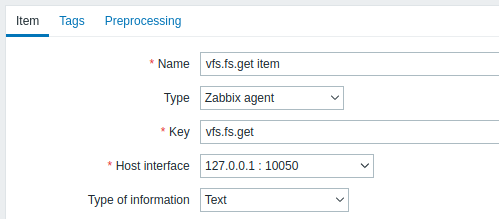
Estableix el tipus d'informació a "Text" per a dades JSON possiblement grans.
Les dades que retorna aquest element contindran alguna cosa com el següent per a un sistema de fitxers muntat:
[
{
"fsname": "/",
"fstype": "ext4",
"bytes": {
"total": 249405239296,
"free": 24069537792,
"used": 212595294208,
"pfree": 10.170306,
"pused": 89.829694
},
"inodes": {
"total": 15532032,
"free": 12656665,
"used": 2875367,
"pfree": 81.487503,
"pused": 18.512497
},
"options": "rw,noatime,errors=remount-ro"
}
]
Regla LLD dependent
Creeu una regla de descoberta de baix nivell com a tipus "Element dependent":
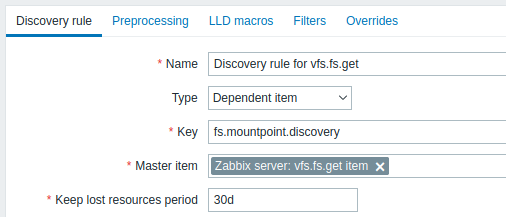
Com a element principal, seleccioneu l'element vs.fs.get que hem creat.
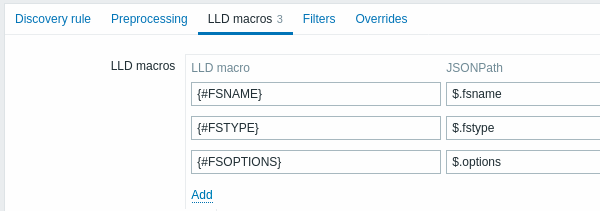
A la pestanya "Macros LLD", definiu macros personalitzades amb el JSONPath corresponent:
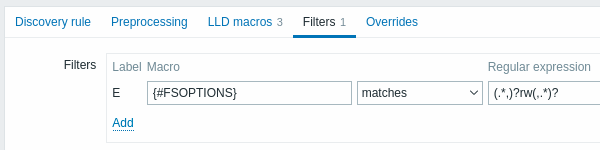
A la pestanya "Filtres", heu d'afegir una expressió regular que filtri només sistemes d'arxius de lectura i escriptura:
Prototip d'element dependent
Creeu un prototip d'element amb el tipus "Article dependent" en aquesta regla de LLD. Com a element mestre d'aquest prototip, escolliu l'element vfs.fs.get que hem creat.
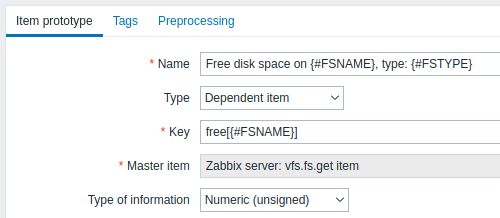
Tingueu en compte l'ús de macros personalitzades al nom i la clau del prototip de l'element:
- Nom: Espai lliure al disc a {#FSNAME}, escriviu: {#FSTYPE}
- Clau: Free[{#FSNAME}]
Com a tipus d'informació, empreu:
- Numèric (sense signe) per a mètriques com ara "lliure", "total", "utilitzat"
- Numèric (flotant) per a mètriques com "pfree", "pused" (percentatge)
A la pestanya "Preprocessament" del prototip d'element, trieu JSONPath i empreu l'expressió JSONPath següent com a paràmetre:
$.[?(@.fsname=='{#FSNAME}')].bytes.free.first()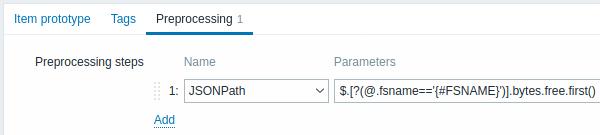
Quan comenci la descoberta, es crearà un element per punt de muntatge. Aquest element retornarà el nombre d'octets lliures per al punt de muntatge donat.
Discovery in the short mode
As an alternative to a dependent discovery rule, you may create a discovery rule of the Zabbix agent type with the key:
vfs.fs.get[short]In the short mode, the item returns the list of mounted filesystems without disk space and inode statistics, for example:
[
  {
    "fsname": "/",
    "fstype": "ext4",
    "options": "rw,noatime,errors=remount-ro"
  },
  {
    "fsname": "/home",
    "fstype": "xfs",
    "options": "rw,relatime,attr2,inode64,noquota"
  }
]
As the agent does not query the filesystems themselves, discovery does not trigger automounting and is not delayed by unresponsive network filesystems. It can also run less often than data collection, for example, once per hour.
In the LLD macros tab, define custom macros with the corresponding JSONPath, for example, {#FSNAME} - $.fsname and {#FSTYPE} - $.fstype.
Then create an item prototype of the Zabbix agent type that returns the statistics of one discovered filesystem:
- Key:
vfs.fs.get[full,{#FSNAME}] - Type of information: Text
- Preprocessing: JSONPath
$[0]
Use this item prototype as the master item for dependent item prototypes, for example, with the JSONPath $.bytes.free to get the number of free bytes.
If the agent cannot obtain statistics for a discovered filesystem (for example, because of missing permissions), vfs.fs.get[full,{#FSNAME}] returns an empty array, the $[0] preprocessing step fails, and the item becomes unsupported, so the problem is visible instead of the filesystem being silently skipped.
Note that this configuration performs a separate agent check for each discovered filesystem.
This approach is used by the OS templates shipped with Zabbix and requires Zabbix agent 8.0 or later.