
Regular expressions
Overview
Perl Compatible Regular Expressions (PCRE, PCRE2) are supported in Zabbix.
There are two ways of using regular expressions in Zabbix:
- Manually entering a regular expression
- Using a global regular expression created in Zabbix
Regular expressions
You may manually enter a regular expression in supported places.
Note that the expression must not start with @, as this symbol is used in Zabbix to reference global regular expressions.
It's possible to run out of stack memory when using regular expressions. See the PCRE PERFORMANCE for more information.
Note that in multiline matching, the ^ and $ anchors match at the beginning and end of each line respectively, instead of the beginning and end of the entire string.
See also examples for correct escaping in various contexts.
Global regular expressions
Zabbix provides an advanced editor in the frontend for creating and testing complex regular expressions.
To access it, go to Administration > General > Regular expressions.
Zabbix includes a number of predefined global regular expressions in its default dataset.
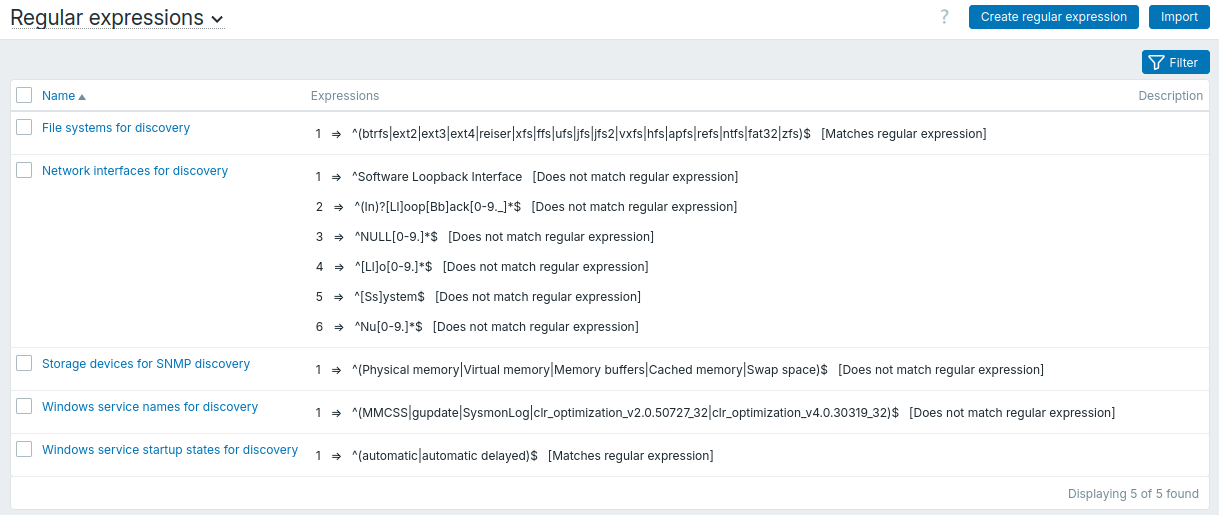
You can filter the regular expressions list by name and description to find the expressions you need.
Configuration
To create a global regular expression:
- Click Create regular expression.
- Enter the regular expression parameters in the form.
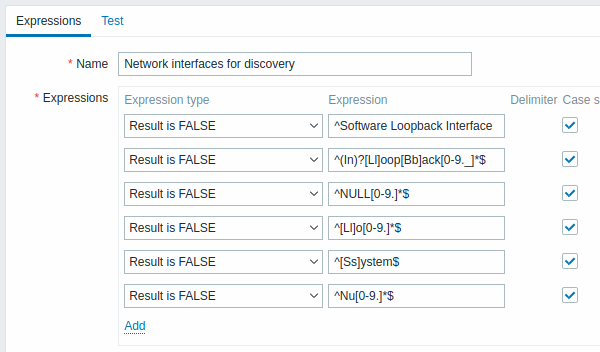
All mandatory input fields are marked with a red asterisk.
| Parameter | Description | |
|---|---|---|
| Name | Set the regular expression name. Any Unicode characters are allowed. | |
| Expressions | Click Add in the Expressions section to add a new subexpression. | |
| Expression type | Select expression type: Contains string - matches the substring. Contains any substring from list - matches any substring from a delimited list. The delimited list includes a comma ,, a dot . or a forward slash /.Does not contain string - matches any string except the substring. Matches regular expression - matches the regular expression. Does not match regular expression - does not match the regular expression. |
|
| Expression | Enter substring/regular expression. Maximum length: 2048 characters. |
|
| Delimiter | A comma ,, a dot ., or a forward slash / to separate text strings in a regular expression. This parameter is active only when Contains any substring from list expression type is selected. |
|
| Case sensitive | A checkbox to specify whether a regular expression is sensitive to capitalization of letters. | |
| Description | Enter a description for the regular expression. | |
| Test expression | A value to use for testing the regular expression. | |
A forward slash / in the expression is treated literally rather than as a delimiter.
This makes it possible to save expressions containing a slash without errors.
A custom regular expression name in Zabbix may contain commas, spaces, etc.
In cases where this may lead to misinterpretation when referencing (for example, a comma in the parameter of an item key), the entire reference may be enclosed in quotes, like this: "\@My custom regexp for purpose1, purpose2".
Regular expression names must not be quoted in other locations (for example, in LLD rule properties).
Once a regular expression has been created, it can be used in several places in the frontend by referring to its name, prefixed with @, for example, @mycustomregexp.
Form buttons
Buttons at the bottom of the form allow you to perform various operations:
| Button | Description |
|---|---|
 |
Add a regular expression. This button is only available for new regular expressions. |
 |
Update the properties of a regular expression. |
 |
Create another regular expression based on the properties of the current regular expression. |
 |
Test a regular expression and its subexpressions against a provided value. |
 |
Delete the regular expression. |
 |
Cancel editing the regular expression properties. |
Testing a regular expression
You may test the regular expression and its subexpressions by entering a value in the Test expression field and clicking the Test button.
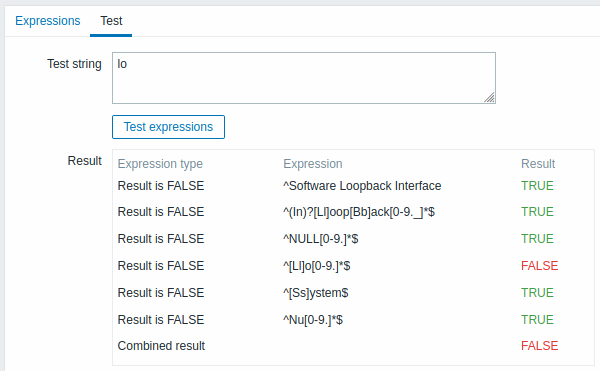
In the Test result column, the status of each subexpression is displayed.
The Combined result field displays the overall status of the regular expression.
If multiple subexpressions are defined, Zabbix uses the logical AND operator to calculate the Combined result; that is, if at least one result is False, the Combined result is also False.
Default global regular expressions
The default dataset includes the following predefined global regular expressions:
| Name | Expression | Matches |
|---|---|---|
| File systems for discovery | ^(btrfs|ext2|ext3|ext4|reiser|xfs|ffs|ufs|jfs|jfs2|vxfs|hfs|apfs|refs|ntfs|fat32|zfs)$ |
"btrfs" or "ext2" or "ext3" or "ext4" or "reiser" or "xfs" or "ffs" or "ufs" or "jfs" or "jfs2" or "vxfs" or "hfs" or "apfs" or "refs" or "ntfs" or "fat32" or "zfs". |
| Network interfaces for discovery | ^Software Loopback Interface |
Strings starting with "Software Loopback Interface". |
^lo$ |
"lo". | |
^(In)?[Ll]oop[Bb]ack[0-9._]*$ |
Strings optionally starting with "In", followed by "L" or "l", followed by "oop", followed by "B" or "b", followed by "ack", and optionally followed by any number of digits, dots, or underscores. | |
^NULL[0-9.]*$ |
Strings starting with "NULL" optionally followed by any number of digits or dots. | |
^[Ll]o[0-9.]*$ |
Strings starting with "Lo" or "lo" and optionally followed by any number of digits or dots. | |
^[Ss]ystem$ |
"System" or "system". | |
^Nu[0-9.]*$ |
Strings starting with "Nu" optionally followed by any number of digits or dots. | |
| Storage devices for SNMP discovery | ^(Physical memory|Virtual memory|Memory buffers|Cached memory|Swap space)$ |
"Physical memory" or "Virtual memory" or "Memory buffers" or "Cached memory" or "Swap space". |
| Windows service names for discovery | ^(MMCSS|gupdate|SysmonLog|clr_optimization_v2.0.50727_32|clr_optimization_v4.0.30319_32)$ |
"MMCSS" or "gupdate" or "SysmonLog" or strings matching "clr_optimization_v2.0.50727_32" or "clr_optimization_v4.0.30319_32", where each dot can be replaced by any character except a newline. |
| Windows service startup states for discovery | ^(automatic|automatic delayed)$ |
"automatic" or "automatic delayed". |
Importing/exporting a regular expression
You can import or export global regular expressions as described on the Regular expressions export/import configuration page.
Examples
Example of excluding an exact string
Use the following expression in low-level discovery to discover databases except for a database with a specific name:
^TESTDATABASE$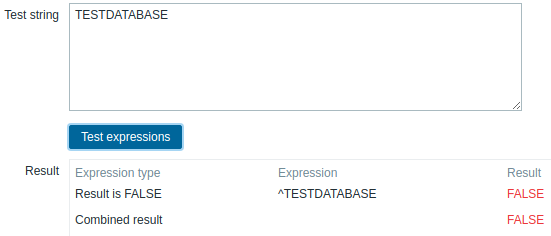
Both Test result and Combined result display FALSE: the name matches "TESTDATABASE", so the Does not match regular expression condition is not satisfied.
Example with an inline regex modifier for a case-insensitive match
Use the following regular expression, which includes the inline modifier (?i) to perform a case-insensitive match of the characters "error":
(?i)error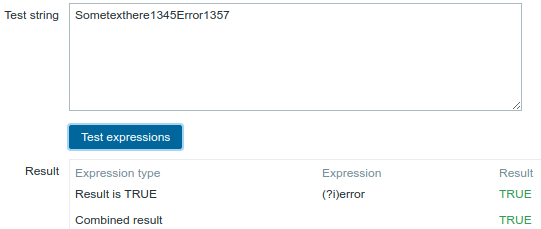
Both Test result and Combined result display TRUE: the characters "error" are matched even with Case sensitive selected, because the inline modifier (?i) makes the match case-insensitive.
Example with multiple inline regex modifiers
Use the following regular expression, which includes multiple inline modifiers, to match the characters after a specific line:
(?<=match (?i)eveRything(?-i) after this line\r\n)(?sx).*# commentwhere:
(?i)- turns case-insensitive matching on;(?-i)- turns case-insensitive matching off;(?s)- enables dotall mode, allowing.to match newline characters;(?x)- enables extended mode, allowing whitespace and comments in the regular expression to be ignored.
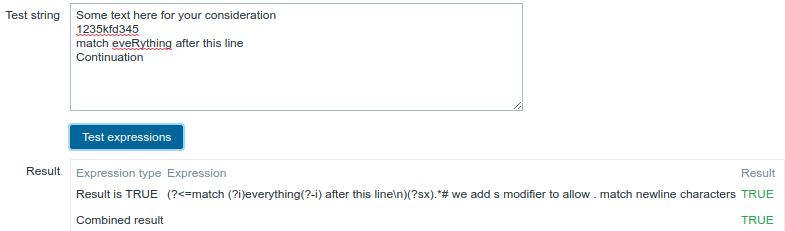
Both Test result and Combined result display TRUE: the characters following the specific line are matched.
The g modifier cannot be specified inline.
The list of available modifiers can be found in pcresyntax man page.
For more information about PCRE syntax, please refer to PCRE HTML documentation.
Regular expression support by location
| Location | Regular expression | Global regular expression | Multiline matching | Comments | |
|---|---|---|---|---|---|
| Agent items | |||||
| eventlog[] | Yes | Yes | Yes | regexp, severity, source, eventid parameters |
|
| eventlog.count[] | regexp, severity, source, eventid parameters |
||||
| log[] | regexp parameter |
||||
| log.count[] | |||||
| logrt[] | Yes/No | regexp parameter supports both, file_regexp parameter supports non-global expressions only |
|||
| logrt.count[] | |||||
| proc.cpu.util[] | No | No | cmdline parameter |
||
| proc.get[] | |||||
| proc.mem[] | |||||
| proc.num[] | |||||
| sensor[] | device and sensor parameters on Linux 2.4 |
||||
| system.hw.macaddr[] | interface parameter |
||||
| system.sw.packages[] | regexp parameter |
||||
| system.sw.packages.get[] | regexp parameter |
||||
| vfs.dir.count[] | regex_incl, regex_excl, regex_excl_dir parameters |
||||
| vfs.dir.get[] | regex_incl, regex_excl, regex_excl_dir parameters |
||||
| vfs.dir.size[] | regex_incl, regex_excl, regex_excl_dir parameters |
||||
| vfs.file.regexp[] | Yes | regexp parameter |
|||
| vfs.file.regmatch[] | |||||
| web.page.regexp[] | |||||
| SNMP traps | |||||
| snmptrap[] | Yes | Yes | No | regexp parameter |
|
| Item value preprocessing | Yes | No | No | pattern parameter |
|
| Functions for triggers/calculated items | |||||
| count() | Yes | Yes | Yes | pattern parameter if operator parameter is regexp or iregexp |
|
| countunique() | Yes | Yes | |||
| find() | Yes | Yes | |||
| logeventid() | Yes | Yes | No | pattern parameter |
|
| logsource() | |||||
| Low-level discovery | |||||
| Filters | Yes | Yes | No | Regular expression field | |
| Overrides | Yes | No | In matches, does not match options for Operation conditions | ||
| Action conditions | Yes | No | No | In matches, does not match options for Host name and Host metadata autoregistration conditions | |
| Scripts | Yes | Yes | No | Input validation rule field | |
| Web monitoring | Yes | No | Yes | Variables with a regex: prefix Required string field |
|
| User macro context | Yes | No | No | In macro context with a regex: prefix | |
| Macro functions | |||||
| regsub() | Yes | No | No | pattern parameter |
|
| iregsub() | |||||
| Link indicators in maps | Yes | No | No | Pattern field (for text items) | |
| Icon mapping | Yes | Yes | No | Expression field | |
| Value mapping | Yes | No | No | Value field if mapping type is regexp |
|
| Agent configuration parameters | |||||
| AllowKeyRegexp | Yes | No | No | Pattern | |
| DenyKeyRegexp | |||||