

6. Zabbix appliance
Overview
As an alternative to setting up manually or reusing an existing server for Zabbix, users may download a Zabbix appliance or a Zabbix appliance installation CD image.
Zabbix appliance and installation CD versions are based upon the following OS:
| Zabbix appliance version | OS |
|---|---|
| 4.0 | CentOS 8 (x86_64) |
Zabbix appliance installation CD can be used for instant deployment of Zabbix server (MySQL).
System requirements:
- RAM: 1.5 GB
- Disk space: at least 8 GB should be allocated for the virtual machine.
Zabbix installation CD/DVD boot menu:
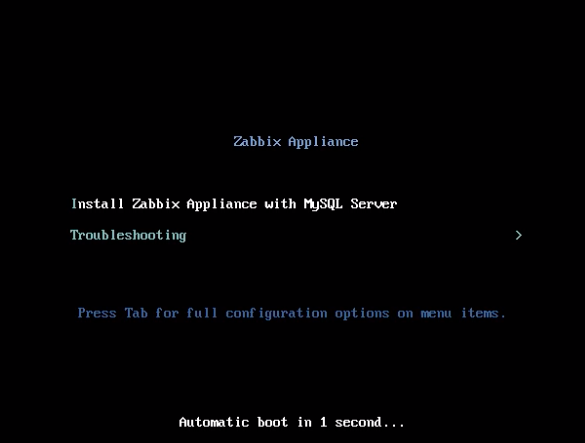
Zabbix appliance contains a Zabbix server (configured and running on MySQL) and a frontend.
Zabbix virtual appliance is available in the following formats:
- VMWare (.vmx)
- Open virtualization format (.ovf)
- Microsoft Hyper-V 2012 (.vhdx)
- Microsoft Hyper-V 2008 (.vhd)
- KVM, Parallels, QEMU, USB stick, VirtualBox, Xen (.raw)
- KVM, QEMU (.qcow2)
To get started, boot the appliance and point a browser at the IP the appliance has received over DHCP.
DHCP must be enabled on the host.
To get the IP address from inside the virtual machine run:
ip addr showTo access Zabbix frontend, go to http://<host_ip> (for access from the host's browser bridged mode should be enabled in the VM network settings).
If the appliance fails to start up in Hyper-V, you may
want to press Ctrl+Alt+F2 to switch tty sessions.
Changes to CentOS 8 configuration
The appliance is based on CentOS 8. There are some changes applied to the base CentOS configuration.
Repositories
Official Zabbix repository has been added to /etc/yum.repos.d:
[zabbix]
name=Zabbix Official Repository - $basearch
baseurl=http://repo.zabbix.com/zabbix/4.5/rhel/8/$basearch/
enabled=1
gpgcheck=1
gpgkey=file:///etc/pki/rpm-gpg/RPM-GPG-KEY-ZABBIX-A14FE591
Firewall configuration
The appliance uses iptables firewall with predefined rules:
- Opened SSH port (22 TCP);
- Opened Zabbix agent (10050 TCP) and Zabbix trapper (10051 TCP) ports;
- Opened HTTP (80 TCP) and HTTPS (443 TCP) ports;
- Opened SNMP trap port (162 UDP);
- Opened outgoing connections to NTP port (53 UDP);
- ICMP packets limited to 5 packets per second;
- All other incoming connections are dropped.
Using a static IP address
By default the appliance uses DHCP to obtain the IP address. To specify a static IP address:
- Log in as root user;
- Open /etc/sysconfig/network-scripts/ifcfg-eth0 file;
- Replace BOOTPROTO=dhcp with BOOTPROTO=none
- Add the following lines:
- IPADDR=<IP address of the appliance>
- PREFIX=<CIDR prefix>
- GATEWAY=<gateway IP address>
- DNS1=<DNS server IP address>
- Run systemctl restart network command.
Consult the official Red Hat documentation if needed.
Changing time zone
By default the appliance uses UTC for the system clock. To change the time zone, copy the appropriate file from /usr/share/zoneinfo to /etc/localtime, for example:
cp /usr/share/zoneinfo/Europe/Riga /etc/localtimeZabbix configuration
Zabbix appliance setup has the following passwords and configuration changes:
Credentials (login:password)
System:
- root:zabbix
Zabbix frontend:
- Admin:zabbix
Database:
- root:<random>
- zabbix:<random>
Database passwords are randomly generated during the
installation process.
Root password is stored inside the /root/.my.cnf file. It is not
required to input a password under the "root" account.
To change the database user password, changes have to be made in the following locations:
- MySQL;
- /etc/zabbix/zabbix_server.conf;
- /etc/zabbix/web/zabbix.conf.php.
Separate users zabbix_srv and zabbix_web are defined
for the server and the frontend respectively.
File locations
- Configuration files are located in /etc/zabbix.
- Zabbix server, proxy and agent logfiles are located in /var/log/zabbix.
- Zabbix frontend is located in /usr/share/zabbix.
- Home directory for the user zabbix is /var/lib/zabbix.
Changes to Zabbix configuration
- Frontend timezone is set to Europe/Riga (this can be modified in /etc/php-fpm.d/zabbix.conf);
Frontend access
By default, access to the frontend is allowed from anywhere.
The frontend can be accessed at http://<host>/zabbix.
This can be customized in /etc/httpd/conf.d/zabbix.conf. Apache has to be restarted after modifying this file. To do so, log in using SSH as root user and execute:
systemctl restart httpdFirewall
By default, only the ports listed in the configuration changes above are open. To open additional ports, modify "/etc/sysconfig/iptables" file and reload firewall rules:
systemctl reload iptablesUpgrading
The Zabbix appliance packages may be upgraded. To do so, run:
dnf update zabbix*System Services
Systemd services are available:
systemctl list-units zabbix*Format-specific notes
VMware
The images in vmdk format are usable directly in VMware Player, Server and Workstation products. For use in ESX, ESXi and vSphere they must be converted using VMware converter.
HDD/flash image (raw)
dd if=./zabbix_appliance_4.0.0_x86_64.raw of=/dev/sdc bs=4k conv=fdatasyncReplace /dev/sdc with your Flash/HDD disk device.