
5 媒介类型
概述
媒介类型是与所有相关对象和对象关系一起导出的
导出时
导出媒体类型,请执行以下操作:
- 前往: Administration → Media types
- 标记要导出的媒介类型的复选框
- 点击列表下面的导出
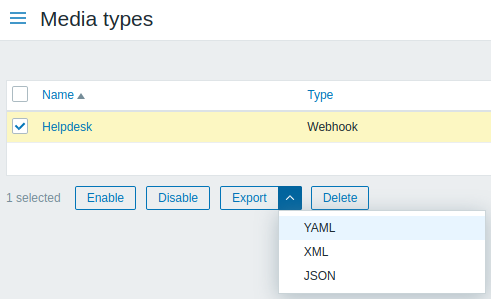
根据选择的格式,媒体类型被导出到一个默认名称的本地文件:
- zabbix_export_mediatypes.yaml - 在YAML导出(导出的默认选项)
- zabbix_export_mediatypes.xml - 在XML导出
- zabbix_export_mediatypes.json - 在JSON导出
导入时
导入媒介类型步骤如下:
- 前往: Administration → Media types
- 点击右边的导入
- 选择要导入的文件
- 在导入规则中标记所需的选项
- 点击 导入
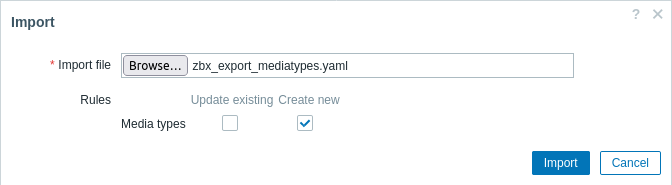
导入成功或失败的消息将在前端页面上显示。
导入规则:
| 规则 | 描述 |
|---|---|
| Update existing | 从导入文件中获取的数据更新。否则它们将不会被更新。 |
| Create new | 文件中的数据添加新元素。否则将不会添加它们。 |
| Delete missing | 在导入的文件中,该元素将会被删除。否则不会删除它们。 |
导出格式
导出到YAML:
zabbix_export:
  version: '6.0'
  date: '2021-08-31T13:34:17Z'
  media_types:
    -
      name: Pushover
      type: WEBHOOK
      parameters:
        -
          name: endpoint
          value: 'https://api.pushover.net/1/messages.json'
        -
          name: eventid
          value: '{EVENT.ID}'
        -
          name: event_nseverity
          value: '{EVENT.NSEVERITY}'
        -
          name: event_source
          value: '{EVENT.SOURCE}'
        -
          name: event_value
          value: '{EVENT.VALUE}'
        -
          name: expire
          value: '1200'
        -
          name: message
          value: '{ALERT.MESSAGE}'
        -
          name: priority_average
          value: '0'
        -
          name: priority_default
          value: '0'
        -
          name: priority_disaster
          value: '0'
        -
          name: priority_high
          value: '0'
        -
          name: priority_information
          value: '0'
        -
          name: priority_not_classified
          value: '0'
        -
          name: priority_warning
          value: '0'
        -
          name: retry
          value: '60'
        -
          name: title
          value: '{ALERT.SUBJECT}'
        -
          name: token
          value: '<PUSHOVER TOKEN HERE>'
        -
          name: triggerid
          value: '{TRIGGER.ID}'
        -
          name: url
          value: '{$ZABBIX.URL}'
        -
          name: url_title
          value: Zabbix
        -
          name: user
          value: '{ALERT.SENDTO}'
      max_sessions: '0'
      script: |
        try {
            var params = JSON.parse(value),
                request = new HttpRequest(),
                data,
                response,
                severities = [
                    {name: 'not_classified', color: '#97AAB3'},
                    {name: 'information', color: '#7499FF'},
                    {name: 'warning', color: '#FFC859'},
                    {name: 'average', color: '#FFA059'},
                    {name: 'high', color: '#E97659'},
                    {name: 'disaster', color: '#E45959'},
                    {name: 'resolved', color: '#009900'},
                    {name: 'default', color: '#000000'}
                ],
                priority;

            if (typeof params.HTTPProxy === 'string' && params.HTTPProxy.trim() !== '') {
                request.setProxy(params.HTTPProxy);
            }

            if ([0, 1, 2, 3].indexOf(parseInt(params.event_source)) === -1) {
                throw 'Incorrect "event_source" parameter given: "' + params.event_source + '".\nMust be 0-3.';
            }

            if (params.event_value !== '0' && params.event_value !== '1'
                && (params.event_source === '0' || params.event_source === '3')) {
                throw 'Incorrect "event_value" parameter given: ' + params.event_value + '\nMust be 0 or 1.';
            }

            if ([0, 1, 2, 3, 4, 5].indexOf(parseInt(params.event_nseverity)) === -1) {
                params.event_nseverity = '7';
            }

            if (params.event_value === '0') {
                params.event_nseverity = '6';
            }

            priority = params['priority_' + severities[params.event_nseverity].name] || params.priority_default;

            if (isNaN(priority) || priority < -2 || priority > 2) {
                throw '"priority" should be -2..2';
            }

            if (params.event_source === '0' && isNaN(params.triggerid)) {
                throw 'field "triggerid" is not a number';
            }

            if (isNaN(params.eventid)) {
                throw 'field "eventid" is not a number';
            }

            if (typeof params.message !== 'string' || params.message.trim() === '') {
                throw 'field "message" cannot be empty';
            }

            data = {
                token: params.token,
                user: params.user,
                title: params.title,
                message: params.message,
                url: (params.event_source === '0')
                    ? params.url + '/tr_events.php?triggerid=' + params.triggerid + '&eventid=' + params.eventid
                    : params.url,
                url_title: params.url_title,
                priority: priority
            };

            if (priority == 2) {
                if (isNaN(params.retry) || params.retry < 30) {
                    throw 'field "retry" should be a number with value of at least 30 if "priority" is set to 2';
                }

                if (isNaN(params.expire) || params.expire > 10800) {
                    throw 'field "expire" should be a number with value of at most 10800 if "priority" is set to 2';
                }

                data.retry = params.retry;
                data.expire = params.expire;
            }

            data = JSON.stringify(data);
            Zabbix.log(4, '[ Pushover Webhook ] Sending request: ' + params.endpoint + '\n' + data);

            request.addHeader('Content-Type: application/json');
            response = request.post(params.endpoint, data);

            Zabbix.log(4, '[ Pushover Webhook ] Received response with status code ' + request.getStatus() + '\n' + response);

            if (response !== null) {
                try {
                    response = JSON.parse(response);
                }
                catch (error) {
                    Zabbix.log(4, '[ Pushover Webhook ] Failed to parse response received from Pushover');
                    response = null;
                }
            }

            if (request.getStatus() != 200 || response === null || typeof response !== 'object' || response.status !== 1) {
                if (response !== null && typeof response === 'object' && typeof response.errors === 'object'
                        && typeof response.errors[0] === 'string') {
                    throw response.errors[0];
                }
                else {
                    throw 'Unknown error. Check debug log for more information.';
                }
            }

            return 'OK';
        }
        catch (error) {
            Zabbix.log(4, '[ Pushover Webhook ] Pushover notification failed: ' + error);
            throw 'Pushover notification failed: ' + error;
        }
      description: |
        Please refer to setup guide here: https://git.zabbix.com/projects/ZBX/repos/zabbix/browse/templates/media/pushover

        Set token parameter with to your Pushover application key.
        When assigning Pushover media to the Zabbix user - add user key into send to field.
      message_templates:
        -
          event_source: TRIGGERS
          operation_mode: PROBLEM
          subject: 'Problem: {EVENT.NAME}'
          message: |
            Problem started at {EVENT.TIME} on {EVENT.DATE}
            Problem name: {EVENT.NAME}
            Host: {HOST.NAME}
            Severity: {EVENT.SEVERITY}
            Operational data: {EVENT.OPDATA}
            Original problem ID: {EVENT.ID}
            {TRIGGER.URL}
        -
          event_source: TRIGGERS
          operation_mode: RECOVERY
          subject: 'Resolved in {EVENT.DURATION}: {EVENT.NAME}'
          message: |
            Problem has been resolved at {EVENT.RECOVERY.TIME} on {EVENT.RECOVERY.DATE}
            Problem name: {EVENT.NAME}
            Problem duration: {EVENT.DURATION}
            Host: {HOST.NAME}
            Severity: {EVENT.SEVERITY}
            Original problem ID: {EVENT.ID}
            {TRIGGER.URL}
        -
          event_source: TRIGGERS
          operation_mode: UPDATE
          subject: 'Updated problem in {EVENT.AGE}: {EVENT.NAME}'
          message: |
            {USER.FULLNAME} {EVENT.UPDATE.ACTION} problem at {EVENT.UPDATE.DATE} {EVENT.UPDATE.TIME}.
            {EVENT.UPDATE.MESSAGE}

            Current problem status is {EVENT.STATUS}, age is {EVENT.AGE}, acknowledged: {EVENT.ACK.STATUS}.
        -
          event_source: DISCOVERY
          operation_mode: PROBLEM
          subject: 'Discovery: {DISCOVERY.DEVICE.STATUS} {DISCOVERY.DEVICE.IPADDRESS}'
          message: |
            Discovery rule: {DISCOVERY.RULE.NAME}

            Device IP: {DISCOVERY.DEVICE.IPADDRESS}
            Device DNS: {DISCOVERY.DEVICE.DNS}
            Device status: {DISCOVERY.DEVICE.STATUS}
            Device uptime: {DISCOVERY.DEVICE.UPTIME}

            Device service name: {DISCOVERY.SERVICE.NAME}
            Device service port: {DISCOVERY.SERVICE.PORT}
            Device service status: {DISCOVERY.SERVICE.STATUS}
            Device service uptime: {DISCOVERY.SERVICE.UPTIME}
        -
          event_source: AUTOREGISTRATION
          operation_mode: PROBLEM
          subject: 'Autoregistration: {HOST.HOST}'
          message: |
            Host name: {HOST.HOST}
            Host IP: {HOST.IP}
            Agent port: {HOST.PORT}
元素标签
下表解释了元素标签值。
| 元素 | 元素属性 | 是否必须 | 类型 | 适用范围1 | 描述 |
|---|---|---|---|---|---|
| media_types | - | 媒体类型的根元素。 | |||
| name | x | string |
媒介类型的名称。 | ||
| type | x | string |
0 - EMAIL 1 - SMS 2 - SCRIPT 4 - WEBHOOK |
媒体类型所使用的数据传输方式。 | |
| status | - | string |
0 - ENABLED (默认) 1 - DISABLED |
是否启用媒体类型。 | |
| max_sessions | - | integer |
Possible values for SMS: 1 - (默认) 其他媒体类型的可能值:0- 100,0 - unlimited |
可并行处理的警报的最大数量。 | |
| attempts | - | integer |
1-10 (默认: 3) | 发送警报的最大尝试次数。 | |
| attempt_interval | - | string |
0-60s (默认: 10s) | 重试间隔时间。 接受带后缀的秒和时间单位。 |
|
| description | - | string |
媒体类型描述。 | ||
| message_templates | - | 媒体类型消息模板的根元素。 | |||
| event_source | x | string |
0 - TRIGGERS 1 - DISCOVERY 2 - AUTOREGISTRATION 3 - INTERNAL |
事件源。 | |
| operation_mode | x | string |
0 - PROBLEM 1 - RECOVERY 2 - UPDATE |
操作模式。 | |
| subject | - | string |
信息主题。 | ||
| message | - | string |
信息主体。 | ||
| 仅用于 e-mail 媒介类型 | |||||
| smtp_server | x | string |
SMTP 服务。 | ||
| smtp_port | - | integer |
默认: 25 | SMTP服务器连接的端口。 | |
| smtp_helo | x | string |
SMTP helo。 | ||
| smtp_email | x | string |
将发送通知的电子邮件地址。 | ||
| smtp_security | - | string |
0 - NONE (默认) 1 - STARTTLS 2 - SSL_OR_TLS |
要使用的SMTP连接安全级别。 | |
| smtp_verify_host | - | string |
0 - NO (默认) 1 - YES |
SSL验证SMTP主机。 如果smtp_security为STARTTLS或SSL_OR_TLS,可选。 | |
| smtp_verify_peer | - | string |
0 - NO (默认) 1 - YES |
SSL验证peer SMTP。 如果smtp_security为STARTTLS或SSL_OR_TLS,可选。 | |
| smtp_authentication | - | string |
0 - NONE (默认) 1 - PASSWORD |
SMTP身份验证方法使用。 | |
| username | - | string |
用户名。 | ||
| password | - | string |
认证密码。 | ||
| content_type | - | string |
0 - TEXT 1 - HTML (默认) |
信息格式。 | |
| 仅 SMS 媒介类型使用 | |||||
| gsm_modem | x | string |
GSM modem的序列号。 | ||
| 仅脚本媒介类型使用 | |||||
| script name | x | string |
脚本名称。 | ||
| parameters | - | 脚本参数的根元素。 | |||
| 仅webhook 媒介类型使用 | |||||
| script | x | string |
脚本。 | ||
| timeout | - | string |
1-60s (默认: 30s) | Javascript 脚本 HTTP 请求超时间隔。 | |
| process_tags | - | string |
0 - NO (默认) 1 - YES |
是否处理返回的标签。 | |
| show_event_menu | - | string |
0 - NO (默认) 1 - YES |
如果{EVENT.TAGS.*}在事件_menu_url和事件_menu_name字段中成功解析了,该字段表示在事件菜单中存在条目。 | |
| event_menu_url | - | string |
事件菜单入口的URL。支持{EVENT.TAGS.*} 宏。 | ||
| event_menu_name | - | string |
事件菜单项的名称。支持{EVENT.TAGS.*} 宏。 | ||
| parameters | - | webhook媒体类型参数的根元素。 | |||
| name | x | string |
Webhook参数名称。 | ||
| value | - | string |
Webhook参数值。 | ||
附注
1 对于字符串值,只有字符串将被导出(例如“EMAIL”),而不使用该表中使用的编号。 该表中的范围值(对应于API值)的编号仅用于排序。