
7 Gestandaardiseerde sjablonen voor netwerkapparaten
To provide monitoring for network devices like switches and routers, Zabbix offers specific models for the device chassis and network interfaces. These models help monitor various aspects of network devices. Starting from Zabbix 3.4, templates are provided for many families of network devices. These templates cover a range of monitoring and inventory collection tasks for network devices. Here's an overview of what these templates offer:
Chassis Monitoring:
- Chassis fault monitoring, including power supplies, fans, and temperature.
- Overall chassis status monitoring.
- Chassis performance monitoring, including CPU and memory items.
- Chassis inventory collection, gathering information like serial numbers, model names, and firmware versions.
Network Interface Monitoring:
- Monitoring network interfaces using standard MIBs like IF-MIB and EtherLike-MIB.
- Tracking interface status, interface traffic load, and duplex status for Ethernet interfaces.
These network device templates are available in the following ways:
-
In New Installations: You can find these templates in the Zabbix frontend under Data collection → Templates.
-
Upgrading from Previous Versions: Templates can be found in the zabbix/templates directory of the downloaded latest Zabbix version. Import these templates manually from this directory through the Zabbix frontend by going to Data collection → Templates.
If you decide to import the new out-of-the-box templates, it's recommended to update the @Network interfaces for discovery global regular expression. This can help filter out unnecessary interfaces during the discovery process. You can update it with the following expressions to exclude loopback and null interfaces on most systems:
Result is FALSE: ^Software Loopback Interface
Result is FALSE: ^(In)?[lL]oop[bB]ack[0-9._]*$
Result is FALSE: ^NULL[0-9.]*$
Result is FALSE: ^[lL]o[0-9.]*$
Result is FALSE: ^[sS]ystem$
Result is FALSE: ^Nu[0-9.]*$
This way, you can ensure that only relevant network interfaces are discovered and monitored by Zabbix.
Here is the continuation of the list of device families for which templates are available in Zabbix:
| Template name | Vendor | Device family | Known models | OS | MIBs used | Tags |
|---|---|---|---|---|---|---|
| MikroTik SNMP | MikroTik | MikroTik RouterOS devices | MikroTik CCR1016-12G, MikroTik RB2011UAS-2HnD, MikroTik 912UAG-5HPnD, MikroTik 941-2nD, MikroTik 951G-2HnD, MikroTik 1100AHx2 | RouterOS | MIKROTIK-MIB, HOST-RESOURCES-MIB | Certified |
| QTech QSW SNMP | QTech | Qtech devices | Qtech QSW-2800-28T | - | QTECH-MIB, ENTITY-MIB | Performance Inventory |
| Ubiquiti AirOS SNMP | Ubiquiti | Ubiquiti AirOS wireless devices | NanoBridge, NanoStation, Unifi | AirOS | FROGFOOT-RESOURCES-MIB, IEEE802dot11-MIB | Performance |
| HP Comware HH3C SNMP | HP | HP (H3C) Comware | HP A5500-24G-4SFP HI Switch | HH3C-ENTITY-EXT-MIB, ENTITY-MIB | Certified | |
| HP Enterprise Switch SNMP | HP | HP Enterprise Switch | HP ProCurve J4900B Switch 2626, HP J9728A 2920-48G Switch | STATISTICS-MIB, NETSWITCH-MIB, HP-ICF-CHASSIS, ENTITY-MIB, SEMI-MIB | Certified | |
| TP-LINK SNMP | TP-LINK | TP-LINK | T2600G-28TS v2.0 | TPLINK-SYSMONITOR-MIB, TPLINK-SYSINFO-MIB | Performance Inventory | |
| Netgear Fastpath SNMP | Netgear | Netgear Fastpath | M5300-28G | FASTPATH-SWITCHING-MIB, FASTPATH-BOXSERVICES-PRIVATE-MIB | Fault Inventory |
This completes the list of device families and associated templates available in Zabbix for network device monitoring. If you have any specific questions or need further assistance, feel free to ask!
Template ontwerp
Templates zijn ontworpen met het volgende in gedachten:
- Gebruikersmacro's worden zoveel mogelijk gebruikt, zodat triggers kunnen worden aangepast door de gebruiker;
- Laag-niveau ontdekking wordt zoveel mogelijk gebruikt om het aantal niet-ondersteunde items te minimaliseren;
- Alle templates zijn afhankelijk van "Template ICMP Ping", zodat alle apparaten ook worden gecontroleerd via ICMP;
- Items gebruiken geen MIB's - SNMP OIDs worden gebruikt in items en bij laag-niveau ontdekkingen. Het is dus niet nodig om MIB's in Zabbix te laden voor de templates om te werken;
- Loopback-netwerkinterfaces worden gefilterd tijdens het ontdekken, evenals interfaces met ifAdminStatus = down(2);
- 64-bits tellers worden gebruikt vanuit IF-MIB::ifXTable waar mogelijk. Indien dit niet wordt ondersteund, worden standaard 32-bits tellers gebruikt.
Alle ontdekte netwerkinterfaces hebben een trigger die de operationele status (link) bewaakt, bijvoorbeeld:
{$IFCONTROL:"{#IFNAME}"}=1 en last(/Alcatel Timetra TiMOS SNMP/net.if.status[ifOperStatus.{#SNMPINDEX}])=2 en (last(/Alcatel Timetra TiMOS SNMP/net.if.status[ifOperStatus.{#SNMPINDEX}],#1)<>last(/Alcatel Timetra TiMOS SNMP/net.if.status[ifOperStatus.{#SNMPINDEX}],#2))- Als je deze voorwaarde niet wilt bewaken voor een specifieke interface, maak dan een gebruikersmacro met context en de waarde 0. Bijvoorbeeld:
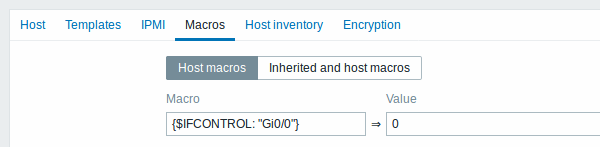
waar Gi0/0 staat voor {#IFNAME}. Op die manier wordt de trigger niet meer gebruikt voor deze specifieke interface.
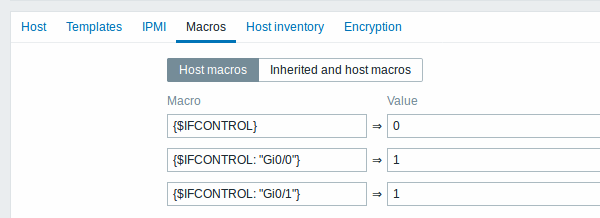
- Je kunt ook het standaardgedrag wijzigen voor alle triggers, zodat ze niet worden geactiveerd, en deze trigger alleen activeren voor een beperkt aantal interfaces zoals uplinks:
Labels
- Prestatie - MIB's van apparaatfamilies bieden een manier om CPU- en geheugenitems te bewaken;
- Storing - MIB's van apparaatfamilies bieden een manier om ten minste één temperatuursensor te bewaken;
- Inventaris - MIB's van apparaatfamilies bieden een manier om ten minste het serienummer en de modelnaam van het apparaat te verzamelen;
- Gecertificeerd - alle drie de belangrijkste categorieën hierboven zijn gedekt.