
3 身份认证
概述
在 Administration → Authentication 中,可以改变Zabbix用户身份认证方法。可用的方法为:内部认证(internal),LDAP和HTTP认证。
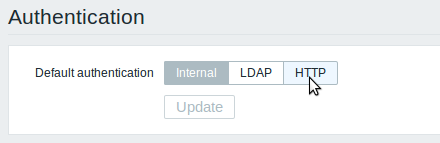
默认情况下,使用内部Zabbix认证。 要更改的话,请点击认需要选择的证方法按钮,然后按 Update更新
Internal
使用内部Zabbix认证。
LDAP
外部LDAP认证可用于检查用户名和密码。 请注意,该用户也必须存在于Zabbix中,但是它的Zabbix密码将不会被使用
Zabbix LDAP验证至少要与Microsoft Active Directory和OpenLDAP一起工作
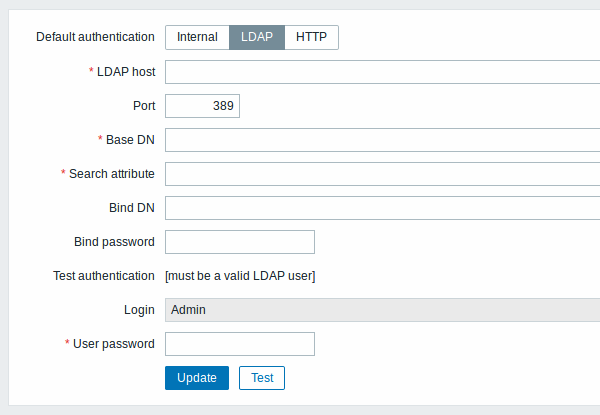
配置参数:
| 参数r 描 | |
|---|---|
| LDAP host | LDAP服务器名称。例如: ldap://ldap.zabbix.com 安全LDAP服务器使用 ldaps 协议。 ldaps://ldap.zabbix.com |
| Port | LDAP服务器接口,默认为389。\\安全 LDAP连接端口号一般为636。 |
| Base DN | 寻找账户的基本路径: ou=Users,ou=system (for OpenLDAP), DC=company,DC=com (for Microsoft Active Directory) |
| Search attribute | 用户搜索的LDAP 账户属性: uid (for OpenLDAP), sAMAccountName (for Microsoft Active Directory) |
| Bind DN | 通过LDAP服务器进行绑定和搜索的LDAP帐户,例如: uid=ldap_search,ou=system (for OpenLDAP), CN=ldap_search,OU=user_group,DC=company,DC=com (for Microsoft Active Directory) Required, 匿名绑定目前不支持。 |
| Bind password | 通过LDAP服务器进行绑定和搜索的LDAP账户密码。 |
| Test authentication | 测试部分的标题 |
| Login | 测试用户名称(当前Zabbix前端登录的). 用户名必须在LDAP服务器上存在。. 如果无法验证测试用户,Zabbix将不会激活LDAP身份验证。 |
| User password | 测试用户的LDAP密码。 |
<note
tip>建议创建一个单独的LDAP帐户(绑定DN),以LDAP中的最小权限执行绑定和搜索,而不使用真正的用户帐户(用于登录Zabbix前端)。
这种方法提供更多的安全性,并且用户在LDAP服务器中更改密码时,不需要更改
Bind password绑定密码 。在上表中, ldap_search 是帐号名。
:::
某些用户组仍然可以由Zabbix授权。 这些组必须具有内部的前端访问设置为内部认证)将被Apache授权,而不是由Zabbix授权!
HTTP
可以使用基于Apache(HTTP)的身份验证来检查用户名和密码。 请注意,用户也必须存在于Zabbix中,但是它的Zabbix密码将不会被使用。
小心! 确保Apache身份验证已配置并正常工作,然后再打开它。
在Apache身份认证验证的情况下,所有用户(即使 前端访问 设置为内部认证)将被Apache授权,而不是由Zabbix授权!
3 Authentication
Overview
In Administration → Authentication the user authentication method to Zabbix can be changed. The available methods are internal, LDAP and HTTP authentication.
By default, internal Zabbix authentication is used. To change, click on the button with the method name and press Update.
Internal
Internal Zabbix authentication is used.
LDAP
External LDAP authentication can be used to check user names and passwords. Note that a user must exist in Zabbix as well, however its Zabbix password will not be used.
Zabbix LDAP authentication works at least with Microsoft Active Directory and OpenLDAP.
Configuration parameters:
| Parameter | Description |
|---|---|
| LDAP host | Name of LDAP server. For example: ldap://ldap.zabbix.com For secure LDAP server use ldaps protocol. ldaps://ldap.zabbix.com With OpenLDAP 2.x.x and later, a full LDAP URI of the form ldap://hostname:port or ldaps://hostname:port may be used. |
| Port | Port of LDAP server. Default is 389. For secure LDAP connection port number is normally 636. Not used when using full LDAP URIs. |
| Base DN | Base path to search accounts: ou=Users,ou=system (for OpenLDAP), DC=company,DC=com (for Microsoft Active Directory) |
| Search attribute | LDAP account attribute used for search: uid (for OpenLDAP), sAMAccountName (for Microsoft Active Directory) |
| Bind DN | LDAP account for binding and searching over the LDAP server, examples: uid=ldap_search,ou=system (for OpenLDAP), CN=ldap_search,OU=user_group,DC=company,DC=com (for Microsoft Active Directory) Required, anonymous binding is not supported. |
| Bind password | LDAP password of the account for binding and searching over the LDAP server. |
| Test authentication | Header of a section for testing |
| Login | Name of a test user (which is currently logged in the Zabbix frontend). This user name must exist in the LDAP server. Zabbix will not activate LDAP authentication if it is unable to authenticate the test user. |
| User password | LDAP password of the test user. |
In case of trouble with certificates, to make a
secure LDAP connection (ldaps) work you may need to add a
TLS_REQCERT allow line to the /etc/openldap/ldap.conf configuration
file. It may decrease the security of connection to the LDAP
catalog.
It is recommended to create a separate LDAP account
(Bind DN) to perform binding and searching over the LDAP server with
minimal privileges in the LDAP instead of using real user accounts (used
for logging in the Zabbix frontend).
Such an approach provides more security and does not require changing
the Bind password when the user changes his own password in the LDAP
server.
In the table above it's ldap_search account name.
Some user groups can still be authenticated by Zabbix. These groups must have frontend access set to Internal.
HTTP
Apache-based (HTTP) authentication can be used to check user names and passwords. Note that a user must exist in Zabbix as well, however its Zabbix password will not be used.
Be careful! Make sure that Apache authentication is configured and works properly before switching it on.
In case of Apache authentication all users (even with frontend access set to Internal) will be authenticated by Apache, not by Zabbix!