
6 事件关联
概述
在配置 - >事件关联中,用户可以配置和维护Zabbix事件的全局关联规则。
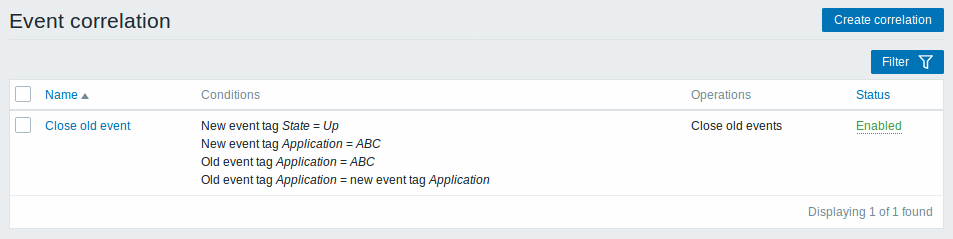
显示数据:
| 列 | 述 |
|---|---|
| Name | 关联规则的名称。 单击关联规则名称打开规则 配置表. |
| Conditions | 显示关联规则条件。 |
| Operations | 显示关联规则操作。 |
| Status | 显示关联规则状态 - 启用 或者禁用. 点击状态可以更改。 |
点击右上角 建立关联 配置新的关联规则。
批量编辑选项
列表下方的按钮提供了一些批量编辑选项:
- Enable - 将相关关联状态更改为启用
- Disable -将相关关联状态更改为 禁用
- Delete - 删除关联规则
要使用这些选项,请在相应的关联规则之前标记复选框,然后单击所需的按钮。
过滤器
由于列表可能包含多个关联规则,可能需要过滤出您真正需要的那些。
过滤器 链接在相关规则列表上方可用。 如果您点击它,则可以使用过滤器,您可以通过名称和状态过滤关联规则。

6 Event correlation
Overview
In the Configuration → Event correlation section users can configure and maintain global correlation rules for Zabbix events.
Displayed data:
| Column | Description |
|---|---|
| Name | Name of the correlation rule. Clicking on the correlation rule name opens the rule configuration form. |
| Conditions | Correlation rule conditions are displayed. |
| Operations | Correlation rule operations are displayed. |
| Status | Correlation rule status is displayed - Enabled or Disabled. By clicking on the status you can change it. |
To configure a new correlation rule, click on the Create correlation button in the top right-hand corner.
Mass editing options
Buttons below the list offer some mass-editing options:
- Enable - change the correlation rule status to Enabled
- Disable - change the correlation rule status to Disabled
- Delete - delete the correlation rules
To use these options, mark the checkboxes before the respective correlation rules, then click on the required button.
Filter
As the list may contain a number of correlation rules, it may be needed to filter out the ones you really need.
The Filter link is available above the list of correlation rules. If you click on it, a filter becomes available where you can filter correlation rules by name and status.