
4 网络拓扑图
概述
网络拓扑图 导出 包含:
- 所有相关的图片
- 拓扑图结构 - 所有拓扑图设置,所有包含元素及其设置,拓扑图链接和拓扑图链接状态指示器
未导出的是主机组,主机,触发器,其他拓扑图或可能与导出的拓扑图相关的任何其他元素。因此,如果缺少拓扑图所引用的元素中的任何一个,导入将失败。
自Zabbix 1.8.2开始支持网络拓扑图导出/导入。
导出
要导出网络拓扑图,请执行以下操作:
- 点击: 监测中 → 拓扑图
- 标记要导出的网络拓扑图的复选框
- 单击列表下方的导出按钮
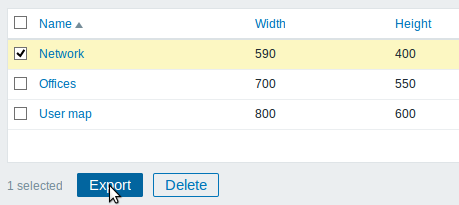
选中的拓扑图以默认名称 zabbix_export_maps.xml 导出到本地的XML文件里。
导入
要导入网络拓扑图,请执行以下操作:
- 点击: 监测中 → 拓扑图
- 点击右侧的导入按钮
- 选择导入文件
- 在导入规则中标记所需选项
- 单击导入按钮
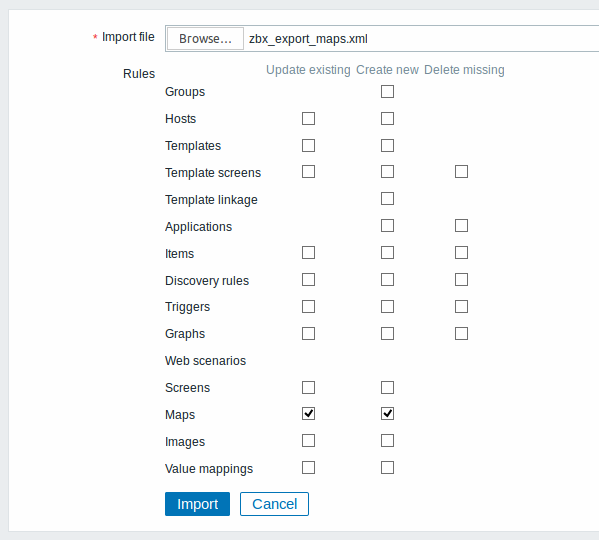
所有必填输入字段都标有红色星号。
导入成功或失败的消息将显示在前端。
导入规则:
| 规则 说 | |
|---|---|
| 更新现有的 已有拓扑 | 将使用从导入文件中的数据更新,失败则不会更新。 |
| 创建新的 导入操 | 会将导入文件中的数据添加为新的拓扑图,失败则不会添加。 |
如果取消选中所有拓扑图选项,勾选图片的相应选项的话,则仅导入图片。图片导入仅适用于Zabbix超级管理员用户。
<note warning>如果替换已有图片,则会影响所有使用此图片的拓扑图。 :::
导出格式
导出一个小型网络拓扑图,其中包含三个元素、图片以及一些相互的链接。请注意,图片被截断以节省空间。
<?xml version="1.0" encoding="UTF-8"?>
<zabbix_export>
    <version>4.0</version>
    <date>2016-10-05T08:16:20Z</date>
    <images>
        <image>
            <name>Server_(64)</name>
            <imagetype>1</imagetype>
            <encodedImage>iVBOR...SuQmCC</encodedImage>
        </image>
        <image>
            <name>Workstation_(64)</name>
            <imagetype>1</imagetype>
            <encodedImage>iVBOR...SuQmCC</encodedImage>
        </image>
        <image>
            <name>Zabbix_server_3D_(96)</name>
            <imagetype>1</imagetype>
            <encodedImage>iVBOR...ggg==</encodedImage>
        </image>
    </images>
    <maps>
        <map>
            <name>Network</name>
            <width>590</width>
            <height>400</height>
            <label_type>0</label_type>
            <label_location>0</label_location>
            <highlight>1</highlight>
            <expandproblem>0</expandproblem>
            <markelements>1</markelements>
            <show_unack>0</show_unack>
            <severity_min>2</severity_min>
            <grid_size>40</grid_size>
            <grid_show>1</grid_show>
            <grid_align>1</grid_align>
            <label_format>0</label_format>
            <label_type_host>2</label_type_host>
            <label_type_hostgroup>2</label_type_hostgroup>
            <label_type_trigger>2</label_type_trigger>
            <label_type_map>2</label_type_map>
            <label_type_image>2</label_type_image>
            <label_string_host/>
            <label_string_hostgroup/>
            <label_string_trigger/>
            <label_string_map/>
            <label_string_image/>
            <expand_macros>0</expand_macros>
            <background/>
            <iconmap/>
            <urls/>
            <selements>
                <selement>
                    <elementtype>0</elementtype>
                    <label>Host 1</label>
                    <label_location>-1</label_location>
                    <x>476</x>
                    <y>28</y>
                    <elementsubtype>0</elementsubtype>
                    <areatype>0</areatype>
                    <width>200</width>
                    <height>200</height>
                    <viewtype>0</viewtype>
                    <use_iconmap>0</use_iconmap>
                    <selementid>8</selementid>
                    <elements>
                        <element>
                            <host>Discovered host</host>
                        </element>
                    </elements>
                    <icon_off>
                        <name>Server_(64)</name>
                    </icon_off>
                    <icon_on/>
                    <icon_disabled/>
                    <icon_maintenance/>
                    <application/>
                    <urls/>
                </selement>
                <selement>
                    <elementtype>0</elementtype>
                    <label>Zabbix server</label>
                    <label_location>-1</label_location>
                    <x>252</x>
                    <y>50</y>
                    <elementsubtype>0</elementsubtype>
                    <areatype>0</areatype>
                    <width>200</width>
                    <height>200</height>
                    <viewtype>0</viewtype>
                    <use_iconmap>0</use_iconmap>
                    <selementid>6</selementid>
                    <elements>
                        <element>
                            <host>Zabbix server</host>
                        </element>
                    </elements>
                    <icon_off>
                        <name>Zabbix_server_3D_(96)</name>
                    </icon_off>
                    <icon_on/>
                    <icon_disabled/>
                    <icon_maintenance/>
                    <application/>
                    <urls/>
                </selement>
                <selement>
                    <elementtype>0</elementtype>
                    <label>New host</label>
                    <label_location>-1</label_location>
                    <x>308</x>
                    <y>230</y>
                    <elementsubtype>0</elementsubtype>
                    <areatype>0</areatype>
                    <width>200</width>
                    <height>200</height>
                    <viewtype>0</viewtype>
                    <use_iconmap>0</use_iconmap>
                    <selementid>7</selementid>
                    <elements>
                        <element>
                            <host>Zabbix host</host>
                        </element>
                    </elements>
                    <icon_off>
                        <name>Workstation_(64)</name>
                    </icon_off>
                    <icon_on/>
                    <icon_disabled/>
                    <icon_maintenance/>
                    <application/>
                    <urls/>
                </selement>
            </selements>
            <links>
                <link>
                    <drawtype>0</drawtype>
                    <color>008800</color>
                    <label/>
                    <selementid1>6</selementid1>
                    <selementid2>8</selementid2>
                    <linktriggers/>
                </link>
                <link>
                    <drawtype>2</drawtype>
                    <color>00CC00</color>
                    <label>100MBps</label>
                    <selementid1>7</selementid1>
                    <selementid2>6</selementid2>
                    <linktriggers>
                        <linktrigger>
                            <drawtype>0</drawtype>
                            <color>DD0000</color>
                            <trigger>
                                <description>Zabbix agent on {HOST.NAME} is unreachable for 5 minutes</description>
                                <expression>{Zabbix host:agent.ping.nodata(5m)}=1</expression>
                                <recovery_expression/>
                            </trigger>
                        </linktrigger>
                    </linktriggers>
                </link>
            </links>
        </map>
    </maps>
</zabbix_export>
元素标签
元素标签值在下表中说明。
| 元素 元 | 属性 类型 | 范围 | 说明 | |
|---|---|---|---|---|
| images | 图片的根元素 | |||
| image | 单独的图片 | |||
| name | 字符串 |
唯一 | 片名称 | |
| imagetype | 整型 1 |
- 图片\ 图片类2 - 背景 | ||
| encodedImage | Base64编码图片 | |||
| maps | 拓扑图的根元素 | |||
| map | 单独的拓扑图 | |||
| name | 字符串 |
唯一 | 扑图名称 | |
| width | 整型 |
拓 | 图宽度,以像素为单位 | |
| height | 整型 |
拓 | 图宽度,以像素为单位 | |
| label_type | 整型 0 |
- 标签\ 拓扑图1 - 主机IP地址 2 - 元素名称 3 - 仅状态 4 - 无 |
素标签类型 | |
| label_location | 整型 0 |
- 底部\ 默认情1 - 左 2 - 右 3 - 顶部 |
下拓扑图元素标签位置 | |
| highlight | 整型 0 |
- 否\ 为激1 - 是 | 触发器和主机状态启用图标高亮显示 | |
| expandproblem | 整型 0 |
- 否\ 显示1 - 是 | 有单个问题的触发器 | |
| markelements | 整型 0 |
- 否\ 高亮1 - 是 | 示最近更改其状态的拓扑图元素 | |
| show_unack | 整型 0 |
- 所有问题的数量\ 问题显示1 - 未确认问题数量 2 - 分别统计已确认和未确认的问题数量 |
||
| severity_min | 整型 0 |
- 未分类\ 默认情况1 - 信息 2 - 警告 3 - 一般严重 4 - 严重 5 - 灾难 |
在拓扑图上的显示最小触发严重程度 | |
| show_suppressed | 整型 0 |
- 否\ 是否1 - 是 | 要在主机维护时,抑制问题显示(不显示) | |
| grid_size | 整型 2 |
, 40, 50, 75 或者 100 如果元 | 属性“grid_show”等于1,该值为拓扑图网格的单元格大小(以像素为单位) | |
| grid_show | 整型 0 |
- 是\ 在拓1 - 否 | 图配置中显示网格 | |
| grid_align | 整型 0 |
- 是\ 在拓1 - 否 | 图配置中自动对齐图标 | |
| label_format | 整型 0 |
- 否\ 使用1 - 是 | 级标签配置 | |
| label_type_host | 整型 0 |
- 标签\ 如果元1 - 主机IP地址 2 - 元素名称 3 - 仅状态 4 - 无 5 - 自定义标签 |
属性“label_format”等于1,该值显示为主机标签 | |
| label_type_hostgroup | 整型 0 |
- 标签\ 如果元2 - 元素名称 3 - 仅状态 4 - 无 5 - 自定义标签 |
属性“label_format”等于1,该值显示为主机组标签 | |
| label_type_trigger | 整型 0 |
- 标签\ 如果元2 - 元素名称 3 - 仅状态 4 - 无 5 - 自定义标签 |
属性“label_format”等于1,该值显示为触发器标签 | |
| label_type_map | 整型 0 |
- 标签\ 如果元2 - 元素名称 3 - 仅状态 4 - 无 5 - 自定义标签 |
属性“label_format”等于1,该值显示为拓扑图标签 | |
| label_type_image | 整型 0 |
- 标签\ 如果元2 - 元素名称 4 - 无 5 - 自定义标签 |
属性“label_format”等于1,该值显示为图像标签 | |
| label_string_host | 字符串 |
如果 | 素属性“label_type_host”等于5,该值为主机元素的自定义标签 | |
| label_string_hostgroup | 字符串 |
如果 | 素属性“label_type_hostgroup”等于5,该值为主机组元素的自定义标签 | |
| label_string_trigger | 字符串 |
如果 | 素属性“label_type_trigger”等于5,该值为触发元素的自定义标签 | |
| label_string_map | 字符串 |
如果 | 素属性“label_type_map”等于5,该值为拓扑图元素的自定义标签 | |
| label_string_image | 字符串 |
如果 | 素属性“label_type_image”等于5,该值为图片元素的自定义标签 | |
| expand_macros | 字符串 0 |
否\ 在拓扑1 - 是 | 配置中展开标签中的宏 | |
| background | id |
如果元素属性“imagetype”等于2,该值为背景图像的ID(若有的话) | ||
| iconmap | id |
图标映射的ID(若有的话) | ||
| urls | ||||
| url | 单独的URL | |||
| name | 字符串 |
链接 | 称 | |
| url | 字符串 |
链接 | RL | |
| elementtype | 整型 0 |
- 主机\ 链接所1 - 拓扑图 2 - 触发器 3 - 主机组 4 - 图像 |
的拓扑图监控项类型 | |
| selements | ||||
| selement | 单独的拓扑图元素 | |||
| elementtype | 整型 0 |
- 主机\ 拓扑图1 - 拓扑图 2 - 触发器 3 - 主机组 4 - 图像 |
素类型 | |
| label | 字符串 |
图标 | 签 | |
| label_location | 整型 - |
- 使用拓扑图默认 0 - 底部 1 - 左 2 - 右 3 - 顶部 |
||
| x | 整型 |
X | 上的位置 | |
| y | 整型 |
Y | 上的位置 | |
| elementsubtype | 整型 0 |
- 单个主机组\ 如果元素属性1 - 所有主机组 | ElementType”等于3,该值为元素子类型 | |
| areatype | 整型 0 |
- 与整个拓扑图相同\ 如果元素属性“el1 - 自定义大小 | mentsubtype”等于1,该值为区域大小 | |
| width | 整型 |
如 | 元素属性“areatype”等于1,该值为面积宽度 | |
| height | 整型 |
如 | 元素属性“areatype”等于1,该值为面积高度 | |
| viewtype | 整型 0 |
- 均匀地放在该区域 如果元素属性“el | mentsubtype”等于1,该值为区域放置算法 | |
| use_iconmap | 整型 0 |
- 否\ 使用1 - 是 | 元素的图标映射。 仅在拓扑图级别激活图标映射时才相关 | |
| selementid | id |
唯一元素记录ID。 | ||
| application | 字符串 |
应用 | 名称过滤器。 如果给定了应用集程序名称,则只会在拓扑图上显示属于给定应用集程序的触发器问题 | |
| elements | ||||
| element | 在拓扑图上表示的单个Zabbix实体(拓扑图,主机组,主机等) | |||
| host | ||||
| icon_off | 元素处于“正常”状态时使用的图像 | |||
| icon_on | 元素处于“问题”状态时使用的图像 | |||
| icon_disabled | 禁用元素时要使用的图像 | |||
| icon_maintenance | 元素处于维护状态时使用的图像 | |||
| name | 字符串 |
唯一 | 图片名称 | |
| links | ||||
| link | 拓扑图元素之间的单个链接 | |||
| drawtype | 整型 0 |
- 线条\ 线条类2 - 粗线条 3 - 虚线 4 - 中划线 |
||
| color | 字符串 |
链接 | 色(6个符号,十六进制) | |
| label | 字符串 |
链接 | 签 | |
| selementid1 | id |
要连接的一个元素的ID | ||
| selementid2 | id |
要连接的其他元素的ID | ||
| linktriggers | ||||
| linktrigger | 单独的链接状态指示灯 | |||
| drawtype | 整型 0 |
- 线条\ 触发器2 - 粗线条 3 - 虚线 4 - 中划线 |
于“问题”状态时的链接样式 | |
| color | 字符串 |
当触 | 器处于“问题”状态时,链接颜色(6个符号,十六进制) | |
| trigger | 触发器用于指示链路状态 | |||
| description | 字符串 |
触发 | 名称 | |
| expression | 字符串 |
触发 | 表达式 | |
| recovery_expression | 字符串 |
触发 | 恢复表达式 | |