

14 ODBC figyelés
Áttekintés
Az ODBC-figyelés az Adatbázis-figyelő elemtípusnak felel meg a Zabbix frontend.
Az ODBC egy C programozási nyelvű középső szoftver API az adatbázis elérésére menedzsment rendszerek (DBMS). Az ODBC koncepciót a Microsoft fejlesztette ki és később más platformokra is portolták.
A Zabbix bármilyen adatbázist lekérdezhet, amelyet az ODBC támogat. Ehhez A Zabbix nem csatlakozik közvetlenül az adatbázisokhoz, hanem az ODBC-t használja interfész és ODBC-ben beállított illesztőprogramok. Ez a funkció többet tesz lehetővé különböző adatbázisok hatékony monitorozása többféle célra - a például adott adatbázis-sorok, használati statisztikák és így tovább ellenőrzése. A Zabbix támogatja a unixODBC-t, amely az egyik leggyakrabban használt nyílt forrás ODBC API implementációk.
::: Fontos Lásd még az ismert issues az ODBC-hez ellenőrzi. :::
UnixODBC telepítése
A unixODBC telepítésének javasolt módja a Linux operációs rendszer használata rendszer alapértelmezett csomagtárolói. A legnépszerűbb Linuxban disztribúciók A unixODBC alapértelmezés szerint benne van a csomagtárban. Ha nem érhető el, akkor a unixODBC honlapján szerezhető be: http://www.unixodbc.org/download.html.
UnixODBC telepítése RedHat/Fedora alapú rendszerekre a yum használatával csomagkezelő:
shell> yum -y install unixODBC unixODBC-develUnixODBC telepítése SUSE alapú rendszerekre a zypper csomag használatával menedzser:
# zypper in unixODBC-develA unixODBC-devel csomag szükséges a Zabbix fordításához unixODBC támogatás.
UnixODBC illesztőprogramok telepítése
Az adatbázishoz telepíteni kell egy unixODBC adatbázis-illesztőprogramot, amely figyelni fogják. A unixODBC rendelkezik a támogatott adatbázisok listájával és illesztőprogramok: http://www.unixodbc.org/drivers.html. Néhány Linuxban A disztribúciók adatbázis-illesztőprogramjait a csomagtárolók tartalmazzák. MySQL adatbázis-illesztőprogram telepítése RedHat/Fedora alapú rendszerekre a használatával a yum csomagkezelő:
shell> yum install mysql-connector-odbcMySQL adatbázis-illesztőprogram telepítése SUSE alapú rendszerekre a zypper csomagkezelő:
zypper in MyODBC-unixODBCConfiguring unixODBC
ODBC configuration is done by editing the odbcinst.ini and odbc.ini files. To verify the configuration file location, type:
shell> odbcinst -jodbcinst.ini is used to list the installed ODBC database drivers:
[mysql]
Description = ODBC for MySQL
Driver      = /usr/lib/libmyodbc5.so
Parameter details:
| Attribute | Description |
|---|---|
| mysql | Database driver name. |
| Description | Database driver description. |
| Driver | Database driver library location. |
odbc.ini is used to define data sources:
[test]
Description = MySQL test database
Driver      = mysql
Server      = 127.0.0.1
User        = root
Password    =
Port        = 3306
Database    = zabbix
Parameter details:
| Attribute | Description |
|---|---|
| test | Data source name (DSN). |
| Description | Data source description. |
| Driver | Database driver name - as specified in odbcinst.ini |
| Server | Database server IP/DNS. |
| User | Database user for connection. |
| Password | Database user password. |
| Port | Database connection port. |
| Database | Database name. |
To verify if ODBC connection is working successfully, a connection to database should be tested. That can be done with the isql utility (included in the unixODBC package):
shell> isql test
+---------------------------------------+
| Connected!                            |
|                                       |
| sql-statement                         |
| help [tablename]                      |
| quit                                  |
|                                       |
+---------------------------------------+
SQL>
Zabbix fordítása ODBC támogatással
Az ODBC támogatás engedélyezéséhez a Zabbixot a következőkkel kell lefordítani zászló: --with-unixodbc[=ARG] · use odbc driver against unixODBC package
További információ a Zabbix telepítéséről a forrás kód.
Item configuration in Zabbix frontend
Configure a database monitoring item.
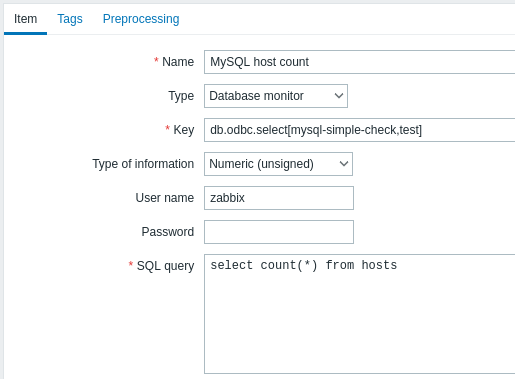
All mandatory input fields are marked with a red asterisk.
Specifically for database monitoring items you must enter:
| Type | Select Database monitor here. |
| Key | Enter one of the two supported item keys: db.odbc.select[<unique short description>,<dsn>,<connection string>] - this item is designed to return one value, i.e. the first column of the first row of the SQL query result. If a query returns more than one column, only the first column is read. If a query returns more than one line, only the first line is read. db.odbc.get[<unique short description>,<dsn>,<connection string>] - this item is capable of returning multiple rows/columns in JSON format. Thus it may be used as a master item that collects all data in one system call, while JSONPath preprocessing may be used in dependent items to extract individual values. For more information, see an example of the returned format, used in low-level discovery. This item is supported since Zabbix 4.4. The unique description will serve to identify the item in triggers, etc. Although dsn and connection string are optional parameters, at least one of them should be present. If both data source name (DSN) and connection string are defined, the DSN will be ignored.The data source name, if used, must be set as specified in odbc.ini. The connection string may contain driver-specific arguments. Example (connection for MySQL ODBC driver 5): => db.odbc.get[MySQL example,,"Driver=/usr/local/lib/libmyodbc5a.so;Database=master;Server=127.0.0.1;Port=3306"] |
| User name | Enter the database user name This parameter is optional if user is specified in odbc.ini. If connection string is used, and User name field is not empty, it is appended to the connection string as UID=<user> |
| Password | Enter the database user password This parameter is optional if password is specified in odbc.ini. If connection string is used, and Password field is not empty, it is appended to the connection string as PWD=<password>.If a password contains semicolon, it should be wrapped in curly brackets, for example: Password: {P?;)*word} (if an actual password is P?;)*word) The password will be appended to connection string after the username as: UID=<username>;PWD={P?;)*word}To test the resulting string, run: isql -v -k 'Driver=libmaodbc.so;Database=zabbix;UID=zabbix;PWD={P?;)*word}' |
| SQL query | Enter the SQL query. Note that with the db.odbc.select[] item the query must return one value only. |
| Type of information | It is important to know what type of information will be returned by the query, so that it is selected correctly here. With an incorrect type of information the item will turn unsupported. |
Important notes
- Database monitoring items will become unsupported if no odbc poller processes are started in the server or proxy configuration. To activate ODBC pollers, set StartODBCPollers parameter in Zabbix server configuration file or, for checks performed by proxy, in Zabbix proxy configuration file.
- Zabbix does not limit the query execution time. It is up to the user to choose queries that can be executed in a reasonable amount of time.
- The Timeout parameter value from Zabbix server is used as the ODBC login timeout (note that depending on ODBC drivers the login timeout setting might be ignored).
- The SQL command must return a result set like any query with
select .... The query syntax will depend on the RDBMS which will process them. The syntax of request to a storage procedure must be started withcallkeyword.
Hibaüzenetek
Az ODBC hibaüzenetek mezőkbe vannak rendezve, hogy részletesen lehessen őket közölni információ. Például:
Nem lehet végrehajtani az ODBC lekérdezést: [SQL_ERROR]:[42601][7][HIBA: szintaktikai hiba ";" vagy annak közelében; Hiba a lekérdezés végrehajtása közben]
└ökké teszi, hogy ─pa ─pa vagy íkja, hogy ──────────────┘
            │ │ │ └─ Natív hibakód └─ Natív hibaüzenet
            │ │ └─ SQLState
            └─ Zabbix üzenet └─ ODBC visszatérési kód
Vegye figyelembe, hogy a hibaüzenet hossza 2048 bájtra korlátozódik, ezért a üzenet csonkolható. Ha egynél több ODBC diagnosztika van record A Zabbix megpróbálja összefűzni őket ("|`-vel elválasztva) amennyire a hosszkorlát lehetővé teszi.