

8 Monitorowanie bazy danych
Omówienie
Typ pozycja Database monitor w frontendzie Zabbix jest używany do monitorowania ODBC (sprawdzeń ODBC).
ODBC to pośredniczące API języka programowania C służące do uzyskiwania dostępu do systemów zarządzania bazami danych (DBMS). Koncepcja ODBC została opracowana przez firmę Microsoft, a następnie przeniesiona na inne platformy.
Zabbix może wykonywać zapytania do dowolnej bazy danych obsługiwanej przez ODBC. Aby to zrobić, Zabbix nie łączy się bezpośrednio z bazami danych, lecz korzysta z interfejsu ODBC oraz sterowników skonfigurowanych w ODBC. Umożliwia to bardziej efektywne monitorowanie różnych baz danych do wielu celów (na przykład sprawdzanie określonych kolejek bazy danych, statystyk użycia itp.).
Zabbix obsługuje unixODBC, który jest jedną z najczęściej używanych otwartoźródłowych implementacji API ODBC.
Zobacz także: znane problemy dotyczące sprawdzeń ODBC.
Instalacja unixODBC
Zalecanym sposobem instalacji unixODBC jest użycie domyślnych repozytoriów pakietów systemu operacyjnego Linux. W większości popularnych dystrybucji Linux unixODBC jest domyślnie dostępny w repozytorium pakietów. Jeśli pakiety nie są dostępne, pliki źródłowe można pobrać ze strony głównej unixODBC: http://www.unixodbc.org/download.html.
Aby zainstalować unixODBC, użyj menedżera pakietów odpowiedniego dla wybranego systemu:
# Dla systemów Ubuntu/Debian:
apt install unixodbc unixodbc-dev

# Dla systemów opartych na RedHat/Fedora:
dnf install unixODBC unixODBC-devel

# Dla systemów opartych na SUSE:
zypper in unixODBC-devel
Pakiet unixodbc-dev lub unixODBC-devel jest niezbędny do skompilowania Zabbixa z obsługą unixODBC.
Aby włączyć obsługę ODBC, Zabbix powinien zostać skompilowany z następującą opcją konfiguracji:
--with-unixodbc[=ARG] # Użyj sterownika ODBC dla pakietu unixODBC.Instalowanie sterowników unixODBC
Sterownik bazy danych unixODBC powinien być zainstalowany dla bazy danych, która będzie monitorowana. Listę obsługiwanych baz danych i sterowników można znaleźć na stronie głównej unixODBC: http://www.unixodbc.org/drivers.html.
W niektórych dystrybucjach Linuksa sterowniki baz danych są dołączone do repozytoriów pakietów.
MySQL
Aby zainstalować sterownik bazy danych MySQL dla unixODBC, użyj menedżera pakietów odpowiedniego dla wybranego systemu:
# Dla systemów Ubuntu/Debian:
apt install odbc-mariadb

# Dla systemów opartych na RedHat/Fedora:
dnf install mariadb-connector-odbc

# Dla systemów opartych na SUSE:
zypper install mariadb-connector-odbc
Aby zainstalować sterownik bazy danych bez użycia menedżera pakietów, zapoznaj się z dokumentacją MySQL dla mysql-connector-odbc lub z dokumentacją MariaDB dla mariadb-connector-odbc.
PostgreSQL
Aby zainstalować sterownik bazy danych PostgreSQL dla unixODBC, użyj menedżera pakietów odpowiedniego dla wybranego systemu:
# Dla systemów Ubuntu/Debian:
apt install odbc-postgresql

# Dla systemów opartych na RedHat/Fedora:
dnf install postgresql-odbc

# Dla systemów opartych na SUSE:
zypper install psqlODBC
Aby zainstalować sterownik bazy danych bez użycia menedżera pakietów, zapoznaj się z dokumentacją PostgreSQL.
Oracle
Aby zainstalować sterownik bazy danych unixODBC, zapoznaj się z dokumentacją Oracle.
MSSQL
Aby zainstalować sterownik bazy danych MSSQL unixODBC, użyj menedżera pakietów odpowiedniego dla wybranego systemu:
# Dla systemów Ubuntu/Debian:
apt install tdsodbc

# Dla systemów opartych na RedHat/Fedora (pakiety EPEL: https://docs.fedoraproject.org/en-US/epel/):
dnf install epel-release
dnf install freetds

# Dla systemów opartych na SUSE:
zypper install libtdsodbc0
Aby zainstalować sterownik bazy danych bez użycia menedżera pakietów, zapoznaj się z przewodnikiem użytkownika FreeTDS.
Konfigurowanie unixODBC
Aby skonfigurować unixODBC, należy edytować pliki odbcinst.ini i odbc.ini.
Lokalizację tych plików można sprawdzić, wykonując następujące polecenie:
odbcinst -jWynik polecenia powinien zawierać informacje podobne do poniższych:
unixODBC 2.3.9
DRIVERS............: /etc/odbcinst.ini
SYSTEM DATA SOURCES: /etc/odbc.ini
FILE DATA SOURCES..: /etc/ODBCDataSources
odbcinst.ini
Plik odbcinst.ini zawiera listę zainstalowanych sterowników baz danych ODBC.
Jeśli plik odbcinst.ini nie istnieje, należy utworzyć go ręcznie.
[TEST_MYSQL]
Description=ODBC for MySQL
Driver=/usr/lib/libmyodbc5.so
FileUsage=1| Parameter | Description |
|---|---|
| TEST_MYSQL | Nazwa sterownika bazy danych. |
| Description | Opis sterownika bazy danych. |
| Driver | Lokalizacja biblioteki sterownika bazy danych. |
| FileUsage | Określa, czy sterownik bazy danych obsługuje połączenie z serwerem bazy danych bez obsługi dostępu do plików lokalnych (0); obsługuje odczyt danych z plików (1); obsługuje zapis danych do plików (2). |
| Threading | Poziom serializacji wątków. Obsługiwane dla PostgreSQL. Od wersji 1.6, jeśli menedżer sterowników został zbudowany z obsługą wątków, można dodać kolejny wpis sterownika. |
odbc.ini
Plik odbc.ini służy do konfigurowania źródeł danych.
Należy pamiętać, że lista obsługiwanych parametrów zależy od sterownika bazy danych (na przykład bazy danych Oracle mogą używać parametru ServerName zamiast Server itd.).
[TEST_MYSQL]
Description=MySQL Test Database
Driver=mysql
Server=127.0.0.1
User=root
Password=
Port=3306
Socket=
Database=zabbix| Parameter | Description |
|---|---|
| TEST_MYSQL | Nazwa źródła danych (DSN). |
| Description | Opis źródła danych. |
| Driver | Nazwa sterownika bazy danych (zgodnie z określeniem w odbcinst.ini). |
| Server | IP/DNS serwera bazy danych. |
| User | Użytkownik bazy danych używany do połączenia. |
| Password | Hasło użytkownika bazy danych. |
| Port | Port połączenia z bazą danych. |
| Socket | Gniazdo połączenia z bazą danych. |
| Database | Nazwa bazy danych. |
Aby poznać inne możliwe opcje parametrów konfiguracyjnych, zobacz dokumentację MySQL.
Plik odbc.ini dla PostgreSQL może zawierać dodatkowe parametry:
[TEST_PSQL]
Description=PostgreSQL Test Database
Driver=postgresql
Username=zbx_test
Password=zabbix
Servername=127.0.0.1
Database=zabbix
Port=5432
ReadOnly=No
Protocol=7.4+
ShowOidColumn=No
FakeOidIndex=No
RowVersioning=No
ShowSystemTables=No
Fetch=Yes
BoolsAsChar=Yes
SSLmode=Require
ConnSettings=| Parameter | Description |
|---|---|
| ReadOnly | Określa, czy połączenie z bazą danych zezwala wyłącznie na operacje odczytu (SELECT) i ogranicza modyfikacje (INSERT, UPDATE oraz DELETE); przydatne w scenariuszach, w których dane powinny pozostać niezmienione. |
| Protocol | Wersja protokołu backendu PostgreSQL (ignorowana podczas korzystania z połączeń SSL). |
| ShowOidColumn | Określa, czy w SQLColumns ma być uwzględniany Object ID (OID). |
| FakeOidIndex | Określa, czy ma zostać utworzony fikcyjny unikalny indeks na OID. |
| RowVersioning | Określa, czy aplikacje mają mieć możliwość wykrywania, czy dane zostały zmodyfikowane przez innych użytkowników podczas próby aktualizacji wiersza. Należy zauważyć, że ten parametr może przyspieszyć proces aktualizacji, ponieważ do zaktualizowania wiersza nie trzeba podawać każdej pojedynczej kolumny w klauzuli WHERE. |
| ShowSystemTables | Określa, czy sterownik bazy danych powinien traktować tabele systemowe jako zwykłe tabele w SQLTables; przydatne ze względu na dostępność, umożliwiając widoczność tabel systemowych. |
| Fetch | Określa, czy sterownik powinien automatycznie używać declare cursor/fetch do obsługi instrukcji SELECT i utrzymywać pamięć podręczną 100 wierszy. |
| BoolsAsChar | Kontroluje mapowanie typów logicznych. Jeśli ustawione na "Yes", wartości logiczne są mapowane na SQL_CHAR; w przeciwnym razie są mapowane na SQL_BIT. |
| SSLmode | Określa tryb SSL dla połączenia. |
| ConnSettings | Dodatkowe ustawienia wysyłane do backendu podczas nawiązywania połączenia. |
Testowanie połączenia ODBC
Aby sprawdzić, czy połączenie ODBC działa poprawnie, można użyć narzędzia isql (dołączonego do pakietu unixODBC):
isql test
+---------------------------------------+
| Connected!                            |
|                                       |
| sql-statement                         |
| help [tablename]                      |
| quit                                  |
|                                       |
+---------------------------------------+
Konfiguracja pozycji w frontend Zabbix
Skonfiguruj pozycję Monitorowanie bazy danych.
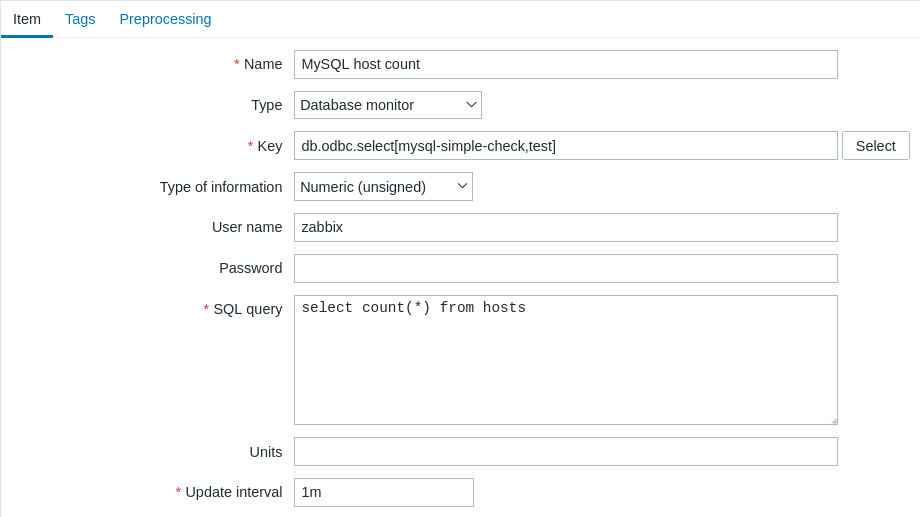
Wszystkie obowiązkowe pola wejściowe są oznaczone czerwoną gwiazdką.
Dla pozycji monitorowania bazy danych należy określić:
| Type | Wybierz tutaj "Database monitor". |
| Key | Wprowadź jeden z obsługiwanych kluczy pozycji: db.odbc.select[] - ta pozycja zwraca jedną wartość (pierwszą kolumnę pierwszego wiersza wyniku zapytania SQL); db.odbc.get[] - ta pozycja zwraca wiele wierszy/kolumn w formacie JSON; db.odbc.discovery[] - ta pozycja zwraca dane do wykrywania niskiego poziomu. |
| User name | Wprowadź nazwę użytkownika bazy danych (do 255 znaków). Ten parametr jest opcjonalny, jeśli nazwa użytkownika bazy danych jest określona w pliku odbc.ini.Jeśli używany jest ciąg połączenia i pole User name nie jest puste, zostanie ono dołączone do ciągu połączenia jako UID=<user>. |
| Password | Wprowadź hasło użytkownika bazy danych (do 255 znaków). Ten parametr jest opcjonalny, jeśli hasło jest określone w pliku odbc.ini.Jeśli używany jest ciąg połączenia i pole Password nie jest puste, zostanie ono dołączone do ciągu połączenia jako PWD=<password>. W tym polu są obsługiwane znaki specjalne. Dla wszystkich baz danych z wyjątkiem Oracle hasła zawierające % muszą być ujęte w nawiasy klamrowe {}.Hasło zostanie dołączone do ciągu połączenia po nazwie użytkownika, na przykład jako UID=<username>;PWD=P?;)*word.Aby przetestować wynikowy ciąg, możesz uruchomić następujące polecenie: isql -v -k 'Driver=libmaodbc.so;Database=zabbix;UID=zabbix;PWD=P?;)*word' |
| SQL query | Wprowadź zapytanie SQL. Pamiętaj, że dla db.odbc.select[] zapytanie musi zwracać tylko jedną wartość. |
| Type of information | Wybierz tutaj typ informacji, który ma zostać zwrócony przez zapytanie. Jeśli typ informacji zostanie wybrany nieprawidłowo, pozycja stanie się nieobsługiwana. |
Ważne uwagi
- Pozycje monitorowania bazy danych staną się nieobsługiwane, jeśli w konfiguracji serwera lub proxy nie zostaną uruchomione żadne procesy odbc poller.
Aby aktywować ODBC pollery, ustaw parametr
StartODBCPollersw pliku konfiguracyjnym Zabbix serwer lub, w przypadku kontroli wykonywanych przez proxy, w pliku konfiguracyjnym Zabbix proxy. - Wartość parametru Timeout w formularzu konfiguracji pozycji jest używana jako limit czasu logowania ODBC oraz limit czasu wykonania zapytania. Należy pamiętać, że te ustawienia limitu czasu mogą zostać zignorowane, jeśli zainstalowany sterownik ODBC nie obsługuje ich.
- Polecenie SQL musi zwracać zestaw wyników, tak jak każde zapytanie używające instrukcji
select. Składnia zapytania będzie zależeć od RDBMS, który je przetworzy. Składnia żądania do procedury składowanej musi იწყynać się od słowa kluczowegocall.
Szczegóły klucza pozycji
Parametry bez nawiasów ostrych są obowiązkowe. Parametry oznaczone nawiasami ostrymi < > są opcjonalne.
db.odbc.select[<unikalny krótki opis>,<dsn>,<connection string>]
Zwraca jedną wartość, czyli pierwszą kolumnę pierwszego wiersza wyniku zapytania SQL.
Wartość zwracana: Zależy od zapytania SQL.
Parametry:
- unikalny krótki opis — unikalny krótki opis identyfikujący pozycja (do użycia w wyzwalaczach itp.);
- dsn — nazwa źródła danych (zgodnie z definicją w
odbc.ini); - connection string — ciąg połączenia (może zawierać argumenty specyficzne dla sterownika).
Uwagi:
- Chociaż
dsniconnection stringsą parametrami opcjonalnymi, wymagany jest co najmniej jeden z nich; jeśli zdefiniowano oba,dsnzostanie zignorowany. - Jeśli zapytanie zwraca więcej niż jedną kolumnę, odczytywana jest tylko pierwsza kolumna. Jeśli zapytanie zwraca więcej niż jeden wiersz, odczytywany jest tylko pierwszy wiersz.
db.odbc.get[<unique short description>,<dsn>,<connection string>]
Przekształca wynik zapytania SQL do tablicy JSON.
Wartość zwracana: obiekt JSON.
Parametry:
- unique short description - unikalny krótki opis służący do identyfikacji pozycji (do użycia w wyzwalaczach itp.);
- dsn - nazwa źródła danych (zgodnie z definicją w
odbc.ini); - connection string - ciąg połączenia (może zawierać argumenty specyficzne dla sterownika).
Uwagi:
- Chociaż
dsniconnection stringsą parametrami opcjonalnymi, wymagany jest co najmniej jeden z nich; jeśli oba są zdefiniowane,dsnzostanie zignorowany. - W formacie JSON mogą zostać zwrócone wiele wierszy/kolumn. Ta pozycja może być używana jako pozycja nadrzędna, która zbiera wszystkie dane w jednym wywołaniu systemowym, natomiast przetwarzanie JSONPath może być używane w pozycjach zależnych do wyodrębniania poszczególnych wartości. Więcej informacji można znaleźć w przykładzie zwracanego formatu, używanego w niskopoziomowym wykrywaniu.
Przykład:
# Połączenie dla sterownika MySQL ODBC 5:
db.odbc.get[MySQL example,,"Driver=/usr/local/lib/libmyodbc5a.so;Database=master;Server=127.0.0.1;Port=3306"]
db.odbc.discovery[<unikalny krótki opis>,<dsn>,<connection string>]
Przekształca wynik zapytania SQL w tablicę JSON, używaną do niskopoziomowego wykrywania.
Nazwy kolumn z wyniku zapytania są przekształcane w nazwy makr niskopoziomowego wykrywania sparowane z wartościami wykrytych pól.
Makra te mogą być używane podczas tworzenia prototypów pozycji, wyzwalaczy itp.
Wartość zwracana: obiekt JSON.
Parametry:
- unikalny krótki opis — unikalny krótki opis identyfikujący pozycję (do użycia w wyzwalaczach itp.);
- dsn — nazwa źródła danych (zgodnie z definicją w
odbc.ini); - connection string — ciąg połączenia (może zawierać argumenty specyficzne dla sterownika).
Uwagi:
- Chociaż
dsniconnection stringsą parametrami opcjonalnymi, wymagany jest co najmniej jeden z nich; jeśli zdefiniowano oba,dsnzostanie zignorowany.
Komunikaty o błędach
Komunikaty o błędach ODBC są podzielone na pola, aby dostarczyć szczegółowych informacji. Na przykład komunikat o błędzie może wyglądać tak:
Cannot execute ODBC query: [SQL_ERROR]:[42601][7][ERROR: syntax error at or near ";"; Error while executing the query]- "
Cannot execute ODBC query" — komunikat Zabbix - "
[SQL_ERROR]" — kod zwrotny ODBC - "
[42601]" — SQLState - "
[7]" — natywny kod błędu - "
[ERROR: syntax error at or near ";"; Error while executing the query]" — natywny komunikat błędu
Należy pamiętać, że długość komunikatu o błędzie jest ograniczona do 2048 bajtów, więc komunikat może zostać obcięty.
Jeśli istnieje więcej niż jeden rekord diagnostyczny ODBC, Zabbix próbuje je połączyć (oddzielając je znakiem |) w zakresie dozwolonym przez limit długości.