
10 What's new in Zabbix 4.4.5
Webhook integrations
New integrations are available allowing to use the webhook media type for pushing Zabbix notifications to:
Redis agent plugin
A Redis plugin in Zabbix agent 2 is now available as part of the out-of-the-box monitoring of Redis instances and clusters.
New items
A new vfs.fs.get agent item has been added that returns a JSON with
filesystem data including such details as the mountpoint name,
mountpoint type, filesystem size and inode metrics.
See a working example of how this item can be used in discovery.
Zabbix JS utility
zabbix_js is a new command line utility that can be used for embedded script testing. See more information.
Cannot support audio notification notice
“Cannot support notification audio for this device.” message will be displayed when notification sounds on the device cannot be played.
New templates
HAProxy
- Template App HAProxy by HTTP - collects metrics by polling HAProxy Stats Page with HTTP agent remotely (see description);
- Template App HAProxy by Zabbix agent - collects metrics by polling HAProxy Stats Page locally with Zabbix agent (see description).
Redis
- Template DB Redis - collects metrics from Redis by polling the new Zabbix agent 2 (see description).
You can get these templates:
- In Configuration → Templates in new installations;
- If you are upgrading from previous versions, you can download these
templates from Zabbix Git
repository
or find them in the
templatesdirectory of the downloaded latest Zabbix version. Then, while in Configuration → Templates you can import them manually into Zabbix.
Template linkage
When linking a template to a host or another template, it is now possible to start typing the template name in the Link new templates field and then scroll down to select the template from the list of matching template names.
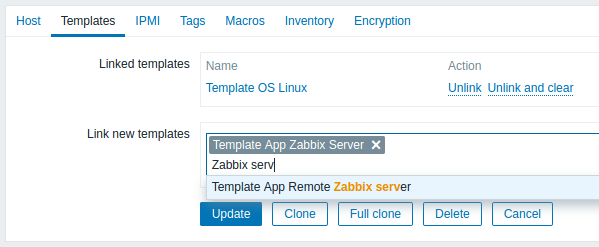
Alternatively, it is also possible to click on Select next to the field and select one or more templates from the list in a popup window.
The templates that have been selected in the Link new templates field are linked to the host/template as soon as the configuration form is saved/updated.