
2 New host
Overview
In this section you will learn how to set up a new host.
A host in Zabbix is a networked entity (physical, virtual) that you wish to monitor. The definition of what can be a "host" in Zabbix is quite flexible. It can be a physical server, a network switch, a virtual machine or some application.
Adding host
Information about configured hosts in Zabbix is available in the Data collection > Hosts menu section, as well as the Monitoring > Hosts menu section. There is already one pre-defined host, called "Zabbix server", but we want to learn adding another.
To add a new host, click Create host. A host configuration form is opened.
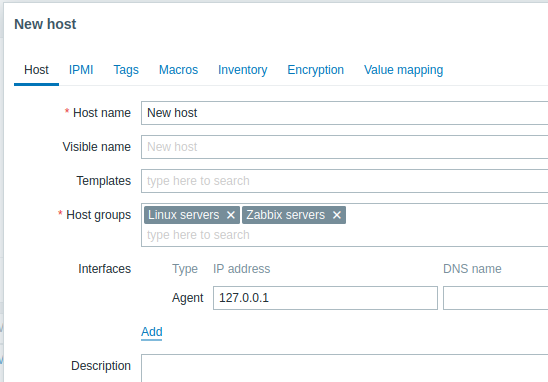
All mandatory input fields are marked with a red asterisk.
The bare minimum to enter here is:
Host name
- Enter a host name. Alphanumerics, spaces, dots, dashes and underscores are allowed.
Host groups
- Select one or several existing groups by clicking the Select button or enter a non-existing group name to create a new group.
All access permissions are assigned to host groups, not individual hosts. That is why a host must belong to at least one group.
Interfaces: IP address
- Although not a required field technically, a host interface is necessary for collecting certain metrics. To use Zabbix agent passive checks, specify the agent's IP or DNS in this field. Note that you should also specify Zabbix server's IP or DNS in the Zabbix agent configuration file 'Server' directive. If Zabbix agent and Zabbix server are installed on the same machine, you need to specify the same IP/DNS in both places.
Other options may be left unchanged, using their default values.
When done, click Add. Your new host should be visible in the host list.

The Availability column contains indicators of host availability per each interface. When a Zabbix agent interface is defined, we can use the agent availability icon (labeled ZBX) to determine the host's availability:
 - host status has not been established; no metric check has happened yet.
 - host is available, a metric check has been successful.
 - host is unavailable, a metric check has failed (move your mouse cursor over the icon to see the error message).
There might be some error with communication, possibly caused by incorrect interface credentials.
Check that Zabbix server is running, and try refreshing the page later as well.
- host is unavailable, a metric check has failed (move your mouse cursor over the icon to see the error message).
There might be some error with communication, possibly caused by incorrect interface credentials.
Check that Zabbix server is running, and try refreshing the page later as well.