
Discovery of network interfaces
It is possible to discover network interfaces and their properties:
- interface name
- interface alias
- interface MAC address
- interface type
- the link speed
- interface latest or current duplex value
- configured and RFC2863 operational state
- physical link presence
- number of times the link has become up or down, and the total number of times the link state has changed
- incoming and outgoing traffic
To do that, you may use a combination of:
- the
net.if.getagent item as the master item - a dependent low-level discovery rule
- dependent item prototypes
Configuration
Master item
Create a Zabbix agent item using the following key:
net.if.get[enp.*]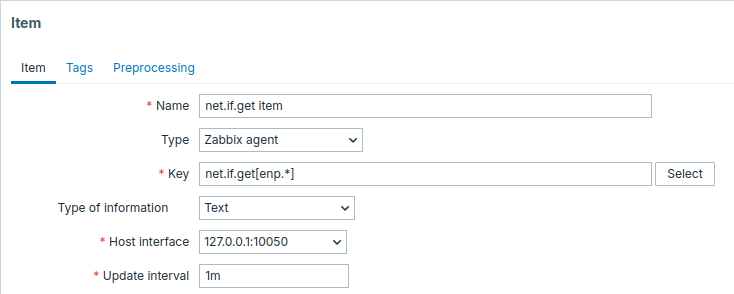
Set the Type of information to Text for possibly big JSON data.
History can be set to Do not store as it is used only as a master item.
A relatively short update interval, such as 1m, may be configured to ensure frequent data polling.
The item discovers network interfaces whose names match enp.* and returns their configuration and statistics.
The data returned by this item will contain information similar to the following for network interfaces:
{
  "config": [
    {
      "name": "enp0s3",
      "mac": "08:00:27:9a:8f:bb",
      "type": "physical",
      "speed": 1000,
      "duplex": "full",
      "administrative_state": "up",
      "operational_state": "up",
      "carrier": 1
    }
  ],
"values": [
    {
      "name": "enp0s3",
      "mac": "08:00:27:9a:8f:bb",
      "carrier": 1,
      "carrier_changes": 2,
      "carrier_up_count": 1,
      "carrier_down_count": 1,
      "in": {
        "bytes": 98241651,
        "packets": 72754,
        "errors": 0,
        "dropped": 0,
        "overruns": 0,
        "frame": 0,
        "compressed": 0,
        "multicast": 17
      },
    "out": {
        "bytes": 1299650,
        "packets": 11380,
        "errors": 0,
        "dropped": 0,
        "overruns": 0,
        "collisions": 0,
        "carrier": 0,
        "compressed": 0
      }
    }
  ]
}
Dependent LLD rule
Create a low-level discovery rule as Dependent item type:
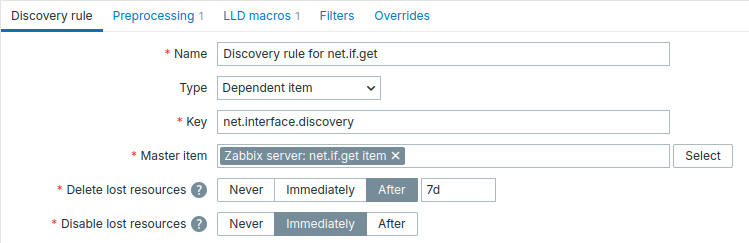
As the master item, select the created net.if.get item.
In the Preprocessing tab, add:
- A JSONPath step with the
$.configparameter. - A Discard unchanged with heartbeat step with a reasonably large heartbeat, for example,
1h, to avoid unnecessary LLD execution. This allows the master item to be polled frequently while low-level discovery is run only when theconfigchanges or when the heartbeat period expires.

In the LLD macros tab, define custom macros with their corresponding JSONPath expressions.
For example, when using net.if.get[enp.*], the following JSONPath expressions can be used:
{#IFNAME} - $.name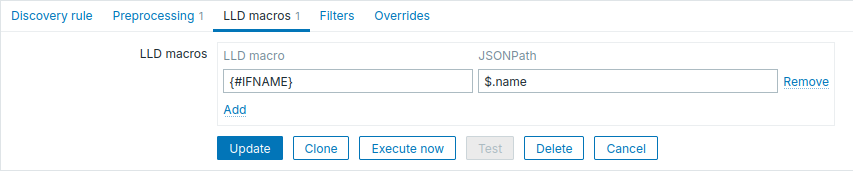
Dependent item prototype
Create an item prototype of type Dependent item in the LLD rule.
Select the created net.if.get item as the master item for this prototype.
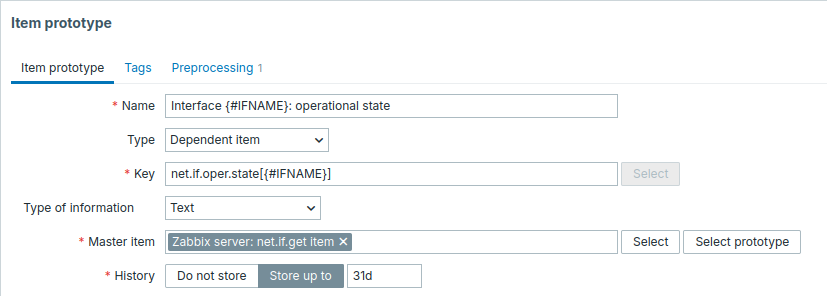
Note the use of custom macros in the item prototype name and key. In this example, the key is custom and user-defined.
- Name: Interface
{#IFNAME}: operational state - Key:
net.if.oper.state[{#IFNAME}]
As type of information, use Text.
In the item prototype Preprocessing tab select JSONPath and use the following JSONPath expression as a parameter:
$.config[?(@.name=='{#IFNAME}')].operational_state.first()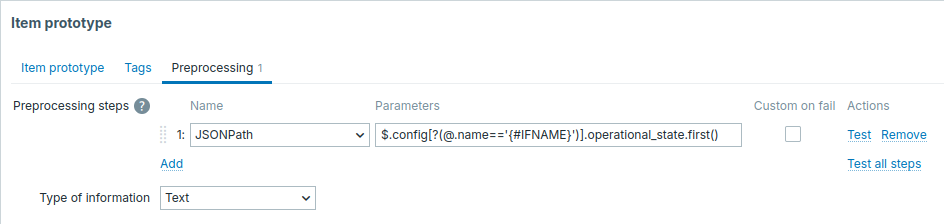
Additional item prototypes can be created in the same way, for example:
- Name: Interface
{#IFNAME}: carrier changes - Key:
net.if.carrier.changes[{#IFNAME}] - Preprocessing: JSONPath -
$.values[?(@.name=='{#IFNAME}')].carrier_changes.first() - Name: Interface
{#IFNAME}: speed - Key:
net.if.speed[{#IFNAME}] - Preprocessing: JSONPath -
$.config[?(@.name=='{#IFNAME}')].speed.first()
When discovery starts, one item per network interface will be created.