
Descoberta de interfaces de rede
É possível descobrir interfaces de rede e suas propriedades:
- nome da interface
- alias da interface
- endereço MAC da interface
- tipo da interface
- velocidade do link
- valor duplex mais recente ou atual da interface
- estado operacional configurado e RFC2863
- presença de link físico
- número de vezes que o link ficou ativo ou inativo, e o número total de vezes que o estado do link foi alterado
- tráfego de entrada e saída
Para fazer isso, você pode usar uma combinação de:
- o item agent
net.if.getcomo item mestre - uma regra de descoberta de baixo nível dependente
- protótipos de item dependentes
Configuração
Item mestre
Crie um item do Zabbix agent usando a seguinte key:
net.if.get[enp.*]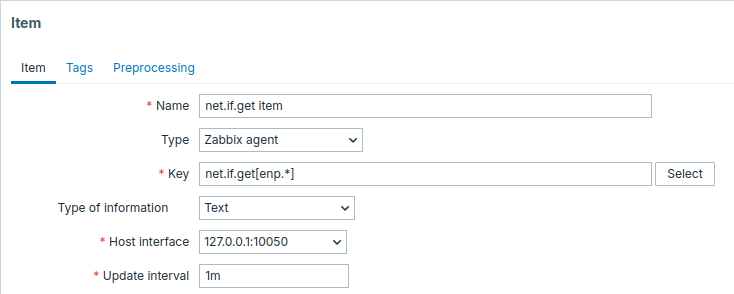
Defina Tipo de informação como Texto para possíveis dados JSON grandes.
O histórico pode ser definido como Não armazenar, pois ele é usado apenas como um item mestre.
Um intervalo de atualização relativamente curto, como 1m, pode ser configurado para garantir a coleta frequente de dados.
O item descobre interfaces de rede cujos nomes correspondem a enp.* e retorna suas configurações e estatísticas.
Os dados retornados por este item conterão informações semelhantes às seguintes para interfaces de rede:
{
  "config": [
    {
      "name": "enp0s3",
      "mac": "08:00:27:9a:8f:bb",
      "type": "physical",
      "speed": 1000,
      "duplex": "full",
      "administrative_state": "up",
      "operational_state": "up",
      "carrier": 1
    }
  ],
"values": [
    {
      "name": "enp0s3",
      "mac": "08:00:27:9a:8f:bb",
      "carrier": 1,
      "carrier_changes": 2,
      "carrier_up_count": 1,
      "carrier_down_count": 1,
      "in": {
        "bytes": 98241651,
        "packets": 72754,
        "errors": 0,
        "dropped": 0,
        "overruns": 0,
        "frame": 0,
        "compressed": 0,
        "multicast": 17
      },
    "out": {
        "bytes": 1299650,
        "packets": 11380,
        "errors": 0,
        "dropped": 0,
        "overruns": 0,
        "collisions": 0,
        "carrier": 0,
        "compressed": 0
      }
    }
  ]
}
Regra LLD dependente
Crie uma regra de descoberta em baixo nível como tipo Dependent item:
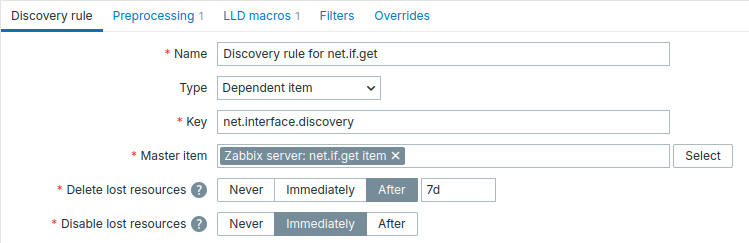
Como item mestre, selecione o item net.if.get criado.
Na aba Preprocessing, adicione:
- Uma etapa JSONPath com o parâmetro
$.config. - Uma etapa Discard unchanged with heartbeat com um heartbeat razoavelmente grande, por exemplo,
1h, para evitar execuções desnecessárias da LLD. Isso permite que o item mestre seja consultado com frequência, enquanto a descoberta em baixo nível é executada somente quandoconfigé alterado ou quando o período de heartbeat expira.

Na aba LLD macros, defina macros personalizadas com suas respectivas expressões JSONPath.
Por exemplo, ao usar net.if.get[enp.*], as seguintes expressões JSONPath podem ser usadas:
{#IFNAME} - $.name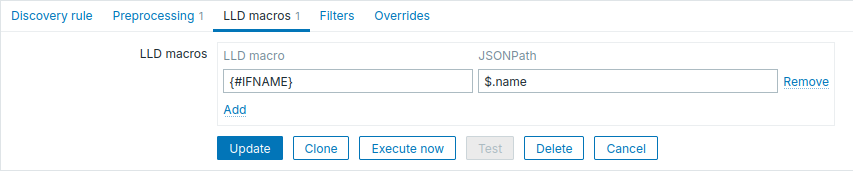
Protótipo de item dependente
Crie um protótipo de item do tipo Dependent item na regra de LLD.
Selecione o item net.if.get criado como o item mestre para este protótipo.
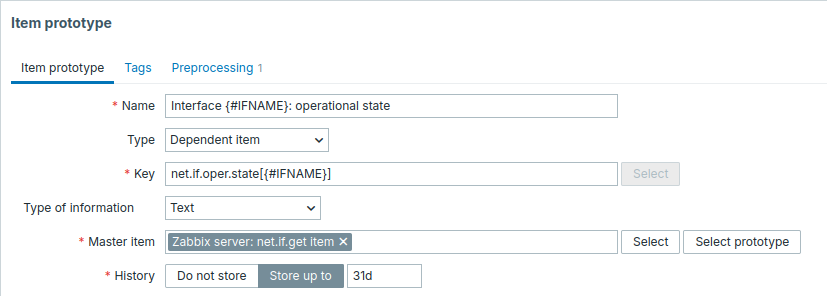
Observe o uso de macros personalizadas no nome e na chave do protótipo de item. Neste exemplo, a chave é personalizada e definida pelo usuário.
- Name: Interface
{#IFNAME}: operational state - Key:
net.if.oper.state[{#IFNAME}]
Como tipo de informação, use Text.
Na aba Preprocessing do protótipo de item, selecione JSONPath e use a seguinte expressão JSONPath como parâmetro:
$.config[?(@.name=='{#IFNAME}')].operational_state.first()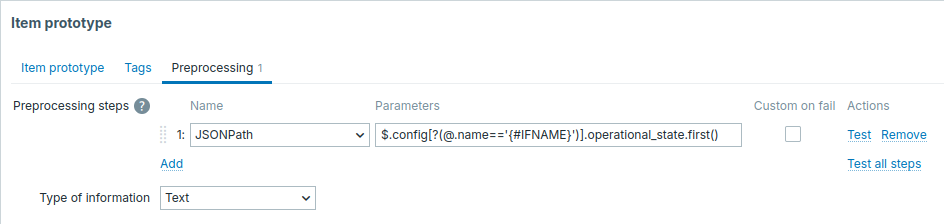
Protótipos de item adicionais podem ser criados da mesma forma, por exemplo:
- Name: Interface
{#IFNAME}: carrier changes - Key:
net.if.carrier.changes[{#IFNAME}] - Preprocessing: JSONPath -
$.values[?(@.name=='{#IFNAME}')].carrier_changes.first() - Name: Interface
{#IFNAME}: speed - Key:
net.if.speed[{#IFNAME}] - Preprocessing: JSONPath -
$.config[?(@.name=='{#IFNAME}')].speed.first()
Quando a descoberta começar, um item por interface de rede será criado.