
- What's new and upgrade notes: 8.0
- Templates
- Media types
- Items
- Plugins
- Discovery and autoregistration
- Low-level discovery
- Databases
- Processes
- SNMPv3 EngineID caching and reuse
- Refined proxy throttling during history cache recovery
- Increased maximum timeout for zabbix_get and zabbix_js
- Optimized housekeeping
- Manual close — trigger tags inherited by recovery events
- DNS query caching for Zabbix daemons
- Build support for c-ares on Windows
- Count-based trigger functions improved
- Runtime control target updates
- Security
- Authentication
- Widgets
- Frontend
- Importable dashboards
- Dashboard export and import
- New and embedded fonts
- Zabbix UI enhancements
- Accessibility enhancement
- Inline validation
- Modal forms
- Inherited tags visible in hosts, templates, items, and triggers
- Tooltips positioning
- New $ZBX_FEATURE_FLAGS variable in frontend configuration
- Event details show suppression reason
- System information report enhancements
- Changes to the Zabbix SELinux policy package
- Dashboard slideshow setting
- Link to Zabbix Cloud proxies
- Documentation
- Upgrade notes
- Breaking changes
- Host interface API methods removed from user roles
- Custom themes and media type
- Internal proxy items restricted to server-monitored hosts
- Discontinued support of pre-1.6 Zabbix agents
- Minimum Logback library version
- Database versions
- Plugins
- MongoDB plugin version support
- Minimum required PHP version
- Extended UnsafeUserParameters list
- Moved filter parameters
- JavaScript preprocessing: built-in object methods are now read-only
- MySQL database character set and collation
- Other
- SAML signing enabled by default
- Deprecated Kubernetes templates
- Deprecated macros dropped
- Deprecated parameters for history storage providers
- Removed JSON and XML validation from HTTP agent items
- Disabled links hidden in monitored hosts
- JSON data type
- Removed radio button in the New tag filter form
- Item values displayed as HTML using iframes
- TLS verification for HTTP-based templates and media types
- Template compatibility with Host Wizard
- Autoresizing for configuration fields
- Replaced frontend configuration variable
- Concurrent processing of SNMPv1 and SNMPv2 checks
- Changes to the Zabbix SELinux policy package
- Renamed maintenance period state
- Deprecated dashboard slideshow parameter
- Changes to global regular expressions
- Default access to API
- Breaking changes
What's new and upgrade notes: 8.0
Zabbix 8.0.0 continues from Zabbix 7.4.0, adding new features and enhancements.
Also on this page:
- What's new in templates, including new templates and changes to existing templates.
- Upgrade notes, including breaking changes.
See also: API changes.
Application performance monitoring
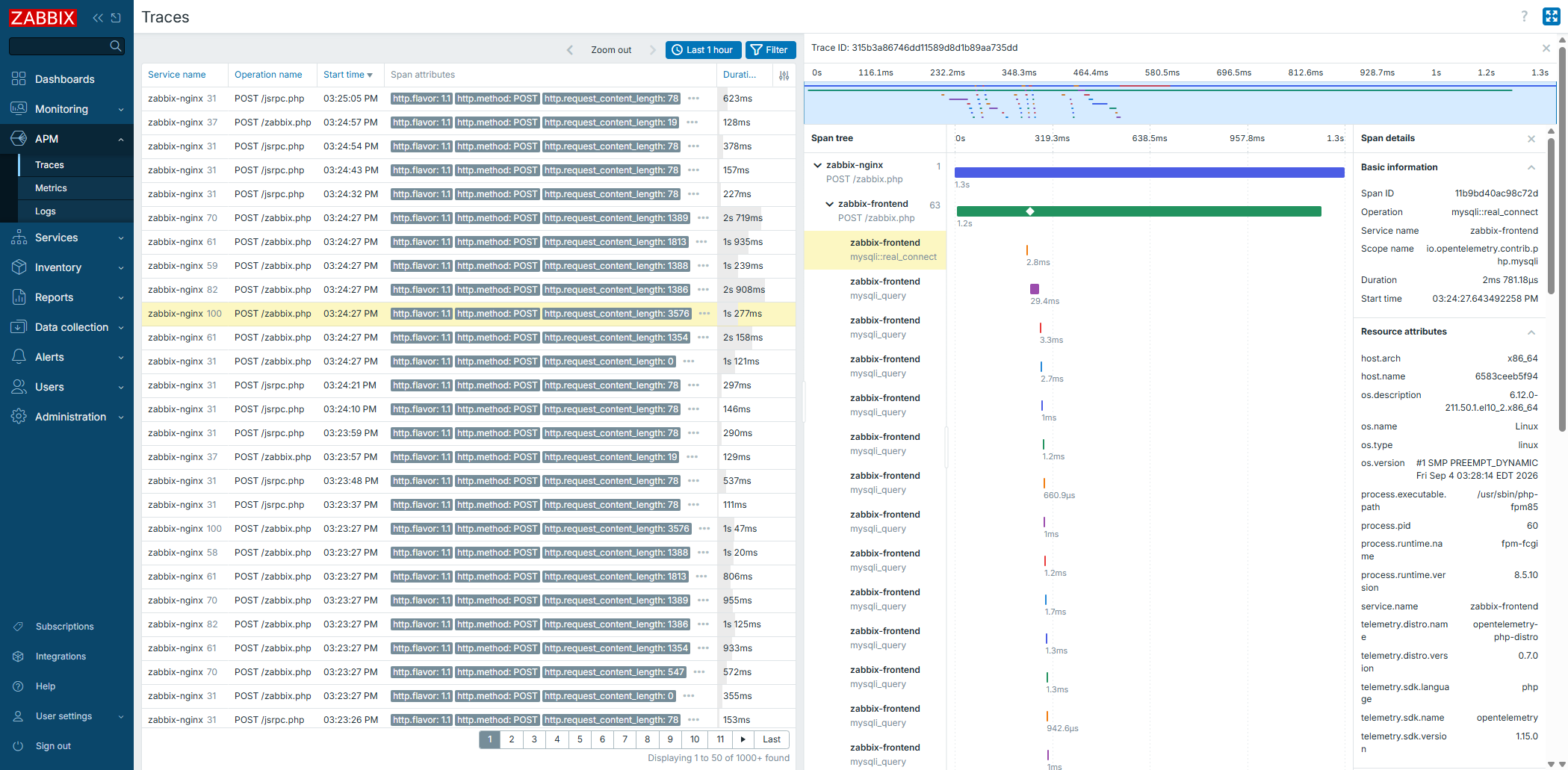
Zabbix now supports application performance monitoring (APM) based on OpenTelemetry, an open standard for collecting telemetry data from applications and services. This data helps you see how requests flow through your applications and services, measure their performance, and find the cause of slow or failed operations.
With APM, you can:
- Collect telemetry data with Zabbix proxy, which can now receive data from applications or OpenTelemetry collectors over the OpenTelemetry protocol (OTLP/gRPC) and write it to the data source; see the new APM tab in proxy configuration.
- Specify a telemetry data source (ClickHouse) in the new Administration > Data source section, and view the data in the new APM menu.
- Use telemetry data in triggers and graphs with the new telemetry query item type.
The following parameters and items have also been added:
- Zabbix server parameters:
TelemetryProviderandStartTelemetryQueryPollers. - Zabbix proxy parameters:
TelemetryProvider,StartTelemetryQueryPollers,StartAPMCollectors,APMListenIP,APMListenPort,APMTLSCAFile,APMTLSCertFile, andAPMTLSKeyFile. - Zabbix frontend parameter:
$TELEMETRY_PROVIDERS[]. - Zabbix proxy compilation option:
--with-apm; official Zabbix proxy packages are built with this option. - Internal item for monitoring telemetry data collection:
zabbix[apm,<type>].
ClickHouse support
You can now use ClickHouse as a Zabbix backend database to store item value history, and as a telemetry data source for application performance monitoring.
For history storage setup details and requirements, see ClickHouse setup. If you want to migrate your history data from an existing Zabbix database (MySQL or PostgreSQL) to ClickHouse, see the ClickHouse schema and history migration scripts.
This feature also changes how you set history storage providers in Zabbix configuration files. This change affects both ClickHouse and Elasticsearch setups. For details, see Upgrade notes.
Complex event processing
Complex event processing (CEP) performs rule-based processing for Zabbix events.
For example, you might want to:
- group related events and mark first event in a series as cause (the following as symptoms)
- specify a time-to-live period for events
- specify a maximum number for certain events
- be notified about similar events by location
- be notified if some event happens too often (or not at all) within a time period
Complex event processing introduces sliding time windows for event analysis. For example, in a 10-minute window, all events that fall within the window form a single context. As the window moves forward, older events leave the window (are "evicted"), while new events may enter.
The time window concept presents logical points for executing operations. For example, an event can be transformed or "enriched" when it enters the window - severity can be raised or lowered, tags can be added or adjusted, suppression can be activated, etc.
Similar operations can be executed when the event leaves the window or when a pattern is found.
Event stream analysis is defined by CEP rules. A CEP rule typically consists of a time window, conditions and operations. Operations are tied to an execution point.
More detailed documentation will be available when stable 8.0 version is released.
Mobile app
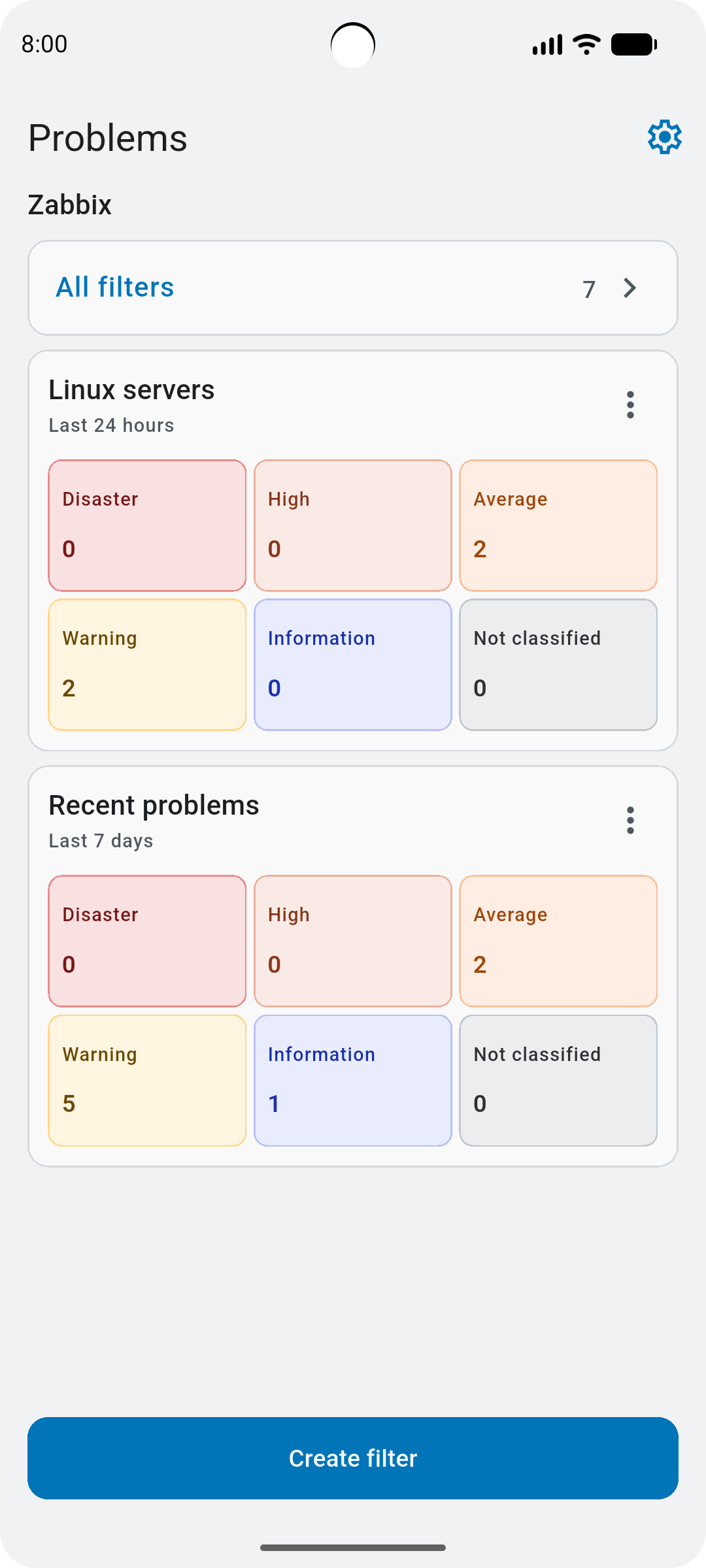
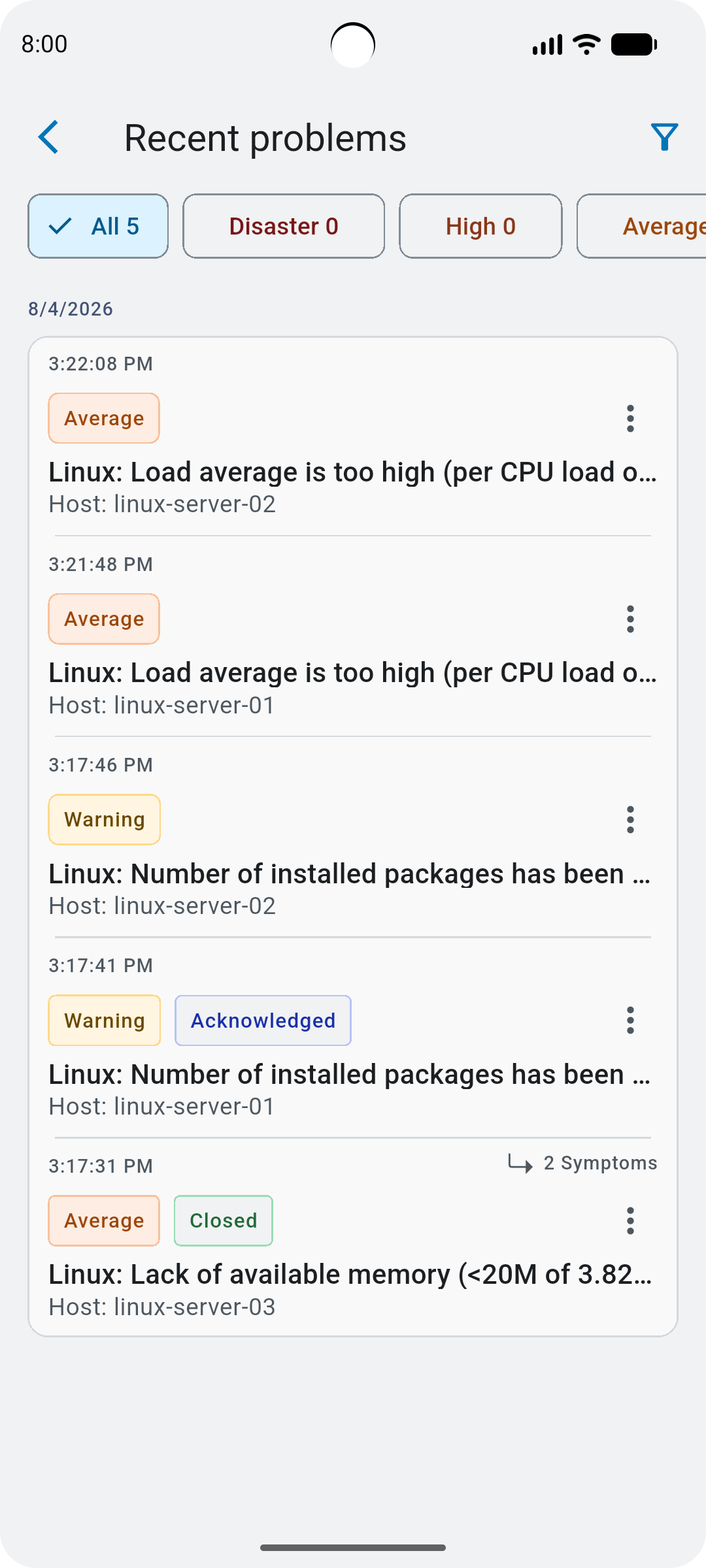
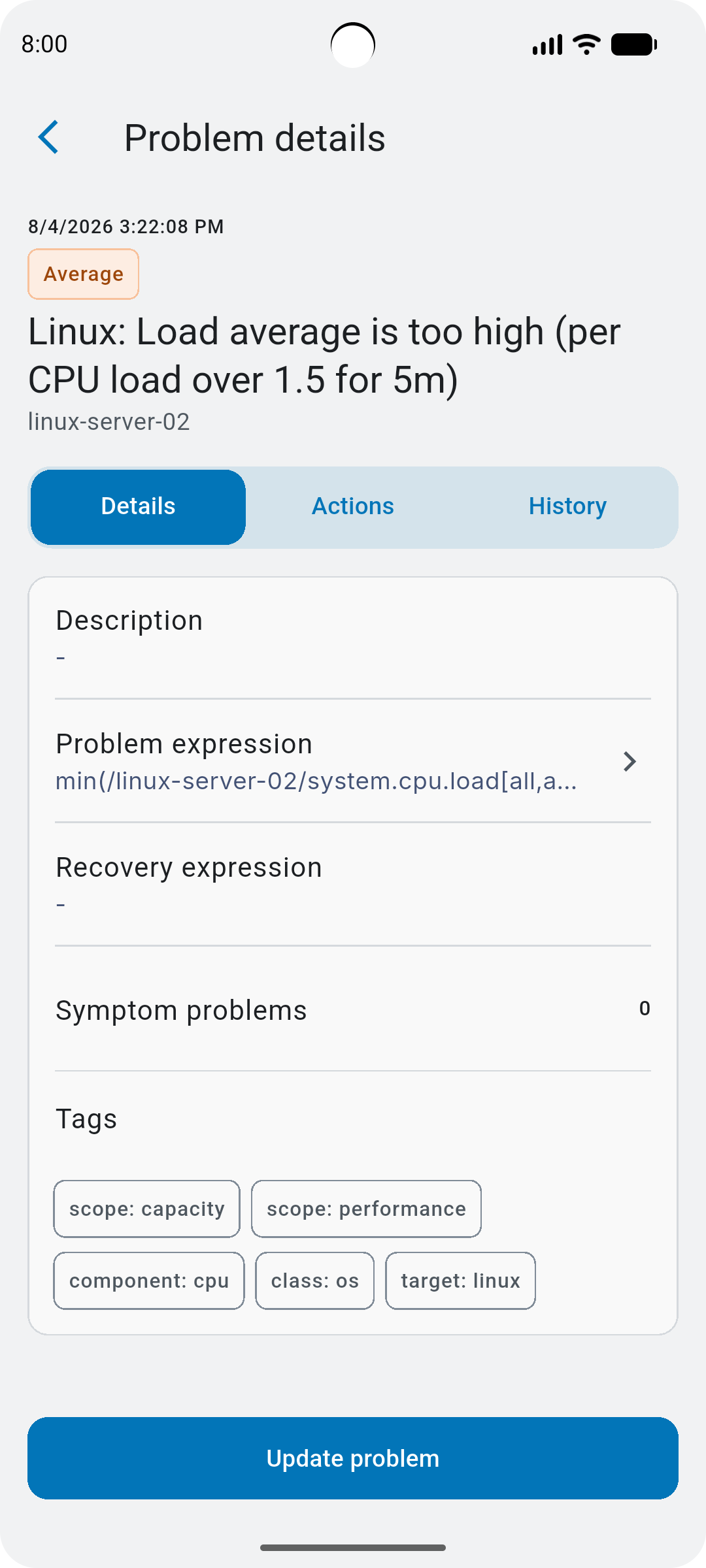
Zabbix mobile app (coming soon) makes it possible to monitor your Zabbix environment from your mobile device. View problems, check their details, update problems, and get push notifications when something needs attention.
With the app, the following features are new in Zabbix 8.0:
- Web interface sections for managing mobile devices: Users > Devices and User settings > Devices.
- Media type for sending problem notifications from Zabbix server to the mobile app: Push notification.
- Component that allows your Zabbix server to communicate with the mobile app: Bridge adapter.
- Zabbix server configuration parameters: BridgeAdapterURL, EnableMobileDevices.
For details on how to set up Zabbix for use with the mobile app, see the Mobile app section.
MCP server
The new Zabbix MCP server connects AI agents to Zabbix through the Model Context Protocol (MCP). You can now ask an AI assistant about your monitoring in plain language, for example:
- Which problems on database servers are not acknowledged yet?
- Why has web-01 been reporting problems since this morning?
- Put all hosts of the Linux servers group into maintenance tonight from 22:00 to 02:00.
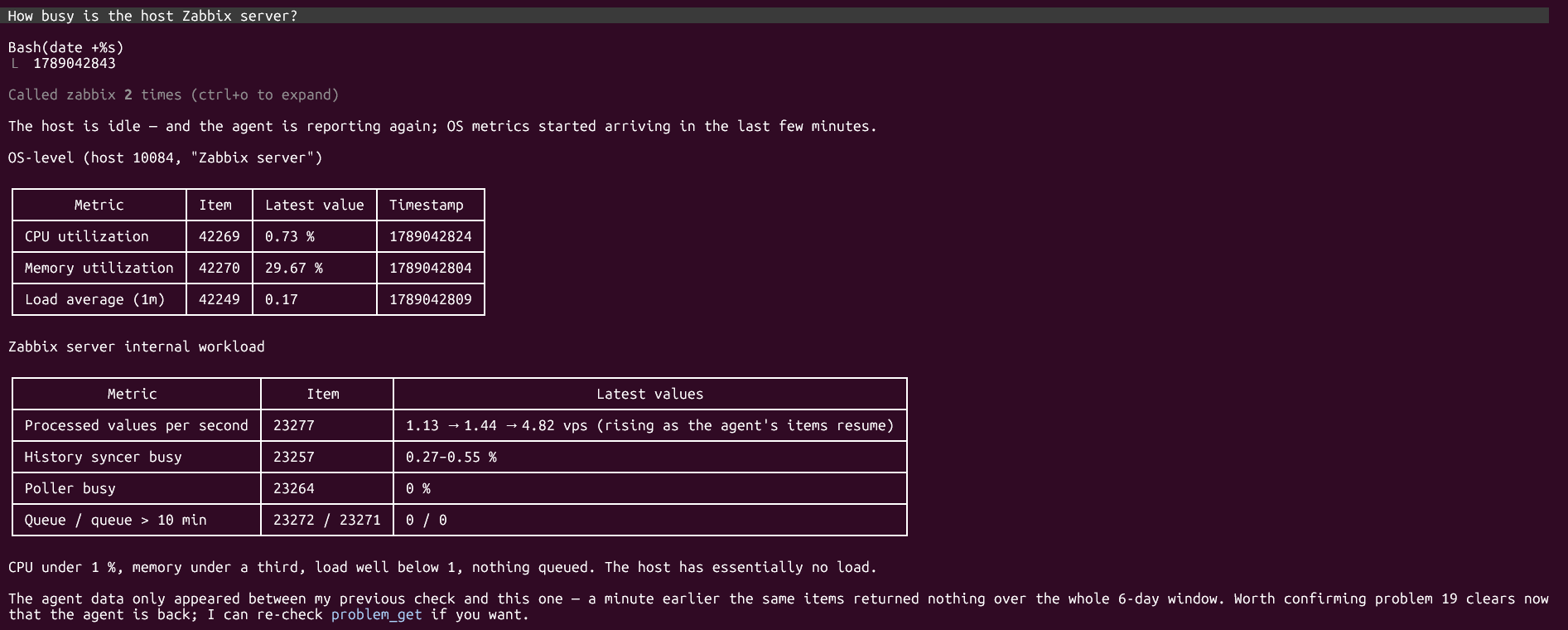
The agent connects with a Zabbix API token, so it can access only what the token owner is allowed to access, and all changes are recorded in the audit log under that user. For the list of available operations, see Tools and resources.
On-demand maintenance for triggers
Maintenance periods now can be defined for triggers or event names.
A maintenance period can also be created on-demand from the event menu. On-demand maintenance can be started for host, trigger, event name, or tags.
Another way of creating a maintenance for trigger is from the problem update form.
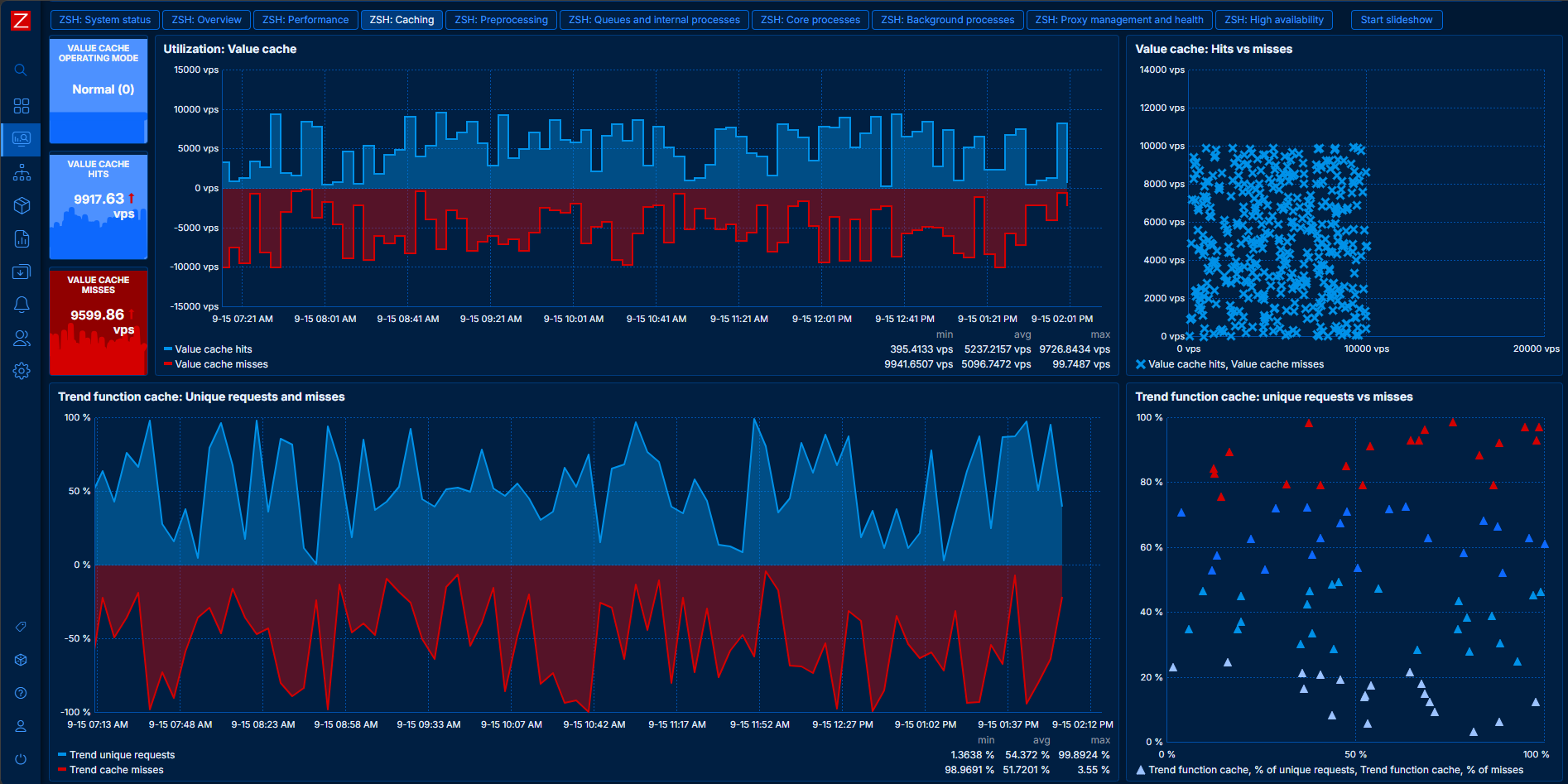
Dark blue theme
The Zabbix web interface now offers a new dark blue theme. It is available in the user profile and as the default theme:
Scatter plot widget
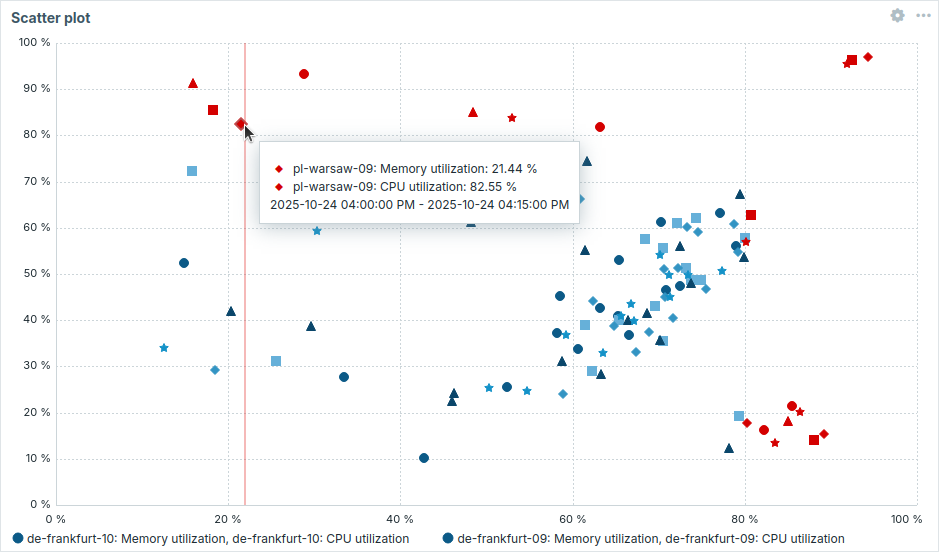
The Scatter plot widget has been added to dashboard widgets. It displays the relationship between two metrics by plotting individual data points along an X and Y axis. This helps reveal patterns, clusters, correlations, and outliers in the data set.
Y-axis inversion for graph widget
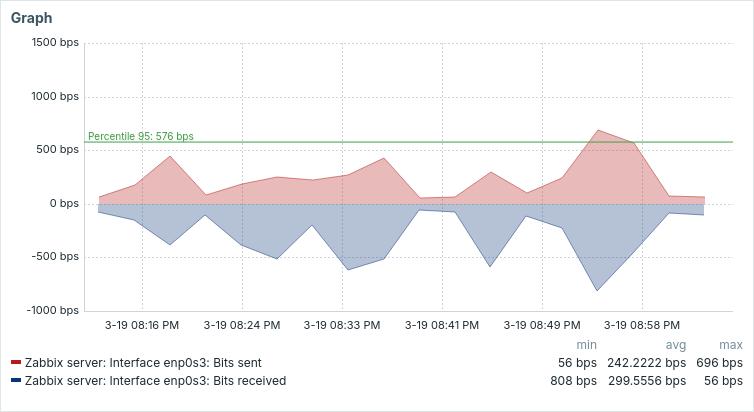
Graphs in the Graph widget can now be displayed with inverted Y-axis values. A new Invert values setting allows you to multiply Y-axis values by −1 without altering the original data.
See also: Graph widget enhancements.
JSON data type
Zabbix now supports JSON as a data type for item values.
Previously, JSON values were collected by text items and stored as strings with a limit of 64KB. Now, Zabbix can store JSON values natively with a limit of 128MiB, and also reject invalid JSON values (e.g., containing unquoted keys, trailing commas, mismatched brackets).
The JSON data type is supported by all item and item prototype types, except Calculated, and is available in real-time data export and connectors. JSON values can be stored in all supported databases and Elasticsearch. If you're using TimescaleDB, please see upgrade notes.
Note that items with the JSON data type cannot be used in triggers; however, you can extract JSON fields with dependent items that have a non-JSON data type and use them in triggers.
Items that return a JSON string (net.if.discovery, vfs.file.get, etc.) are still text items; however, you can change them to JSON if needed.
For more details and JSON data limits, see item configuration.
Custom layout for tables
In a number of frontend tables you can now hide/show, reorder, and resize columns. It is also possible to add a Custom text column with custom text, macro values, or both.
Custom layouts are available in these locations:
- Monitoring > Hosts, Latest data, and Problems
- Data collection > Templates and Hosts
For example, the default table layout in Monitoring > Latest data:
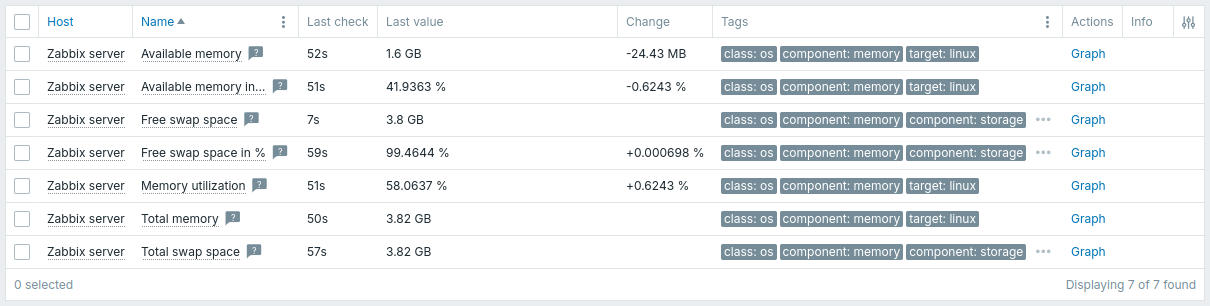
Example of a custom layout:
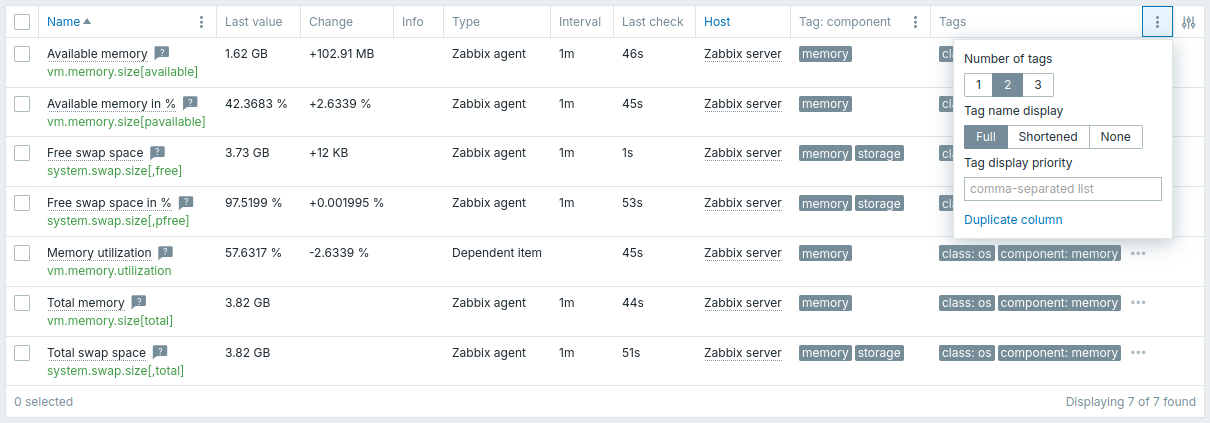
Some columns also have the  Options button that provides additional controls over how that column displays data.
Because of this, some filter parameters have been moved from the filter tab to column options.
If you're using tabs for favorite filters, please see Upgrade notes.
Options button that provides additional controls over how that column displays data.
Because of this, some filter parameters have been moved from the filter tab to column options.
If you're using tabs for favorite filters, please see Upgrade notes.
Global regular expressions
Several usability improvements have been added to global regular expressions:
- The global regular expression configuration form now opens in a modal window:
- Expression types have been renamed.
- The form now includes a Description field.
- Testing is no longer in a separate tab.
- The global regular expression list now can be filtered by name and description.
- Global regular expressions can now be exported and imported.
Templates
New templates have been added, and many templates have been updated.
Templates that connect to HTTPS endpoints now verify the endpoint TLS certificate by default. This affects all cloud and API monitoring templates, such as Claude API by HTTP, Cloudflare by HTTP, Kubernetes Cluster by HTTP, etc. See upgrade notes before upgrading any HTTP-based templates.
When upgrading Zabbix, existing templates are not updated automatically to avoid overwriting custom modifications. To upgrade templates or add new ones, see Template upgrade.
Please be informed that since Zabbix 6.0, all templates follow an updated format, which may impact the import of pre-6.0 templates. For more information, see Template changes in 6.0.
New templates
AI usage monitoring
- Claude API by HTTP, a template for monitoring Claude API usage and costs.
- OpenAI Platform by HTTP, a template for monitoring OpenAI's developer platform.
Cloud
- The AWS by HTTP template set has been supplemented with the template AWS Backup Vault by HTTP.
- The Azure by HTTP template set has been supplemented with the templates Azure Sentinel by HTTP and Azure Container Apps by HTTP.
- The GCP by HTTP template set has been supplemented with the templates GCP Cloud Run Service by HTTP, GCP Cloud Storage Bucket by HTTP, GCP Application Load Balancer by HTTP, and GCP Cost Monitoring by HTTP.
- The Oracle Cloud by HTTP template set has been supplemented with the templates Oracle Cloud Load Balancer by HTTP and Oracle Cloud Costs by HTTP.
Virtualization and containers
- Kubernetes Cluster by HTTP, a template for monitoring Kubernetes clusters, with nodes automatically discovered and monitored through dedicated hosts; the template replaces the previous Kubernetes templates.
- Microsoft Hyper-V Failover Cluster by SSH and Microsoft Hyper-V Standalone by SSH, templates for monitoring Microsoft Hyper-V clusters and standalone hosts via SSH.
- Podman by Zabbix agent, by Zabbix agent active, and by HTTP: templates for monitoring Podman containers and service health via the Podman API. Note that the Podman API does not support authorization methods.
Databases
- MariaDB by ODBC, a template for monitoring MariaDB databases via ODBC.
- MariaDB by Zabbix agent and MariaDB by Zabbix agent active, templates for monitoring MariaDB databases via Zabbix agent and Zabbix agent active.
- Percona by ODBC, a template for monitoring Percona databases via ODBC.
- Percona by Zabbix agent and Percona by Zabbix agent active, templates for monitoring Percona databases via Zabbix agent and Zabbix agent active.
Network, security, and telecommunications
- Aruba CX 8300s by SNMP, a template providing SNMP-based monitoring for the Aruba CX 8300 switch series.
- Ciena 3906 by SNMP, a template for monitoring Ciena 3906 devices, including filesystem and CPU load.
- Cisco Secure Firewall Threat Defense by HTTP, a template providing monitoring capabilities for Cisco Secure Firewall Threat Defense devices using REST API.
- Cradlepoint NCM v2 by HTTP, a template set for monitoring Cradlepoint NCM v2 and its devices via HTTP.
- Huawei AR600 by SNMP, a template for monitoring Huawei AR600 routers, including CoS and NQA metrics.
- Ribbon SBC Edge by HTTP, a template for monitoring Ribbon SBC Edge (formerly SWe Lite) devices via HTTP.
- Ribbon SBC SWe Core by HTTP, a template for monitoring SBC SWe Core devices via HTTP, and Ribbon SBC SWe CE by HTTP, a template for monitoring Ribbon SBC SWe Call Engine (CE) instances via HTTP.
- Stormshield SNS by SNMP, a template for monitoring Stormshield Network Security (SNS) devices via SNMP.
- VeloCloud SD-WAN Edge by HTTP, a template for monitoring VeloCloud SD-WAN Edge devices via HTTP.
- Vyatta Virtual Router by SNMP, a template for monitoring the Vyatta 1908e virtual router.
Applications and services
- Domain RDAP by HTTP, a template for monitoring domain registration data via the RDAP protocol.
- Envoy Proxy by OTLP, a template for collecting Envoy Proxy's OpenTelemetry traces and logs via Telemetry query items.
- Generic OpenTelemetry by OTLP, a template for collecting OpenTelemetry traces, metrics, and logs via Telemetry query items.
- GLPI by HTTP, a template for monitoring GLPI via HTTP using the REST API v2 with OAuth2 authentication.
- OpenRouter traces by OTLP, a template for collecting OpenRouter trace data.
- Proxmox VE by OTLP, a template for monitoring a Proxmox VE node using its OpenTelemetry metric stream via Telemetry query items.
Updated templates
- Improved device uptime trigger in SNMP templates to handle SNMP uptime counter resets and prevent false restart alerts.
Operating systems
- In the AIX, FreeBSD, HP-UX, Linux, macOS, OpenBSD, Solaris, and Windows templates, filesystem monitoring now uses the new
vfs.fs.getparameters (see Lightweight filesystem discovery). For details, see Template changes. - Linux by Zabbix agent and Linux by Zabbix agent active have been updated with improved dashboards and enhanced monitoring of network interfaces and block devices.
- Linux by Prom and Linux by SNMP have been updated with improved dashboards.
- Windows by Zabbix agent and Windows by Zabbix agent active templates have been enhanced with new metrics, discovery rules, prototypes, user macros, and dashboard widgets, including support for Windows scheduled tasks, Windows Firewall profiles, and BitLocker encryptable volumes.
AI usage monitoring
- GitHub organization by HTTP has been updated to include items for monitoring Microsoft Copilot.
- Microsoft 365 reports by HTTP has been updated to include items for monitoring Microsoft Copilot.
Cloud
- AWS Cost Explorer by HTTP of the AWS by HTTP template set and Azure Cost Management by HTTP of the Azure by HTTP template set have been updated with improved dashboards.
Virtualization
- Proxmox VE by HTTP has been updated with the nested LLD functionality. In addition, the unit format for items displaying percentages has been adjusted for clarity.
- In the VMware and VMware FQDN template sets, the item and trigger prototype names for VMware alarm discovery have been updated to include the alarm entity name.
Databases
- MySQL by Zabbix agent, MySQL by Zabbix agent 2, MySQL by Zabbix agent active, MySQL by Zabbix agent 2 active, and MySQL by ODBC have been updated to support both
SHOW SLAVE STATUS(old syntax) andSHOW REPLICA STATUS(new syntax). Additionally, MySQL by Zabbix agent, MySQL by Zabbix agent active, and MySQL by ODBC have been updated with new metrics, an improved dashboard, and expanded discovery rules for tables (as well as replicas for MySQL by ODBC). - PostgreSQL by ODBC has been updated with new metrics, discovery rules, and dashboards, along with general improvements to performance and observability.
- PostgreSQL by Zabbix agent and PostgreSQL by Zabbix agent active have been updated with additional metrics, discovery rules, item and trigger prototypes, and enhanced monitoring capabilities.
- Redis by Zabbix agent 2 has been updated with authentication via user and password macros and improved item descriptions.
Network, security, and telecommunications
-
VeloCloud SD-WAN by HTTP, previously VMWare SD-WAN VeloCloud by HTTP, has been renamed and updated to align with the latest VeloCloud SD-WAN platform. Storage and backup
-
Ceph by Zabbix agent 2 now supports native connection mode. See Ceph plugin for details.
-
Veeam Backup and Replication by HTTP and Veeam Backup Enterprise Manager by HTTP have been updated with new monitoring capabilities and support for Veeam Backup & Replication v13.1.1.18, including REST API revision 1.3-rev2 and updated license expiration monitoring.
Filesystem monitoring in OS templates
In the AIX, FreeBSD, HP-UX, Linux, macOS, OpenBSD, Solaris, and Windows templates (including the active-check variants of the Linux and Windows templates), filesystem monitoring now uses the new vfs.fs.get parameters:
- the Get filesystems item (
vfs.fs.get) has been removed; - the Mounted filesystem discovery rule is now a Zabbix agent item with the key
vfs.fs.get[short](update interval: 1h), instead of a dependent discovery rule; - the FS [{#FSNAME}]: Get data item prototype (FS [{#FSLABEL}({#FSNAME})]: Get data in the Windows templates) is now a Zabbix agent item with the key
vfs.fs.get[full,{#FSNAME}], which collects statistics for one filesystem only. The other filesystem item prototypes use it as the master item.
As a result, statistics are collected by a separate agent check per filesystem, and newly mounted filesystems are discovered within the discovery update interval (1h by default).
Filesystem monitoring in these templates requires Zabbix agent 8.0 or later.
Media types
This media type has been added:
- The IBM Maximo Service Request webhook media type enables linking Zabbix to IBM Maximo.
These media types have been updated:
- The GLPI webhook media type has been updated to support the RESTful API v2 with OAuth2 authorization (enabled by default), optional legacy REST API v1 support via configuration flag, ticket creation for problem events, and user-configurable urgency mapping.
- The MS Teams Workflow webhook media type is now the recommended integration for Microsoft Teams. The MS Teams webhook media type, based on the Office 365 Connector (Incoming Webhook) feature that Microsoft retired as of May 22, 2026, is no longer functional. Existing MS Teams webhook configurations need to be migrated to the MS Teams Workflow webhook media type.
Also, media types that connect to HTTPS endpoints now verify the endpoint's TLS certificate by default. This affects all webhook media types, such as Slack, Jira, Telegram, etc. See upgrade notes before upgrading any webhook media types.
Items
Default value for trapper item allowed hosts
The Allowed hosts field for Zabbix trapper items and for HTTP agent items with Enable trapping enabled, now uses the user macro {$TRAPPER.ALLOWED_HOSTS} by default.
If this value is empty, incoming connections are denied from all hosts.
To allow data submission, specify one or more IP addresses or DNS names.
Trend function cache utilization monitoring
The paccessed parameter has been added to the zabbix[tcache,cache,<parameter>] internal item.
It returns the percentage of trend function cache entries accessed within the last 24 hours.
Redirects in web.page.* items
The web.page.get, web.page.perf, and web.page.regexp items of Zabbix agent and Zabbix agent 2 can now follow redirects.
The maximum number of redirects is set in the new optional redirect_limit parameter; by default, redirects are not followed.
Plugins
Ceph plugin
The Zabbix agent 2 Ceph plugin now operates in two modes:
- native - This mode uses the go-ceph library to communicate directly with the Ceph cluster using the native Ceph API (msgr2 protocol). This is the recommended mode for modern Ceph installations, but is only supported on Linux and starting with Ceph 16.
- restful (deprecated) - This mode uses the Ceph RESTful API for communication.
It is the default mode for backward compatibility but will not work with Ceph version 20 (Tentacle) or newer due to the removal of the
mgr/restfulmodule.
Important: When monitoring Ceph 20 (Tentacle) and newer versions with the Ceph plugin for Zabbix agent 2, use native mode, as the restful mode is no longer supported.
Which mode to use is determined by the value of the mode parameter (native/restful):
Plugins.Ceph.Default.Mode=native- set the native mode for the pluginPlugins.Ceph.Sessions.<SessionName>.Mode=native- set the native mode for the named session
Note that the user credential set differs for each mode and they are not compatible with each other.
The Plugins.Ceph.InsecureSkipVerify parameter is ignored in native mode because connection security is defined on the Ceph cluster side by msgr2 protocol (secure by default).
Note that the Ceph plugin for Zabbix agent 2 is now a loadable plugin and requires additional installation steps. This is due to the librados package requirement (for the native mode). See the Ceph plugin readme for details.
MongoDB plugin
The Zabbix agent 2 MongoDB plugin offers multiple enhancements:
- Full support for conventional MongoDB URI parsing, with support for both
mongodb://andmongodb+srv://schemes. - Automatic discovery of MongoDB replica set nodes, enhancing the ability to monitor MongoDB clusters.
- Support for x509 authentication, enabling secure connections to MongoDB using client certificates.
Oracle plugin
The Zabbix agent 2 Oracle plugin now supports encrypted connections to Oracle databases using the TCPS (TLS) protocol. This adds the ability to monitor Oracle instances over TLS-secured sockets, improving security for remote monitoring.
Redis plugin — TLS support and startup-time validation
TLS support has been added to the Zabbix agent 2 Redis plugin.
Startup-time validation of the plugin TLS configuration was implemented and validation/error messages improved.
An invalid configuration logic (for example: using connection type verify_full without specifying TLSCAFile) can prevent Zabbix agent 2 from starting.
Test execution mode for loadable plugins
Loadable plugins can now be launched in test mode using the -t (--test) flag, passing an item key as argument.
In this mode, the plugin runs for debugging and development purposes, and plugin configuration files are ignored.
Discovery and autoregistration
Proxy group condition
A proxy group condition is now supported in discovery and autoregistration actions.
Low-level discovery
Convert to JSON checkbox in discovery forms
A new Convert to JSON checkbox was added to the low-level discovery rule form and discovery prototype form, which is shown if "HTTP agent" is selected in the Type dropdown. This option allows you to mark retrieved data for automatic conversion to JSON before further processing.
Macro support for nested low-level discovery
Low-level discovery macros are now supported in nested low-level discovery rules, in:
- JSONPath preprocessing parameters
- JSONPath field for custom LLD macros
Editable tags for triggers created by low-level discovery
Triggers created from trigger prototypes can now have tags added manually. Tags inherited from trigger prototypes are still applied automatically. Tags added manually may be modified on discovered triggers and will be included in event tag arrays and available to tag-aware features such as filters, dashboard widgets, and notification macros.
Block device discovery on Linux and AIX
The new vfs.dev.get item key was added for block device discovery on Linux and AIX.
It can be used in low-level discovery for block devices.
The vfs.dev.discovery item key remains available for compatibility.
Network interfaces discovery on Linux
The new net.if.get item key has been added to Zabbix agent and Zabbix agent 2 on Linux.
It can be used in low-level discovery of network interfaces to return a list of network interfaces with detailed information.
The net.if.discovery item key remains available for compatibility.
Lightweight filesystem discovery
The vfs.fs.get item of Zabbix agent and Zabbix agent 2 now supports two optional parameters that make filesystem discovery lighter and more reliable:
- mode - in the
shortmode, the item returns only the list of mounted filesystems with their basic properties, without disk space and inode statistics. As the filesystems themselves are not queried, discovery does not trigger automounting and is not affected by unresponsive network filesystems. Thefullmode (default) returns the same data as before. - mountpoint - returns data for the specified mount point only, so that statistics can be collected separately for each discovered filesystem (for example, with
vfs.fs.get[full,{#FSNAME}]).
The OS templates now use this approach; see Template changes.
For more information, see vfs.fs.get and Discovery of mounted filesystems.
Databases
Support for multiple PostgreSQL database hosts
Zabbix now supports specifying multiple PostgreSQL database hosts as a comma-separated list of host:port values, leveraging PostgreSQL connection failover support.
The hosts are tried in order until a read-write connection is established.
This behavior is available during frontend installation in the Database host field and in DBHost in zabbix_server.conf and zabbix_proxy.conf.
Optimized Zabbix server startup
Zabbix server now starts up significantly faster. It does so by loading history data from the database for multiple items at once instead of one at a time. This improvement applies to all database types supported by Zabbix server.
Optimized Elasticsearch performance
Zabbix server now works better with Elasticsearch. The server retrieves data more efficiently without using Elasticsearch's scroll feature, and reuses existing connections to Elasticsearch instead of opening a new one for every request. The server also no longer hangs when sending multiple requests to Elasticsearch at the same time (using cURL's multi-handle).
Processes
SNMPv3 EngineID caching and reuse
Zabbix now caches SNMPv3 EngineID → IP mappings and will attempt to reuse cached EngineIDs for subsequent SNMPv3 checks, reducing probe traffic and improving poller performance. If a reused EngineID does not respond, the poller falls back to an EngineID probe and may remove stale entries after interface changes or persistent failures.
Refined proxy throttling during history cache recovery
Proxy throttling logic has been refined to improve server stability during history cache recovery. When history cache usage reaches the throttling threshold, the server continues to stop accepting proxy data as before. When cache usage falls to 60%, the server begins processing the throttling list but may still reject proxy uploads that contain very large batches (approximately more than 10k records) until cache pressure decreases further. This change reduces the risk of repeated cache overloads while the server recovers.
Increased maximum timeout for zabbix_get and zabbix_js
The maximum value for the timeout parameter of the zabbix_get and zabbix_js command-line utilities has been increased to 600 seconds.
Optimized housekeeping
Housekeeping has been optimized by moving the creation of housekeeper tasks to database triggers.
When items (including low-level discovery rules), triggers, services, or network discovery rules are deleted, database triggers (instead of explicit application-level calls) now populate the housekeeper table with cleanup tasks.
For details, see the housekeeping procedure.
The housekeeper now also removes network discovery events generated from discovered hosts or services that have since been deleted, as well as all events associated with problems of triggers that have since been deleted (previously, only the problems themselves were removed; associated events were only removed after the housekeeper Trigger data storage period expired).
Manual close — trigger tags inherited by recovery events
Recovery events created after a manual close inherit trigger tags in addition to item and host tags.
These tags are present in the event tags array and are available to notification macros such as {EVENT.RECOVERY.TAGS} and {EVENT.RECOVERY.TAGSJSON}.
DNS query caching for Zabbix daemons
Zabbix server, Zabbix proxy, and Zabbix agent received support for using the c-ares resolver for all DNS requests, providing DNS query caching and improved resolver failover when Zabbix is built with --with-ares.
DNS query caching requires c-ares 1.26.0 or later.
Build support for c-ares on Windows
Zabbix agent can now be built with the c-ares resolver on Microsoft Windows.
c-ares may be installed via vcpkg, and the agent build supports either ARES=<vcpkg prefix> or separate ARESINCDIR/ARESLIBDIR paths for include and library directories.
Count-based trigger functions improved
The operation of count-based functions (count(), item_count(), changecount(), etc.) in trigger expressions has been improved, allowing more values to be processed faster.
Runtime control target updates
The list of available runtime control targets in Zabbix server and proxy help messages and manpages has been updated to match the supported process types.
The supervisor target has been added, while the unsupported discovery worker and preprocessing worker targets have been removed.
Security
Proxy and server access control
The new Proxy access list tab in the user group configuration allows you to grant user group access to proxies, either individually or through proxy groups.
The new Select "Server" for monitoring and discovery option in the user role configuration allows you to prevent users from creating hosts monitored by the server and network discovery rules executed by the server, as well as from testing of items with the server.
New AllowKeyRegexp and DenyKeyRegexp parameters in Zabbix agent and Zabbix agent 2 configuration
The new AllowKeyRegexp and DenyKeyRegexp parameters have been added to the Zabbix agent and Zabbix agent 2 configuration.
These parameters allow you to define regular expression-based patterns for more precise and flexible matching of keys and their parameters.
Authentication
Importable SAML certificates for single sign-on
Super admin users can now import certificates and private keys directly in the frontend for SAML configuration. Three new fields were added to Users > Authentication > SAML settings:
- IdP certificate - X.509 certificate presented by the identity provider
- SP certificate - service provider certificate used for SAML exchanges
- SP private key - private key corresponding to the SP certificate
These controls allow adding new values or modifying existing ones from the SAML settings tab. Certificates and private keys are validated before being saved to the chosen storage backend; invalid or malformed values are rejected with an explanatory error.
HashiCorp vault authentication with AppRole method
HashiCorp vault authentication now supports the AppRole method:
- In server/proxy configuration, using the new
VaultAppRoleIDandVaultAppSecretIDparameters (see example). - In frontend configuration, by supplying authentication role ID and secret ID values.
Widgets
Changes to the clock widget Time zone option
The Time zone option in the clock widget configuration form has been moved from the Advanced configuration section to the main widget configuration section and renamed to Override time zone.
This option is available for the Local time and Server time time types.
Geomap host marker clustering
The Geomap widget now supports a Clustering parameter to control how nearby host markers are combined into a single marker with a count. By setting the map zoom level for clustering, you can keep large maps readable and maintain precise visibility when zoomed in.
Aggregate columns in Top items
The Top items widget can now group item patterns into a single aggregated column or row, making it easy to present combined metrics (for example: total incoming traffic across all network interfaces of a host). Three new options were added when configuring item columns: Aggregate columns, Column aggregation function, and Combined column name.
Graph widget enhancements
The Graph widget offers multiple usability enhancements:
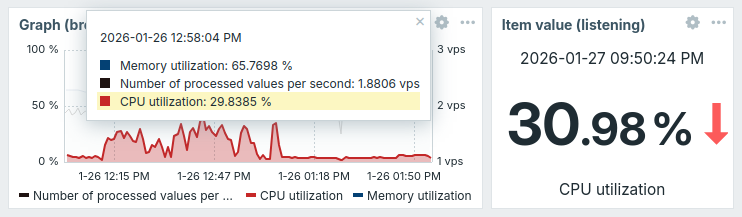
- Items in the graph data tooltip that appears when hovering over the graph are sorted by value in descending order.
- Hovering over an item in the tooltip highlights its graph while dimming others.
- Selecting an item in the tooltip broadcasts its data to other widgets that support listening to it.
- The limit on the number of items displayed in the tooltip has been removed.
- A new Host names in labels setting allows you to choose whether host names are displayed in the tooltip and graph legend.
- A new Invert values setting allows you to flip a graph.
Increased character limit for widget description fields
The character limit for the Description field in the Gauge and Item value widgets has been increased from 2048 to 65535 characters.
Frontend
Importable dashboards
New importable dashboards are available in the Dashboards repository:
- Multicloud Cost Dashboard - a dashboard for monitoring cloud costs across AWS, Azure, Google Cloud, and Oracle Cloud.
- Multicloud Virtual Machines Dashboard - a dashboard for monitoring virtual machines running in AWS, Google Cloud, Oracle Cloud, and Azure.
These dashboards are designed to work with existing Zabbix integrations by combining data from multiple hosts and monitoring targets into a unified global dashboard.
Dashboard export and import
Dashboards can now be exported and imported, making it easier to migrate dashboards between Zabbix instances or reuse them in different environments.
A new Export option allows saving selected dashboards to YAML, JSON, or XML files. These files can later be imported through the Import functionality to recreate the dashboards with their pages, widgets, and configuration.
New and embedded fonts
Zabbix now includes new and embedded fonts that improve readability, load faster, and render additional frontend languages with minimal layout impact. Being embedded, these fonts also ensure a consistent appearance across systems.
New fonts: |
Legacy fonts: |
The new fonts are used in almost all themes. If needed, the newly added Blue (classic) and Dark (classic) themes are available with legacy fonts.
The font family for monospace content and graphs remains unchanged.
Zabbix UI enhancements
The Zabbix user interface has been modernized to improve accessibility and usability.
Accessibility enhancement
The Skip to main content link has been added to improve keyboard navigation and accessibility.
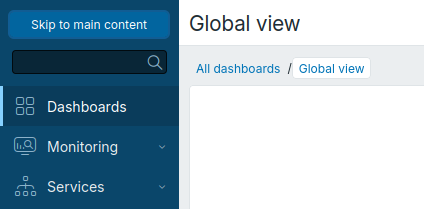
The link allows keyboard and screen reader users to skip repetitive sidebar navigation and move directly to the main content.
It remains hidden during normal use and appears only when focused, such as when the Tab key is pressed after the page loads or when it is accessed using a screen reader.
Inline validation
The following forms in the frontend have been added to the set of forms that support inline validation:
- API token
- Audit log
- Authentication
- Autoregistration
- Connector
- Discovery prototype
- Low-level discovery rule
- Network discovery rule
- Event correlation
- Geographical maps
- Graph prototypes
- Custom graphs
- GUI
- Host group
- Host prototypes
- Housekeeping
- Icon mapping
- Images
- Maintenance
- Media type
- Notifications
- Other configuration parameters
- Profile
- Proxy
- Proxy group
- Regular expressions
- Scheduled reports
- Script
- Service
- SLA
- Template group
- Test item
- Test media type
- Timeouts
- Trigger displaying options
- Trigger expression constructor
- Update problem
- User groups
- Global user macros
- User roles
- Users
Input errors are displayed immediately after filling in the fields, improving usability and reducing configuration mistakes.
Modal forms
The following forms are now opened in a modal window:
- Discovery prototype configuration form
- Low-level discovery rule configuration form
- Host prototype configuration form
- Global regular expression configuration form
Inherited tags visible in hosts, templates, items, and triggers
Inherited tags are now displayed and returned consistently across templates, hosts, items, web scenarios, and triggers. Tags inherited from template/host chains are visible in Monitoring > Latest data. Filtering by inherited tags is available wherever tag filtering is supported—including the Monitoring > Latest data and Data collection sections, and all dashboard widgets that allow filtering by host, item, trigger, or web scenario tags—so tag-based selection and subfiltering behave the same regardless of where a tag was defined.
The Tags tab on template, host and host prototype configuration forms now exposes a radio element to choose how tags are presented: templates show Template tags / Inherited and template tags, and hosts and host prototypes show Host tags / Inherited and host tags. Inherited tags are visually distinguished by a new outlined document icon next to the tag label.
Graph and Pie chart widgets include a new Item tags setting.
Tooltips positioning
Tooltips can now be repositioned by dragging them to a new location. This applies, for example, to the Graph tooltip, as well as to tooltips with descriptions in the Latest Data or Problems sections.
New $ZBX_FEATURE_FLAGS variable in frontend configuration
The new $ZBX_FEATURE_FLAGS[] variable has been implemented in the frontend configuration to control access to user HTTP authentication, modules, and media types configurations.
The following feature flags have been added to the zabbix.conf.php configuration file:
$ZBX_FEATURE_FLAGS['http_auth_enabled'] = falsedisables access to the configuration of user HTTP authentication (replaces the$ALLOW_HTTP_AUTHvariable).$ZBX_FEATURE_FLAGS['modules_config_enabled'] = falsedisables access to the modules configuration.$ZBX_FEATURE_FLAGS['media_type_denylist'] = [<value1>, <value2>, ...]restricts editing of media types that use the specified delivery methods ('email','script','sms', or'webhook'; one or more values can be specified).
Access to setup.php is restricted if the zabbix.conf.php configuration file exists.
Event details show suppression reason
The event details page, opened from Monitoring > Problems, now shows whether an event was suppressed because of host maintenance or suppressed manually by a user.
Orange icons  and
and  indicate maintenance-related suppression/unsuppression, while grey icons
  and
and  indicate manual suppression/unsuppression.
In problem and event histories, actions performed by deleted users are now shown as Inaccessible user.
System information report enhancements
The System information report now displays the server ID (UUIDv7).
The system information report is now also available to Zabbix Admin users.
Changes to the Zabbix SELinux policy package
For version 10 of AlmaLinux, CentOS Stream, RHEL, Rocky Linux, and Oracle Linux, the SELinux policy is provided by the new zabbix-selinux-policy-main package, which contains the SELinux policy from the upstream SELinux repository.
The existing zabbix-selinux-policy package now has a dependency on either zabbix-selinux-policy-main or selinux-policy-targeted-extra.
The zabbix-selinux-policy-main package conflicts with selinux-policy-targeted-extra; therefore, both packages cannot be installed at the same time.
If you have existing zabbix-selinux-policy installation, no manual changes are required.
During package upgrade, zabbix-selinux-policy-main will be installed automatically.
If selinux-policy-targeted-extra is already installed, no additional package will be installed.
Dashboard slideshow setting
When creating a dashboard, the Start slideshow checkbox is disabled by default and must be enabled explicitly.
A slideshow URL parameter supports the values on or off allowing the dashboard slideshow setting to be overridden quickly.
The slideshow=1 parameter is deprecated and will no longer be supported.
Link to Zabbix Cloud proxies
The proxy list in Administration > Proxies now includes a Create proxy in Cloud button. Clicking it opens Zabbix Cloud in a new browser tab, where you can deploy a proxy without installing it on your own infrastructure. For more information, see Set up a Zabbix Cloud proxy.
Documentation
Consolidated documentation pages for minor releases
Release documentation for minor versions of a major Zabbix release will now be collected in a single documentation page for both new features and upgrade notes.
Upgrade notes
These notes are for upgrading from Zabbix 7.4.x to Zabbix 8.0.0.
All notes are grouped into:
- Breaking changes - changes that may break existing installations and other critical information related to the upgrade process
- Other - all remaining information describing the changes in Zabbix functionality
See also:
- Upgrade procedure for all relevant information about upgrading from versions before Zabbix 8.0.0;
- Upgrading HA cluster for instructions on upgrading servers in a high-availability (HA) cluster.
Breaking changes
Host interface API methods removed from user roles
After upgrading Zabbix, the hostinterface.create, hostinterface.update, hostinterface.delete, hostinterface.massadd, and hostinterface.massremove API methods will be removed from the Access to API lists of existing user roles.
Custom themes and media type
Zabbix adds three new predefined frontend themes: Blue (classic), Dark (classic), and Dark blue, as well as a new Push notification media type.
If you have a custom theme with one of these names (blue-classic-theme, dark-classic-theme, dark-blue-theme), or a media type named Push notification, rename the theme or media type before upgrading.
Otherwise, after the upgrade:
- The predefined theme will replace your custom theme's stylesheet, while your custom graph colors will remain in use, resulting in a mix of both themes.
- Your existing media type will remain unchanged, but the new media type will not be created.
Custom themes and media types with other names are not affected by the upgrade.
Internal proxy items restricted to server-monitored hosts
The internal items zabbix[proxy,*] and zabbix[proxy group,*] are no longer supported on hosts monitored by a proxy or proxy group.
Discontinued support of pre-1.6 Zabbix agents
Due to the removal of support for legacy plain-text and XML protocols from Zabbix server/proxy trapper, pre-1.6 Zabbix agents are no longer supported.
Minimum Logback library version
The minimum Logback library version has been raised from 1.5.16 to 1.5.25.
Database versions
The minimum required database versions have been raised:
- MySQL/Percona: 8.0.30 → 8.4.0
- MariaDB: 10.5.00 → 10.11.00
- PostgreSQL: 13.0 → 15.0
- TimescaleDB: 2.13.0 → 2.20.0
Plugins
The Ceph plugin for Zabbix agent 2 is now a loadable plugin and requires additional installation steps. See the Ceph plugin readme for details.
The tcp:// scheme is deprecated in the MongoDB plugin but is kept for backward compatibility with existing configurations.
The Plugins.Oracle.CallTimeout parameter in the Oracle plugin configuration file no longer has any effect.
The maximum wait time is now determined by the item timeout.
MongoDB plugin version support
This plugin version no longer supports MongoDB 2.6–4.0. It uses MongoDB Go Driver v2, which requires MongoDB 4.2 or later.
To monitor MongoDB 2.6–4.0, use an earlier version of the plugin. Earlier versions support MongoDB 2.6–5.3 and can be used with Zabbix agent 2 version 6.0.0 or later.
Minimum required PHP version
The minimum required PHP version has been raised from 8.0.0 to 8.2.0.
Extended UnsafeUserParameters list
The % character has been added to the UnsafeUserParameters list for Zabbix agent and Zabbix agent 2.
Moved filter parameters
As part of the customizable tables feature, some filter parameters have been moved from the filter tab to column options. If you have saved tabs for favorite filters that use any of the following filter parameters, they will be reset and must be reconfigured manually after the upgrade:
- Monitoring > Hosts: Show suppressed problems
- Monitoring > Latest data: Show tags, Tag name, Tag display priority, Show details
- Monitoring > Problems: Show tags, Tag name, Tag display priority, Show operational data, Compact view, Show details, Show timeline, Highlight whole row
JavaScript preprocessing: built-in object methods are now read-only
Built-in JavaScript object methods in preprocessing scripts are now read-only. If you have already modified built-in methods on JavaScript prototypes in item preprocessing scripts, you may encounter issues, as modifying built-in prototype methods is no longer allowed.
MySQL database character set and collation
If the Zabbix MySQL database was created with the utf8mb3 character set and utf8mb3_bin collation, it is strongly recommended to convert it to utf8mb4 character set and utf8mb4_bin collation before upgrading Zabbix, as described in Repairing Zabbix database character set and collation.
Other
SAML signing enabled by default
For improved security, all SAML signing options (Messages, Assertions, AuthN requests, Logout requests, and Logout responses) are now enabled by default when configuring SAML authentication in Users > Authentication. As a result, SP private key and SP certificate are now required for new SAML configurations unless the signing options are cleared.
Existing SAML configurations are not affected by the upgrade.
Deprecated Kubernetes templates
The Kubernetes templates are deprecated and have been replaced by the Kubernetes Cluster by HTTP template. The old templates are retained for backward compatibility with existing configurations.
Deprecated macros dropped
The support for the following built-in macros has now been dropped:
| Dropped | Use instead |
|---|---|
{ACK.DATE} |
{EVENT.UPDATE.DATE} |
{ACK.MESSAGE} |
{EVENT.UPDATE.MESSAGE} |
{ACK.TIME} |
{EVENT.UPDATE.TIME} |
{EVENT.ACK.HISTORY} |
{EVENT.UPDATE.HISTORY} |
{HOSTNAME<1-9>} |
{HOST.HOST} |
{IPADDRESS<1-9>} |
{HOST.IP} |
{PROFILE.*} |
{INVENTORY.*} |
{TRIGGER.COMMENT} |
{TRIGGER.DESCRIPTION} |
{TRIGGER.KEY} |
{ITEM.KEY} |
{STATUS} |
{TRIGGER.STATUS} |
{USER.ALIAS} |
{USER.USERNAME} |
Deprecated parameters for history storage providers
The following parameters have now been deprecated:
- Zabbix server configuration file:
HistoryStorageDateIndex,HistoryStorageURL, andHistoryStorageTypes. Please use the newHistoryProviderparameter instead. - Zabbix frontend configuration file:
$HISTORY. Please use the new$HISTORY_PROVIDERSparameter instead.
Both new parameters let you choose the history storage provider: Elasticsearch, ClickHouse, or SQL (default). Note that you cannot use these new and deprecated parameters together.
Removed JSON and XML validation from HTTP agent items
JSON and XML validation has been removed from the Request body field in HTTP agent items. The field no longer checks whether the value is valid XML or JSON, and selecting XML data as the Request body type no longer requires the libxml2 library.
Disabled links hidden in monitored hosts
Disabled Graphs, Dashboards, and Web links are no longer displayed in the list of monitored hosts.
JSON data type
Zabbix now supports JSON as a data type for item values.
If you are using TimescaleDB, the new history_json hypertable (used to store JSON values) must be configured manually.
If you are using Elasticsearch, the default value of the deprecated HistoryStorageTypes Zabbix server configuration parameter now includes json.
Removed radio button in the New tag filter form
The radio button that required choosing between All tags and Tag list when creating a new tag filter has been removed.
Item values displayed as HTML using iframes
Item data in the Item history widget, when displayed as HTML-formatted text, is now isolated in iframes.
TLS verification for HTTP-based templates and media types
Templates and media types that connect to HTTPS endpoints now verify the endpoint's TLS certificate by default.
This change affects all cloud and API monitoring templates (e.g., Claude API by HTTP, Cloudflare by HTTP, Kubernetes Cluster by HTTP) and all webhook media types (e.g., Slack, Jira, Telegram).
You can change this behavior with the new {$HTTP.TLS.VERIFY} user macro that has been added to these templates and media types.
Set the macro value to none to disable verification, peer to verify only the certificate chain and expiration, or full for full verification.
For details, see the README file of each HTTP template or webhook.
When you upgrade Zabbix, templates and media types are not upgraded automatically. This avoids overwriting any custom changes you have made. To upgrade or add templates and media types manually, see the template upgrade instructions.
Template compatibility with Host Wizard
All out-of-the-box templates are now compatible with the Host Wizard. To upgrade them, see Template upgrade.
Autoresizing for configuration fields
Most configuration fields in the UI now automatically resize to fit their content.
Replaced frontend configuration variable
The $ALLOW_HTTP_AUTH variable has been replaced by the $ZBX_FEATURE_FLAGS['http_auth_enabled'] feature flag in the frontend configuration file (zabbix.conf.php).
Concurrent processing of SNMPv1 and SNMPv2 checks
SNMPv1 and SNMPv2 asynchronous service checks are now processed concurrently by available discovery workers.
Changes to the Zabbix SELinux policy package
For version 10 of AlmaLinux, CentOS Stream, RHEL, Rocky Linux, and Oracle Linux, the existing zabbix-selinux-policy package now has a dependency on either zabbix-selinux-policy-main or selinux-policy-targeted-extra.
If you have existing zabbix-selinux-policy installation, no manual changes are required.
During package upgrade, zabbix-selinux-policy-main will be installed automatically.
If selinux-policy-targeted-extra is already installed, no additional package will be installed.
Renamed maintenance period state
The maintenance period state has been renamed from Approaching to Upcoming.
Deprecated dashboard slideshow parameter
Support for the slideshow=1 parameter will be removed.
New values for the slideshow parameter have been introduced to start and stop the slideshow:
slideshow=on- start the slideshowslideshow=off- stop the slideshow
Changes to global regular expressions
- The Description field has been added to the regular expressions configuration form.
- The Expression type options have been renamed:
| Before | Now |
|---|---|
| Character string included | Contains string |
| Any character string included | Contains any substring from list |
| Character string not included | Does not contain string |
| Result is TRUE | Matches regular expression |
| Result is FALSE | Does not match regular expression |
Default access to API
For new installations, access to the API is disabled by default for all roles, including newly created roles and default user roles.
For existing installations, access to the API is disabled by default only for newly created roles.