
3. Очистка истории
Обзор
Раздел Administration > Housekeeping позволяет настроить внутреннюю очистку Zabbix, которая автоматически удаляет устаревшие данные или данные, удаленные пользователем, из базы данных. Это предотвращает бесконечный рост базы данных, который приводил бы к ненужному расходу дискового пространства и снижению производительности базы данных.
Очистку можно включить и настроить для следующих типов данных:
- События и оповещения от триггеров, служб, внутренних данных, сетевого обнаружения и авто-регистрации
- Службы
- Сеансы пользователей
- История и тренды для элементов данных
Очистка журнала аудита настраивается отдельно.
Конфигурация
Доступны следующие параметры:
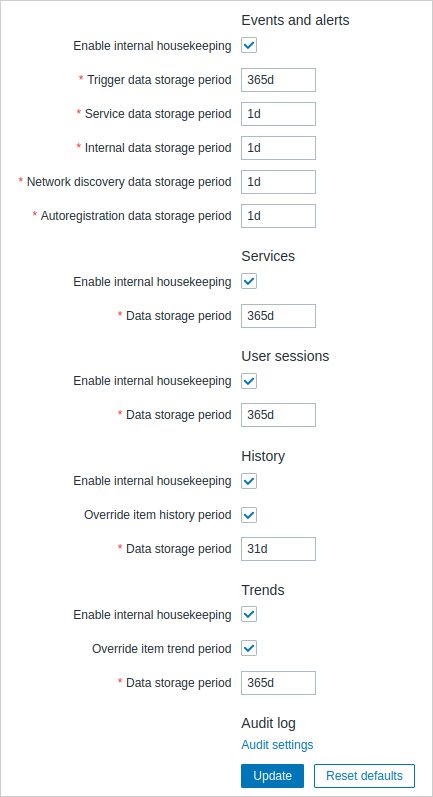
| Parameter | Description |
|---|---|
| Enable internal housekeeping | Включить или отключить внутреннюю очистку (по умолчанию включена). Если включено, процесс housekeeper сервера Zabbix автоматически удаляет из базы данных данные, срок хранения которых превышает Data storage period. |
| Data storage period | Укажите, как долго хранить данные до их удаления housekeeper. Обязательно, если включена внутренняя очистка. Диапазон: от 1 дня (1 часа для history) до 25 лет; или "0". Поддерживаются суффиксы времени (например, 1d, 1w). Для Events and alerts период хранения данных задается отдельно для триггеров, services, внутренних данных, network discovery и autoregistration. Housekeeper удаляет только те события, которые не связаны с проблемами. Например, событие problem/recovery, которое старше Data storage period, не будет удалено, если оно связано с нерешенной проблемой. Когда housekeeper удаляет устаревшие сущности, он сначала удаляет проблемы, затем события. Обратите внимание, что при удалении элемента данных/триггера его проблемы также удаляются; однако связанные события problem/recovery остаются в базе данных, пока housekeeper не удалит их. Для History и Trends периоды хранения данных также определяют, как долго данные остаются видимыми в Monitoring > Latest data, даже если внутренняя очистка отключена. |
| Override item history period | Если включено, период хранения history/trend, указанный в конфигурации элемента данных, переопределяется настройкой Data storage period (кроме элементов данных с включенной опцией Do not store). Эту опцию можно использовать даже при отключенной внутренней очистке, если используется внешний housekeeper. |
| Override item trend period |
Если используется TimescaleDB, становится доступен раздел History, trends and audit log compression.
Для TimescaleDB включите Override item history period, Override item trend period и Enable internal housekeeping для history и trends, чтобы в полной мере использовать автоматическое разбиение на разделы. Если эти параметры отключены, данные, хранящиеся в таблицах history и trends, по-прежнему будут разбиваться на разделы, но housekeeper не будет удалять устаревшие разделы, и будут отображаться предупреждения о конфигурации. Когда удаление устаревших разделов включено, сервер Zabbix и веб-интерфейс больше не будут отслеживать удаленные элементы данных, а history для этих элементов данных будет очищена при удалении устаревшего раздела.
Housekeeper по умолчанию выполняется автоматически каждый час.
Вы можете изменить частоту выполнения, задав параметр конфигурации сервера Zabbix HousekeepingFrequency.
Кнопка Reset defaults позволяет отменить все внесенные изменения.