
Discovery of mounted filesystems
Overview
It is possible to discover mounted filesystems and their properties:
- mountpoint name
- filesystem type
- filesystem size
- inode statistics
- mount options
To do that, you may use a combination of:
- the
vfs.fs.getagent item as the master item - dependent low-level discovery rule and item prototypes
In the full mode (default), the filesystem statistics are returned only if the Zabbix agent user has traverse permission on every directory in the mountpoint path; otherwise, the affected filesystem is omitted from the vfs.fs.get output.
To have such filesystems discovered and reported as unsupported rather than silently skipped, use discovery in the short mode.
Configuration
Master item
Create a Zabbix agent item using the following key:
vfs.fs.get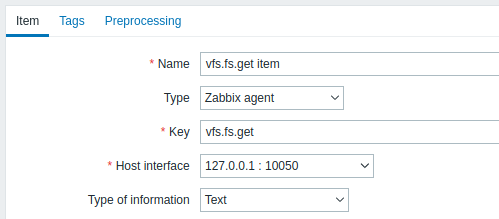
Set the type of information to "Text" for possibly big JSON data.
The data returned by this item will contain something like the following for a mounted filesystem:
[
  {
    "fsname": "/",
    "fstype": "ext4",
    "bytes": {
      "total": 249405239296,
      "free": 24069537792,
      "used": 212595294208,
      "pfree": 10.170306,
      "pused": 89.829694
    },
    "inodes": {
      "total": 15532032,
      "free": 12656665,
      "used": 2875367,
      "pfree": 81.487503,
      "pused": 18.512497
    },
    "options": "rw,noatime,errors=remount-ro"
  }
]
Dependent LLD rule
Create a low-level discovery rule as Dependent item type:
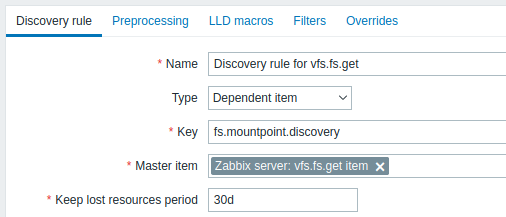
As master item select the vfs.fs.get item we created.
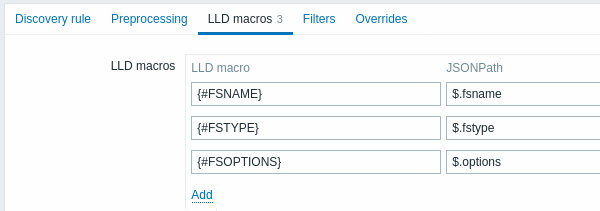
In the LLD macros tab define custom macros with the corresponding JSONPath:
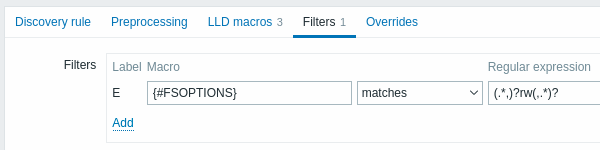
In the Filters tab you may add a regular expression that filters only read-write filesystems:
Dependent item prototype
Create an item prototype with "Dependent item" type in this LLD rule.
As master item for this prototype select the vfs.fs.get item we created.
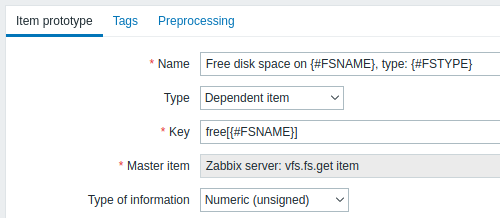
Note the use of custom macros in the item prototype name and key:
- Name: Free disk space on {#FSNAME}, type: {#FSTYPE}
- Key: Free[{#FSNAME}]
As type of information, use:
- Numeric (unsigned) for metrics like 'free', 'total', 'used'
- Numeric (float) for metrics like 'pfree', 'pused' (percentage)
In the item prototype Preprocessing tab select JSONPath and use the following JSONPath expression as parameter:
$.[?(@.fsname=='{#FSNAME}')].bytes.free.first()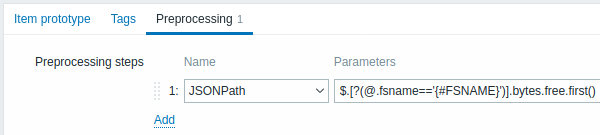
When discovery starts, one item per each mountpoint will be created. This item will return the number of free bytes for the given mountpoint.
Discovery in the short mode
As an alternative to a dependent discovery rule, you may create a discovery rule of the Zabbix agent type with the key:
vfs.fs.get[short]In the short mode, the item returns the list of mounted filesystems without disk space and inode statistics, for example:
[
  {
    "fsname": "/",
    "fstype": "ext4",
    "options": "rw,noatime,errors=remount-ro"
  },
  {
    "fsname": "/home",
    "fstype": "xfs",
    "options": "rw,relatime,attr2,inode64,noquota"
  }
]
As the agent does not query the filesystems themselves, discovery does not trigger automounting and is not delayed by unresponsive network filesystems. It can also run less often than data collection, for example, once per hour.
In the LLD macros tab, define custom macros with the corresponding JSONPath, for example, {#FSNAME} - $.fsname and {#FSTYPE} - $.fstype.
Then create an item prototype of the Zabbix agent type that returns the statistics of one discovered filesystem:
- Key:
vfs.fs.get[full,{#FSNAME}] - Type of information: Text
- Preprocessing: JSONPath
$[0]
Use this item prototype as the master item for dependent item prototypes, for example, with the JSONPath $.bytes.free to get the number of free bytes.
If the agent cannot obtain statistics for a discovered filesystem (for example, because of missing permissions), vfs.fs.get[full,{#FSNAME}] returns an empty array, the $[0] preprocessing step fails, and the item becomes unsupported, so the problem is visible instead of the filesystem being silently skipped.
Note that this configuration performs a separate agent check for each discovered filesystem.
This approach is used by the OS templates shipped with Zabbix and requires Zabbix agent 8.0 or later.