
Rilevamento dei filesystem montati
Panoramica
È possibile rilevare i filesystem montati e le relative proprietà:
- nome del punto di montaggio
- tipo di filesystem
- dimensione del filesystem
- statistiche degli inode
- opzioni di montaggio
A tale scopo, è possibile utilizzare una combinazione di:
- l'item agent
vfs.fs.getcome item master - una regola di discovery di basso livello dipendente e prototipi di item
Nella modalità full (predefinita), le statistiche del filesystem vengono restituite solo se l'utente dell'agent Zabbix dispone dell'autorizzazione di attraversamento per ogni directory nel percorso del punto di montaggio; in caso contrario, il filesystem interessato viene omesso dall'output di vfs.fs.get.
Per fare in modo che tali filesystem vengano rilevati e segnalati come non supportati anziché ignorati silenziosamente, utilizzare la discovery in modalità short.
Configurazione
Item master
Crea un item di Zabbix agent utilizzando la seguente chiave:
vfs.fs.get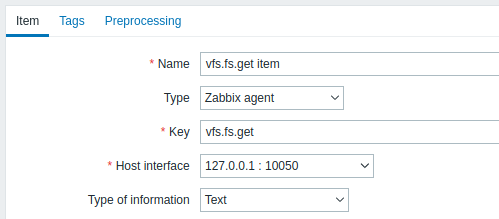
Imposta il tipo di informazione su "Text" per eventuali dati JSON di grandi dimensioni.
I dati restituiti da questo item conterranno qualcosa di simile al seguente per un filesystem montato:
[
  {
    "fsname": "/",
    "fstype": "ext4",
    "bytes": {
      "total": 249405239296,
      "free": 24069537792,
      "used": 212595294208,
      "pfree": 10.170306,
      "pused": 89.829694
    },
    "inodes": {
      "total": 15532032,
      "free": 12656665,
      "used": 2875367,
      "pfree": 81.487503,
      "pused": 18.512497
    },
    "options": "rw,noatime,errors=remount-ro"
  }
]
Regola LLD dipendente
Crea una regola di discovery a basso livello come tipo Dependent item:
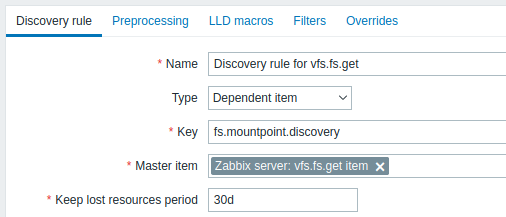
Come master item seleziona l'item vfs.fs.get che abbiamo creato.
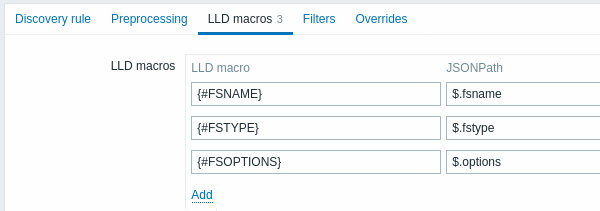
Nella scheda LLD macros definisci macro personalizzate con il corrispondente JSONPath:
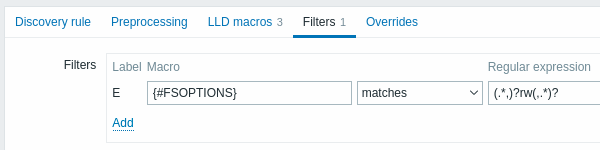
Nella scheda Filters puoi aggiungere un'espressione regolare che filtra solo i filesystem read-write:
Prototipo di item dipendente
Crea un prototipo di item con tipo "Dependent item" in questa regola LLD.
Come item master per questo prototipo seleziona l'item vfs.fs.get che abbiamo creato.
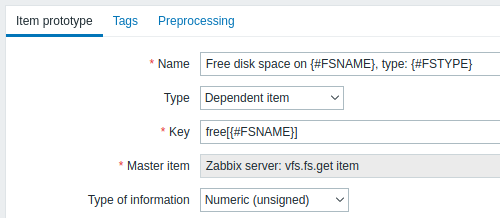
Nota l'uso di macro personalizzate nel nome e nella chiave del prototipo di item:
- Name: Free disk space on {#FSNAME}, type: {#FSTYPE}
- Key: Free[{#FSNAME}]
Come tipo di informazione, usa:
- Numeric (unsigned) per metriche come 'free', 'total', 'used'
- Numeric (float) per metriche come 'pfree', 'pused' (percentage)
Nella scheda Preprocessing del prototipo di item seleziona JSONPath e usa la seguente espressione JSONPath come parametro:
$.[?(@.fsname=='{#FSNAME}')].bytes.free.first()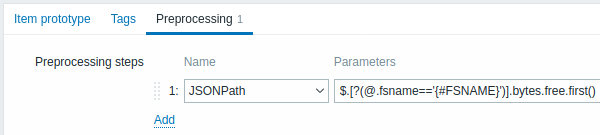
Quando inizia la discovery, verrà creato un item per ogni mountpoint. Questo item restituirà il numero di byte liberi per il mountpoint specificato.
Discovery in modalità breve
In alternativa a una regola di discovery dipendente, è possibile creare una regola di discovery di tipo Zabbix agent con la chiave:
vfs.fs.get[short]In modalità short, l'item restituisce l'elenco dei filesystem montati senza statistiche sullo spazio su disco e sugli inode, ad esempio:
[
  {
    "fsname": "/",
    "fstype": "ext4",
    "options": "rw,noatime,errors=remount-ro"
  },
  {
    "fsname": "/home",
    "fstype": "xfs",
    "options": "rw,relatime,attr2,inode64,noquota"
  }
]
Poiché l'agent non interroga direttamente i filesystem, la discovery non attiva l'automount e non viene ritardata da filesystem di rete che non rispondono. Può inoltre essere eseguita meno frequentemente rispetto alla raccolta dei dati, ad esempio una volta all'ora.
Nella scheda LLD macros, definire macro personalizzate con il JSONPath corrispondente, ad esempio {#FSNAME} - $.fsname e {#FSTYPE} - $.fstype.
Creare quindi un prototipo di item di tipo Zabbix agent che restituisca le statistiche di un filesystem individuato:
- Key:
vfs.fs.get[full,{#FSNAME}] - Type of information: Text
- Preprocessing: JSONPath
$[0]
Utilizzare questo prototipo di item come item master per i prototipi di item dipendenti, ad esempio con il JSONPath $.bytes.free per ottenere il numero di byte liberi.
Se l'agent non riesce a ottenere le statistiche di un filesystem individuato, ad esempio a causa di autorizzazioni mancanti, vfs.fs.get[full,{#FSNAME}] restituisce un array vuoto, il passaggio di preprocessing $[0] non riesce e l'item diventa non supportato. In questo modo il problema è visibile, invece di ignorare silenziosamente il filesystem.
Tenere presente che questa configurazione esegue un controllo separato dell'agent per ogni filesystem individuato.
Questo approccio viene utilizzato dai template del sistema operativo forniti con Zabbix e richiede Zabbix agent 8.0 o versioni successive.