
- 6 Connexion sécurisée entre l'interface et le serveur
- Présentation générale
- Configuration
- Dépannage
- L’adresse IP de l’interface n’est pas autorisée
- Les connexions non chiffrées ne sont pas autorisées
- L’interface tente d’utiliser TLS alors que le serveur attend une connexion non chiffrée
- Le certificat de l’interface n’est pas approuvé
- Le fichier de clé TLS n'est pas lisible
- Les fichiers TLS sont invalides ou corrompus
6 Connexion sécurisée entre l'interface et le serveur
Présentation générale
Cette section fournit les étapes de configuration de Zabbix et des exemples de configuration pour établir des connexions TLS sécurisées entre l'interface Zabbix et le serveur Zabbix.
Configuration
Par défaut, la communication entre l'interface Zabbix et le serveur Zabbix n'est pas chiffrée. Pour renforcer la sécurité, activez TLS des deux côtés. Voici un exemple de la manière la plus simple de procéder.
1. Générez les certificats et les clés.
Créez un répertoire de travail :
sudo mkdir -p /etc/zabbix/ssl && cd /etc/zabbix/sslCréez un certificat CA (adaptez la valeur MyZabbixCA pour qu'elle corresponde au nom commun réel) :
sudo openssl genrsa -out ca.key 4096
sudo openssl req -new -x509 -days 3650 -key ca.key -out ca.crt -subj "/CN=MyZabbixCA/"
Générez une clé privée et un certificat pour le serveur Zabbix (adaptez la valeur zabbix-server.example.com pour qu'elle corresponde au nom commun réel) :
sudo openssl genrsa -out server.key 2048
sudo openssl req -new -key server.key -out server.csr -subj "/CN=zabbix-server.example.com/"
sudo openssl x509 -req -days 365 -in server.csr -CA ca.crt -CAkey ca.key -CAcreateserial -sha256 -out server.crt
Générez une clé privée et un certificat pour l'interface Zabbix (adaptez la valeur zabbix-frontend-node pour qu'elle corresponde au nom commun réel) :
sudo openssl genrsa -out frontend.key 2048
sudo openssl req -new -key frontend.key -out frontend.csr -subj "/CN=zabbix-frontend-node/"
sudo openssl x509 -req -days 365 -in frontend.csr -CA ca.crt -CAkey ca.key -CAcreateserial -sha256 -out frontend.crt
2. Définissez les autorisations appropriées.
Pour le serveur Zabbix (adaptez le propriétaire et le groupe en fonction de l'utilisateur du démon du serveur Zabbix de votre distribution) :
sudo chown root:zabbix /etc/zabbix/ssl/server.{crt,key} /etc/zabbix/ssl/ca.crt
sudo chmod 640 /etc/zabbix/ssl/server.key
sudo chmod 644 /etc/zabbix/ssl/server.crt /etc/zabbix/ssl/ca.crt
Pour l'interface (adaptez le propriétaire et le groupe en fonction de l'utilisateur du serveur web de votre distribution) :
sudo chown root:www-data /etc/zabbix/ssl/frontend.{crt,key}
sudo chmod 640 /etc/zabbix/ssl/frontend.key
sudo chmod 644 /etc/zabbix/ssl/frontend.crt
3. Configurez le serveur Zabbix.
Dans zabbix_server.conf, ajoutez :
TLSFrontendAccept=cert
TLSCertFile=/etc/zabbix/ssl/server.crt
TLSKeyFile=/etc/zabbix/ssl/server.key
TLSCAFile=/etc/zabbix/ssl/ca.crt
# Facultatif :
# TLSFrontendCertIssuer=CN=MyZabbixCA
# TLSFrontendCertSubject=CN=zabbix-frontend-node
Redémarrez ensuite le serveur :
sudo systemctl restart zabbix-server4. Configurez l'interface Zabbix.
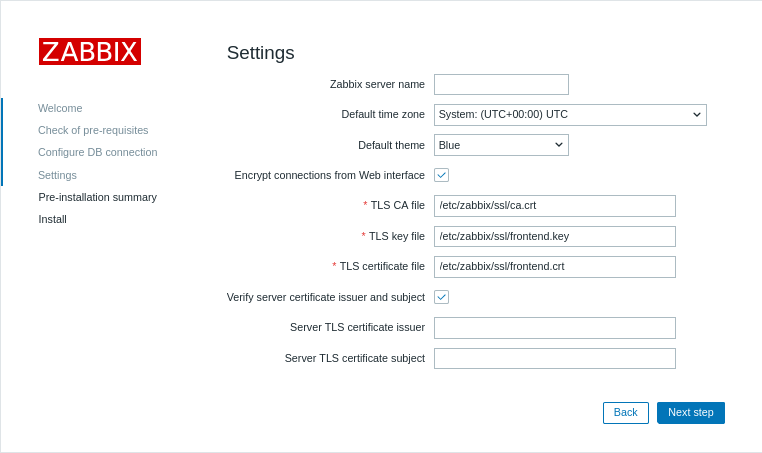
Lors de l'installation de l'interface web, activez l'option Encrypt connections from Web interface (ainsi que l'option Verify server certificate issuer and subject, si nécessaire) et renseignez les champs TLS CA file, TLS key file et TLS certificate file (ainsi que les champs Server TLS certificate issuer et Server TLS certificate subject, si nécessaire) :
| Parameter | Description |
|---|---|
| TLS CA file | Indiquez le chemin complet vers le fichier de certificat de l'autorité de certification (CA) utilisé pour vérifier le certificat du serveur. |
| TLS key file | Indiquez le chemin complet vers le fichier de clé privée du client correspondant au certificat du client. |
| TLS certificate file | Indiquez le chemin complet vers le fichier de certificat du client si une authentification TLS mutuelle est requise. |
| Server TLS certificate issuer | Indiquez un nom distinctif (DN) de l'émetteur à comparer à celui du certificat du serveur. |
| Server TLS certificate subject | Indiquez un nom distinctif (DN) du sujet à comparer à celui du certificat du serveur. |
Dans les installations existantes, modifiez les champs suivants dans zabbix.conf.php :
$ZBX_SERVER_TLS['ACTIVE'] = '1';
$ZBX_SERVER_TLS['CA_FILE'] = '/etc/zabbix/ssl/ca.crt';
$ZBX_SERVER_TLS['KEY_FILE'] = '/etc/zabbix/ssl/frontend.key';
$ZBX_SERVER_TLS['CERT_FILE'] = '/etc/zabbix/ssl/frontend.crt';
// Facultatif :
// $ZBX_SERVER_TLS['CERTIFICATE_ISSUER']  = 'CN=MyZabbixCA';
// $ZBX_SERVER_TLS['CERTIFICATE_SUBJECT'] = 'CN=zabbix-server.example.com';
5. Vérifiez le chiffrement en vous assurant qu'aucun message d'erreur ne figure dans l'interface Zabbix ou dans le fichier journal du serveur Zabbix :
tail -f /var/log/zabbix/zabbix_server.logDépannage
Une configuration TLS incorrecte ou incomplète peut provoquer des erreurs dans l’interface Zabbix ou indiquer que le serveur Zabbix est en cours d’exécution, mais que la connexion ne s’établit pas correctement :
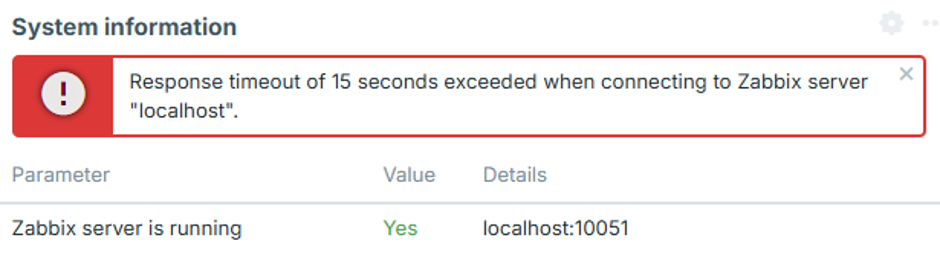
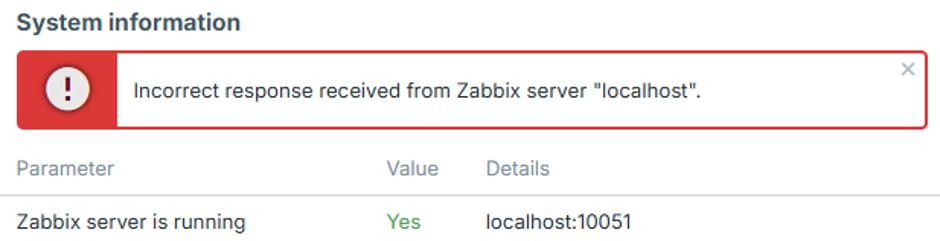
Pour identifier le problème de configuration exact, définissez le niveau de journalisation du serveur Zabbix sur 4, reproduisez l’erreur dans l’interface, puis consultez le journal du serveur Zabbix pour trouver le message d’erreur correspondant.
Les cas suivants décrivent les erreurs courantes et leurs causes possibles.
L’adresse IP de l’interface n’est pas autorisée
Le journal du serveur Zabbix contient une erreur similaire à celle-ci :
54283:20260819:105926.400 frontend connection from "127.0.0.1" is not allowed by FrontendAllowedIPLa connexion est interrompue après l’établissement de la liaison TCP, car l’adresse IP de l’interface n’est pas autorisée.
Ajoutez l’adresse IP de l’interface au paramètre FrontendAllowedIP dans zabbix_server.conf, puis redémarrez le serveur Zabbix.
Les connexions non chiffrées ne sont pas autorisées
Le journal du serveur Zabbix contient une erreur similaire à celle-ci :
56884:20260819:111154.285 frontend connection of type "unencrypted" is not allowed by TLSFrontendAcceptLe serveur Zabbix est configuré pour accepter uniquement les connexions TLS, par exemple avec TLSFrontendAccept=cert, mais l’interface tente de se connecter sans chiffrement.
Activez le chiffrement de l’interface et configurez les fichiers TLS requis dans zabbix.conf.php, comme décrit à l’étape 4 de la section Configuration.
L’interface tente d’utiliser TLS alors que le serveur attend une connexion non chiffrée
Le journal du serveur Zabbix contient une erreur similaire à celle-ci :
61091:20260819:115916.019 End of zbx_tls_accept():FAIL error:'TLS handshake set result code to 1: file ../ssl/record/rec_layer_s3.c line 317 func ssl3_read_n: error:0A000126:SSL routines::unexpected eof while reading: TLS write fatal alert "decode error"'Le message d’erreur exact dépend de la version d’OpenSSL.
Le serveur Zabbix est configuré pour accepter uniquement les connexions non chiffrées, par exemple avec TLSFrontendAccept=unencrypted, tandis que l’interface tente d’établir une connexion TLS.
Configurez le serveur Zabbix pour accepter les connexions TLS en définissant TLSFrontendAccept=cert et en indiquant TLSCertFile et TLSKeyFile dans zabbix_server.conf.
Vous pouvez également désactiver le chiffrement de l’interface dans zabbix.conf.php.
Le certificat de l’interface n’est pas approuvé
Le journal du serveur Zabbix contient une erreur similaire à celle-ci :
62248:20260819:124203.812 End of zbx_tls_accept():FAIL error:'self-signed certificate: TLS handshake set result code to 1: file ../ssl/statem/statem_srvr.c line 3522 func tls_process_client_certificate: error:0A000086:SSL routines::certificate verify failed: TLS write fatal alert "unknown CA"'L’interface a présenté un certificat, mais le serveur Zabbix n’approuve pas l’autorité de certification (CA) qui l’a signé.
Le même problème peut également apparaître dans les informations système de l’interface sous la forme suivante :
fread(): SSL operation failed with code 1. OpenSSL Error messages:

error:0A000418:SSL routines::tlsv1 alert unknown ca [zabbix.php:17 → require_once() → ZBase->run() → ZBase->processRequest() → CController->run() → Widgets\SystemInfo\Actions\WidgetView->doAction() → CSystemInfoHelper::getData() → CSystemInfoHelper::getServerStatus() → CZabbixServer->getStatus() → CZabbixServer->request() → fread() → CConfigFile->{closure:/user/share/conf/zabbix.conf.php:89}() in conf/zabbix.conf.php:95]
L’interface peut également afficher le message « Incorrect response received from Zabbix server "localhost" ».
Vérifiez que le certificat de l’interface est signé par l’autorité de certification spécifiée par TLSCAFile dans zabbix_server.conf.
Le fichier de clé TLS n'est pas lisible
L'interface peut afficher « Fichier de clé TLS : le fichier n'est pas lisible. »
Elle peut également afficher « Impossible de se connecter au serveur Zabbix en raison des paramètres TLS. Certaines fonctions sont indisponibles. ».
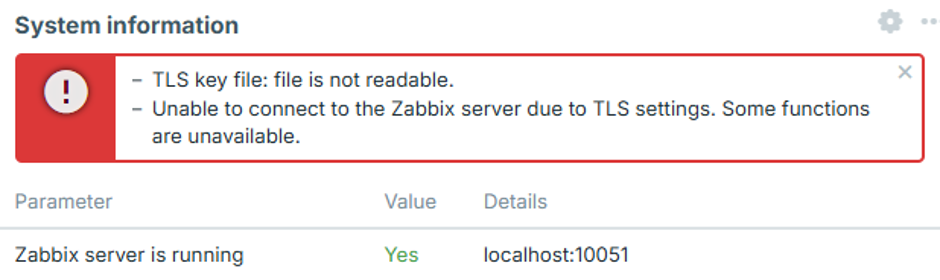
L'utilisateur du serveur web ne dispose pas des autorisations suffisantes pour lire un ou plusieurs fichiers de certificat, de clé ou d'autorité de certification configurés dans zabbix.conf.php.
Cela peut se produire lorsque les fichiers de certificat sont stockés dans un répertoire à accès restreint, tel que /root/ ou le répertoire personnel d'un utilisateur.
Déplacez les fichiers de certificat vers un répertoire accessible au serveur web et définissez les autorisations appropriées, comme décrit à l'étape 2 de la Configuration.
Les fichiers TLS sont invalides ou corrompus
L'interface peut afficher « Impossible de se connecter au serveur Zabbix en raison des paramètres TLS. Certaines fonctions sont indisponibles. ».
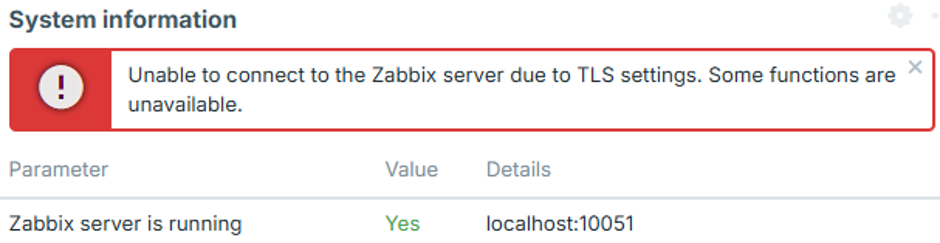
Cela peut se produire lorsque les fichiers de certificat ou de clé configurés existent et sont lisibles, mais que leur contenu est vide, corrompu ou autrement invalide. Dans ce cas, l'interface n'établit pas de connexion au serveur Zabbix, et aucune tentative de connexion correspondante n'apparaît dans le journal du serveur Zabbix.
Vérifiez que les fichiers de certificat et de clé contiennent des données valides et correctement formatées, et que la clé privée correspond au certificat.