
6 Connexió segura a la interfície
Visió general
Aquesta secció proporciona le passes de configuració i exemples de Zabbix per a connexions TLS segures entre la interfície de Zabbix i el servidor Zabbix.
Configuració
Per defecte, la comunicació entre la interfície de Zabbix i el servidor Zabbix no és pas xifrada. Per a una millor seguretat, activeu TLS a banda i banda. Tot seguit es mostra un exemple de la manera més senzilla de fer-ho.
1. Generar certificats i claus.
Creeu un directori de treball:
sudo mkdir -p /etc/zabbix/ssl && cd /etc/zabbix/sslCreeu un certificat CA (ajusta el valor de MyZabbixCA perquè coincideixi amb el nom comú real):
sudo openssl genrsa -out ca.key 4096
sudo openssl req -new -x509 -days 3650 -key ca.key -out ca.crt -subj "/CN=MyZabbixCA/"
Genereu una clau privada i un certificat per al servidor Zabbix (ajusta el valor de zabbix-server.example.com perquè coincideixi amb el nom comú real):
sudo openssl genrsa -out server.key 2048
sudo openssl req -new -key server.key -out server.csr -subj "/CN=zabbix-server.example.com/"
sudo openssl x509 -req -days 365 -in server.csr -CA ca.crt -CAkey ca.key -CAcreateserial -sha256 -out server.crt
Genera una clau privada i un certificat per al frontend de Zabbix (ajusta el valor de zabbix-frontend-node perquè coincideixi amb el nom comú real):
sudo openssl genrsa -out frontend.key 2048
sudo openssl req -new -key frontend.key -out frontend.csr -subj "/CN=zabbix-frontend-node/"
sudo openssl x509 -req -days 365 -in frontend.csr -CA ca.crt -CAkey ca.key -CAcreateserial -sha256 -out frontend.crt
2. Establiu els permisos adequats.
Per al servidor Zabbix (ajusteu la propietat/grup segons l'usuari del daemon del servidor Zabbix de la vostra distribució):
sudo chown root:zabbix /etc/zabbix/ssl/server.{crt,key} /etc/zabbix/ssl/ca.crt
sudo chmod 640 /etc/zabbix/ssl/server.key
sudo chmod 644 /etc/zabbix/ssl/server.crt /etc/zabbix/ssl/ca.crt
Per a la interfície (ajusteu la propietat/grup segons l'usuari del servidor web de la vostra distribució):
sudo chown root:www-data /etc/zabbix/ssl/frontend.{crt,key}
sudo chmod 640 /etc/zabbix/ssl/frontend.key
sudo chmod 644 /etc/zabbix/ssl/frontend.crt
3. Configureu el servidor Zabbix.
A zabbix_server.conf afegiu:
TLSFrontendAccept=cert
TLSCertFile=/etc/zabbix/ssl/server.crt
TLSKeyFile=/etc/zabbix/ssl/server.key
TLSCAFile=/etc/zabbix/ssl/ca.crt
# Opcionalment:
# TLSFrontendCertIssuer=CN=MyZabbixCA
# TLSFrontendCertSubject=CN=zabbix-frontend-node
Tot seguit, reinicieu el servidor:
sudo systemctl restart zabbix-server4. Configureu el frontend de Zabbix.
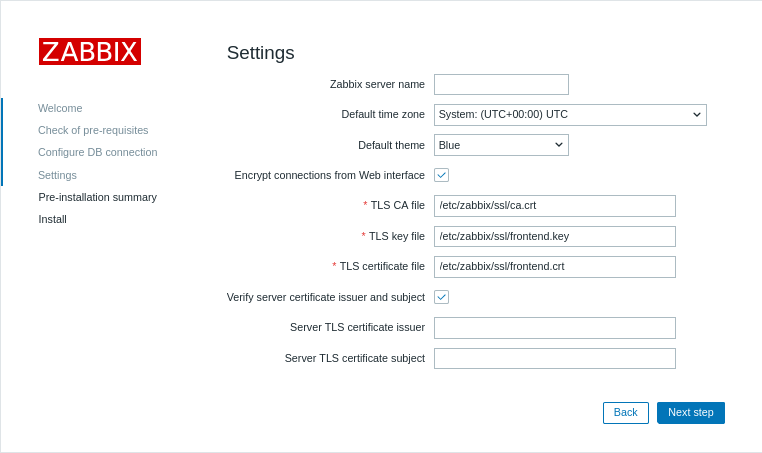
Durant la instal·lació de la interfície web, activeu l'opció Xifrar les connexions des de la interfície web (i l'opció Verificar l'emissor i l'assumpte del certificat del servidor, si cal) i ompliu els camps Fitxer TLS CA, Fitxer de clau TLS, Fitxer de certificat TLS (i els camps Emissor del certificat TLS del servidor i Assumpte del certificat TLS del servidor, si cal):
| Paràmetre | Descripció |
|---|---|
| Fitxer TLS CA | Especifiqueu la ruta completa al fitxer de certificat de l'autoritat de certificació (CA) utilitzat per verificar el certificat del servidor. |
| Fitxer de clau TLS | Especifiqueu la ruta completa al fitxer de clau privada del client corresponent al certificat del client. |
| Fitxer de certificat TLS | Especifiqueu la ruta completa al fitxer de certificat del client si es requereix autenticació TLS mútua. |
| Emissor del certificat TLS del servidor | Especifiqueu un nom distingit (DN) de l'emissor que coincideixi amb el certificat del servidor. |
| Assumpte del certificat TLS del servidor | Especifiqueu un nom distingit (DN) del subjecte que coincideixi amb el certificat del servidor. |
En instal·lacions existents, editeu els camps següents a zabbix.conf.php:
$ZBX_SERVER_TLS['ACTIVE'] = '1';
$ZBX_SERVER_TLS['CA_FILE'] = '/etc/zabbix/ssl/ca.crt';
$ZBX_SERVER_TLS['KEY_FILE'] = '/etc/zabbix/ssl/frontend.key';
$ZBX_SERVER_TLS['CERT_FILE'] = '/etc/zabbix/ssl/frontend.crt';
// Opcionalment:
// $ZBX_SERVER_TLS['CERTIFICATE_ISSUER'] = 'CN=MyZabbixCA';
// $ZBX_SERVER_TLS['CERTIFICATE_SUBJECT'] = 'CN=zabbix-server.example.com';
5. Verifiqueu el xifrat confirmant que no hi ha missatges d'error a la interfície de Zabbix o al fitxer de registre del servidor Zabbix:
tail -f /var/log/zabbix/zabbix_server.logTroubleshooting
Incorrect or incomplete TLS configuration can cause errors in the Zabbix frontend or indicate that the Zabbix server is running but the connection is not established successfully:
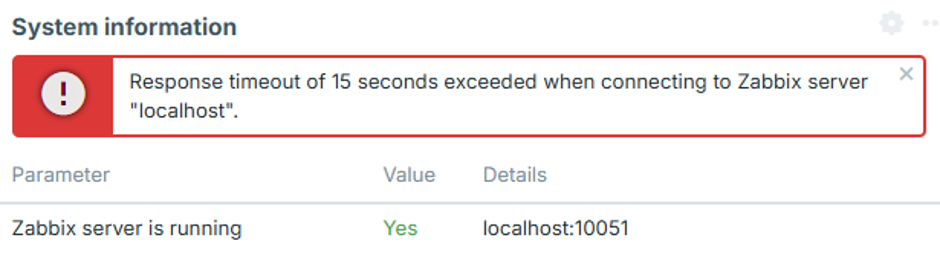
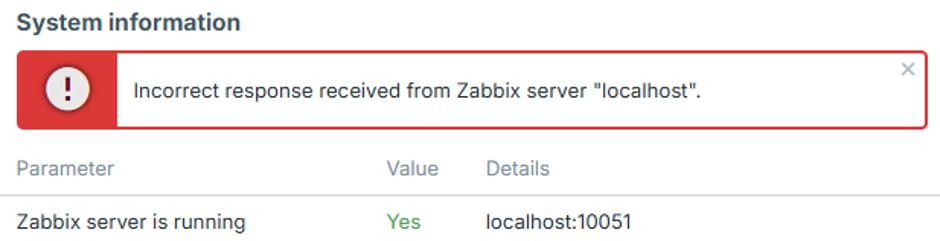
To identify the exact configuration issue, set the Zabbix server log level to 4, reproduce the error in the frontend, and check the Zabbix server log for the corresponding error message.
The following cases describe common errors and their possible causes.
Frontend IP address is not allowed
The Zabbix server log contains an error similar to:
54283:20260819:105926.400 frontend connection from "127.0.0.1" is not allowed by FrontendAllowedIPThe connection is dropped after the TCP handshake because the frontend IP address is not authorized.
Add the frontend IP address to the FrontendAllowedIP parameter in zabbix_server.conf and restart the Zabbix server.
Unencrypted connection is not allowed
The Zabbix server log contains an error similar to:
56884:20260819:111154.285 frontend connection of type "unencrypted" is not allowed by TLSFrontendAcceptThe Zabbix server is configured to accept only TLS connections, for example with TLSFrontendAccept=cert, but the frontend is attempting to connect without encryption.
Enable frontend encryption and configure the required TLS files in zabbix.conf.php, as described in step 4 of the Configuration.
Frontend attempts TLS while server expects unencrypted
The Zabbix server log contains an error similar to:
61091:20260819:115916.019 End of zbx_tls_accept():FAIL error:'TLS handshake set result code to 1: file ../ssl/record/rec_layer_s3.c line 317 func ssl3_read_n: error:0A000126:SSL routines::unexpected eof while reading: TLS write fatal alert "decode error"'The exact error message depends on the OpenSSL version.
The Zabbix server is configured to accept only unencrypted connections, for example with TLSFrontendAccept=unencrypted, while the frontend is attempting to establish a TLS connection.
Configure the Zabbix server to accept TLS connections by setting TLSFrontendAccept=cert and defining TLSCertFile and TLSKeyFile in zabbix_server.conf.
Alternatively, disable frontend encryption in zabbix.conf.php.
Frontend certificate is not trusted
The Zabbix server log contains an error similar to:
62248:20260819:124203.812 End of zbx_tls_accept():FAIL error:'self-signed certificate: TLS handshake set result code to 1: file ../ssl/statem/statem_srvr.c line 3522 func tls_process_client_certificate: error:0A000086:SSL routines::certificate verify failed: TLS write fatal alert "unknown CA"'The frontend presented a certificate, but the Zabbix server does not trust the Certificate Authority (CA) that signed it.
The same problem can also appear in the frontend system information as:
fread(): SSL operation failed with code 1. OpenSSL Error messages:

error:0A000418:SSL routines::tlsv1 alert unknown ca [zabbix.php:17 → require_once() → ZBase->run() → ZBase->processRequest() → CController->run() → Widgets\SystemInfo\Actions\WidgetView->doAction() → CSystemInfoHelper::getData() → CSystemInfoHelper::getServerStatus() → CZabbixServer->getStatus() → CZabbixServer->request() → fread() → CConfigFile->{closure:/user/share/conf/zabbix.conf.php:89}() in conf/zabbix.conf.php:95]
The frontend may also display "Incorrect response received from Zabbix server "localhost"".
Verify that the frontend certificate is signed by the CA specified by TLSCAFile in zabbix_server.conf.
TLS key file is not readable
The frontend may display "TLS key file: file is not readable."
It may also display "Unable to connect to the Zabbix server due to TLS settings. Some functions are unavailable.".
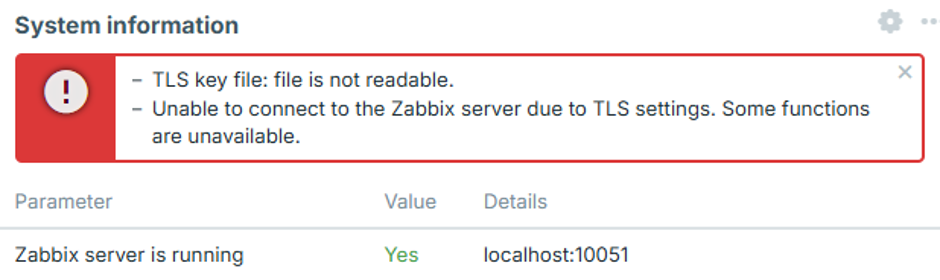
The web server user does not have sufficient permissions to read one or more certificate, key, or CA files configured in zabbix.conf.php.
This can occur when certificate files are stored in a restricted directory, such as /root/ or a user's home directory.
Move the certificate files to a directory accessible to the web server and set appropriate permissions as described in step 2 of the Configuration.
TLS files are invalid or corrupted
The frontend may display "Unable to connect to the Zabbix server due to TLS settings. Some functions are unavailable.".
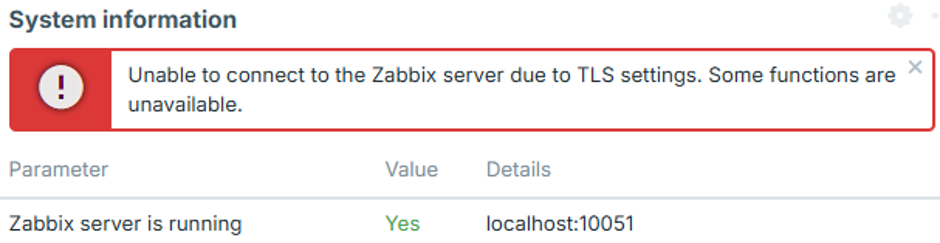
This can occur when the configured certificate or key files exist and are readable, but their contents are empty, corrupted, or otherwise invalid. In this case, the frontend does not establish a connection to the Zabbix server, and no corresponding connection attempt appears in the Zabbix server log.
Verify that the certificate and key files contain valid, properly formatted data and that the private key corresponds to the certificate.