
- Calculated item
- Overview
- Configurable fields
- Simple calculation formula
- Data aggregations
- Examples of calculated items
- (1) Total traffic on interface
- (2) Percentage of free disk space
- (3) Percentage of incoming traffic
- (4) Average number of processed values
- (5) Total incoming traffic for host
- (6) Total disk space for group
- (7) Average processor load for group
- (8) Average processor load for group and tag
- (9) Average number of queries for group
- (10) Total number of successful DNS checks
- (11) Total number of unsupported items for group
- (12) Interface stats for group
- Examples of correct/incorrect syntax
Calculated item
Overview
This item type allows you to perform calculations on the metrics that already exist. A calculated item does not collect any data by itself.
For example, you may want to:
- Count two values.
- Calculate the average of several item values.
- Calculate the total value for a group of items.
The resulting value is stored in the Zabbix database as for any other item; both history and trend values are stored and graphs can be generated.
The calculation is based on a formula. The syntax of the formula is shared with trigger expressions.
In fact, it's possible to keep triggers simple by having complex data-shaping logic in a calculated item—then reference the calculated item in a trigger using the item key.
Two possibilities exist for specifying data source for calculations:
- Specify items in the formula.
- Do data aggregation based on a filter that selects items.
The second option allows you to calculate group averages, totals, etc.
All calculations are done by Zabbix server and handled by the history poller processes; proxy or agents are not involved at all. Note that extensive use of calculated items with long time periods may affect the server performance.
Please note that calculated items can access the history of other items, including items that the user creating the calculated item does not have access to.
If this behavior is not desired, you can disable calculated items by setting the StartHistoryPollers configuration parameter to 0.
Configurable fields
To use calculated items, choose the item type Calculated.
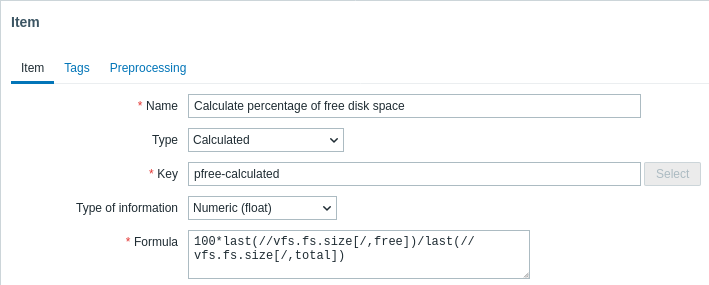
The key is a unique item identifier (per host). You can create any key name using supported symbols. The key allows you to reference the calculated item in triggers.
The calculation definition must be entered in the Formula field.
There is no connection between the formula and the key. The key parameters are not used in the formula in any way.
Unlike trigger expressions, Zabbix processes calculated items according to the item update interval, not upon receiving a new value.
Note that if you select Numeric (unsigned) as type of information and the calculation result is a float value, it is trimmed to an integer.
Simple calculation formula
The syntax of a simple formula is:
function(/host/key,<parameter1>,<parameter2>,...)where:
| Element | Description |
|---|---|
function |
One of the supported functions: last, min, max, avg, count, etc |
host |
Host of the item that is used for calculation. The current host can be omitted (i.e. as in function(//key,parameter,...)). |
key |
Key of the item that is used for calculation. Items returning values with the binary or JSON data type are not supported. If you change the item key of a referenced item, the key must be manually updated in the formula. All items that are referenced by history functions must exist and be collecting data. |
parameter(s) |
Parameters of the function, if required. Time suffixes and memory size suffixes are supported. |
A more complex formula may use a combination of functions, operators and brackets.
See examples of calculated item formulas:
- (1) Total traffic on interface
- (2) Percentage of free disk space
- (3) Percentage of incoming traffic
- (4) Average number of processed values
Some variables may be passed to the formula with user macros. Note that user macros:
- will be resolved - if used to reference a function parameter, item filter parameter, or a constant.
- will not be resolved - if referencing a function, host name, item key, item key parameter or operator.
Comparison to strings is allowed.
If there is no recent data in the cache and there is no defined querying period in the function, Zabbix will by default go as far back in the past as one week to query the database for historical values.
A calculated item may become unsupported in several cases:
- referenced item
- is not found
- is disabled, or belongs to a disabled host
- is not supported (except with nodata() function and operators with unknown values)
- no data to calculate a function
- division by zero
- incorrect syntax used
Data aggregations
Data aggregations are based on a filter that selects multiple items.
Data aggregations are also a calculated item type, however, you use a slightly different syntax in the formula.
To retrieve aggregates use one of the supported aggregate functions: avg, max, min, sum, etc.
Then add the foreach function as the only parameter and its item filter to select the required items:
aggregate_function(function_foreach(/host/key?[group="host group"],timeperiod))A foreach function (e.g., avg_foreach, count_foreach, etc.) returns one aggregate value for each selected item.
Items are selected by using the item filter (/host/key?[group="host group"]), from item history.
For more details, see foreach functions.
If some of the items have no data for the requested period, they are ignored in the calculation. If no items have data, the function will return an error.
Alternatively you may list several items as parameters for aggregation:
aggregate_function(function(/host/key,parameter),function(/host2/key2,parameter),...)Note that function here must be a history/trend function.
See examples of aggregate calculations:
- (5) Total incoming traffic for host
- (6) Total disk space for group
- (7) Average processor load for group
- (8) Average processor load for group and tag
- (9) Average number of processed values
- (10) Average number of queries for group
- (11) Total number of successful DNS checks
- (12) Total number of unsupported items for group
- (13) Interface stats for group
User macros and low-level discovery macros are supported in:
- item key parameters
- function parameters
- filter conditions (host group name and tag name)
- expression constants
An aggregate calculation may become unsupported if:
- none of the referenced items is found (which may happen if the item key is incorrect, none of the items exists or all included groups are incorrect)
- no data to calculate a function
Examples of calculated items
(1) Total traffic on interface
last(//net.if.in[eth0,bytes])+last(//net.if.out[eth0,bytes])Calculate the total bandwidth on eth0.
(2) Percentage of free disk space
100*last(//vfs.fs.size[/,free])/last(//vfs.fs.size[/,total])Zabbix will take the latest values for free and total disk spaces (on /) and calculate percentage according to the given formula.
(3) Percentage of incoming traffic
100*last(//net.if.in[eth0,bytes])/(last(//net.if.in[eth0,bytes])+last(//net.if.out[eth0,bytes]))Calculate the percentage of incoming traffic from the total traffic.
(4) Average number of processed values
avg(/Zabbix server/zabbix[wcache,values],10m)Calculate a 10-minute average of the number of values processed by Zabbix.
(5) Total incoming traffic for host
sum(last_foreach(/host/net.if.in[*]))Calculate the total of all items matching net.if.in[*] on the host.
(6) Total disk space for group
sum(last_foreach(/*/vfs.fs.size[/,total]?[group="MySQL Servers"]))Calculate the total disk space for all MySQL Servers.
(7) Average processor load for group
avg(last_foreach(/*/system.cpu.load[,avg1]?[group="MySQL Servers"]))Calculate the average processor load for all MySQL Servers.
(8) Average processor load for group and tag
avg(last_foreach(/*/system.cpu.load?[(group="Servers A" or group="Servers B" or group="Servers C") and (tag="Service:" or tag="Importance:High")]))Calculate the average CPU load on all hosts in multiple host groups that have specific tags.
(9) Average number of queries for group
avg(avg_foreach(/*/mysql.qps?[group="MySQL Servers"],5m))Calculate the 5-minute average of the number of queries per second for MySQL Servers.
(10) Total number of successful DNS checks
sum(last_foreach(/*/net.dns[*,*,*]))Calculate the total number of successful DNS checks across all hosts.
The shown item form is net.dns[192.0.2.1,example.com,A] as an example of one possible key.
Note that wildcards must match the number of parameters in the key (here net.dns has three parameters: ip, name, type).
(11) Total number of unsupported items for group
sum(last_foreach(/*/zabbix[host,,items_unsupported]?[group="Zabbix servers"]))Calculate the total number of unsupported items for Zabbix servers.
(12) Interface stats for group
sum(last_foreach(/*/net.if.out[eth0,bytes]?[group="video"])) / sum(last_foreach(/*/nginx_stat.sh[active]?[group="video"])) Calculate the interface stats for video group.
Examples of correct/incorrect syntax
Expressions (including function calls) cannot be used as history, trend, or foreach function parameters. However, those functions themselves can be used in other (non-historical) function parameters.
| Expression | Example |
|---|---|
| Valid | avg(last(/host/key1),last(/host/key2)*10,last(/host/key1)*100)max(avg(avg_foreach(/*/system.cpu.load?[group="Servers A"],5m)),avg(avg_foreach(/*/system.cpu.load?[group="Servers B"],5m)),avg(avg_foreach(/*/system.cpu.load?[group="Servers C"],5m))) |
| Invalid | sum(/host/key,10+2)sum(/host/key, avg(10,2))sum(/host/key,last(/host/key2)) |
Note that in an expression like:
sum(sum_foreach(//resptime[*],5m))/sum(count_foreach(//resptime[*],5m))(where resptime[*] is an example of an item key pattern matching the keys resptime[1], resptime[2], etc., used to acquire the response time from several active cluster nodes), it cannot be guaranteed that both parts of the equation will always have the same set of values.
While one part of the expression is evaluated, a new value for the requested period may arrive and then the other part of the expression will have a different set of values.