

2 Remote commands
Overview
With remote commands you can define that a certain pre-defined command is automatically executed on the monitored host upon some condition.
Thus remote commands are a powerful mechanism for smart pro-active monitoring.
In the most obvious uses of the feature you can try to:
- Automatically restart some application (web server, middleware, CRM) if it does not respond
- Use IPMI 'reboot' command to reboot some remote server if it does not answer requests
- Automatically free disk space (removing older files, cleaning /tmp) if running out of disk space
- Migrate a VM from one physical box to another depending on the CPU load
- Add new nodes to a cloud environment upon insufficient CPU (disk, memory, whatever) resources
Configuring an action for remote commands is similar to that for sending a message, the only difference being that Zabbix will execute a command instead of sending a message.
Remote commands are not supported to be executed on Zabbix agents monitored by Zabbix proxy, so for commands from Zabbix server to agent a direct connection is required.
Remote command limit after all macros expansion depends on the type of database and character set (non- ASCII characters require more than one byte to be stored):
| Database | //Limit in characters // | //Limit in bytes // |
| MySQL | 65535 | 65535 |
| Oracle Database | 2048 | 4000 |
| PostgreSQL | 65535 | not limited |
| IBM DB2 | 2048 | 2048 |
| SQLite (only Zabbix proxy) | 65535 | not limited |
See also the command execution page.
Remote commands are executed even if the target host is in maintenance.
The following tutorial provides step-by-step instructions on how to set up remote commands.
Configuration
Those remote commands that are executed on Zabbix agent (custom scripts) must be first enabled in the respective zabbix_agentd.conf.
Make sure that the EnableRemoteCommands parameter is set to 1 and uncommented. Restart agent daemon if changing this parameter.
Remote commands do not work with active Zabbix agents.
Then, when configuring a new action in Configuration→Actions:
- In the Operations tab, select the Remote command operation type
- Select the remote command type (IPMI, Custom script, SSH, Telnet, Global script)
- Enter the remote command
For example:
sudo /etc/init.d/apache restart In this case, Zabbix will try to restart an Apache process. With this command, make sure that the command is executed on Zabbix agent (mark the respective radio button against Execute on).
Note the use of sudo - Zabbix user does not have permissions to restart system services by default. See below for hints on how to configure sudo.
Zabbix agent should run on the remote host and accept incoming connections. Zabbix agent executes commands in background.
Zabbix does not check if a command has been executed successfully.
Remote commands on Zabbix agent are executed without timeout by the system.run[,nowait] key. On Zabbix server remote commands are executed with timeout as set in the TrapperTimeout parameter of zabbix_server.conf file.
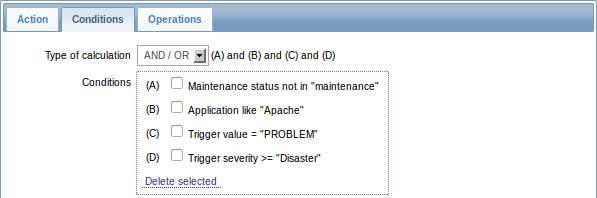
- In the Conditions tab, define the appropriate conditions. In this example, set that the action is activated upon any disaster problems with one of Apache applications.
Access permissions
Make sure that the 'zabbix' user has execute permissions for configured commands. One may be interested in using sudo to give access to privileged commands. To configure access, execute as root:
# visudoExample lines that could be used in sudoers file:
# allows 'zabbix' user to run all commands without password.
zabbix ALL=NOPASSWD: ALL

# allows 'zabbix' user to restart apache without password.
zabbix ALL=NOPASSWD: /etc/init.d/apache restart
On some systems sudoers file will prevent non-local users from executing commands. To change this, comment out requiretty option in /etc/sudoers.
Remote commands with multiple interfaces
If the target system has multiple interfaces of the selected type (Zabbix agent or IPMI), remote commands will be executed on the default interface.
IPMI remote commands
For IPMI remote commands the following syntax should be used:
<command> [<value>]where
- <command> - one of IPMI commands without spaces
- <value> - 'on', 'off' or any unsigned integer. <value> is an optional parameter.
Examples
Example 1
Restart of Windows on certain condition.
In order to automatically restart Windows upon a problem detected by Zabbix, define the following actions:
| PARAMETER | Description |
|---|---|
| Operation type | 'Remote command' |
| Type | 'Custom script' |
| Command | c:\windows\system32\shutdown.exe -r -f |
Example 2
Restart the host by using IPMI control.
| PARAMETER | Description |
|---|---|
| Operation type | 'Remote command' |
| Type | 'IPMI' |
| Command | reset |
Example 3
Power off the host by using IPMI control.
| PARAMETER | Description |
|---|---|
| Operation type | 'Remote command' |
| Type | 'IPMI' |
| Command | power off |